1. Okwu mmalite
The NEDIS VEXT3470AT HDMI Audio Extractor allows you to separate audio signals from an HDMI source and output them to an audio system, while simultaneously passing the video signal to a display. This device is designed to integrate modern HDMI sources with audio systems that may not have HDMI inputs, providing both digital (Toslink) and analog (L/R stereo) audio outputs.
It supports 3D video and amplifies the digital video signal for reliable transmission.
2. Ozi nchekwa
- Jiri nlezianya gụọ ntuziaka ndị a tupu ojiji.
- Debe ngwaọrụ ahụ pụọ na mmiri, mmiri, na oke okpomọkụ.
- Anwala imeghe ma ọ bụ rụkwaa ngwaọrụ n'onwe gị. Kpọtụrụ ndị ọrụ ruru eru ọrụ niile.
- Use only the provided power adapter. Using an incorrect adapter may damage the device and void the warranty.
- Gbaa mbọ hụ na ikuku ikuku dị na gburugburu ngwaọrụ iji gbochie ikpo oke ọkụ.
- Gbanyụọ ihe nkwụnye ọkụ eletrik n'oge oké ifufe ma ọ bụ mgbe ejiri ya ruo ogologo oge.
3. Ihe ngwugwu
Please check the package contents to ensure all items are present and in good condition:
- NEDIS VEXT3470AT HDMI Audio Extractor
- Ihe nkwụnye ọkụ
- Akwụkwọ ntuziaka (akwụkwọ a)
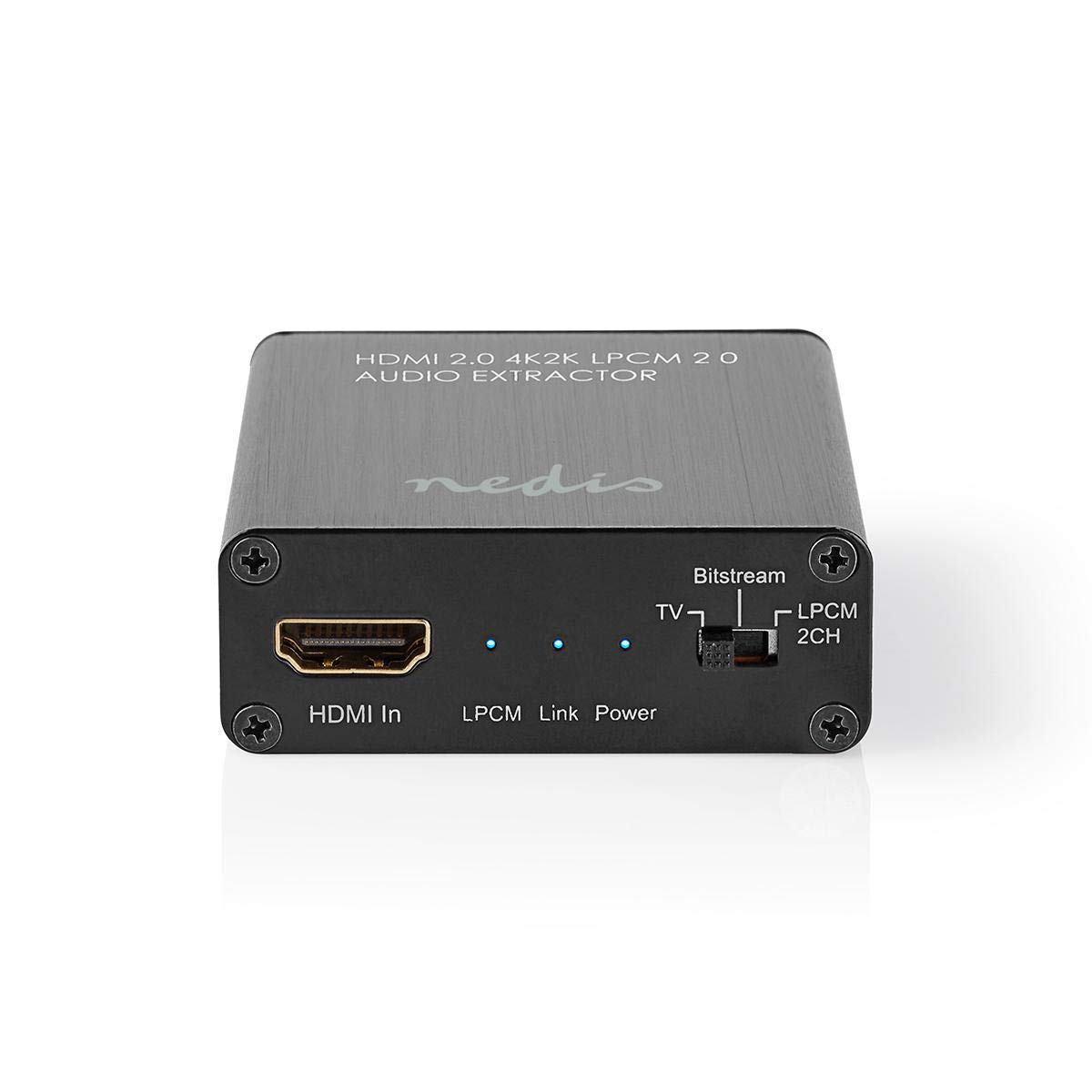
Image: The NEDIS VEXT3470AT HDMI Audio Extractor unit shown alongside its power adapter.
4. Ngwaahịa gafereview
Familiarize yourself with the ports and indicators on the HDMI Audio Extractor:
4.1 Input Side
Image: Close-up of the input side of the audio extractor, showing the HDMI In port, LPCM, Link, and Power indicator LEDs, and the Audio Mode Switch.
- HDMI na: Connect your HDMI source device (e.g., DVD/Blu-ray player, game console).
- LPCM LED: Indicates when LPCM audio format is detected.
- Link ikanam: Indicates an active HDMI connection.
- Igwe ọkụ ọkụ: Na-enwu mgbe ngwaọrụ ahụ gbanyere ọkụ.
- Audio Mode Switch:
- Bitstream: For multi-channel audio formats like Dolby Digital or DTS.
- TV: Passes audio directly from the HDMI source to the TV.
- LPCM 2CH: For 2-channel stereo audio output via L/R analog and Toslink.
4.2 Output Side

Image: Close-up of the output side of the audio extractor, showing the 5V/DC power input, Optical (Toslink) audio output, HDMI Out port, and L/R analog audio outputs.
- 5V/DC: Ọdụ ntinye ike. Jikọọ ihe nkwụnye ike enyere ebe a.
- Ngwa anya: Digital audio output (Toslink). Connect to an audio receiver or soundbar.
- HDMI Ọpụpụ: Connect to your TV or display.
- L/R: Analog stereo audio output. Connect to an amplifier or stereo system using RCA cables.
5. Nhazi ntuziaka
Follow these steps to connect your HDMI Audio Extractor:
- Gbanyụọ ngwaọrụ: Ensure all devices (HDMI source, TV, audio system) are powered off before making connections.
- Jikọọ HDMI Isi mmalite: Connect an HDMI cable from your source device (e.g., Blu-ray player) to the HDMI Na port on the audio extractor.
- Ngosipụta Jikọọ: Jikọọ eriri HDMI ọzọ site na HDMI pụọ port on the audio extractor to your TV or display.
- Connect Audio System:
- For digital audio, connect an optical Toslink cable from the Ngwa anya ọdụ ụgbọ mmiri na ihe na-ewepụta ihe na ihe nnata ọdịyo gị ma ọ bụ ogwe ụda.
- For analog stereo audio, connect RCA cables from the L/R ports on the extractor to your stereo amplifier ma ọ bụ ndị na-ekwu okwu na-arụ ọrụ.
- Njikọ Ike: Plug the provided power adapter into the 5V/DC ọdụ ụgbọ mmiri na ihe na-ewepụta ihe, wee tinye ihe nkwụnye ahụ n'ime oghere ọkụ eletrik. Power LED kwesịrị ịgba ọkụ.
- Ike Na Ngwaọrụ: Power on your TV/display, audio system, and then your HDMI source device.
6. Ntuziaka ọrụ
Once connected, operate the device as follows:
- Họrọ Ụdị ọdịyo: Jiri ihe Ngbanwe Ụdị ọdịyo on the input side to select the desired audio output format:
- Bitstream: For multi-channel audio (e.g., Dolby Digital, DTS) to be passed through the Optical output. Your audio receiver must support these formats.
- TV: Passes the audio directly to the TV via HDMI. Audio extraction via Optical/L/R may be limited or unavailable in this mode, depending on the source and TV capabilities.
- LPCM 2CH: Converts multi-channel audio to 2-channel LPCM for output via Optical and L/R analog ports. This is suitable for stereo systems or when your receiver does not support Bitstream formats.
- Nyochaa ihe ngosi:
- Nke Ikanye ike kwesịrị ịdị na.
- Nke Link ikanam should be on when an active HDMI signal is detected from the source.
- Nke LPCM LED will illuminate if the audio signal is in LPCM format.
- Adjust Audio System: Ensure your audio receiver or soundbar is set to the correct input (Optical or Analog L/R) and volume.
7. Nlekọta
Iji hụ na HDMI Audio Extractor gị dị ogologo ma rụọ ọrụ nke ọma:
- Nhicha: Jiri akwa dị nro dị nro hichaa ngwaọrụ ahụ. Ejila ihe nhicha mmiri ma ọ bụ ikuku ikuku.
- Nchekwa: Chekwaa ngwaọrụ ahụ n'ebe dị jụụ, kpọrọ nkụ mgbe ọ naghị eji ya.
- Ijikwa: Zere idobe ma ọ bụ idobe ngwaọrụ ahụ na mmetụta siri ike.
8. Nchọpụta nsogbu
If you encounter issues, refer to the following troubleshooting guide:
| Nsogbu | Ihe kpatara/ Ngwọta nwere ike ime |
|---|---|
| Enweghị mpụta vidiyo |
|
| Enweghị mmepụta ọdịyo |
|
| Ike ikanam agbanyụrụ |
|
| Intermittent Audio/Video |
|
9. Nkọwapụta
Key technical specifications for the NEDIS VEXT3470AT HDMI Audio Extractor:
- Nọmba nlereanya: VEXT3470AT
- Akara: NEDIS
- Ntinye: 1x HDMI
- Mpụta: 1x HDMI, 1x Optical (Toslink), 1x L/R Stereo (RCA)
- Ụdị HDMI: Compatible with HDMI 2.0 (implied by 4K2K support in product name)
- Mkpebi vidiyo: Up to 4K (4K2K)
- Nkwado 3D: Ee
- Ụdị ọdịyo: LPCM 2.0, Bitstream (Dolby Digital, DTS pass-through)
- Ịnye ọkụ: 5V DC (via included adapter)
- Akụkụ (L x W x H): Ihe dịka 7.7 x 6.4 x 2.3 cm
- Arọ: 240 grams
- Agba: Anthracite (Black)
- Mba onye si: China
10. Akwụkwọ ikike na nkwado
NEDIS products are manufactured to high quality standards. In the unlikely event of a defect during the warranty period, please contact your retailer for support. The warranty period is subject to local consumer laws and regulations.
For technical assistance or further inquiries, please refer to the support information provided by your retailer or visit the official NEDIS websaịtị.


