1. Okwu mmalite
The AOPUTTRIVER AP-570C is a 4000-count auto-ranging digital clamp meter designed for precise electrical measurements. It offers a wide range of functions including AC/DC current, AC/DC voltage, resistance, capacitance, frequency, duty cycle, temperature, diode test, and continuity. This manual provides essential information for safe and effective operation of your device.
2. Ozi nchekwa
Always adhere to safety precautions when using electrical testing equipment. Failure to do so may result in electric shock, injury, or damage to the meter or equipment under test.
- Ensure the meter is in good working condition before use.
- Etinyekwala voltage or current exceeding the maximum rated values.
- Jiri ngwa nchedo onwe onye kwesịrị ekwesị (PPE) dịka uwe aka mkpuchi na ugogbe nchekwa.
- Verify the function switch is in the correct position for the measurement being performed.
- Avoid touching exposed conductors or circuit components during measurements.
- Do not operate the meter in wet environments or in the presence of explosive gases or dust.
- Dochie batrị ozugbo mgbe ihe ngosi batrị dị ala pụtara iji hụ na agụpụtara nke ọma.
- The AP-570C Clamp Meter meets IEC1010 Double Insulation, Pollution Degree 2, and Overvoltage Category III standards.
3. Ngwa ngwaahịa
The AOPUTTRIVER AP-570C package includes the following items:
- AOPUTTRIVER AP-570C Clamp Mita
- Nleba ule (2)
- Nyocha okpomọkụ
- 9V (6F22) Battery
- Akwụkwọ ntuziaka onye ọrụ
- Akpa nchekwa
- Obere screwdriver

Image: AOPUTTRIVER AP-570C Digital Clamp Meter with test leads, temperature probe, battery, and storage bag.
4. Product Diagram and Key Functions
Familiarize yourself with the main parts and controls of the AP-570C clamp mita:

Image: Labeled diagram of the AP-570C showing the clamp, rotary switch, LCD display, D.HOLD/Back Light key, SELECT key, MAX/MIN key, REL key, Hz/DUTY key, COM Input Jack, and T+VΩHz Input Jack.
- Clamp: Used for non-contact AC/DC current measurement.
- Ngbanwe Rotary: Selects the desired measurement function.
- Ngosipụta LCD: Shows measurement readings and indicators.
- D.HOLD/Back Light Key: Freezes the current reading on the display and activates/deactivates the backlight.
- SELECT Key: Toggles between different measurement modes within a single rotary switch position (e.g., AC/DC voltage, diode/continuity).
- Igodo MAX/MIN: Na-edekọ uru kachasị na nke kacha nta n'oge nnọkọ nha.
- REL Key: Activates relative measurement mode.
- Hz/DUTY Key: Selects frequency or duty cycle measurement.
- Input Jacks (COM, T+VΩHz): Connect test leads for voltage, resistance, capacitance, diode, continuity, and temperature measurements.
5. Nhazi
5.1. Ntinye batrị
The AP-570C requires one 9V (6F22) battery. To install or replace the battery:
- Hụ na agbanyụrụ mita ahụ.
- Use the provided small screwdriver to open the battery compartment cover on the back of the meter.
- Insert the 9V battery, observing the correct polarity (+/-).
- Dochie mkpuchi nke batrị batrị ma jiri nkedo chekwaa ya.
5.2. Ijikọ ụzọ ule
Maka ọtụtụ nha (mkpụrụ)tage, resistance, capacitance, diode, continuity, temperature), connect the test leads:
- Insert the black test lead into the "COM" (common) input jack.
- Insert the red test lead into the "T+VΩHz" input jack.
- For temperature measurements, connect the temperature probe to the same input jacks, ensuring correct polarity if applicable.
6. Ntuziaka ọrụ
6.1. AC/DC Current Measurement (Clamp)
Ihe clamp function allows for non-contact current measurement. This is ideal for safely measuring current in live circuits.
- Turn the rotary switch to the desired current range (e.g., 400A or 1000A).
- Press the SELECT button to toggle between AC and DC current measurement if necessary.
- Mepee clamp agba site na ịpị ihe mkpali ahụ.
- Enclose a single conductor (not a bundle of wires) within the clamp jaws. Ensure the jaws are fully closed.
- Gụọ uru dị ugbu a na ngosipụta LCD.

Image: The AP-570C clamp meter measuring current on an electrical cable.
Video: Demonstration on how to measure DC current using a clamp mita.
6.2. AC/DC Voltage Ntụ
Iji tụọ voltage, use the test leads connected to the appropriate input jacks.
- Turn the rotary switch to the "V~" (AC Voltage) ma ọ bụ "V-" (DC Mpịakọtatage) position. The meter may auto-range.
- Connect the test leads in parallel to the circuit or component you wish to measure.
- Gụọ voltage uru na LCD ngosi.

Image: The AP-570C clamp meter with test leads connected to an electrical outlet for voltage nha.
6.3. Resistance, Capacitance, Diode, and Continuity Measurement
These functions are accessed via the rotary switch and SELECT button.
- Turn the rotary switch to the "Ω" (Resistance), "CAP" (Capacitance), or "Diode/Continuity" position.
- Use the SELECT button to switch between Diode Test and Continuity Test if on the combined setting.
- Jikọọ ihe nlele ndị a ga-eji tụọ.
- Read the value on the LCD display. For continuity, a buzzer will sound if continuity is detected.
Video: Demonstration on how to measure capacitance using a clamp mita.
6.4. Nleba okpomọkụ
The AP-570C can measure temperature using the included temperature probe.
- Turn the rotary switch to the "°C" (Temperature) position.
- Connect the temperature probe to the "COM" and "T+VΩHz" input jacks.
- Place the tip of the temperature probe on or in the object whose temperature you wish to measure.
- Read the temperature value on the LCD display. The range is -20°C to 1000°C.
6.5. Backlight and Data Hold
- Ìhè azụ: Press the "D.HOLD/Back Light" button briefly to turn the LCD backlight on or off, improving visibility in low-light conditions.
- Jide data: Press and hold the "D.HOLD/Back Light" button to freeze the current reading on the display. Press again to release.

Foto: nso nso view of the AP-570C's bright LCD display and protective case.
6.6. Ndị na-abụghị kọntaktị Voltage (NCV) Nchọpụta
The NCV function allows for quick detection of AC voltage enweghị kọntaktị kpọmkwem.
- Turn the rotary switch to the "NCV" position.
- Move the top part of the meter (near the clamp jaws) close to the conductor or outlet.
- Mita ahụ ga-egosi ọnụnọ AC voltage through an audible beep and/or visual indicator.
7. Nkọwapụta
Key technical specifications for the AOPUTTRIVER AP-570C:
- Ngosipụta: 4000 Ọnụ
- DC ugbu a: 200A~1000A
- AC ugbu a: 400A~1000A (0.1A resolution for 0.1~400A)
- DC Voltage: 400mV ~ 1000V
- AC Voltage: 4V~750V
- Nguzogide: 400Ω, 4KΩ, 40KΩ, 400KΩ, 4MΩ, 40MΩ
- Ike: 5.12nF ~ 100µF
- Ugboro: Ee
- Usoro ọrụ: Ee
- Nnwale diode: Ee
- Continuity Buzzer: Ee
- Oke okpomọkụ: -20°C ruo 1000°C
- Jaw Caliber: 45mm (1.77 anụ ọhịa)
- Ogo nchekwa: IEC1010 Double Insulation, Pollution Degree 2, Overvoltage Ụdị III
- Isi mmalite ike: 1 x 9V batrị (gụnyere)
- Akụkụ ngwaahịa: 22.35 x 9.65 x 3.81 cm
- Ibu ihe: 444.52g (0.98 pound)
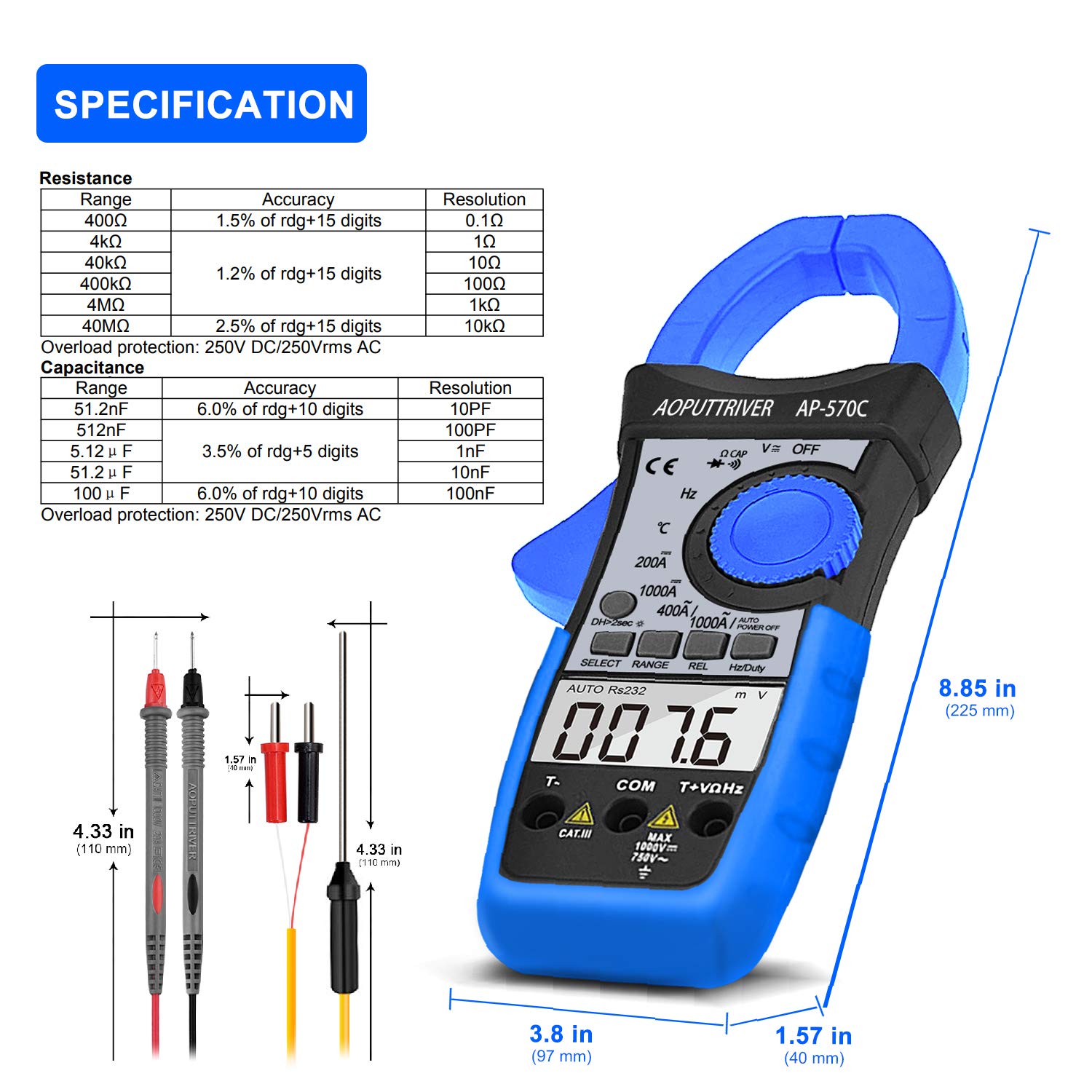
Image: Detailed specifications table for Resistance and Capacitance, along with physical dimensions of the meter and test leads.
8. Nlekọta
8.1. Nhicha
To maintain the accuracy and longevity of your meter:
- Jiri mgbasa ozi hichapụ ikpe ahụamp akwa na ncha dị nro. Ejila abrasives ma ọ bụ ihe mgbaze.
- Keep the input terminals and clamp jaws clean and free of debris.
8.2. Ngbanwe batrị
When the low battery indicator appears on the LCD, replace the 9V battery as described in the "Setup" section. Prompt replacement ensures continued accuracy.
8.3. Nchekwa
When not in use, store the meter in its protective storage bag in a dry, cool place, away from direct sunlight and extreme temperatures.
9. Nchọpụta nsogbu
If you encounter issues with your AP-570C, consider the following common solutions:
- Enweghị Ngosipụta/Ngosipụta Na-adịghị Ike: Check battery charge and ensure it is correctly installed. Replace if necessary.
- "OL" on Display: Indicates an over-range condition. The measured value exceeds the selected range. Switch to a higher range or verify the circuit.
- Ọgụgụ na-ezighi ezi:
- Ensure test leads are fully inserted and making good contact.
- Verify the rotary switch is set to the correct function and range.
- For current measurements, ensure only one conductor is within the clamp agba.
- Check for external electromagnetic interference.
- Continuity Buzzer Not Working: Ensure the meter is in continuity mode and test leads are making proper contact. If the issue persists, the meter may require service.
10. Akwụkwọ ikike na nkwado
The AOPUTTRIVER AP-570C comes with a 2-afọ akwụkwọ ikike and lifetime technical support. For any questions or assistance with your product, please contact AOPUTTRIVER customer support.
You can visit the official AOPUTTRIVER store for more information: AOPUTTRIVER Store


