1. Okwu mmalite
Thank you for choosing the Soundmaster Eliteline IR300SI Internet DAB+ FM Radio. This device offers a wide range of audio entertainment options, including Internet Radio, DAB+ digital radio, FM radio, Bluetooth connectivity, and USB playback. It also features Amazon Alexa compatibility for voice control and can be managed via the UNDOK app. This manual provides essential information for setting up, operating, and maintaining your radio.
2. Ozi nchekwa
- Read all instructions carefully before use and retain them for future reference.
- Ewepụla ngwaọrụ ahụ na mmiri ozuzo, mmiri mmiri ma ọ bụ oke okpomọkụ.
- Gbaa mbọ hụ na ikuku ikuku kwesịrị ekwesị; egbochila oghere ventilashị ọ bụla.
- Jiri naanị ihe nkwụnye ọkụ ewepụtara na unit ahụ.
- Anwala imepe ma ọ bụ rụzie ihe niile dị na ngalaba ahụ n'onwe gị. Nye ndị ọrụ ruru eru ọrụ niile.
- Debe ngwaọrụ ahụ pụọ na oghere magnetik siri ike.
3. Ihe ngwugwu
Biko lelee na ihe niile dị:
- Soundmaster Eliteline IR300SI Internet DAB+ FM Radio
- Ihe nkwụnye ọkụ
- Njikwa anya
- Akwụkwọ ntuziaka (akwụkwọ a)
- Installation material (e.g., antenna, if separate)
4. Ngwaahịa gafereview
Familiarize yourself with the various parts and controls of your Soundmaster IR300SI radio.

Ọgụgụ 4.1: Nkuku ihu view of the Soundmaster IR300SI radio, showing the display, speakers, and control buttons.
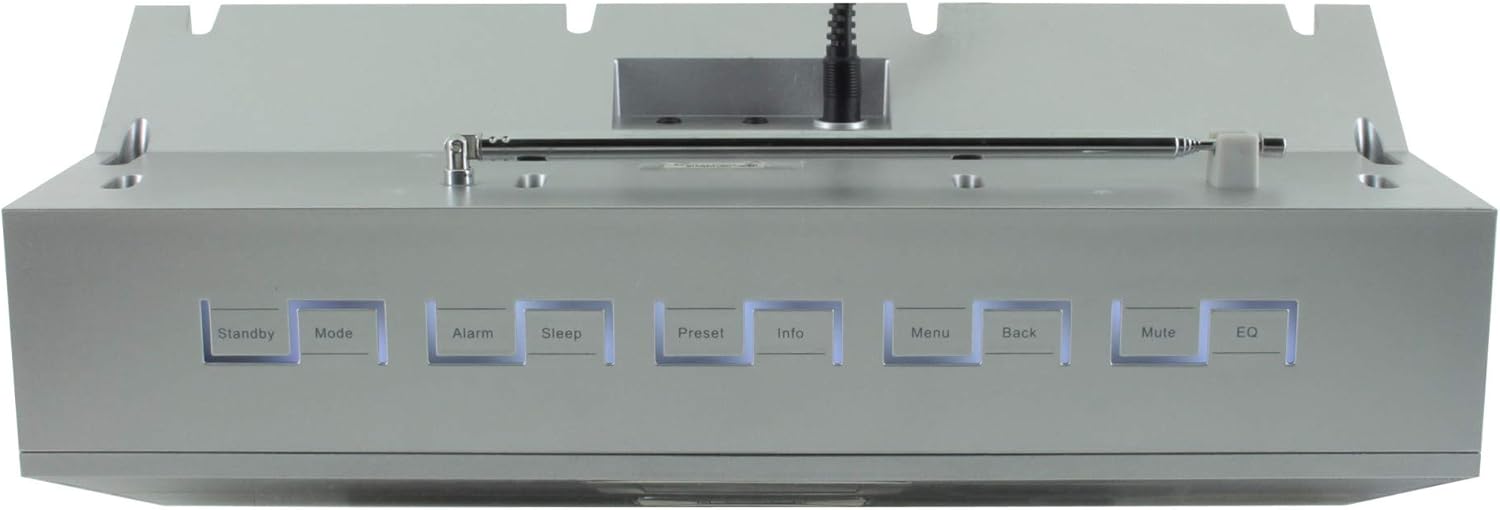
Foto 4.2: Top view of the Soundmaster IR300SI radio, highlighting the control buttons: Standby, Mode, Alarm, Sleep, Preset, Info, Menu, Back, Mute, and EQ.
Ogwe ihu
- 2.4" / 6 cm TFT Color Display: Shows station information, menus, and time.
- Ndị na-ekwu okwu: Stereo sound output.
- Control Dial/Buttons: For navigation and selection.
Njikwa Panel nke dị elu
- Kwụrụ n'ụsọ: Gbanyụọ/ gbanyụọ ike.
- Ụdị: Switch between Internet Radio, DAB+, FM, Bluetooth, USB, AUX.
- Mkpu: Tọọ ma jikwaa mkpu.
- Ụra: Activate sleep timer.
- Ntọala: Access and save favorite stations.
- Ozi: Display additional information about the current broadcast.
- NchNhr: Access system settings and options.
- Azu: Laghachi na menu gara aga.
- Mechie: Mechie/mechie ụda.
- EQ: Họrọ atọrọ nhazi nhazi.
Rear/Side Panel Connections
- Ntinye ike: Jikọọ ihe nkwụnye ọkụ ewepụtara.
- Antenna telescopic: For DAB+ and FM reception.
- Ọdụ ụgbọ mmiri USB: For MP3 playback from USB storage devices.
- 3.5mm Aux-In Port: Jikọọ isi mmalite ọdịyo dị na mpụga.
- Jack ekweisi: Maka ige ntị nkeonwe.
5. Nhazi
5.1 Njikọ ike
- Connect the power adapter to the DC input on the rear of the radio.
- Tinye nkwụnye ọkụ n'ime oghere mgbidi.
- Pịa Kwụrụ n'ụsọ button on the top panel or remote control to turn on the radio.
5.2 Ntọala antenna
Extend the telescopic antenna fully for optimal DAB+ and FM radio reception.
5.3 Initial Wi-Fi Network Setup
Upon first power-on, the radio will guide you through the initial setup wizard:
- Select your preferred language using the control dial and confirm.
- Redio ga-enyocha maka netwọk Wi-Fi dị.
- Họrọ netwọk gị na listi ahụ.
- Enter your Wi-Fi password using the on-screen keyboard and control dial. Confirm to connect.
- Once connected, the radio will display the main menu.
6. Ntuziaka ọrụ
Jiri ihe Ụdị button to switch between different audio sources.
6.1 Redio ịntanetị
- Pịa Ụdị to select "Internet Radio".
- Navigate through categories (e.g., Location, Genre, Popular) using the control dial.
- Select a station to begin playback.
- Iji chekwaa ọdụ dị ka ihe edobere, pịa ma jide Ntọala button, then select a preset number.
6.2 DAB + Redio
- Pịa Ụdị to select "DAB+ Radio".
- The radio will automatically scan for available DAB+ stations.
- Use the control dial to browse and select stations.
- Pịa ma jide Ntọala to save a station.
Igwe redio FM 6.3
- Pịa Ụdị to select "FM Radio".
- The radio will automatically scan for available FM stations.
- Use the control dial to browse and select stations.
- Pịa ma jide Ntọala to save a station.
6.4 Njikọ Bluetooth
- Pịa Ụdị to select "Bluetooth". The radio will enter pairing mode.
- Na ekwentị mkpanaaka gị (ama, mbadamba), mee ka Bluetooth rụọ ọrụ ma chọọ ngwaọrụ dị.
- Select "Soundmaster IR300SI" from the list to pair.
- Once connected, you can stream audio from your device to the radio.
6.5 USB playback
- Insert a USB storage device (formatted as FAT32) containing MP3 files n'ọdụ ụgbọ mmiri USB.
- Pịa Ụdị to select "USB".
- Navigate through folders and select tracks using the control dial.
Ntinye AUX 6.6
- Connect an external audio device (e.g., MP3 player) to the 3.5mm Aux-In port using an audio cable (not supplied).
- Pịa Ụdị to select "AUX".
- Jikwaa ọkpụkpọ dị na mpụga ngwaọrụ gị.
6.7 Alarms and Sleep Timer
- Mkpu: Pịa Oti mkpu button to set up to two alarms. Configure time, source (buzzer, radio), and frequency (daily, weekdays, weekends).
- Oge ụra: Pịa Ụra button to set a countdown timer (e.g., 15, 30, 60 minutes) after which the radio will automatically turn off.
6.8 ihe nhata (EQ)
Pịa EQ button to cycle through pre-programmed sound settings (e.g., Normal, Jazz, Rock, Classical, Pop, News) to optimize audio output for different content.
6.9 Amazon Alexa and UNDOK App Control
- Amazon Alexa: The radio is compatible with Amazon Alexa. Follow the instructions in the Alexa app to link your Soundmaster IR300SI for voice control functionalities.
- UNDOK App: Download the UNDOK app from your mobile device's app store. Ensure your mobile device and the radio are on the same Wi-Fi network. The app allows you to control the radio, browse stations, and manage settings remotely.
7. Nlekọta
7.1 Nhicha
- Always unplug the radio from the power outlet before cleaning.
- Jiri akwa dị nro ma kpọọ nkụ hichapụ elu elu.
- Ejila ihe nchacha, waxes, ma ọ bụ ihe mgbaze ka ha nwere ike imebi njedebe.
7.2 Nchekwa
If you plan to store the radio for an extended period, unplug it from the power source and store it in a cool, dry place, away from direct sunlight and extreme temperatures.
8. Nchọpụta nsogbu
Ọ bụrụ na ị na-enwe nsogbu, rụtụ aka na nsogbu ndị a na-ahụkarị na ngwọta ndị a:
| Nsogbu | Ihe nwere ike ime | Ngwọta |
|---|---|---|
| Enweghị ike | Ejikọghị ihe nkwụnye ọkụ ma ọ bụ ụzọ adịghị mma. | Lelee njikọ ike. Nwaa ebe ọzọ. |
| Enweghị ụda | Volume too low, muted, or incorrect source selected. | Increase volume. Press Ogbi. Ensure correct mode (Internet Radio, DAB+, etc.) is selected. |
| Enweghị ike ijikọ na Wi-Fi | Paswọọdụ na-ezighi ezi, mgbaàmà na-adịghị ike, ma ọ bụ nsogbu rawụta. | Verify password. Move radio closer to router. Restart router. |
| Poor DAB+/FM reception | Antenna anaghị agbatị ma ọ bụ ebe mgbaàmà adịghị mma. | Fully extend the telescopic antenna. Reposition the radio. |
| Njikọ Bluetooth ada ada | Radio not in pairing mode, or device too far. | Ensure radio is in Bluetooth mode. Move devices closer. Restart Bluetooth on both devices. |
9. Nkọwapụta
| Njirimara | Nkọwapụta |
|---|---|
| Aha Nlereanya | IR300SI |
| Ụdị | Onye isi ụda |
| Teknụzụ Njikọta | Bluetooth, USB, Wi-Fi |
| Atụmatụ pụrụ iche | Integrated Clock, Internet Radio, DAB+, FM, Bluetooth, USB MP3 Playback, AUX-In, Headphone Jack, 2 Alarms with Weekend Function, Sleep Timer, Equalizer, Amazon Alexa Compatible, UNDOK App Control, Network Music Player (DLNA) |
| Ọnọdụ mmepụta ọdịyo | Stereo |
| Ike Mmepụta Ọkà Okwu Kachasị Elu | 2 x 10 watts RMS |
| Ngosipụta | 2.4" / 6 cm TFT Color Display |
| Usoro njikwa | Remote Control, UNDOK App, On-device Buttons |
| Isi Iyi Ike | AC Powered (100 Volts input) |
| Akụkụ ngwaahịa (L x W x H) | 17 x 18 x 15 cm |
| Ibu Ibu | 2.3 kilogram |
| Agba | Ọlaọcha |
| Ngwa dakọtara | Personal Computer, Television, Tablet, Smartphone, Laptop |
| Ụdị nkwụnye | N'elu tebụl |
10. Akwụkwọ ikike na nkwado
The Soundmaster Eliteline IR300SI comes with a spare parts availability period of 1 year from the date of purchase. For technical support, warranty claims, or further assistance, please contact your retailer or the Soundmaster customer service department. Refer to the contact information provided with your purchase documentation.


