1. Okwu mmalite
This manual provides essential information for the safe and efficient installation, operation, and maintenance of your Cata UC-10 Bathroom Exhaust Fan. Please read this manual thoroughly before installation and use, and retain it for future reference. Proper installation and adherence to these instructions will ensure optimal performance and longevity of the product.
2. Ozi nchekwa
Na-agbaso ihe ndị a dị mkpa mgbe niile iji belata ihe egwu nke ọkụ, ọkụ eletrik, ma ọ bụ mmerụ ahụ.
- Nchekwa Eletriki: Ensure the power supply is disconnected before installation, maintenance, or cleaning. All electrical wiring must be performed by a qualified electrician and comply with local regulations.
- Nwụnye: Install the fan in accordance with the instructions provided. Do not install in areas where temperatures exceed 40°C. Ensure proper ventilation and clearance around the unit.
- Ojiji: Ebughị ngwa a maka ndị mmadụ (gụnyere ụmụaka) nwere ike anụ ahụ, mmetụta uche, ma ọ bụ nke uche, ma ọ bụ enweghị ahụmịhe na ihe ọmụma, ma ọ bụrụ na enyereghị ha nlekọta ma ọ bụ ntụziaka gbasara iji ngwa ahụ site n'aka onye na-ahụ maka nchekwa ha. .
- Nlekọta: Only use original spare parts for repairs. Do not attempt to modify the fan. Regular cleaning is recommended to maintain performance.
3. Ngwaahịa gafereview
The Cata UC-10 is a high-efficiency bathroom exhaust fan designed for effective ventilation, featuring an extra-flat design, low noise operation, and adjustable speed settings. It includes a humidity sensor (Hygro) and a timer function for automated control.
3.1 Atụmatụ
- Extra-Flat Design: Modern and discreet aesthetic.
- Very Silent Operation: Minimum sound level of 26 dB(A).
- Ịrụ ọrụ ike dị elu: Maximum power consumption of 8 W.
- Kemeghi Speed: Six selectable speed levels for optimal airflow control.
- Humidity Sensor (Hygro): Automatically activates the fan based on ambient humidity levels.
- Ọrụ ngụ oge: Adjustable run-on timer after activation.
- Backdraft Dampnke: Prevents unwanted air entry when the fan is off.
- Ihe nchekwa ọkụ: Ensures safe operation up to 40°C ambient temperature.
- IP-44 Rated & Double Insulated: Provides protection against splashing water and electrical hazards.
3.2 Akụkụ
The Cata UC-10 fan unit typically includes the main fan body, a removable front cover, and necessary electrical cabling for installation.

Foto 1: N'ihu view of the Cata UC-10 Bathroom Exhaust Fan. This image displays the fan's white, extra-flat design with its central impeller visible through the protective grille.

Foto 2: Ihu ihu view of the Cata UC-10 fan, highlighting its compact and modern aesthetic suitable for various bathroom decors.

Foto 3: Akụkụ view of the Cata UC-10 fan, showing the depth of the unit and the exhaust duct connection point.
4. Ntọala na nwụnye
Installation of the Cata UC-10 fan requires electrical knowledge and should be performed by a qualified professional. The fan is designed for wall mounting.
4.1 Akụkụ
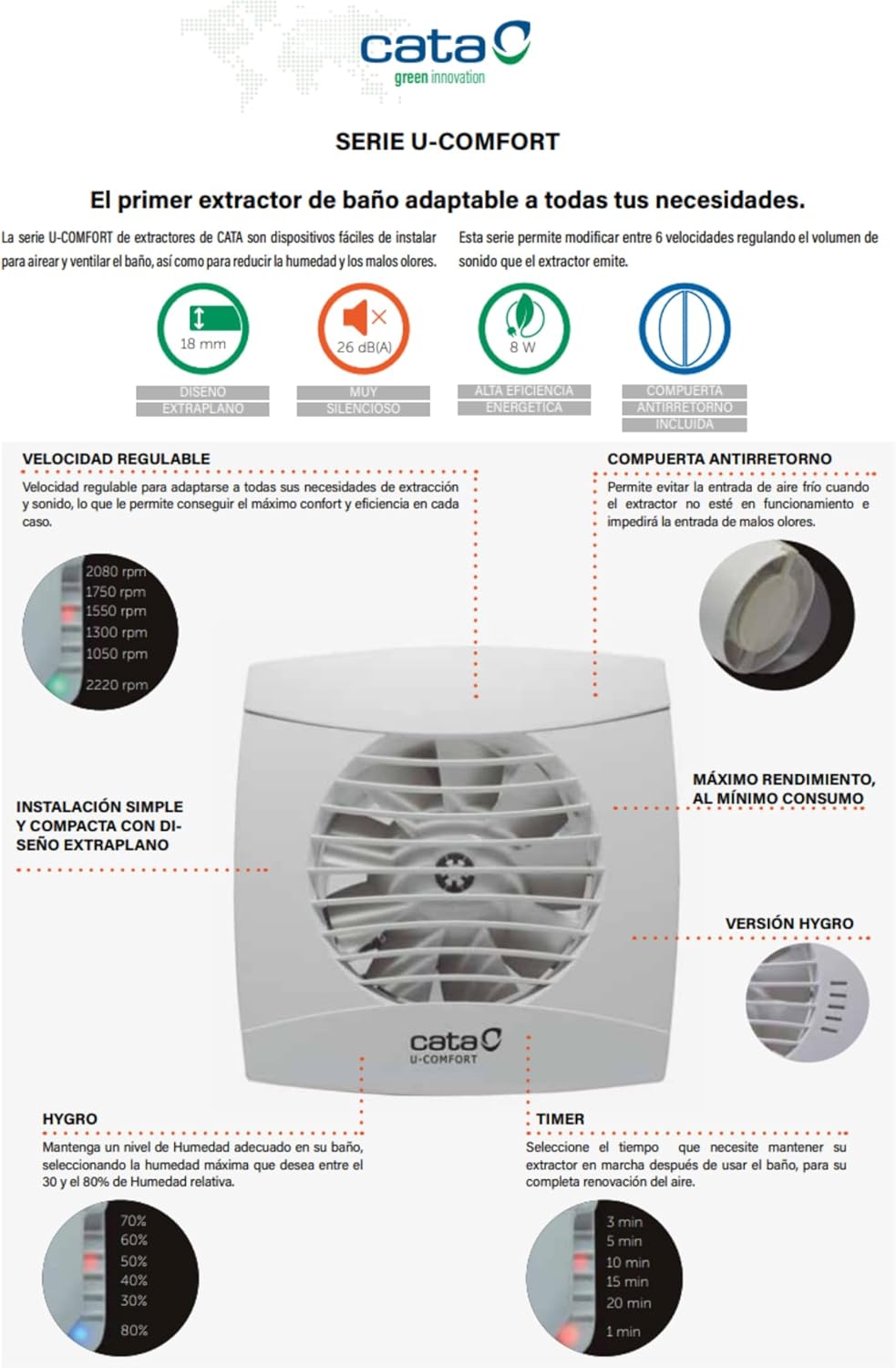
Foto 4: Technical diagram illustrating the dimensions of the Cata UC-10 fan. The front panel measures 150x150 mm, with a depth of 18.5 mm. The exhaust duct has a diameter of 100 mm and a length of 77.5 mm.
4.2 Nzọụkwụ Nwụnye (Ntuziaka Izugbe)
- Nkwadebe: Disconnect power at the main circuit breaker. Choose a suitable wall mounting location, ensuring adequate space for the fan and ducting.
- Ịkwanye: Create an opening in the wall according to the fan's duct diameter (100 mm). Secure the fan body to the wall using appropriate fasteners.
- Ntugharị: Connect suitable ducting from the fan's exhaust outlet to the exterior. Ensure ducting is sealed to prevent air leakage.
- Wiring: Connect the electrical cable to the fan's terminal block. Ensure correct polarity and secure all connections. The fan operates on 220-240V, 50/60Hz.
- Mgbakọ ikpeazụ: Attach the front cover securely to the fan body.
- Nnwale: Restore power and test the fan's operation, including the timer and humidity sensor functions.
5. Ntuziaka ọrụ
The Cata UC-10 fan offers automated and adjustable operation modes.

Foto 5: Diagram illustrating the adjustable speed, humidity sensor (Hygro), and timer settings of the Cata UC-10 fan.
5.1 Adjustable Speed
The fan features six adjustable speed levels, allowing you to optimize airflow and noise levels according to your needs. The available speeds range from 1050 RPM to 2220 RPM. Consult the internal adjustment mechanism (typically potentiometers or switches accessible after removing the front cover) to select the desired speed setting.
5.2 Humidity Sensor (Hygro)
The integrated humidity sensor automatically activates the fan when the ambient humidity exceeds a preset threshold. This threshold can typically be adjusted (e.g., from 30% to 80% relative humidity) using a control knob or potentiometer located inside the fan unit. The fan will run until the humidity level drops below the set point.
5.3 Ọrụ ngụ oge
The timer function allows the fan to continue operating for a set period after it has been manually switched off or after the humidity level has dropped below the sensor's threshold. The timer duration is adjustable, commonly offering settings such as 3, 5, 10, 15, or 20 minutes. This setting is usually adjusted via a control knob or potentiometer within the fan unit.
6. Nlekọta
Regular maintenance ensures the efficient and safe operation of your Cata UC-10 fan.
6.1 Nhicha
- Kwụpụ ike: Always ensure the power supply to the fan is disconnected before cleaning.
- Wepu mkpuchi ihu: Carefully detach the extra-flat front cover.
- Ngwa dị ọcha: Jiri nwayọọ, damp cloth to wipe down the front cover and the fan blades. Avoid using abrasive cleaners or solvents. Ensure no water enters the electrical components.
- Gbakọtaghachi: Once all parts are dry, reattach the front cover securely.
It is recommended to clean the fan at least once every six months, or more frequently in dusty or high-humidity environments.
7. Nchọpụta nsogbu
If you encounter issues with your Cata UC-10 fan, refer to the following common problems and solutions:
| Nsogbu | Ihe nwere ike ime | Ngwọta |
|---|---|---|
| Onye ofufe anaghị agbanwuo. | Enweghị ọkụ. Wiwi na-ezighi ezi. Humidity sensor not triggered. Edobeghi ngụ oge. | Lelee ihe mgbawa sekit na njikọ ike. Verify wiring connections (consult an electrician). Increase humidity or manually activate. Adjust timer settings. |
| Fan is excessively noisy. | Agụba fan ruru unyi. Nkwalite rụrụ arụ. Obstruction in ducting. | Clean fan blades (see Maintenance). Ensure fan is securely mounted. Check ducting for blockages. |
| Poor air extraction. | Blocked ducting. Agụba fan ruru unyi. Ntọala ọsọ na-ezighi ezi. | Clear any obstructions in the duct. Mpekere fan dị ọcha. Gbanwee na ntọala ọsọ dị elu. |
| Humidity sensor not working. | Sensor setting too high. Ihe mmetụta sensọ adịghị arụ ọrụ. | Adjust the humidity threshold to a lower percentage. Ọ bụrụ na nsogbu ka dị, kpọtụrụ nkwado. |
If the problem persists after attempting these solutions, please contact Cata customer support or a qualified technician.
8. Nkọwapụta
| Njirimara | Nkọwapụta |
|---|---|
| Nlereanya | UC-10 (1200200) |
| Ụdị | Cata |
| Ụdị | Onye na-ekpochapụ ime ụlọ ịwụ ahụ |
| Ụdị nkwụnye | Ugwu mgbidi |
| Isi Iyi Ike | Igwe ọkụ eletrik |
| Voltage / Ugboro ugboro | 220-240V, 50/60Hz |
| Oriri ike kacha | 8 W |
| Oke ikuku ikuku | 110m³/h |
| Minimum Noise Level | 26 dB(A) |
| Ọsọ fan | Adjustable, up to 2220 RPM (6 levels) |
| Dayameta ọpụpụ | 100 mm |
| Front Panel Dimensions (W x H) | 150 mm x 150 mm |
| Front Panel Depth | 18.5 mm |
| Ogologo Ọwa | 77.5 mm |
| Ibu | 0.65 n'arọ |
| Ihe onwunwe | Plastic (Kunststoff) |
| Ogo IP | IP-44 |
| Klas mkpuchi | Double Insulation (Class B) |
| Nchekwa okpomọkụ | Up to 40°C ambient temperature |
| Atụmatụ pụrụ iche | Timer, Humidity Sensor (Hygro), Adjustable Speed, Backdraft Damper |
9. Akwụkwọ ikike na nkwado
Cata products are manufactured to high-quality standards and are covered by a manufacturer's warranty against defects in materials and workmanship. Please refer to the warranty card included with your product or visit the official Cata websaịtị maka nkọwa na usoro akwụkwọ ikike.
For technical assistance, spare parts, or warranty claims, please contact your local dealer or Cata customer service. Ensure you have your product model number (UC-10, 1200200) and proof of purchase available when contacting support.


