Ngwaahịa gafereview
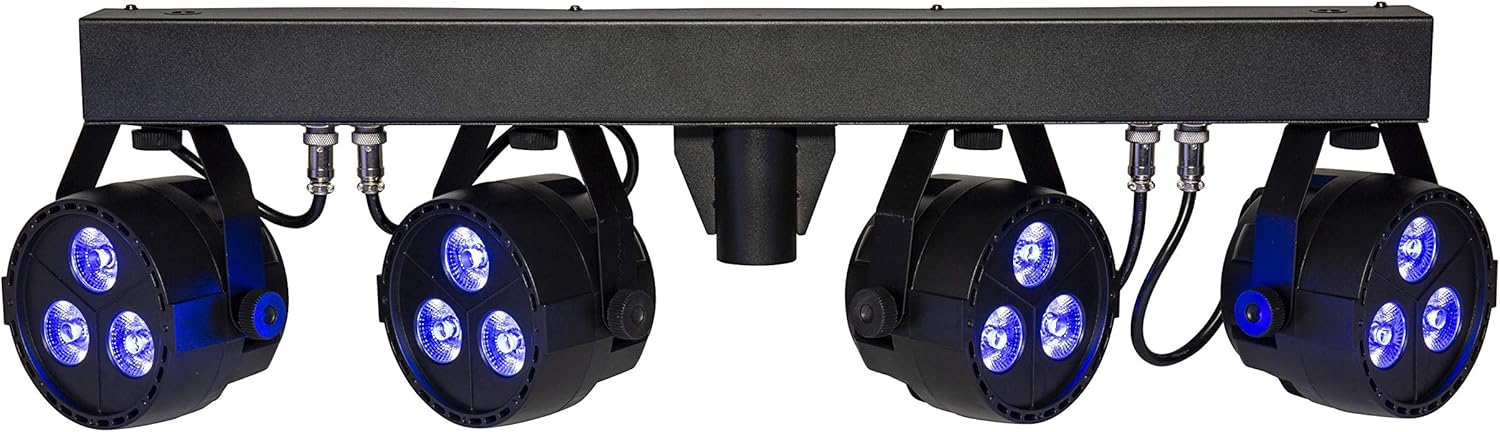
The lightmaXX CLS Nano RGBW is an LED lighting system featuring four spotlights, designed for use on theater and stage productions. Its compact size and low weight also make it suitable for mobile applications.
Each spotlight is equipped with three powerful 4W QCL LEDs, contributing to a total power consumption of 48 watts. The COB LEDs incorporate red, green, blue, and white primary colors, allowing for the creation of a wide spectrum of other colors through mixing. The beam angle is 25 degrees. Additionally, the QCL LEDs offer stepless dimming from 0-100% and can produce a powerful strobe effect. Control options include DMX and music control.

The lightmaXX CLS Nano RGBW LED Spot Set, showcasing its four individual spotlights mounted on a central bar, with the LEDs emitting green light.
Ntuziaka nchekwa
Biko gụọ ma ghọta ntuziaka nchekwa niile tupu ị rụọ ọrụ ngwaọrụ. Emeghị nke a nwere ike bute mmerụ ahụ ma ọ bụ mebie ngwaahịa ahụ.
- Jikọọ ngwaọrụ mgbe ọ bụla na nkwụnye ọkụ kwụsịrị.
- Gbaa mbọ hụ na ikuku ikuku dị na gburugburu unit ahụ iji gbochie ikpo oke ọkụ.
- Ewepụla ngwaọrụ ahụ na mmiri ozuzo ma ọ bụ mmiri.
- Zere ikpughe anya ozugbo na isi iyi ọkụ.
- Only qualified personnel should perform service or repairs.
- Kwụpụ na ike tupu ihicha ma ọ bụ mmezi.
Melite
Iwepu ngwongwo
Carefully remove the CLS Nano RGBW from its packaging. Inspect the unit for any signs of damage during transit. Retain the packaging for future storage or transport.
Ịkwanye
The CLS Nano RGBW is designed for secure mounting on a lighting stand or truss system. Use appropriate clamps and safety cables (not included) to ensure the unit is securely fastened and cannot fall. Ensure the mounting surface can support the weight of the fixture (7.13 kg).
Njikọ
Jikọọ ngwaọrụ dị ka ndị a:
- Njikọ ike: Use the provided IEC power cable to connect the unit to a suitable mains power outlet.
- Njikọ DMX (Nhọrọ): For DMX control, connect a 3-pin XLR DMX cable from your DMX controller's output to the unit's DMX IN port. If linking multiple units, connect from the first unit's DMX OUT to the next unit's DMX IN.

Azụ zuru ezu view of the lightmaXX CLS Nano RGBW, highlighting the power input, DMX In/Out ports, and the digital control display with navigation buttons.
Ntuziaka ọrụ
Ogwe njikwa gafereview
The control panel on the rear of the unit features a digital display and four buttons:
- NchNhr: Navigates through the main menu options.
- Elu: Increases values or moves up through menu options.
- N'okpuru: Decreases values or moves down through menu options.
- Tinye: Na-akwado nhọrọ ma ọ bụ na-abanye na obere menu.
Ụdị arụ ọrụ
The CLS Nano RGBW offers several operating modes:
- Ụdị DMX: For external control via a DMX controller.
- Nchekwa onwe na ọnọdụ: Runs pre-programmed light shows automatically.
- Ụdị agbanyere ụda: Reacts to music or sound via a built-in microphone.
- Ụdị Agba Static: Displays a single, constant color.
Njikwa DMX
To operate the unit via DMX, set the DMX address using the control panel. Refer to the DMX channel chart in the full manual for specific channel functions (e.g., Dimmer, Red, Green, Blue, White, Strobe, Programs).
Mmemme Nchekwa onwe
Navigate to the Auto mode setting using the MENU button. Use UP/DOWN to select different built-in programs. Press ENTER to confirm. Some programs may allow adjustment of speed or intensity.
Ụdị agbanyere ụda
Select the Sound-Activated mode from the menu. The unit will use its internal microphone to react to ambient sound. Adjust the microphone sensitivity if available in the menu to fine-tune the response.
Ụdị agba Static
In Static Color mode, you can manually select a desired color. Use the UP/DOWN buttons to adjust the intensity of Red, Green, Blue, and White LEDs to create custom colors.

The lightmaXX CLS Nano RGBW LED Spot Set displaying a vibrant red color output from its four spotlights.
The lightmaXX CLS Nano RGBW LED Spot Set illuminating with a deep blue color.

The lightmaXX CLS Nano RGBW LED Spot Set producing a bright white light.

The lightmaXX CLS Nano RGBW LED Spot Set emitting a warm yellow light.

The lightmaXX CLS Nano RGBW LED Spot Set displaying a cool cyan light.

The lightmaXX CLS Nano RGBW LED Spot Set showcasing a rich purple illumination.

The lightmaXX CLS Nano RGBW LED Spot Set with its spotlights in an off state, showing the clear lenses.
Nlekọta
Nhicha
Regular cleaning helps maintain optimal performance and appearance. Disconnect the unit from power before cleaning.
- Use a soft, lint-free cloth to wipe down the exterior.
- For lenses, use a specialized lens cleaner and a soft cloth to avoid scratches.
- Ejila ihe nhicha, ihe mgbaze, ma ọ bụ kemịkal siri ike mee ihe.
Nchekwa
When not in use for extended periods, store the CLS Nano RGBW in its original packaging or a suitable flight case. Store in a cool, dry place away from direct sunlight and extreme temperatures.
Nchọpụta nsogbu
Nkebi a na-eleba anya na nsogbu ndị ị na-enwekarị. Ọ bụrụ na nsogbu ahụ anọgide, kpọtụrụ ndị ọrụ nkwado ndị ahịa.
| Nsogbu | Ihe nwere ike ime | Ngwọta |
|---|---|---|
| Enweghị ike | Power cable disconnected; Outlet not active; Fuse blown | Check power cable connection; Test outlet with another device; Replace fuse (if applicable and safe to do so) |
| Enweghị njikwa DMX | Incorrect DMX address; Faulty DMX cable; DMX controller issue; Master/Slave conflict | Verify DMX address setting; Test/replace DMX cable; Check DMX controller output; Ensure correct Master/Slave configuration |
| Lights not responding in Auto/Sound mode | Incorrect mode selected; Microphone sensitivity too low (Sound mode) | Ensure correct operating mode is selected; Adjust microphone sensitivity in Sound mode |
| Otu na-ekpo oke ọkụ | Insufficient ventilation; Blocked cooling vents | Ensure adequate space around the unit; Clean any dust or debris from cooling vents |
Nkọwapụta
| Nlereanya | LIG0015656-000 |
| Ụdị | ọkụmaXX |
| Akụkụ (L x W x H) | 88.6 x 38 x 18.8 cm |
| Ibu | 7.13 n'arọ |
| Ụdị LED | 4 x (3x 4W QCL RGBW LEDs) |
| Mkpokọta oriri ike | 48 watt |
| Angle Beam | 25° |
| Ụdị njikwa | DMX, Auto, Sound-activated, Static Color |
| Atụmatụ | Dimmable, Strobe Effect, DMX Control, Music Control, RGBW LED |
| Isi Iyi Ike | Mains Power (IEC C14) |
| Onye nrụpụta | ọkụmaXX |
| Mba onye si | Germany |
| Ụbọchị mbụ dị | Jenụwarị 15, 2020 |
Akwụkwọ ikike na nkwado
This lightmaXX product is covered by a manufacturer's warranty. For specific warranty terms and conditions, please refer to the documentation included with your purchase or contact the seller directly.
For technical support, troubleshooting assistance beyond this manual, or spare parts inquiries, please contact your authorized lightmaXX dealer or the manufacturer's customer service department. Keep your purchase receipt and model number (LIG0015656-000) ready when contacting support.


