1. Ngwaahịa gafereview
The ANENG Q1 is a 9999 counts True RMS digital multimeter designed for accurate measurement of various electrical parameters. It features an EBTN black screen with a large, backlit LCD for clear readability in diverse lighting conditions. This device supports both automatic and manual ranging, offering flexibility for different measurement needs. It includes an analog bar graph display for quick visual indication of readings.
Akụkụ ndị bụ isi:
- Ezi nha RMS: Na-enye ọgụgụ ziri ezi maka ụdị ebili mmiri na-abụghị sinusoidal.
- NCV (Ndị na-abụghị kọntaktị Voltage) Nchọpụta: For safe identification of live wires without direct contact.
- Nhazi akpaaka/aka: User-selectable measurement range for convenience and precision.
- Analog Bar Graph: Visual representation of measurement trends.
- Nnukwu LCD backlit: Ọhụhụ ka mma n'ebe ọkụ dị ala.
- Nchekwa ibu ibu: Ensures safety across all measurement ranges.
- Ngosipụta batrị dị ala: Alerts when battery replacement is needed.
- Ọrụ njide data: Na-eme ka ọgụgụ egosiri na-akpọnwụ ka ọ dị mfe idekọ.
- Gbanyụọ ike akpaaka: Na-echekwa ndụ batrị.
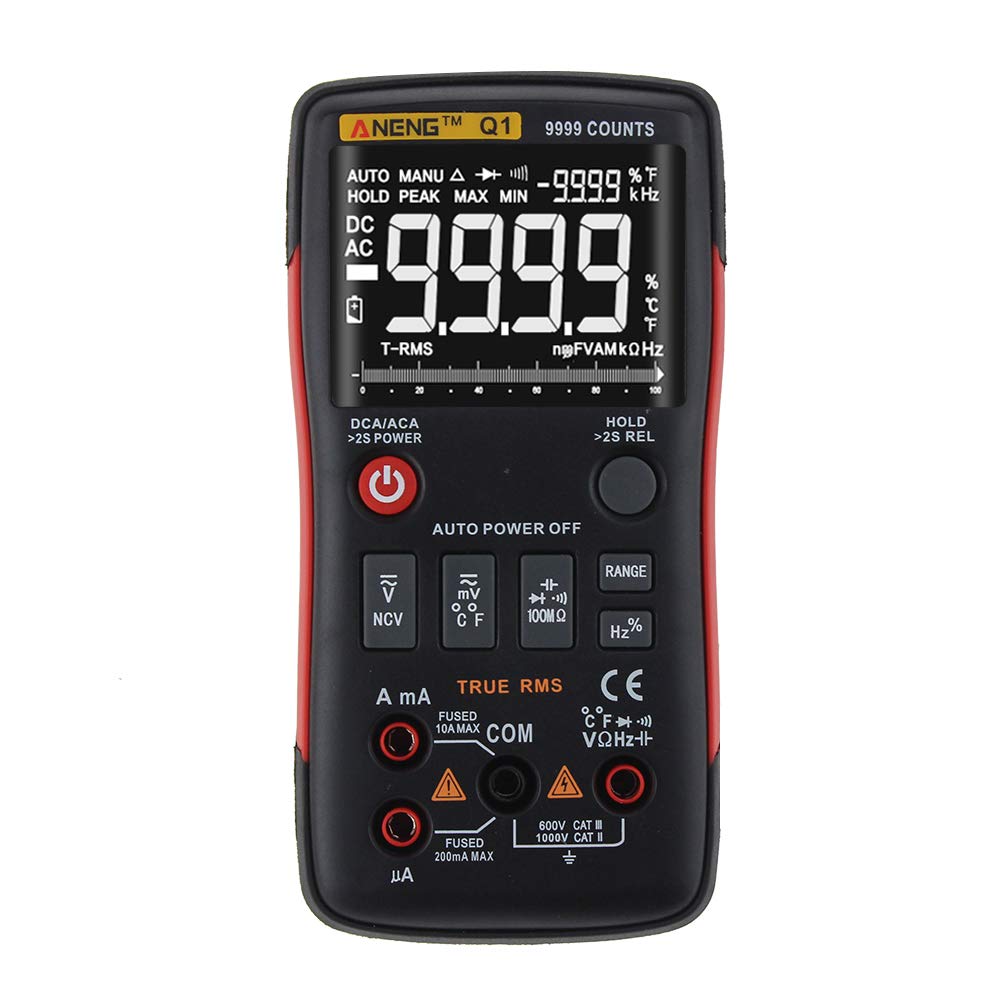
Figure 1: ANENG Q1 Digital Multimeter with its display and function buttons.
2. Ozi nchekwa
Always observe basic safety precautions when using this multimeter to prevent personal injury or damage to the device. Read and understand all safety information before operation.
- Ekwela ka ihe niile dị mkpa maka ọrụ ọ bụla gafere.
- Jiri nlezianya na-arụ ọrụ na voltages karịrị 30V AC RMS, 42V elu, ma ọ bụ 60V DC. Vol ndị atages na-ebute ihe egwu ujo.
- Before measuring current, ensure the circuit is de-energized and the multimeter is connected in series.
- Always disconnect test leads from the circuit before changing functions.
- Inspect test leads for damaged insulation or exposed metal before use. Replace if damaged.
- Do not operate the multimeter if the battery cover is not properly closed.
- Replace batteries immediately when the low battery indicator appears to ensure accurate readings.
- Soro koodu nchekwa obodo na obodo.
3. Nhazi
3.1 Ntinye batrị
- Jide n'aka na agbanyụrụ multimeter ahụ.
- Chọta ebe batrị dị n'azụ ngwaọrụ.
- Mepee mkpuchi nke batrị ma wepụ ya.
- Insert two 1.5V AA batteries, observing the correct polarity (+/-).
- Dochie mkpuchi batrị ma jiri ịghasa chekwaa ya.
3.2 Njikọ Ndị Nnwale Nlele
The multimeter comes with a set of test leads. Always connect the black lead to the 'COM' (Common) jack. Connect the red lead to the appropriate input jack based on the measurement function:
- VΩHz+ jack for Voltage, Resistance, Frequency, Capacitance, Diode, and Continuity measurements.
- mA jack for current measurements up to 999.9mA.
- 10A jack for current measurements up to 10A.

Figure 2: Included test leads and probes.

Figure 3: Complete ANENG Q1 Multimeter kit with accessories.
4. Ntuziaka ọrụ
The ANENG Q1 multimeter offers both automatic and manual ranging. Press the 'RANGE' button to switch between auto and manual modes. In manual mode, press 'RANGE' repeatedly to cycle through available ranges.
4.1 Gbanyụọ ma ọ bụ gbanyụọ
Press the red power button to turn the multimeter on or off. The device features an auto power-off function to conserve battery life after a period of inactivity.
4.2 Na-atụ AC/DC Voltage (V)
- Connect the black test lead to the 'COM' jack and the red test lead to the 'VΩHz+' jack.
- Họrọ voltage measurement function (AC V or DC V) using the function button.
- Jikọọ ihe nyocha ule n'otu akụkụ n'ofe sekit ma ọ bụ akụkụ a ga-atụ.
- Gụọ voltage uru na ngosi.
4.3 Measuring AC/DC Current (A/mA/µA)
- Ihe dị mkpa: Ensure the circuit is de-energized before connecting the multimeter for current measurement.
- Connect the black test lead to the 'COM' jack. Connect the red test lead to the 'mA' jack for currents up to 999.9mA, or to the '10A' jack for currents up to 10A.
- Select the current measurement function (AC A or DC A).
- Open the circuit and connect the multimeter in series with the load.
- Re-energize the circuit and read the current value on the display.
4.4 Measuring Resistance (Ω)
- Connect the black test lead to 'COM' and the red test lead to 'VΩHz+'.
- Select the resistance measurement function.
- Hụ na sekit ma ọ bụ akụkụ ahụ anaghị arụ ọrụ nke ọma tupu ị tụọ ihe ndị na-eguzogide ya.
- Jikọọ nyocha ule n'ofe akụkụ ahụ.
- Gụọ uru ndị na-eguzogide na ngosipụta.
4.5 Measuring Capacitance (F)
- Connect the black test lead to 'COM' and the red test lead to 'VΩHz+'.
- Select the capacitance measurement function.
- Hụ na a na-ewepụ capacitor ahụ kpamkpam tupu a tụọ ya iji gbochie mmebi na multimeter ahụ.
- Jikọọ nyocha ule n'ofe njedebe capacitor ahụ.
- Gụọ uru capacitance na ngosipụta.
4.6 Measuring Frequency (Hz) and Duty Cycle (%)
- Connect the black test lead to 'COM' and the red test lead to 'VΩHz+'.
- Select the frequency/duty cycle measurement function.
- Jikọọ nyocha ule ahụ n'ofe isi iyi mgbaàmà ahụ.
- Read the frequency or duty cycle value on the display.
4.7 Measuring Temperature (°C/°F)
- Connect the temperature probe to the appropriate input jacks (usually 'COM' and 'VΩHz+' or dedicated temperature jacks if available).
- Select the temperature measurement function.
- Debe nsọtụ ihe nyocha okpomọkụ ahụ n'elu ma ọ bụ nso ihe a ga-atụ okpomọkụ ya.
- Read the temperature value on the display.
4.8 Diode Ule
- Connect the black test lead to 'COM' and the red test lead to 'VΩHz+'.
- Select the diode test function.
- Connect the red probe to the anode and the black probe to the cathode of the diode.
- Ngosipụta ga-egosi volta n'ihutage drop. Reverse the probes; an open circuit (OL) indicates a good diode.
4.9 Nnwale na-aga n'ihu
- Connect the black test lead to 'COM' and the red test lead to 'VΩHz+'.
- Họrọ ọrụ ule ịga n'ihu.
- Jikọọ ihe nyocha ule n'ofe sekit ma ọ bụ akụkụ ahụ.
- A continuous beep indicates a low resistance path (continuity).
4.10 NCV (anaghị ana-akpọtụrụ Voltage) Nchọpụta
- Select the NCV function.
- Bring the top of the multimeter close to the conductor or outlet.
- The device will indicate the presence of AC voltage through an audible alarm and/or visual indicator.
5. Nlekọta
5.1 Nhicha
Jiri mgbasa ozi hichapụ ikpe ahụamp cloth and mild detergent. Do not use abrasives or solvents. Ensure the device is completely dry before use.
5.2 Nchekwa
When not in use for extended periods, remove the batteries to prevent leakage. Store the multimeter in a cool, dry place, away from direct sunlight and extreme temperatures. The recommended storage conditions are -20°C to 60°C (-4°F to 140°F) with humidity less than 80% RH.
6. Nchọpụta nsogbu
- Enweghị Ngosipụta: Lelee nrụnye batrị ma hụ na batrị anaghị agwụcha. Dochie ma ọ dị mkpa.
- Ọgụgụ na-ezighi ezi: Verify that the correct function and range are selected. Ensure test leads are properly connected and not damaged. Check battery level.
- 'OL' (Overload) Display: The measured value exceeds the selected range or the maximum input limit. Switch to a higher range or ensure the input is within the device's specifications.
- Enweghị ụda na-aga n'ihu: Check if the circuit is truly continuous and has very low resistance. Ensure test leads are making good contact.
7. Nkọwapụta
7.1 Nkọwapụta ọkụ eletrik

Figure 4: Electrical Specifications - DC and AC Voltage.

Figure 5: Electrical Specifications - DC and AC Current, and Resistance.

Figure 6: Electrical Specifications - Capacitance, Frequency, and Duty Cycle.

Figure 7: Electrical Specifications - Temperature, Diode, Continuity, and NCV.
7.2 General, Mechanical, and Environmental Specifications

Figure 8: General, Mechanical, and Environmental Specifications.
| Oke | Uru |
|---|---|
| Ngosipụta | 9999 Counts LCD |
| Na-agba ọsọ | Akpaaka/Akwụkwọ ntuziaka |
| Ihe onwunwe | ABS+TPE |
| Ọnụego mmelite | 3 ugboro/ abụọ |
| Ezi RMS | Ee |
| Jide data | Ee |
| Ìhè azụ | Ee |
| Ngosipụta batrị dị ala | Ee |
| Gbanyụọ ike akpaaka | Ee |
| Oke | Uru |
|---|---|
| Akụkụ | 146*74*34mm |
| Ibu | 125g |
| Ụdị batrị | 2 x 1.5V AA Battery (not included) |
| Oke | Uru |
|---|---|
| Okpomọkụ na-arụ ọrụ | 0 ~ 40 Celsius |
| Iru mmiri na-arụ ọrụ | <75% RH |
| Okpomọkụ nchekwa | -20 ~ 60 Celsius |
| Ebe nchekwa iru mmiri | <80% RH |
8. Akwụkwọ ikike na nkwado
8.1 Akwụkwọ ikike
This ANENG Q1 Digital Multimeter comes with a akwụkwọ ikike otu afọ from the date of purchase, covering manufacturing defects. This warranty does not cover damage caused by misuse, accident, unauthorized modification, or normal wear and tear. Please retain your proof of purchase for warranty claims.
8.2 Nkwado ndị ahịa
For technical assistance, troubleshooting, or warranty inquiries, please contact the retailer or manufacturer's customer service. Refer to your purchase documentation for specific contact details.


