1. Okwu mmalite
The Aqua Control C4099O is an automatic irrigation programmer designed for efficient garden watering. This device allows you to automate your watering schedule with precise control over frequency and duration, ensuring your plants receive optimal hydration. Its robust design and user-friendly interface make it suitable for various garden setups, including those with low water pressure.
This manual provides comprehensive instructions for the installation, operation, and maintenance of your Aqua Control C4099O irrigation programmer.
2. Atụmatụ igodo
- Mmemme akpaaka: Automates irrigation with desired frequency and duration settings.
- Adjustable Frequency: Options include every 1, 2, 3, 4, 5, 6, 8, 12, 24, 48, 72 hours, or once per week.
- Adjustable Duration: Watering times can be set for 1, 2, 3, 5, 10, 15, 20, 30, 60, 90, or 120 minutes.
- Njikwa ntuziaka: Features a manual open and close option for immediate watering or stopping.
- Ọrụ igbu oge: Allows delaying the start of irrigation from 1 to 12 hours from the time of setting.
- Ọrụ Nrụgide Dị Ala: Designed to open at 0 bar, making it suitable for use with water tanks, though a minimum operating pressure of 1 bar and maximum of 8 bar is recommended for proper function.
- Akwadoro batrị: Operates on 2 x 1.5V AAA alkaline batteries (not included), housed in a waterproof compartment.

Nyocha 2.1: N'eluview of the Aqua Control C4099O's features, including its pressure requirements, frequency and duration settings, battery type, and 3/4-inch faucet connection.
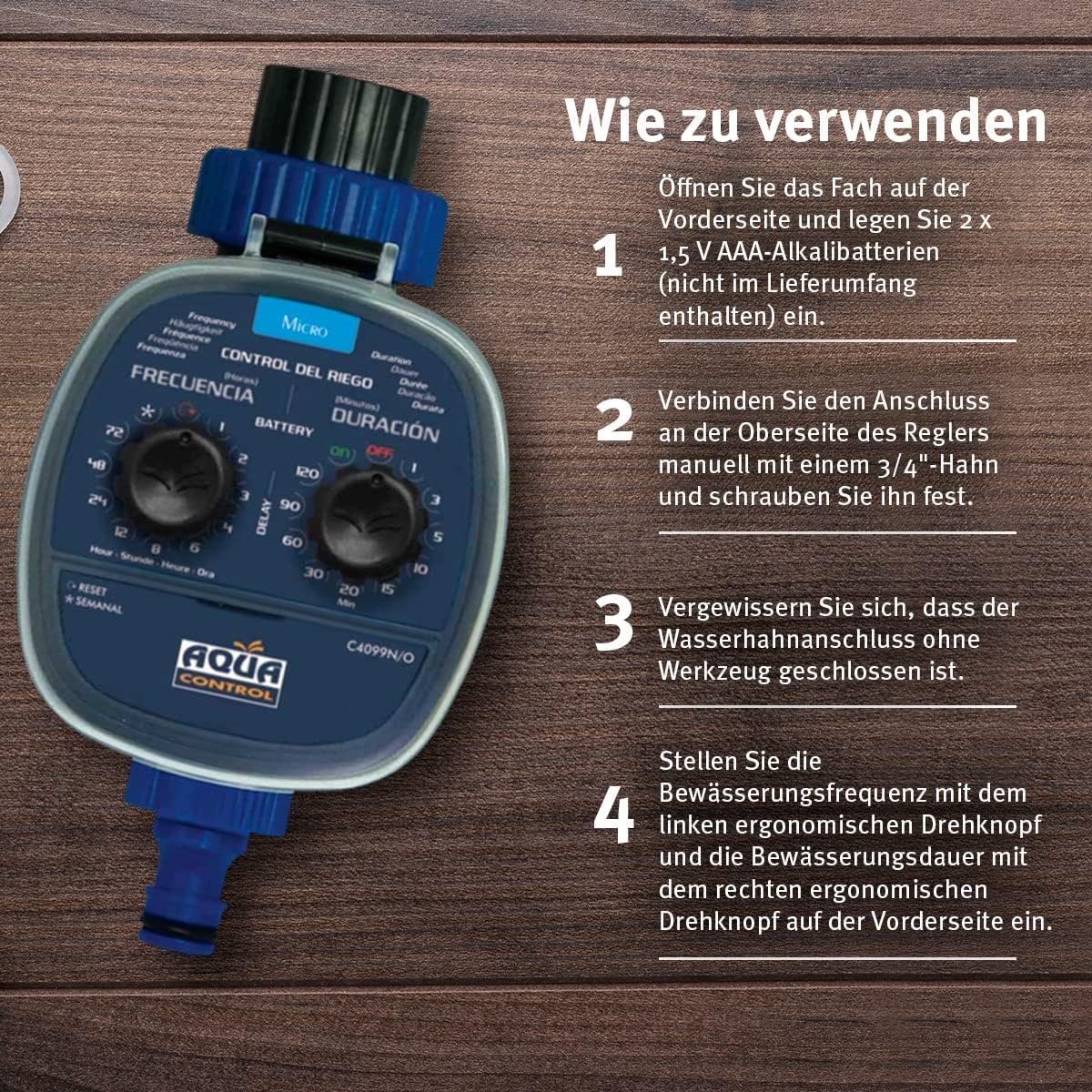
Figure 2.2: Important recommendations for optimal use, such as using a pressure reducer and filter, using only cold water, and avoiding rechargeable batteries.
3. Nhazi
- Wụnye batrị:
Open the battery compartment located on the front side of the programmer. Insert 2 x 1.5V AAA alkaline batteries (not included), ensuring correct polarity. Close the compartment securely to maintain its waterproof seal.

Figure 3.1: Inserting AAA batteries into the waterproof compartment.
- Jikọọ na Faucet:
Manually connect the programmer's inlet to a 3/4-inch garden faucet. Screw it on firmly by hand until it is secure. Do not use tools or Teflon tape, as the unit is designed for a tight seal without them.

Figure 3.2: The irrigation programmer securely attached to a garden faucet.
- Open Water Supply:
Ensure the water faucet is fully open. The programmer will control the water flow based on your settings.
4. Ntuziaka ọrụ
The Aqua Control C4099O features two main dials for setting frequency and duration, along with a delay button for advanced scheduling.
4.1. Setting Automatic Irrigation
- Tọọ ugboro ugboro: Rotate the left dial (labeled "FRECUENCIA" / "Frequency") to select how often you want the irrigation to occur. Options range from every 1 hour to once per week.
- Tọọ oge: Rotate the right dial (labeled "DURACIÓN" / "Duration") to select the desired watering time. Options range from 1 minute to 120 minutes.
- Mee ọrụ: Once both dials are set, the programmer will begin its cycle based on the current time and your chosen settings.

Figure 4.1: Setting the frequency and duration using the two ergonomic dials on the front of the programmer.
4.2. Ọrụ ntuziaka
To manually open or close the water flow:
- Rotate the "Duration" dial to the "ON" position to open the valve and start watering immediately.
- Rotate the "Duration" dial to the "OFF" position to close the valve and stop watering.
- Remember that manual operation will override any active program. To resume automatic programming, you may need to re-set the dials or adjust the delay function.
4.3. Ọrụ igbu oge
The delay function allows you to postpone the start of the programmed irrigation cycle by a specific number of hours (1 to 12 hours).
- Set your desired Frequency and Duration using the respective dials.
- Press and hold the "DELAY" button for 2 seconds until the LED indicator lights up.
- Press the "DELAY" button repeatedly to increase the delay time by one hour with each press. The LED will flash to indicate the selected delay.
- After selecting the desired delay, wait 3 seconds for the setting to be confirmed, and the LED will turn off. The irrigation will start after the set delay period.

Figure 4.2: Utilizing the delay function to postpone the start of watering, useful for specific timing needs.
5. Nlekọta
- Ngbanwe batrị: Replace batteries when the battery indicator light signals low power or when the unit stops functioning. Always use new 1.5V AAA alkaline batteries. Do not use rechargeable batteries.
- Nhicha: Periodically check the inlet filter for debris and clean it if necessary to ensure proper water flow. Use a soft cloth to wipe the exterior of the programmer. Do not use abrasive cleaners.
- Nchekwa oyi: Before the first frost, disconnect the programmer from the faucet. Drain any remaining water from the unit and store it in a dry, frost-free location indoors. This prevents damage from freezing water.
- Summer Protection: While designed for outdoor use, prolonged direct exposure to intense sunlight can affect the unit's lifespan. Consider providing some shade if possible.
6. Nchọpụta nsogbu
| Nsogbu | Ihe nwere ike ime | Ngwọta |
|---|---|---|
| No water flow / Unit not activating. |
|
|
| Mmiri na-agbapụta site na njikọ. |
|
|
| Programmer drains batteries quickly. |
|
|
| Valve anaghị emechi kpamkpam. |
|
|
7. Nkọwapụta
| Njirimara | Uru |
|---|---|
| Nọmba nlereanya | C4099O |
| Akụkụ | 17 x 11 x 8 cm |
| Ibu | 290 grams |
| Ihe onwunwe | Plastic |
| Isi Iyi Ike | 2 x 1.5V AAA Alkaline batrị (anaghị etinye ya) |
| Nrụgide arụ ọrụ | 1 - 8 bar (opens at 0 bar) |
| Foset Connection | 3/4 nke anụ ọhịa |
| Ugboro mmiri | 1, 2, 3, 4, 5, 6, 8, 12, 24, 48, 72 hours, or once per week |
| Ogologo oge ịgbara mmiri | 1, 2, 3, 5, 10, 15, 20, 30, 60, 90, 120 minutes |
8. Akwụkwọ ikike na nkwado
The Aqua Control C4099O irrigation programmer is covered by the manufacturer's standard warranty. Please refer to the product packaging or the official Aqua Control websaịtị maka usoro na ọnọdụ akwụkwọ ikike akọwapụtara.
For technical support, troubleshooting assistance beyond this manual, or warranty claims, please contact Aqua Control customer service. Contact information can typically be found on the product packaging or the manufacturer's official websaịtị.
Rịba ama: Debe risit ịzụrụ ihe gị dị ka ihe akaebe nke ịzụrụ ihe maka ebumnuche nkwa.


