1. Okwu mmalite
Thank you for choosing the RCF F-6X 6 Channel Mixing Console. This manual provides essential information for the safe and efficient operation of your new mixer. Please read it thoroughly before connecting or operating the unit to ensure proper setup and to maximize its performance and longevity. The F-6X is designed for professional audio applications, offering high-quality sound, versatile connectivity, and integrated PRO DSP effects.
2. Ozi nchekwa dị mkpa
Always observe the following basic precautions when using this product to avoid the risk of electric shock, short circuit, damage, fire, or other hazards.
- Ịnye ọkụ: Use only the specified external universal power supply. Ensure the voltage ziri ezi maka mpaghara gị.
- Nda ala: Do not defeat the grounding purpose of the polarized or grounding-type plug.
- Mmiri: Do not expose this equipment to rain or moisture. Do not place objects filled with liquids, such as vases, on the unit.
- Igwe ikuku: Ensure adequate ventilation. Do not block any ventilation openings. Install in accordance with the manufacturer's instructions.
- Okpomọkụ: Awụnyela n'akụkụ ebe okpomọkụ ọ bụla dị ka radiators, ndekọ okpomọkụ, stovu, ma ọ bụ ngwa ndị ọzọ (gụnyere amplifiers) nke na-emepụta okpomọkụ.
- Gịnị: Chebe eriri ọkụ ka ị ghara ịgagharị ma ọ bụ tuo ya, ọkachasị na plọg, ebe nchekwa dị mma, na ebe ha si na ngwa ahụ pụta.
- Ije ozi: Tụtụ aka n'aka ndị ọrụ ruru eru. A na-achọ ọrụ mgbe ngwa ahụ mebiri emebi n'ụzọ ọ bụla, dị ka eriri ọkụ ma ọ bụ plọg mebiri emebi, mmiri mmiri wụfuru ma ọ bụ ihe dabara n'ime ngwa ahụ, ekpughere ngwa ahụ na mmiri ozuzo ma ọ bụ mmiri, anaghị arụ ọrụ nke ọma. , ma ọ bụ ahapụla ya.
Warning: To reduce the risk of fire or electric shock, do not expose this equipment to rain or moisture.

Foto 2.1: Rear panel of the RCF F-6X, displaying the power input (12V DC - 2000 mA), power on/off switch, serial number, and important safety warnings regarding electric shock and moisture exposure. The CE compliance mark is also visible, indicating conformity with European safety standards.
3. Ngwaahịa gafereview
The RCF F-6X is a compact yet powerful 6-channel mixing console designed for a variety of audio applications. It features two Mic/Line inputs, two stereo line inputs, and a balanced main output audio path. The mixer also includes a 16-preset PRO DSP internal effects processor for enhanced sound shaping.
3.1 Nhazi Panel Ihu
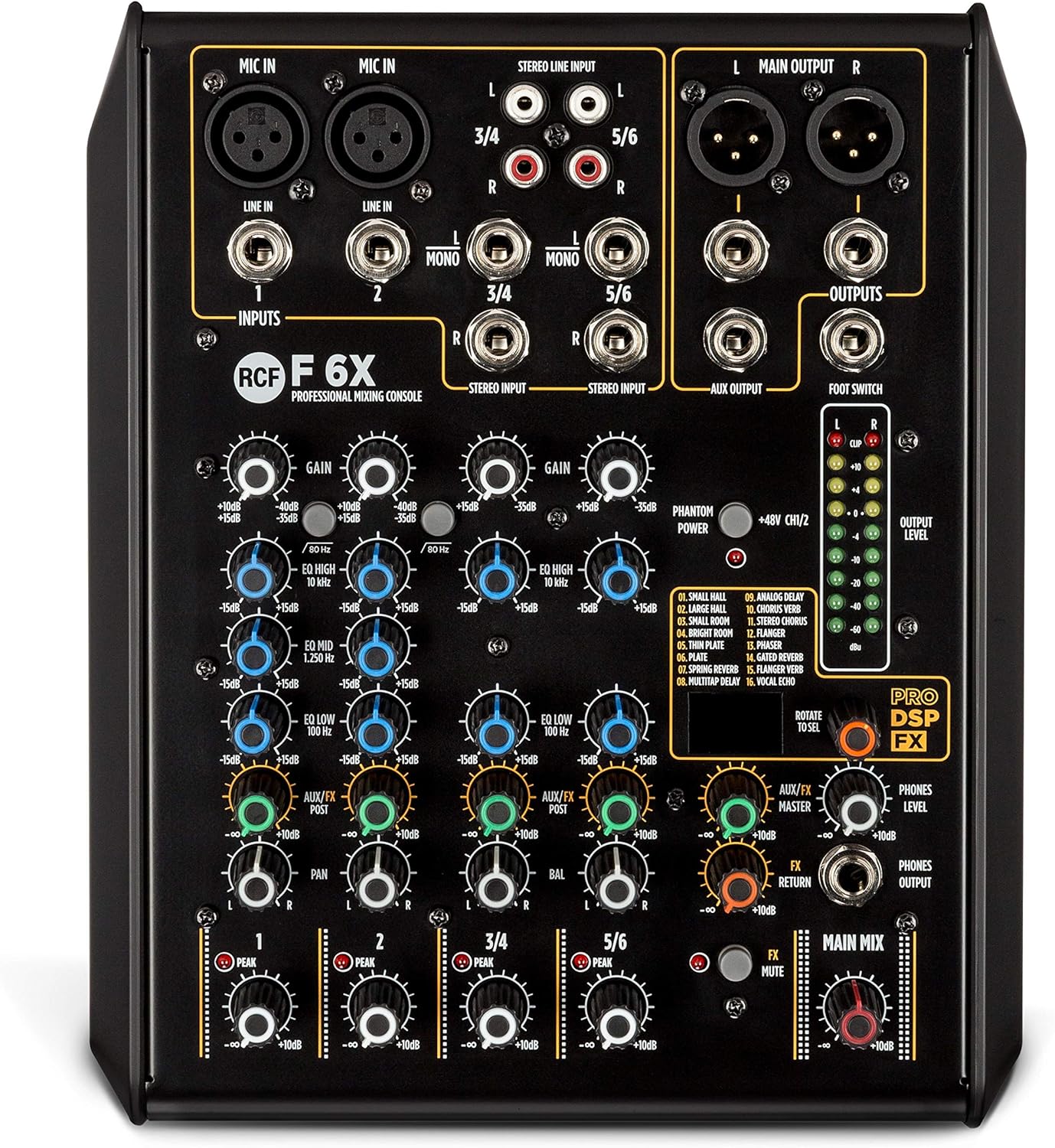
Foto 3.1: The RCF F-6X front panel, showcasing the input section with XLR/Jack combo inputs for Mic/Line channels 1 and 2, and stereo line inputs for channels 3/4 and 5/6. Each channel features GAIN, EQ (HIGH, MID, LOW), AUX/FX, and PAN controls. The master section includes FX MASTER, FX RETURN, PHONES LEVEL, and MAIN MIX controls, along with the PRO DSP FX section and output level meters.
3.2 Atụmatụ
- 2 Mic/Line inputs with XLR/Jack combo connectors.
- 2 stereo line inputs (channels 3/4 and 5/6).
- One AUX/FX (POST) send.
- Balanced main output audio path from input to output.
- 16 presets PRO DSP internal FX processor.
- Sturdy metal chassis for durability.
- External universal power supply.
- Designed and engineered in Italy.
4. Ntuziaka Nhazi
4.1 Nwepu
Carefully remove the mixer and all accessories from the packaging. Retain the packaging for future transport or storage.
4.2 Njikọ ike
- Hụ na ihe mgba ọkụ ike nke igwekota ahụ nọ n'ọnọdụ OFF.
- Connect the provided external power supply to the 12V DC input on the rear panel of the mixer.
- Tinye ọkụ eletrik ahụ n'ime oghere AC kwesịrị ekwesị.
- Turn the power switch to the ON position. The power indicator LED will illuminate.
4.3 Ijikọ Audio Devices
Before making any connections, ensure all audio equipment is turned off to prevent damage to speakers or other devices.
- Microphones (Mic In 1-2): Connect microphones to the XLR or 1/4" Jack inputs. For condenser microphones requiring phantom power, activate the +48V PHANTOM POWER switch.
- Mono Line Inputs (Line In 1-2): Connect mono line-level sources (e.g., instruments, preamps) to the 1/4" Jack inputs for channels 1 and 2.
- Stereo Line Inputs (Line In 3/4, 5/6): Connect stereo line-level sources (e.g., keyboards, media players) to the 1/4" Jack (L/R) or RCA (L/R) inputs for channels 3/4 and 5/6.
- Main Outputs (Main Output L/R): Connect the mixer's main outputs to your power amplifier, powered speakers, or recording device using XLR or 1/4" Jack cables.
- AUX Output (AUX Output): Connect this output to external effects processors or monitor systems.
- Phones Output (Phones Output): Connect your headphones to the 1/4" Jack for monitoring.
- Ihe mgbakwasị ụkwụ: Connect an optional footswitch to control the internal effects bypass.
5. Ntuziaka ọrụ
5.1 njikwa ọwa
- Nweta: Adjusts the input sensitivity for each channel. Set this to achieve a healthy signal level without clipping (indicated by the PEAK LED).
- EQ (HIGH, MID, LOW): Three-band equalizer for shaping the tone of each channel.
- Elu: +/-15 dB @ 10 kHz Shelving.
- Ọkara: +/-15 dB @ 1.25 kHz Bell.
- ala: +/-15 dB @ 100 Hz Shelving.
- AUX/FX: Controls the amount of signal sent from the channel to the internal effects processor or external AUX output. This is a POST-fader send.
- PAN (Mono Channels) / BAL (Stereo Channels): Adjusts the stereo position of the channel's signal in the main mix.
- Ọkwa: Controls the overall output level of the individual channel to the main mix.
5.2 Nkebi Ukwu
- MAIN MIX: The master fader controls the overall output level of the main stereo mix.
- FX MASTER: Controls the overall level of the internal effects return to the main mix.
- Nlaghachi azụ FX: Adjusts the level of the signal returning from the internal effects processor.
- PHONES LEVEL: Na-achịkwa olu mmepụta ekweisi.
- OUTPUT LEVEL METERS: LED meters display the output level of the main mix. Aim for levels around 0 dB to avoid clipping.
5.3 Internal Effects (PRO DSP FX)
The RCF F-6X features a high-quality PRO DSP effects processor with 16 selectable presets:
- Obere Ụlọ Nzukọ
- Nnukwu Ụlọ Nzukọ
- Ime ụlọ na-egbuke egbuke
- WARM ROOM
- Efere
- SPRING REV
- Analog igbu oge
- Ngwaa CHORUS
- FLANGER VERB
- ROTARY VERB
- TREMOLO VERB
- PHASER VERB
- Analog igbu oge
- KORUS
- EGO
- ROTARY
To select an effect, rotate the 'ROTATE TO SEL' knob to browse through the presets. Press the knob to confirm your selection. Adjust the FX MASTER and individual channel AUX/FX sends to control the effect amount.
5.4 Footswitch Functionality
A footswitch can be connected to the dedicated input to remotely bypass (turn on/off) the internal effects, providing hands-free control during performance.
6. Nlekọta na nlekọta
Proper maintenance ensures the longevity and optimal performance of your RCF F-6X mixer.
- Nhicha: Jiri ákwà dị nro ma kpọọ nkụ hichaa mpụta nke ihe ahụ. Ejila ihe nhicha, wax, ma ọ bụ ihe mgbaze.
- Nchekwa: Mgbe a naghị eji ya ruo ogologo oge, debe ihe ngwakọta ahụ n'ebe dị jụụ ma kpọọ nkụ, ebe anwụ na-anaghị apụta kpọmkwem ma ọ bụ oke okpomọkụ.
- Igwe ikuku: Ensure that the ventilation openings are not obstructed by dust or debris.
- Njikwa USB: Avoid bending or kinking cables excessively. Disconnect cables by pulling the plug, not the cable itself.
7. Nchọpụta nsogbu
If you encounter issues with your RCF F-6X mixer, refer to the following common problems and solutions:
| Nsogbu | Ihe nwere ike ime | Ngwọta |
|---|---|---|
| Enweghị ike | Power cable not connected; Power supply faulty; Power switch off. | Check power cable connection; Try a different outlet; Ensure power switch is ON. |
| No sound from a channel | GAIN too low; Channel LEVEL too low; Input cable faulty; Mute engaged (if applicable). | Increase GAIN and LEVEL; Check input cable; Ensure no mute is active. |
| No sound from main output | MAIN MIX fader too low; Output cables faulty; Connected amplifier/speakers off or muted. | Increase MAIN MIX fader; Check output cables; Verify amplifier/speaker status. |
| Ụda agbagọ | GAIN too high (clipping); Output level too high; Faulty cable/device. | Reduce GAIN and output levels; Check all cables and connected devices. |
| Mmetụta anaghị arụ ọrụ | AUX/FX send too low; FX MASTER too low; Effect not selected; Footswitch engaged. | Increase AUX/FX send and FX MASTER; Select an effect; Disengage footswitch. |
Ọ bụrụ na nsogbu ahụ anọgide mgbe ị nwalechara azịza ndị a, biko kpọtụrụ ndị ọrụ nkwado RCF ma ọ bụ ọkachamara ọrụ ruru eru.
8. Nka na ụzụ nkọwa
| Otu | Nkọwapụta |
|---|---|
| Izugbe | |
| Nlereanya | F-6X |
| Ọwa | 6 |
| Ihe onwunwe Cabinet/Case | Ọla |
| Agba | Nwa |
| Ụlọ ọrụ nchekwa | CE na-akwado |
| Nkọwapụta eletrọnịkị | |
| Nzaghachi ugboro ugboro | 20 Hz - 20 kHz |
| THD+N (20dB gain, 0dBu out) | <0.02% A-Weighted |
| Oke dị ike | > 85dB |
| Nkọwa ntinye | |
| Ntinye igwe okwu | 2 (XLR, Jack) |
| Mic Gain Range | 0 dB – -50 dB |
| Mmebi ntinye igwe okwu | 14 kahm |
| Low Cut Myọcha | 80 Hz |
| Phantom Ike | +48V |
| Ntinye Ahịrị Mono | 2 (Jack) |
| Mono Line Gain Selection | 20 dB – -30 dB |
| Mono Line Input Impedance | 21 kahm |
| Ntinye ahịrị stereo | 2 (Jack, RCA) |
| Stereo Line Gain Selection | 20 dB – -30 dB |
| Stereo Line Input Impedance | 15 kahm |
| Nkọwapụta mmepụta | |
| Main MIX Outputs | 1 (XLR, Jack) |
| Isi Ọkwa | 28 dbu |
| AUX mmepụta | 1 (Jack) |
| Aux Out Level | 28 dbu |
| Mbupute ekwentị | 1 (Jack) |
| Phones Out Impedance | 150 ohm |
| EQ | |
| Elu | +/- 15 dB @ 10 kHz Shelving |
| N'etiti | +/- 15 dB @ 1.25 kHz Mgbịrịgba |
| Dị ala | +/- 15 dB @ 100 Hz Shelving |
| Nkọwapụta anụ ahụ | |
| Ogologo | 79 mm / 3.11 sentimita asatọ |
| Obosara | 210 mm / 8.27 sentimita asatọ |
| Omimi | 255 mm / 10.04 sentimita asatọ |
| Ibu | 1.8 n'arọ / 3.97 lbs |
9. Akwụkwọ ikike na nkwado
RCF products are designed and manufactured to the highest quality standards. This product is covered by a limited warranty against defects in materials and workmanship. For specific warranty terms and conditions, please refer to the warranty card included with your product or visit the official RCF websaịtị.
For technical support, service, or spare parts, please contact your authorized RCF dealer or distributor. You can also find additional resources and contact information on the official RCF websaịtị: www.rcf.it
Please have your product model number (F-6X) and serial number ready when contacting support.


