1. Okwu mmalite
This manual provides comprehensive instructions for the safe and effective use of your Ledlenser MH11 Outdoor LED Connect Bluetooth Headlamp. Please read this manual thoroughly before operating the device and retain it for future reference. The Ledlenser MH11 is a high-performance headlamp designed for outdoor activities, featuring powerful illumination, rechargeable battery, and Bluetooth connectivity for personalized settings via the Ledlenser Connect app.
2. Ntuziaka nchekwa
- Elela anya ozugbo n'ime ọkụ ọkụ.
- Debe ngwaọrụ ahụ ka ụmụaka ghara iru ya.
- Ewepụla ma ọ bụ gbanwee headlampNke a nwere ike imebi akwụkwọ ikike ahụ ma tinye ihe egwu nchekwa.
- Use only the original or approved charging accessories.
- Zere ikpughe isiamp ruo oke okpomọkụ ma ọ bụ ìhè anyanwụ kpọmkwem ruo ogologo oge.
- Ensure the charging port is dry before connecting the magnetic charging cable.
3. Ihe ngwugwu
Chọpụta na ihe niile dị na ngwugwu gị:
- Ledlenser MH11 Headlamp
- 1 set of rechargeable batteries (Lithium Ion)
- Magnetic Charge System cable
- Obere akpa
- Akwụkwọ ntuziaka (akwụkwọ a)
4. Ngwaahịa gafereview
Familiarize yourself with the components of your Ledlenser MH11 headlamp.

Foto 1: N'ihu view of the Ledlenser MH11 Headlamp, showing the main light, auxiliary lights, and adjustable head strap.
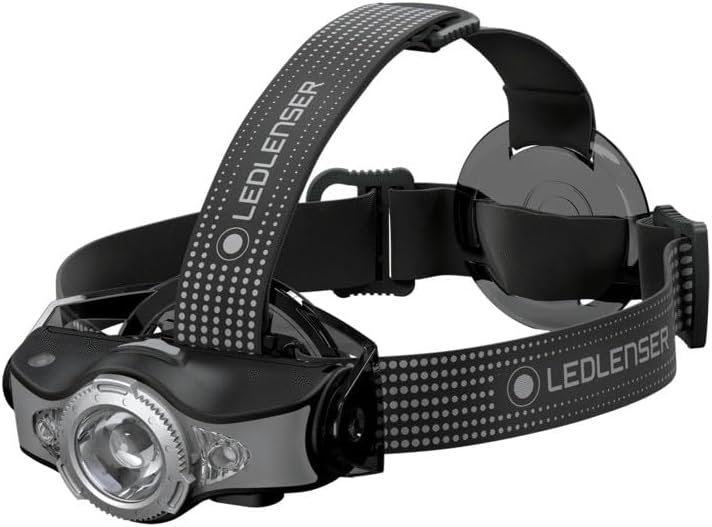
Foto 2: Akụkụ view of the Ledlenser MH11 Headlamp, illustrating the adjustable lamp head and strap design.
Isi okwuamp features a main LED light, auxiliary colored lights, a power button, and a magnetic charging port. The adjustable head strap ensures a comfortable and secure fit.
5. Nhazi
5.1. Ịchaji batrị
The Ledlenser MH11 comes with a rechargeable Lithium Ion battery. Before first use, fully charge the headlamp.
- Gbaa mbọ hụ na isi okwuamp agbanyụrụ.
- Locate the magnetic charging port on the headlamp.
- Connect the magnetic charging cable to the port. The cable will snap into place.
- Connect the other end of the charging cable to a USB power source (e.g., computer, USB wall adapter).
- The charging indicator will show the charging status. A full charge typically takes several hours.
- Ozugbo chachara chajịrị, kwụpụ eriri ahụ.
5.2. Adjusting the Head Strap
The head strap is designed for comfort and stability during various activities.
- Debe isi isiamp n'isi gi.
- Adjust the elastic straps using the buckles to achieve a snug, yet comfortable fit. The top strap provides additional stability.
- Gbaa mbọ hụ na lamp unit is centered on your forehead.
6. Ntuziaka ọrụ
6.1. Basic Ọrụ
The main power button controls the headlamp's primary functions.
- Gbanyụọ/ Gbanyụọ: Press and hold the power button for approximately 1 second to turn the headlamp gbanye ma ọ bụ gbanyụọ.
- Switching Brightness Modes: Na headlamp on, short press the power button to cycle through different brightness levels (e.g., High, Medium, Low).
- Ụdị nkwalite: A quick double-press of the power button may activate a temporary boost mode for maximum brightness. Refer to the Ledlenser Connect app for specific customization.

Foto 3: The Ledlenser MH11 headlamp in use, demonstrating its illumination capabilities.
6.2. Advanced Light Functions
The MH11 offers various light functions, including colored lights (red, green, blue) and specialized modes. These can often be accessed by specific button sequences or, more conveniently, through the Ledlenser Connect app.
6.3. Bluetooth Connectivity and Ledlenser Connect App
The Ledlenser MH11 can be connected to your smartphone via Bluetooth to customize settings and access additional features.
- Budata ngwa: Download the "Ledlenser Connect" app from your smartphone's app store (iOS or Android).
- Kwado Bluetooth: Gbaa mbọ hụ na agbanyere Bluetooth na ekwentị gị.
- Na-ejikọta: Follow the in-app instructions to pair your MH11 headlamp. This usually involves turning on the headlamp and selecting it within the app's device list.
- Nhazi: Once connected, you can personalize light settings, adjust brightness levels, configure button functions, and activate special modes directly from your phone.

Foto 4: The Ledlenser Connect app interface, showing options for adjusting power levels, such as 'Low Power'.

Foto 5: The Ledlenser Connect app interface, demonstrating the selection of 'Mid Power' for balanced illumination.

Foto 6: The Ledlenser Connect app interface, displaying options for selecting different multicolor lights (red, green, blue).
7. Nlekọta
7.1. Nhicha
- Hichapụ isi isiamp body with a soft, damp akwa .
- Ejila ihe nchacha abrasive ma ọ bụ ihe mgbaze.
- The head strap can be hand-washed with mild soap and water, then air-dried.
7.2. Nlekọta batrị na nchekwa
- For long-term storage, charge the battery to approximately 50-70% and store the headlamp n'ebe dị jụụ, kpọrọ nkụ.
- Recharge the battery every 3-6 months during storage to maintain battery health.
- Zere ka batrị ahụ gbapụta nke ọma mgbe niile, n'ihi na nke a nwere ike ibelata ndụ ya.
8. Nchọpụta nsogbu
| Nsogbu | Ihe nwere ike ime | Ngwọta |
|---|---|---|
| Isiamp adịghị agbanye. | Batrị agwụla. | Charge the battery using the magnetic charging cable. |
| Mwepụta ọkụ adịghị ada. | Low battery level. Lens is dirty. | Tinyeghachi batrị ahụ. Jiri ákwà dị nro hichaa anya ahụ. |
| Enweghị ike ijikọ site na Bluetooth. | Bluetooth is off on phone. Headlamp is not in pairing mode. App issue. | Ensure phone's Bluetooth is on. Restart headlamp and app. Follow app pairing instructions carefully. |
| Isiamp gets warm during use. | Normal operation for high-power LEDs. | This is normal, especially on higher brightness settings. If it becomes excessively hot, reduce brightness or turn off. |
9. Nkọwapụta
- Ụdị: MH11
- Nọmba nlereanya: 500996
- Isi mmalite ọkụ: Ikanam
- Kacha ihie: 1000 Lumen
- Maximum Beam Range: Ruo mita 130
- Maximum Light Duration: Up to 100 hours (on lowest setting)
- Ụdị batrị: 1 x lithium ion (gụnyere)
- Voltage: 3.6 volts
- Ibu ihe: 179 grams (6.3 ounces)
- Akụkụ: 1.57"D x 1.57"W x 1.57"H (approximate lamp unit)
- Nguzogide mmiri: Mmiri na-eguzogide
- Atụmatụ pụrụ iche: Rechargeable, Bluetooth Connectivity, Red/Green/Blue Front Light, Magnetic Charge System
10. Akwụkwọ ikike na nkwado
Ledlenser products are manufactured with high-quality materials and undergo strict quality control. For information regarding warranty terms and conditions, please refer to the warranty card included with your product or visit the official Ledlenser website. For technical support, troubleshooting assistance, or spare parts, please contact Ledlenser customer service through their official channels.
Websaịtị: www.ledlenser.com


