1. Okwu mmalite
Daalụ maka ịzụrụasing the Infocus 24-inch 720p LED TV, model IM24ED800. This manual provides essential information for setting up, operating, and maintaining your television. Please read this manual thoroughly before using the product and retain it for future reference.
Ozi nchekwa
- Ewepụla TV na mmiri ozuzo ma ọ bụ mmiri.
- Akwụsịla oghere ikuku.
- Gbaa mbọ hụ na ọkọnọ ọkụ nke ọma voltage.
- Chebe eriri ọkụ ka ị ghara ịgagharị ma ọ bụ tuo ya.
- Tụtụ aka n'aka ndị ọrụ ruru eru.
- Debe TV ka ọ pụọ na ìhè anyanwụ kpọmkwem, ebe okpomọkụ na ebe magnetik siri ike.
2. Ihe ngwugwu
Biko lelee igbe maka ihe ndị a:
- Infocus 24-inch 720p LED TV (IM24ED800)
- Remote Control (with batteries, if included)
- Ụdọ ọkụ
- Ihe nkwụnye TV (2 iberibe)
- Ihe nkedo maka TV Stand
- Akwụkwọ ntuziaka (akwụkwọ a)
3. Nhazi
3.1 Na-agbakwunye ihe nkwụnye TV
To attach the stand to your Infocus TV:
- Jiri nlezianya dobe ihuenyo TV n'elu ala dị nro ma dị ọcha iji gbochie ncha.
- Kwado ibe nkwụnye ọ bụla na oghere kwekọrọ na ala TV.
- Jiri skru ndị enyere kee ihe ọ bụla e ji ejide ya. Hụ na e siri ike nke ọma.
- Jiri nlezianya bulie TV ahụ ma tinye ya n'elu ebe kwụsiri ike ma dị larịị.
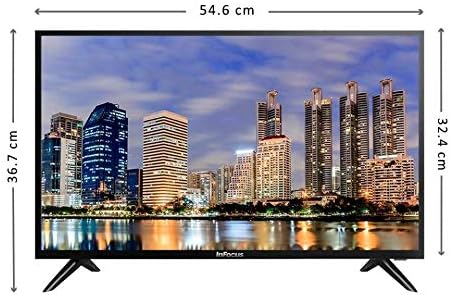
Foto: N'ihu view of the Infocus 24-inch LED TV with dimensions indicated. The TV measures approximately 54.6 cm in width and 36.7 cm in height with the stand.
3.2 Ngwa jikọọ
Your Infocus TV features multiple input ports for connecting external devices.

Foto: N'azụ view of the Infocus 24-inch LED TV, highlighting the location of various input ports including HDMI and USB.
- Njikọ HDMI: Connect Blu-ray players, game consoles, or cable/satellite boxes to the HDMI ports. The TV has 2 HDMI inputs.
- Njikọ USB: Connect USB flash drives for media playback to the USB ports. The TV has 2 USB inputs.
- Antenna/Cable: Connect an antenna or cable TV signal to the RF input (if available, not explicitly listed but standard for TVs).
- Ike: Jikọọ eriri ọkụ na ntinye ike TV wee tinye ya na mgbidi.
3.3 Ike mbido
Mgbe ejikọtara eriri niile dị mkpa:
- Ensure the power cord is securely plugged into both the TV and a power outlet.
- Pịa bọtịnụ ike na njikwa anya ma ọ bụ na TV n'onwe ya.
- Follow the on-screen instructions for initial setup, which may include language selection, time zone, and channel scanning.
4. Na-arụ ọrụ TV gị
4.1 Remote Control Overview
The remote control allows you to access all TV functions. While specific button layouts may vary, common functions include:
- Ike: Gbanyụọ ma ọ bụ gbanyụọ TV.
- Ntinye/Isi mmalite: Na-ahọrọ isi iyi ntinye (HDMI 1, HDMI 2, USB, TV).
- Elu elu/ala: Na-edozi ọkwa ụda.
- Ọwa elu/ala: Na-agbanwe ọwa TV.
- Mechie: Na-eme ka ụda TV ghara ịdị jụụ.
- NchNhr: Opens the main menu for settings adjustments.
- Bọtịnụ igodo nsoroụzọ (elu/ala/ekpe/aka nri/OK): A na-eji ịnyagharịa menu ma kwado nhọrọ.
- Wepụ/Azu: Na-alaghachi na ihuenyo gara aga ma ọ bụ pụọ na menu.
4.2 Ọrụ ndị bụ isi
- Na-agbanwe isi mmalite ntinye: Pịa Ntinye or Isi mmalite button on your remote control. Use the navigation buttons to select the desired input (e.g., HDMI 1, USB) and press OK.
- Na-agbanwe olu: Jiri ihe Elu elu (+) or Olu ala (-) bọtịnụ.
- Ọwa na-agbanwe: Jiri ihe Channel Up (CH+) or Channel Down (CH-) bọtịnụ.
4.3 Igwe egwu mgbasa ozi USB
Ịkpọ mgbasa ozi files from a USB flash drive:
- Insert a USB flash drive into one of the TV's USB ports.
- Pịa Ntinye or Isi mmalite bọtịnụ na remote control gị wee họrọ USB.
- The TV's media browser should appear. Navigate through your files (photos, music, videos) using the remote control.
- Họrọ a file na pịa OK ịkpọ ya.
5. Nlekọta
5.1 Na-ehicha ihuenyo ahụ
- Turn off the TV and unplug the power cord before cleaning.
- Use a soft, lint-free cloth (e.g., microfiber cloth) to gently wipe the screen.
- Maka akara ndị isi ike, dị obere dampen akwa na mmiri ma ọ bụ pụrụ iche ihuenyo Cleaner. Efela ihe nhicha ozugbo na ihuenyo.
- Avoid using abrasive cleaners, alcohol, benzene, or thinners, as these can damage the screen.
5.2 Nlekọta n'ozuzu
- Debe TV na mpaghara ikuku nke ọma.
- Zere idobe ihe ndị dị arọ n'elu TV.
- Kwụpụ TV n'oge oké ifufe ọkụ ma ọ bụ mgbe ọ ga-adị ogologo oge.
6. Nchọpụta nsogbu
Ọ bụrụ na ị na-enwe nsogbu na TV gị, rụtụ aka na nsogbu na ngwọta ndị a na-emekarị:
| Nsogbu | Ihe nwere ike ime | Ngwọta |
|---|---|---|
| Enweghị ike | Ejikọghị eriri ọkụ; okwu mgbapụta ike | Gbaa mbọ hụ na etinyere eriri ọkụ na nchekwa. Jiri ngwaọrụ ọzọ nwalee oghere ahụ. |
| Enweghị foto, mana ụda dị | Incorrect input source selected; loose video cable | Pịa Ntinye/Isi iyi button to select the correct input. Check video cable connections. |
| Enweghị ụda, mana foto dị | Volume muted or too low; audio cable issue | Pịa Ogbi button or increase volume. Check audio cable connections. |
| Njikwa anya anaghị arụ ọrụ | Batrị agwụla; ihe mgbochi; ihe mmetụta dịpụrụ adịpụ akpọchiri | Replace batteries. Remove any obstructions between the remote and TV. Ensure the TV's remote sensor is clear. |
| Ozi "Ọ dịghị Signal". | Incorrect input source; device not powered on; cable issue | Verify the correct input source is selected. Ensure the connected device is powered on. Check all cable connections. |
7. Nkọwapụta
The following are the technical specifications for the Infocus 24-inch 720p LED TV model IM24ED800:
| Njirimara | Nkọwa |
|---|---|
| Nọmba nlereanya | IM24ED800 |
| Nha ihuenyo | 24 sentimita (61 cm) |
| Ngosipụta teknụzụ | Ikanam |
| Mkpebi | 1366 x 768 (720p HD) |
| Ọnụego ume ọhụrụ | 60 Hz |
| Ntinye HDMI | 2 |
| Ntinye USB | 2 |
| Njikọta | HDMI, USB |
| Ụdị nkwụnye | Nkwụsị tebụl |
| Akụkụ ngwugwu | 60.8 x 37.8 x 12 cm |
| Ibu ngwugwu | 5 n'arọ |
8. Akwụkwọ ikike na nkwado
This Infocus TV is sold as a renewed product, which typically comes with a limited warranty provided by the seller or refurbisher. Please refer to your purchase documentation or contact your retailer for specific warranty terms and conditions.
For technical support or service inquiries, please contact the customer support channel provided by your retailer or the Infocus support websaịtị.


