1. Okwu mmalite
Thank you for choosing the MIATONE BOOMBOX Bluetooth Speaker. This portable and waterproof wireless speaker is designed to deliver high-quality audio for various environments, from indoor relaxation to outdoor adventures. Please read this manual carefully before using the product to ensure proper operation and to maximize its lifespan.

Ọdịnyo dị elu: Experience crisp highs, rich mids, and deep bass with advanced DSP-enhanced sound technology.
2. Ozi nchekwa
- Do not expose the speaker to extreme temperatures (heat or cold) or high humidity.
- Zere idobe ma ọ bụ idobe ọkà okwu na mmetụta siri ike.
- Do not disassemble, repair, or modify the speaker yourself. Refer to qualified service personnel.
- Keep the speaker away from medical devices, as its magnetic field may interfere with their operation.
- Ensure the charging port cover is securely closed when using the speaker near water to maintain its waterproof rating.
- Jiri naanị eriri nchaji enyere ma ọ bụ ihe dabara adabara.
- Do not listen at excessively high volumes for prolonged periods to prevent hearing damage.
3. Ihe ngwugwu
Biko lelee ngwungwu maka ihe ndị a:
- MIATONE BOOMBOX Bluetooth Speaker
- Igwe chaja USB Micro
- USB Input inyeaka
- Ntuziaka onye ọrụ
4. Ngwaahịa gafereview
Familiarize yourself with the various parts and controls of your MIATONE BOOMBOX speaker.
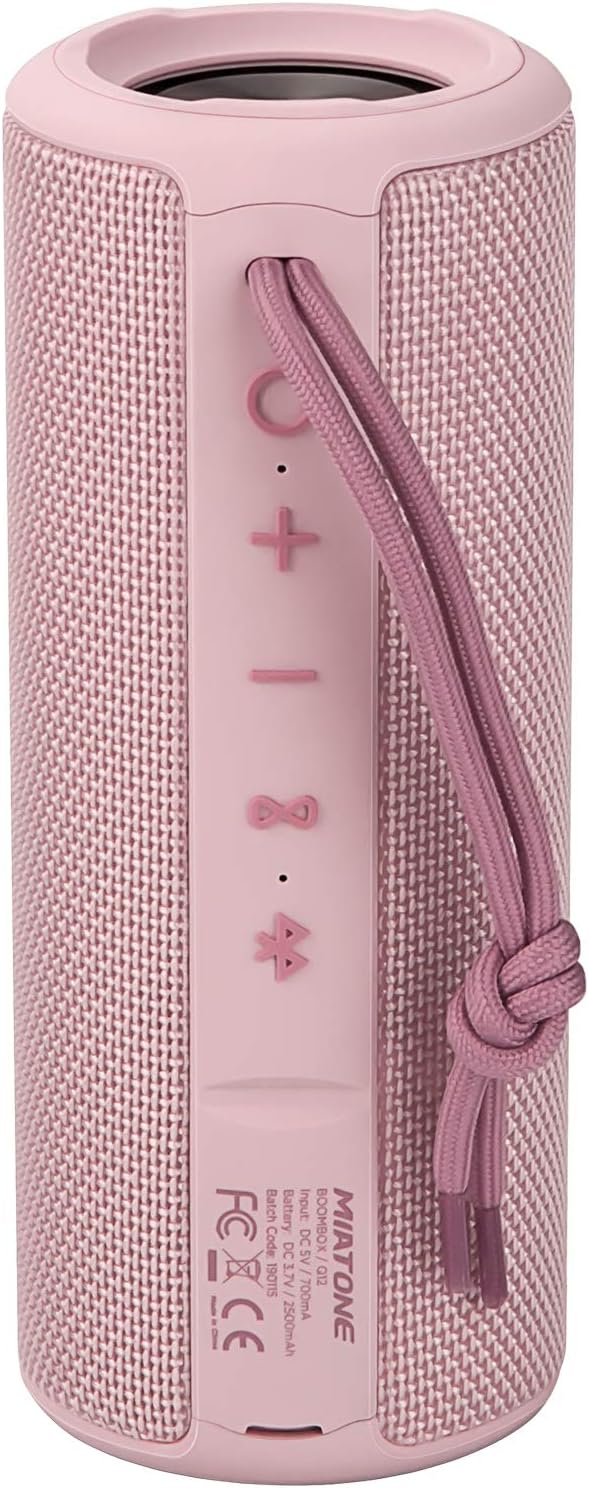
N'ihu View: Shows the speaker grille and the MIATONE logo.

N'azụ View: Displays the control buttons (+, -, Play/Pause, Bluetooth, TWS) and the charging/AUX ports under a protective flap.

Reinforced Silicone End Caps: The speaker features durable silicone bumpers on both ends to absorb impact and prevent slipping.
Ọrụ bọtịnụ:
| Bọtịnụ | Ọrụ |
|---|---|
| + | Short press: Volume Up; Long press: Next Track |
| - | Short press: Volume Down; Long press: Previous Track |
| Gwuo/kwụsịtụ | Short press: Play/Pause; Short press (incoming call): Answer/End Call; Long press (incoming call): Reject Call |
| Akara Bluetooth | Long press: Disconnect current Bluetooth device and enter pairing mode |
| TWS Icon | Short press: Initiate TWS pairing (True Wireless Stereo) |
| bọtịnụ ike | Pịa ogologo: Gbanyụọ/ gbanyụọ |
5. Nhazi
5.1 Ịchaji ọkà okwu
- Open the protective flap on the back of the speaker to reveal the charging port.
- Connect the Micro USB charging cable to the speaker's charging port and the other end to a USB power adapter (not included) or a computer's USB port.
- Ihe ngosi LED ga-egosi ọnọdụ chajị (dịka ọmụmaatụ, ọbara ọbara maka chajị, gbanyụọ mgbe chajị zuru oke).
- A full charge takes approximately 12 hours. Ensure the protective flap is sealed after charging.
5.2 Gbanyụọ/ gbanyụọ
- Ike Na: Long press the Power button until you hear a power-on prompt.
- Gbanyụọ: Long press the Power button until you hear a power-off prompt.
5.3 Njikọ Bluetooth
- Ensure the speaker is powered on and in Bluetooth pairing mode (indicated by a flashing blue LED). If not, long press the Bluetooth icon button.
- Kwado Bluetooth na ngwaọrụ gị (ama, mbadamba, kọmputa).
- Chọọ maka "BOOMBOX" in your device's Bluetooth list.
- Select "BOOMBOX" to connect. You will hear a confirmation sound once paired.
- Ọkà okwu ahụ ga-ejikọghachi na ngwaọrụ ejikọtara ikpeazụ ozugbo mgbe agbanyere ya, ọ bụrụ na ọ dị n'ime oke.

Upgraded Bluetooth 5.3: Provides faster and more stable wireless connections.
Njikọta 5.4 TWS (Ezigbo Stereo Wireless)
TWS allows you to pair two MIATONE BOOMBOX speakers together for a true stereo sound experience.
- Ensure both BOOMBOX speakers are powered on and not connected to any Bluetooth device.
- On one speaker (this will be the primary speaker), short press the TWS icon button. It will enter TWS pairing mode.
- The two speakers will automatically connect to each other. You will hear a confirmation sound once TWS pairing is successful.
- Once TWS paired, connect your device to the primary speaker via Bluetooth as described in section 5.3.
- To disconnect TWS, short press the TWS icon button on either speaker.
6. Ntuziaka ọrụ
6.1 Nghaghachi egwu
- Gwuo/kwụsịtụ: Obere pịa bọtịnụ Play/kwụsịtụ.
- Olu elu: Mkpirisi pịa + bọtịnụ.
- Olu ala: Mkpirisi pịa - bọtịnụ.
- Track na-esote: Pịa ogologo + bọtịnụ.
- Gara aga Track: Pịa ogologo - bọtịnụ.
6.2 Oku na-enweghị aka
- Oku azaa: Pịa obere bọtịnụ Play/Pause mgbe oku na-abata na-ada.
- Oku ngwụcha: Mkpirisi pịa bọtịnụ Play/kwụsịtụ mgbe oku na-aga.
- Jụ oku: Pịa bọtịnụ Play/Pause ruo ogologo oge mgbe oku na-abata na-ada.
6.3 Auxiliary Input (AUX Mode)
You can connect non-Bluetooth devices to the speaker using the provided 3.5mm auxiliary cable.
- Open the protective flap on the back of the speaker.
- Connect one end of the 3.5mm AUX cable to the speaker's AUX port and the other end to your audio device's headphone jack.
- Ọkà okwu ga-agbanwe ozugbo gaa na ọnọdụ AUX.
- Jikwaa ọkpụkpọ na olu site na ngwaọrụ ejikọrọ gị.
- Ensure the protective flap is sealed after use to maintain water resistance.
7. Nlekọta
7.1 Nhicha
- Jiri nwayọ hichaa ọkà okwu, damp akwa .
- Ejila ihe mkpocha abrasive, mmanya, ma ọ bụ ihe mgbaze kemịkal.
- Ensure the speaker is completely dry before charging or storing.
7.2 Nchekwa
- Chekwaa ọkà okwu n'ebe dị jụụ, kpọrọ nkụ na-adịghị na ìhè anyanwụ kpọmkwem na oke okpomọkụ.
- If storing for a long period, charge the battery to about 50% every few months to preserve battery life.
7.3 Nlekọta Mmiri Na-anaghị Adọba Mmiri (IPX6)
The MIATONE BOOMBOX is IPX6 waterproof, meaning it can withstand powerful water jets. It is not designed for submersion.
- Always ensure the charging port and AUX port protective flap is securely closed before exposing the speaker to water.
- If the speaker gets wet, wipe it dry with a clean cloth before opening the port flap or charging.
- Do not charge the speaker if the ports are wet.

IPX6 Waterproof Speaker: Designed to float and withstand water splashes, making it ideal for poolside or beach use.
8. Nchọpụta nsogbu
| Nsogbu | Ihe nwere ike ime | Ngwọta |
|---|---|---|
| Igwe okwu agaghị agbanwu. | Batrị dị obere ma ọ bụ nwụrụ anwụ. | Chajie ọkà okwu zuru ezu. |
| Enweghị ike ijikọ na ngwaọrụ Bluetooth. | Speaker is not in pairing mode; device's Bluetooth is off; speaker is already connected to another device; device list needs refresh. | Ensure speaker is in pairing mode (flashing blue LED). Turn device's Bluetooth off and on. Disconnect from other devices. Forget "BOOMBOX" on your device and re-scan. |
| Enweghị ụda ma ọ bụ obere olu. | Volume too low on speaker or device; incorrect input mode; speaker not connected. | Increase volume on both speaker and device. Ensure correct input mode (Bluetooth/AUX). Re-establish Bluetooth connection. |
| Mgbagwoju anya ụda. | Olu dị oke elu; obere batrị; nnyonye anya. | Reduce volume. Charge the speaker. Move speaker closer to the device or away from other electronic devices. |
| Njikọ TWS dara. | Speakers are too far apart; one speaker is already connected to a device. | Hụ na okwu abụọ ahụ dị nso ma ghara ijikọ na ngwaọrụ Bluetooth ọ bụla tupu ịmalite ijikọ TWS. |
9. Nkọwapụta
| Njirimara | Nkọwa |
|---|---|
| Aha Nlereanya | BOOMBOX (Q12) |
| Teknụzụ Njikọta | Bluetooth 5.3, USB, AUX |
| Ụdị Ọkà Okwu | Portable Speaker, Bluetooth Speaker |
| Ike Nwepu kacha | 20 Watt |
| Nzaghachi ugboro ugboro | 20 kHz |
| Ndụ batrị | Ruo awa 17 (na olu 50%) |
| Oge Nchaji | awa 12 |
| Ngosi nke enweghị mmiri | IPX6 |
| Oke Bluetooth | Ruo 100 ụkwụ (mita 30.5) |
| Akụkụ (L x W x H) | 7.11 x 7.11 x 18.54 cm (2.8 x 2.8 x 7.3 inch) |
| Ibu | 421.84 grams (0.93 lbs) |
| Ihe onwunwe | Aluminom |
| Ngwa dakọtara | Personal Computer, Laptop, Tablet, Smartphone |

Oge egwuregwu na-adịte aka: Enjoy up to 17 hours of playback at 50% volume.
10. Akwụkwọ ikike na nkwado
MIATONE products are designed and manufactured to the highest quality standards. For information regarding warranty coverage, technical support, or service inquiries, please refer to the contact information provided on the product packaging or visit the official MIATONE websaịtị.
Biko dowe ihe akaebe nke ịzụrụ ihe maka akwụkwọ ikike.


