1. Okwu mmalite
This manual provides essential information for the safe and efficient operation of your Intex SH4004 40-inch HD Ready LED Smart TV. Please read these instructions carefully before using the product and retain them for future reference. Your Intex SH4004 TV features a 40-inch HD Ready LED display, smart TV capabilities with Android OS, built-in Wi-Fi, and multiple connectivity options.
2. Ozi nchekwa
Na-agbaso usoro nchekwa nchekwa mgbe niile mgbe ị na-eji igwe onyonyo a iji belata ihe egwu nke ọkụ, ujo eletrik na mmerụ ahụ.
- Isi mmalite ike: Gbaa mbọ hụ na ejikọrọ TV na ọkụ ọkụ n'ime voltage nso. Ebubigala ebe ọkụ eletrik.
- Igwe ikuku: Akwụsịla oghere ikuku. Nye ohere zuru oke na gburugburu TV maka ikuku ikuku kwesịrị ekwesị iji gbochie ikpo oke ọkụ.
- Mmiri na mmiri: Ewepụla TV na mmiri ozuzo ma ọ bụ mmiri. Edokwala ihe jupụtara na mmiri mmiri, dị ka vases, na TV.
- Nhicha: Kwupuo TV na oghere ọkụ tupu ihicha. Jiri akwa dị nro ma kpọọ nkụ. Ejila ihe nhicha mmiri ma ọ bụ ihe nhicha ikuku.
- Nkwanye: Tinye TV n'elu elu kwụsiri ike, dịkwa larịị. Zere itinye ya na ìhè anyanwụ kpọmkwem ma ọ bụ nso ebe okpomọkụ.
- Ije ozi: Anwala ịnye ngwaahịa a n'onwe gị. Tụtụ aka n'aka ndị ọrụ ruru eru.
3. Ihe ngwugwu
Chọpụta na ihe niile dị na ngwugwu:
- Intex SH4004 40-inch HD Ready LED Smart TV
- Njikwa anya
- Ihe nkwụnye TV (2 iberibe)
- Ihe nkedo maka TV Stand
- Igwe ọkụ ọkụ
- Akwụkwọ ntuziaka onye ọrụ
4. Ngwaahịa gafereview
4.1 N'ihu View
The front of the Intex SH4004 TV features the 40-inch LED display and the Intex brand logo at the bottom center.

Foto 4.1: N'ihu view of the Intex SH4004 Smart TV.
4.2 N'azụ View na Njikọta Ports
The rear panel houses various input and output ports for connecting external devices.

Ọgụgụ 4.2: N'azụ view of the Intex SH4004 Smart TV, highlighting port locations.
Ọdụ ụgbọ mmiri dị:
- ọdụ ụgbọ mmiri HDMI (x2): For connecting set-top boxes, Blu-ray players, gaming consoles, and other HDMI-enabled devices.
- Ọdụ USB (x1): For connecting USB hard drives, flash drives, and other USB devices for media playback.
- Ntinye antenna: For connecting an aerial for terrestrial TV channels.
- Ntinye ọdịyo/Video: For connecting older devices using composite cables.
- Njikọ Ethernet: Maka njikọ ịntanetị ejikọrọ.
4.3 Akụkụ
The physical dimensions of the TV are important for placement and installation.
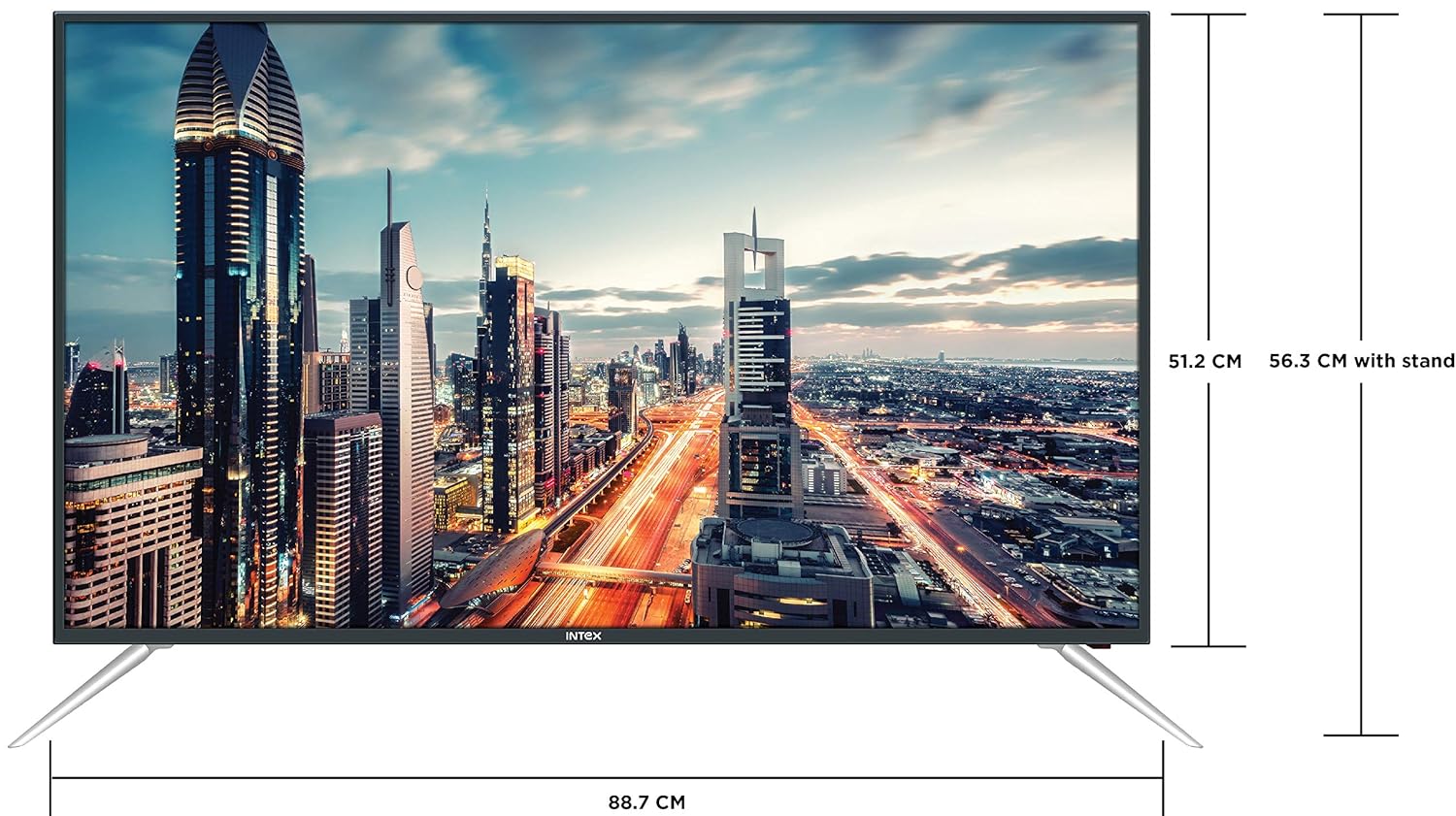
Figure 4.3: Intex SH4004 Smart TV dimensions.
- Nha ihuenyo: 40 sentimita (98 cm)
- Obosara Ihe dịka 88.7 cm
- Ogologo (na-enweghị nkwụnye): Ihe dịka 51.2 cm
- Ogologo (ya na nkwụnye): Ihe dịka 56.3 cm
- Akụkụ ngwugwu: 102 x 60.5 x 16 cm
- Ibu ihe: 10.8 n'arọ
5. Nhazi
5.1 Na-agbakwunye ihe nkwụnye TV
- Jiri nlezianya dobe TV ihu ala n'elu dị nro ma dị ọcha iji gbochie mmebi ihuenyo.
- Hazie ihe ndị a na-eguzo na oghere ndị kwekọrọ na ala TV ahụ.
- Jiri skru ndị enyere kee akụkụ ihe ndị ahụ. Hụ na e siri ha ike nke ọma.
5.2 Mgbidi Mgbidi
If you prefer to wall mount your TV, please contact Intex support for professional installation. Refer to the Warranty and Support section for contact details. Ensure you use a compatible VESA wall mount kit (not included) and follow its instructions carefully.
5.3 Ijikọ ike
Jikọọ eriri ọkụ eletrik ahụ na ntinye ike nke TV ahụ wee tinye nsọtụ nke ọzọ n'ime oghere mgbidi.
5.4 Ijikọ ngwaọrụ mpụga
- HDMI: Use an HDMI cable to connect devices like set-top boxes, gaming consoles, or Blu-ray players to the HDMI ports on the TV's rear panel.
- USB: Insert USB flash drives or external hard drives into the USB port for media playback.
- Antenna: Connect your antenna cable to the ANTENNA IN port for receiving broadcast channels.
5.5 Ọkachamara Mbido Mbido
Ozugbo agbanyere ya na mbụ, TV ga-eduzi gị site na usoro ntọala mbụ:
- Nhọrọ asụsụ: Họrọ asụsụ nke masịrị gị.
- Ntọala netwọkụ: Connect to your Wi-Fi network or use a wired Ethernet connection. Enter your Wi-Fi password if prompted.
- Nyocha ọwa: The TV will scan for available broadcast channels.
- Mpaghara Oge: Tọọ mpaghara oge mpaghara gị.
6. Ntuziaka ọrụ
6.1 Ọrụ njikwa anya
The remote control allows you to navigate the TV's features. Common buttons include Power, Volume Up/Down, Channel Up/Down, Input Source, Menu, Navigation (Up/Down/Left/Right), OK, Back, Home, and Smart TV app shortcuts.
6.2 Ọrụ TV bụ isi
- Gbanyụọ/ Gbanyụọ: Press the Power button on the remote or TV.
- Ndozi olu: Jiri bọtịnụ olu elu/ala.
- Nhọrọ ọwa: Use the Channel Up/Down buttons or enter channel numbers directly.
- Isi mmalite ntinye: Press the Input/Source button to switch between HDMI, USB, AV, and TV inputs.
6.3 Atụmatụ TV Smart (Android OS)
Your Intex SH4004 runs on Android OS, providing access to various smart features:
- Njikọ Wi-Fi: Connect to your home network for internet access.
- Ụlọ ahịa ngwa: Download and install applications. Supported internet services include Sony, TV Store, YouTube, and Zee5.
- Ndabere mgbasa ozi: Kpọọ vidiyo, egwu, na view photos from connected USB devices.
- Motion Sensor Gaming: The TV supports motion sensor gaming. An in-built tennis game is included for entertainment.
- Ịchekwa Ike Smart: Features designed to optimize energy consumption.
- Eye Safe-T Matrix: Display technology aimed at reducing eye strain.
7. Nlekọta
7.1 Ihicha TV
- Kwupuo TV mgbe niile tupu ihicha ya.
- Jiri ákwà dị nro, kpọrọ nkụ, nke na-enweghị lint hichaa ihuenyo na kabinet ahụ nke ọma.
- Maka akara ndị isi ike na ihuenyo, jiri obere dampen the cloth with water or a specialized screen cleaner (ensure it's suitable for LED screens) and wipe gently. Do not spray liquid directly onto the screen.
- Zere iji ihe nchacha, waxes, ma ọ bụ ihe mgbaze.
7.2 Nlekọta n'ozuzu
- Debe TV pụọ na ìhè anyanwụ kpọmkwem na ebe okpomọkụ.
- Gbaa mbọ hụ na ikuku ikuku dị na gburugburu TV.
- Ọ bụrụ na a gaghị eji TV ahụ ruo ogologo oge, kwụpụ ya na ebe ọkụ eletrik.
8. Nchọpụta nsogbu
Before contacting support, try these basic troubleshooting steps for common issues.
| Nsogbu | Ihe nwere ike ime | Ngwọta |
|---|---|---|
| Enweghị ike | Power cable disconnected; Power outlet fault. | Check power cable connection; Try a different outlet; Press power button on TV/remote. |
| Enweghị foto, mana ụda dị ugbu a | Ahọpụtara isi mmalite ntinye na-ezighi ezi; Nsogbu ngwaọrụ mpụga. | Press the 'Input/Source' button to select the correct input; Check external device connections. |
| Enweghị ụda, mana Foto dị ugbu a | Olu dara ụda ma ọ bụ dị ala nke ukwuu; Nsogbu sistemụ ọdịyo dị n'èzí. | Unmute volume or increase level; Check audio cables to external sound system. |
| Okwu njikọ Wi-Fi | Incorrect password; Router too far; Router issue. | Re-enter Wi-Fi password; Move TV closer to router or use Ethernet; Restart router. |
| Njikwa Remote anaghị arụ ọrụ | Batteries depleted; Obstruction between remote and TV. | Replace remote batteries; Remove any obstructions; Point remote directly at TV sensor. |
9. Nkọwapụta
Detailed technical specifications for the Intex SH4004 Smart TV.
| Njirimara | Nkọwapụta |
|---|---|
| Ụdị | Intex |
| Aha Nlereanya | SH4004 |
| Ngosipụta teknụzụ | Ikanam |
| Nha ihuenyo | 40 sentimita (98 cm) |
| Mkpebi | HD dị njikere (pikselụ 1366 x 768) |
| Ọnụego ume ọhụrụ | 60 Hz |
| Viewna n'akuku | 178 ogo |
| Akụkụ akụkụ | 16:9 |
| Sistemụ nrụọrụ | Android |
| Nhazi | 1.2GHz Quad core Mali 450 |
| RAM | 512MB |
| Ebe nchekwa | 4GB |
| Njikọta | 2 HDMI ports, 1 USB port, Built-In-Wifi, Ethernet |
| Mpụta ụda | 20 Watts (2 speakers, Stereo) |
| Ọrụ ịntanetị akwadoro | Sony, TV Store, Youtube, Zee5 |
| Ụdị nkwụnye | Mgbidi / Elu Tebụl |
| Ibu Ibu | 10.8 n'arọ |
10. Akwụkwọ ikike na nkwado
Ozi akwụkwọ ikike:
- The product comes with a 1-year manufacturer warranty from the date of purchase.
- An additional 2 years of extended warranty is provided by Intex.
Installation and Support:
For requesting installation, wall mounting, or a product demonstration after delivery, please contact Intex support directly.
Intex Support Contact:
- Ekwentị: 0120-4895555
When contacting support, please provide the product's model name (SH4004) and seller's details as mentioned on your invoice.


