1. Okwu mmalite
The Marantz SR5013 is a 7.2 channel AV Receiver designed to deliver high-quality audio and video performance for home entertainment systems. It supports advanced audio formats and video technologies, providing a comprehensive solution for your home theater needs.
Atụmatụ gụnyere:
- 7.2 Channel Surround Sound with 100W per channel output.
- Support for object-based audio formats: Dolby Atmos, DTS:X, and DTS Virtual:X.
- Advanced video processing: Full-rate pass-through, SD/HD video upscaling to Ultra HD, 4:4:4 Pure Color sub-sampegbu oge.
- HDR compatibility: HDR10, BT.2020, 3D, 21:9 video, Dolby Vision, and HLG (Hybrid Log-Gamma).
- Multiple HDMI inputs and outputs: 8 HDMI inputs and 2 HDMI outputs with full HDCP 2.2 support.
2. Ozi nchekwa
Biko gụọ ntuziaka nchekwa ndị a nke ọma tupu ị rụọ ọrụ na ngwaọrụ ahụ. Debe akwụkwọ ntuziaka a maka ntụaka n'ọdịnihu.
- Igwe ikuku: Ensure adequate space around the unit for proper ventilation. Do not block ventilation openings.
- Isi mmalite ike: Jikọọ unit naanị na oghere AC nke voltage kpọmkwem na azụ panel.
- Mmiri na mmiri: Ewepụla unit ahụ na mmiri ozuzo ma ọ bụ mmiri. Edokwala ihe jupụtara na mmiri mmiri, dị ka vases, na unit.
- Nhicha: Wepụ ihe mkpuchi ahụ na ihe mkpuchi mgbidi tupu ị hichaa ya. Jiri naanị ákwà kpọrọ nkụ.
- Ije ozi: Anwala ijere unit ahụ n'onwe gị. Tụtụ aka n'aka ndị ọrụ ruru eru.
3. Nhazi
3.1. Mwepu na ntinye
Carefully remove the receiver and all accessories from the packaging. Ensure all components are present, including the receiver unit, remote control, batteries, and setup microphone.

The Marantz SR5013 AV Receiver positioned within a home entertainment environment, illustrating typical placement for optimal performance and ventilation.
Place the receiver on a stable, level surface with sufficient space around it for proper ventilation. Avoid placing it in direct sunlight or near heat sources.
3.2. Njikọ
Before making any connections, ensure the receiver and all connected devices are powered off and unplugged from the wall outlet.
3.2.1. HDMI Connections
Connect your video sources (e.g., Blu-ray player, game console, streaming device) to the HDMI input ports on the rear of the receiver. Connect your TV or projector to one of the HDMI output ports.
- The SR5013 features 8 HDMI inputs and 2 HDMI outputs.
- All HDMI ports support HDCP 2.2 for protected content.
- The receiver supports 4K Ultra HD pass-through and upscaling.
3.2.2. Njikọ ọdịyo
Connect your speakers to the corresponding speaker terminals on the rear panel. Ensure correct polarity (+ to + and - to -) for each speaker.
- Supports 7.2 channel speaker configurations.
- Dedicated terminals for front, center, surround, and surround back/height speakers.
3.2.3. Njikọ ihu panel

Close-up of the front panel connections on the Marantz SR5013, including AUX1 HDMI input, USB port, and setup microphone input.
The front panel provides convenient access to additional inputs:
- AUX1 HDMI: For temporary connection of HDMI devices.
- Ọdụ ụgbọ mmiri USB: For connecting USB storage devices to play audio files.
- SETUP MIC: For connecting the supplied setup microphone for room calibration.
3.3. Nhazi mmalite
After making all physical connections, power on the receiver and your display device. The receiver will guide you through the initial setup process using an on-screen display.
3.3.1. On-Screen Smart Menu

An on-screen display of the Marantz SR5013's Smart Menu, showing options for "Now Playing," "Source," "Sound Mode," and "Setup Menu."
Follow the on-screen instructions to configure basic settings such as language, network connection, and speaker setup.
3.3.2. Audyssey Room Calibration
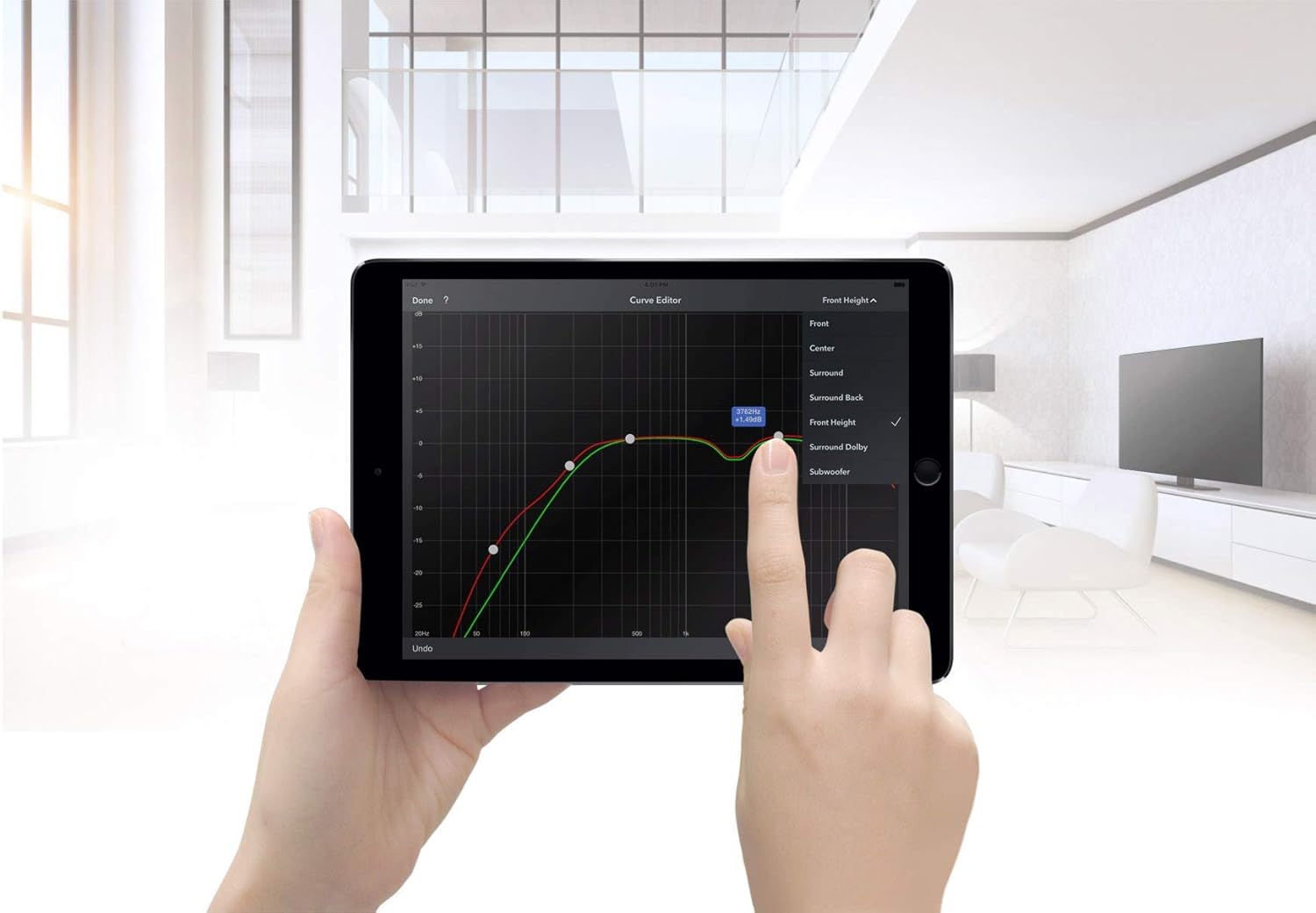
A tablet displaying the Audyssey MultEQ XT32 curve editor, used for precise room acoustic calibration of the Marantz SR5013.
Use the supplied setup microphone and the Audyssey MultEQ XT32 calibration system to automatically measure and optimize your speaker settings for your listening environment. This process ensures the best possible sound quality.
4. Ntuziaka ọrụ
4.1. Remote Control

The RC036SR remote control for the Marantz SR5013 AV Receiver, displaying various buttons for device control, input selection, and sound modes.
The included remote control (RC036SR) provides full control over the receiver's functions. Insert the two AA batteries (not included) into the remote control, observing correct polarity.
4.2. Basic Ọrụ
- Gbanyụọ/ Gbanyụọ: Press the POWER button on the remote or the front panel.
- Nhọrọ ntinye: Use the INPUT SELECTOR knob on the front panel or the dedicated input buttons on the remote (e.g., Blu-ray, TV Audio, Game) to switch between connected sources.
- Njikwa olu: Use the VOLUME knob on the front panel or the VOLUME +/- buttons on the remote to adjust the sound level.
4.3. Ụdị ọdịyo
The SR5013 supports various audio modes to enhance your listening experience:
- Dolby Atmos: Provides immersive, multi-dimensional sound by adding overhead audio effects.
- DTS:X: Object-based audio technology that delivers flexible and immersive soundscapes.
- DTS mebere:X: Creates a virtual height and surround effect without the need for dedicated height or surround speakers.
- Siriani: For traditional two-channel audio playback.
Use the 'SOUND MODE' button on the remote control to cycle through available audio modes.
4.4. Video Features
The receiver processes and passes through various video signals:
- HDR10, Dolby Vision, HLG: Support for High Dynamic Range video formats for enhanced contrast and color.
- BT.2020: Wide color gamut support for more vibrant and realistic colors.
- 3D and 21:9 Video: Compatibility with 3D content and ultra-wide aspect ratio displays.
5. Nlekọta
- Nhicha: Jiri akwa dị nro hichaa otu ahụ. Ejila ihe nchacha abrasive ma ọ bụ ihe mgbaze.
- Igwe ikuku: Na-enyocha mgbe niile na uzuzu ma ọ bụ ihe mkpofu anaghị egbochi oghere ikuku.
- eriri ike: Lelee eriri ike ahụ kwa oge maka mmebi ọ bụla.
6. Nchọpụta nsogbu
If you encounter issues with your Marantz SR5013, refer to the following common troubleshooting steps:
- Enweghị ike: Ensure the power cord is securely connected and the wall outlet is functioning. Check the power switch on the unit.
- Enweghị ụda: Verify speaker connections, input selection, and volume level. Check if the MUTE function is active. Ensure the correct audio output mode is selected.
- Enweghị vidiyo: Confirm HDMI cable connections between the source, receiver, and TV. Ensure the correct HDMI input is selected on both the receiver and the TV. Check video output settings on the source device.
- Njikwa anya anaghị arụ ọrụ: Check the batteries and ensure they are inserted correctly. Point the remote directly at the receiver's remote sensor.
- Okwu njikọ Bluetooth: Ensure the receiver's Bluetooth function is enabled and the device you are trying to connect is in pairing mode. Move the devices closer to each other.
For persistent issues, consult the full troubleshooting guide in the comprehensive user manual (if available) or contact customer support.
7. Nkọwapụta
| Njirimara | Nkọwapụta |
|---|---|
| Aha ika | Marantz |
| Nọmba nlereanya | SR5013 |
| Mpụta Wattage | 100 Watts kwa ọwa |
| Agba | Nwa |
| Atụmatụ pụrụ iche | Support 3D Audio |
| Akụkụ ngwaahịa (LxWxH) | 33.81 x 43.99 x 16.1 cm |
| Ibu Ibu | 12.38 n'arọ |
| Batrị achọrọ | Batrị 2 AA (maka ime ime) |
| Teknụzụ Njikọta | Igwe na-enweghị ikuku (Bluetooth, Wi-Fi) |
| Ụdị njikwa | Google Assistant (Voice Control) |
| Ngwa dakọtara | Igwe onyonyo |
| Mgbakọta ọdụ ụgbọ mmiri HDMI | 10 (8 n'ime, 2 n'èzí) |
| Ụdị njikọ | HDMI |
| Ọnọdụ mmepụta ọdịyo | Stereo, Surround, Dolby Atmos, DTS:X, DTS Virtual:X |
| Nhazi ọwa ụda gburugburu | 7.2 ọwa |
| Nkwado nzuzo vidiyo | HDR10, BT.2020, 3D, 21:9, Dolby Vision, HLG |
8. Akwụkwọ ikike na nkwado
This Marantz SR5013 AV Receiver is offered as a refurbished product. Refurbished products are typically inspected and tested to function like new.
Nkwa Amazon eweghachitere: If purchased through Amazon Renewed, this product is eligible for replacement or refund under the Amazon Renewed Guarantee if you are not satisfied with your purchase.
Akwụkwọ ikike onye nrụpụta: Please be aware that manufacturer warranties for new products may not apply to refurbished units. Some users have reported that Marantz may not honor warranty claims for products purchased as renewed. It is advisable to verify warranty coverage directly with the seller or Marantz if this is a concern.
For further assistance, please refer to the seller's support channels or the official Marantz website for product documentation and service information.


