Nnọọ
Thank you for choosing the iTek GGC 30-inch Curved Monitor. This manual provides essential information for setting up, operating, and maintaining your new monitor. Please read it thoroughly before use to ensure optimal performance and safety.
Ntuziaka nchekwa dị mkpa
To prevent damage and ensure safe operation, please observe the following precautions:
- Etinyela ihe nlele ahụ n'ebe mmiri ozuzo, mmiri ozuzo, ma ọ bụ oke okpomọkụ dị elu.
- Hụ na ikuku dị mma gburugburu ihe nlele ahụ. Ekpuchila oghere ikuku.
- Jiri naanị ihe nkwụnye ọkụ wetara n'ihe nleba anya.
- Zere itinye ihe ndị dị arọ na eriri ike.
- Disconnect the power plug from the outlet if the monitor will not be used for a long period.
- Do not attempt to service the monitor yourself. Refer all servicing to qualified personnel.
- Hichaa ihuenyo ihe nlele ahụ ma casing na akwa dị nro, kpọrọ nkụ. Zere iji ihe nhicha ma ọ bụ ihe mgbaze.
Ihe ngwugwu
Biko lelee ngwungwu maka ihe ndị a:
- iTek GGC 30-inch Curved Monitor
- Nyochaa Stand (Base and Olu)
- Ihe nkwụnye ọkụ na eriri
- USB DisplayPort
- HDMI USB
- Akwụkwọ ntuziaka onye ọrụ
- Kpọsara maka Mgbakọ kwụrụ ọtọ
Ngwaahịa gafereview
The iTek GGC 30-inch Curved Monitor is designed for an immersive viewing experience, ideal for gaming and professional use. It features a WFHD (2560x1080) resolution, a high 200Hz refresh rate, and a rapid 1ms MPRT response time.

Key Performance Highlights
- 200Hz Refresh Rate & AMD FreeSync Technology: Experience ultra-smooth visuals and tear-free gaming with a high refresh rate and adaptive sync technology.

Figure 2: 200Hz Refresh Rate and AMD FreeSync Technology in action. - Flicker-Free & Low Blue Light: Designed to reduce eye strain during prolonged use, providing a more comfortable viewahụmahụ.

Figure 3: Flicker-Free and Low Blue Light features for eye comfort. - Oge nzaghachi MPRT 1ms: Minimizes motion blur and ghosting, crucial for fast-paced games and action sequences.

Figure 4: Rapid Refresh Rate and Response Time for smooth visuals. - 1800R Curved Display: The immersive curvature brings the edges of the screen closer to your field of view, enhancing depth perception and reducing distortion.

Figure 5: 1800R Curved Display for an immersive experience.
Melite
Chịkọta Guzosie
- Jiri nlezianya wepụ ihe nleba anya ma guzobe ihe ndị dị na nkwakọ ngwaahịa ahụ.
- Attach the stand neck to the monitor panel using the provided screws. Ensure it clicks securely into place or is fastened tightly.
- Attach the stand base to the stand neck, securing it with the thumb screw or screws from underneath.
- Debe ihe nleba anya gbakọtara n'elu kwụsiri ike ma dịkwa larịị.
Ijikọ nlekota oru gị
The iTek GGC monitor offers multiple connectivity options for various devices:
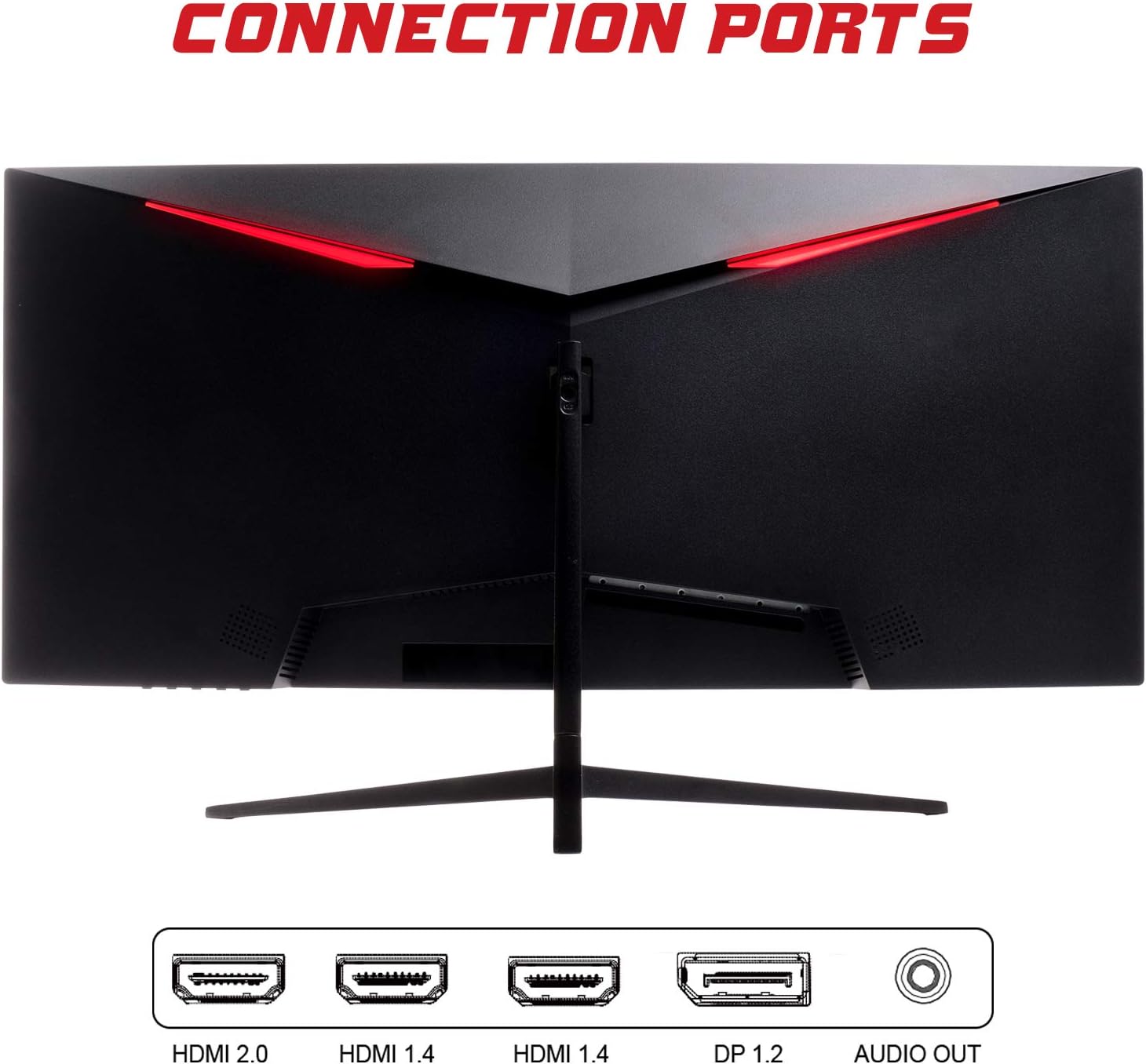
- Ngosipụta ngosi (DP 1.2): For high-resolution and high-refresh-rate connections to your PC.
- HDMI (HDMI 2.0, HDMI 1.4 x2): Connect to PCs, gaming consoles, and other multimedia devices. HDMI 2.0 supports higher refresh rates at certain resolutions.
- Apụọ ọdịyo: Jikọọ igwe okwu ma ọ bụ ekweisi mpụga.
Mgbe ị jikọọchara eriri vidiyo ahụ, jikọọ ihe nkwụnye ọkụ eletrik na ihe nlele ahụ wee jikọọ na ebe a na-enye ọkụ eletrik.
Na-arụ ọrụ Monitor
Gbanyụọ/ Gbanyụọ
Press the power button, usually located on the bottom or back of the monitor, to turn it on or off. The power indicator light will illuminate when the monitor is on.
Ngosipụta na ihuenyo (OSD) NchNhr
Ndepụta OSD na-enye gị ohere ịgbanwe ntọala nlele dị iche iche. Jiri bọtịnụ dị na ihuenyo ahụ (karịsịa n'azụ ma ọ bụ aka nri ala) iji gaa na menu ahụ.
- Ntọala foto: Hazie nchapụta, ọdịiche, nkọ, na gamma.
- Ntọala agba: Gbanwee okpomọkụ agba, agba, na njupụta.
- Họrọ ntinye: Manually switch between DisplayPort and HDMI inputs.
- Audio: Hazie olu maka mmepụta ọdịyo.
- Ntọala sistemụ: Access language, OSD timeout, and reset options.
- Njirimara egwuregwu: Enable/disable FreeSync, adjust response time overdrive, and activate crosshair overlays if available.
Nlekọta
Nlekọta kwesịrị ekwesị na-eme ka ihe nlele gị dị ogologo oge:
- Gbanyụọ ihe nlele ahụ mgbe niile ma wepụ eriri ọkụ eletrik tupu ị sachaa ya.
- Jiri akwa dị nro na-enweghị lint iji hichaa ihuenyo ahụ nwayọ. Maka akara isi ike, ntakịrị dampen akwa na mmiri ma ọ bụ dị nwayọọ, na-adịghị abrasive ihuenyo Cleaner.
- Hichaa ihe nlele casing na akwa dị nro, kpọrọ nkụ.
- Avoid spraying liquids directly onto the screen or casing.
- Do not use benzene, thinner, ammonia-based cleaners, or abrasive materials.
Nchọpụta nsogbu
If you encounter issues with your monitor, please refer to the following table for common problems and solutions:
| Nsogbu | Ngwọta enwere ike |
|---|---|
| Enweghị ike | Ensure the power cable is securely connected to the monitor and the power outlet. Check if the power outlet is working. |
| Enweghị mgbaama / Ihuenyo efu | Verify the video cable (DisplayPort or HDMI) is firmly connected to both the monitor and your computer. Select the correct input source via the OSD menu. Ensure your computer is powered on and not in sleep mode. |
| Foto na-egbuke egbuke ma ọ bụ na-akwụghị ọtọ | Check the video cable connection. Try a different cable or port. Ensure your graphics card drivers are up to date. Adjust the refresh rate in your computer's display settings. |
| Poor image quality (blurry, distorted colors) | Adjust brightness, contrast, and color settings in the OSD menu. Ensure the display resolution on your computer matches the monitor's native resolution (2560x1080). |
| No sound from audio out | Check the audio cable connection to your speakers/headphones. Verify the volume setting in the OSD menu and on your computer. Ensure the correct audio output device is selected in your computer's sound settings. |
Nkọwa nka nka
| Njirimara | Nkọwapụta |
|---|---|
| Ụdị | Itek |
| Nlereanya | ITMC30V201FHD |
| Nha ihuenyo | 30 sentimita asatọ |
| Ụdị panel | VA |
| Curvature | R1800 |
| Mkpebi | 2560 x 1080 (WFHD) |
| Akụkụ akụkụ | 21:9 |
| Ọnụego ume ọhụrụ | 200 Hz |
| Oge nzaghachi | 1ms MPRT |
| Icha ọkụ | 350 cd/m² |
| Ọnụọgụ ọdịiche | 3000:1 |
| Viewna n'akuku | 178° (Kwụ ọtọ/Kwụ ọtọ) |
| Njikọta | 1x DisplayPort 1.2, 1x HDMI 2.0, 2x HDMI 1.4, Audio Out |
| Atụmatụ pụrụ iche | HDR Ready, FreeSync, Low Blue Light, Flicker Free, VESA Mountable |
| Akụkụ ngwaahịa (ya na nkwụnye) | 70.68 x 40.89 x 18.48 cm |
| Ibu | 6.9 n'arọ |
Ịrụ ọrụ ike

For detailed energy consumption information and product registration, please refer to the official EPREL database:
Akwụkwọ ikike na nkwado
Your iTek GGC monitor is backed by a manufacturer's warranty. Please retain your proof of purchase for warranty claims.
- Guaranteed Product Support: This product is guaranteed to have support available until at least January 1, 2031.
- For technical support, warranty inquiries, or service requests, please contact iTek customer service through their official websaịtị ma ọ bụ ozi kọntaktị enyere na ịzụrụ gị.


