1. Okwu mmalite
Welcome to the user manual for your new Bissell EV675 Robot Vacuum Cleaner. This document provides essential information for the safe and efficient operation, maintenance, and troubleshooting of your robotic vacuum. Please read this manual thoroughly before using your device.
2. Ntuziaka nchekwa dị mkpa
To reduce the risk of fire, electric shock, or injury, always follow basic precautions, including the following:
- Gụọ ntuziaka niile tupu i jiri ngwa.
- Ejila n'èzí ma ọ bụ n'elu mmiri.
- Ekwela ka eji mee ihe egwuregwu ụmụaka. Nlebara anya dị mkpa mgbe ụmụaka na-eji ma ọ bụ nso.
- Jiri naanị dị ka akọwara n'akwụkwọ ntuziaka a. Jiri naanị mgbakwunye atụnyere ndị nrụpụta.
- Ejila eriri ma ọ bụ plọg mebiri emebi. Ọ bụrụ na ngwa anaghị arụ ọrụ ka ọ kwesịrị, atụbagoro, mebie, hapụ ya n'èzí, ma ọ bụ tụba ya na mmiri, weghachite ya na ebe ọrụ.
- Anaghachila ma ọ bụ were ụdọ buru, jiri eriri dị ka aka, mechie ọnụ ụzọ na eriri, ma ọ bụ dọpụta eriri n'akụkụ ọnụ ma ọ bụ nkuku dị nkọ. Ejila ngwa n'elu eriri. Debe eriri n'ebe dị ọkụ.
- Akwụpụla eriri site na ịdọrọ eriri. Iji kwụpụ, jide plọg, ọ bụghị eriri.
- Ejila aka mmiri were jide plọg ma ọ bụ ngwa.
- Etinyela ihe ọ bụla n'ime oghere. Ejila oghere ọ bụla akpọchiri; na-ezere uzuzu, lint, ntutu, na ihe ọ bụla nwere ike ibelata ikuku.
- Debe ntutu isi, uwe na-adịghị mma, mkpịsị aka na akụkụ ahụ niile pụọ na oghere na akụkụ ndị na-akpụ akpụ.
- Ewelitela ihe ọ bụla na-ere ọkụ ma ọ bụ ise siga, dị ka sịga, ọkụ, ma ọ bụ ntụ na-ekpo ọkụ.
- Jiri nlezianya mee ihe mgbe ị na-ehicha ihe na steepụ.
- Ejila eburu mmiri ọkụ na-ere ọkụ ma ọ bụ ọkụ ọkụ, dị ka mmanụ ụgbọala, ma ọ bụ jiri n'ebe ha nwere ike ịnọ.
- Ebulikwala ihe na-egbu egbu (chlorine bleach, amonia, drain Cleaner, wdg).
- Ejila ya n'ebe a na-emechi emechi ebe uzuoku sitere na agba mmanụ, ihe na-eme ka agba dị nro, ihe ndị na-egbochi anwụ, uzuzu na-ere ọkụ, ma ọ bụ uzu ndị ọzọ na-agbawa agbawa ma ọ bụ na-egbu egbu.
- Ejila ya eburu ihe siri ike ma ọ bụ dị nkọ dịka iko, mbọ, skru, mkpụrụ ego, wdg.
- Ejikwala iko uzuzu na/ma ọ bụ nzacha n'ebe.
- Gbanyụọ njikwa niile tupu ịtọpụ ya.
- Kpupu na ntinye mgbe ejighị ya na tupu ị rụọ ọrụ.
3. Ihe ngwugwu
Your Bissell EV675 Robot Vacuum Cleaner package includes the following items:
- Bissell EV675 Robot Vacuum Cleaner
- Self-Charging Dock
- Ihe nkwụnye ọkụ
- Njikwa anya
- Bonus Filter
- Bonus Edge Cleaning Brushes (2 sets)
- Ngwá Ọrụ Nhicha

This image displays the additional filter and two sets of edge cleaning brushes that come with your robot vacuum, ensuring you have spare parts for maintenance.
4. Ngwaahịa gafereview
The Bissell EV675 is a robotic vacuum designed for efficient floor cleaning, especially effective on pet hair. It features a low-profile design to clean hard-to-reach spaces and a self-charging dock for convenience.
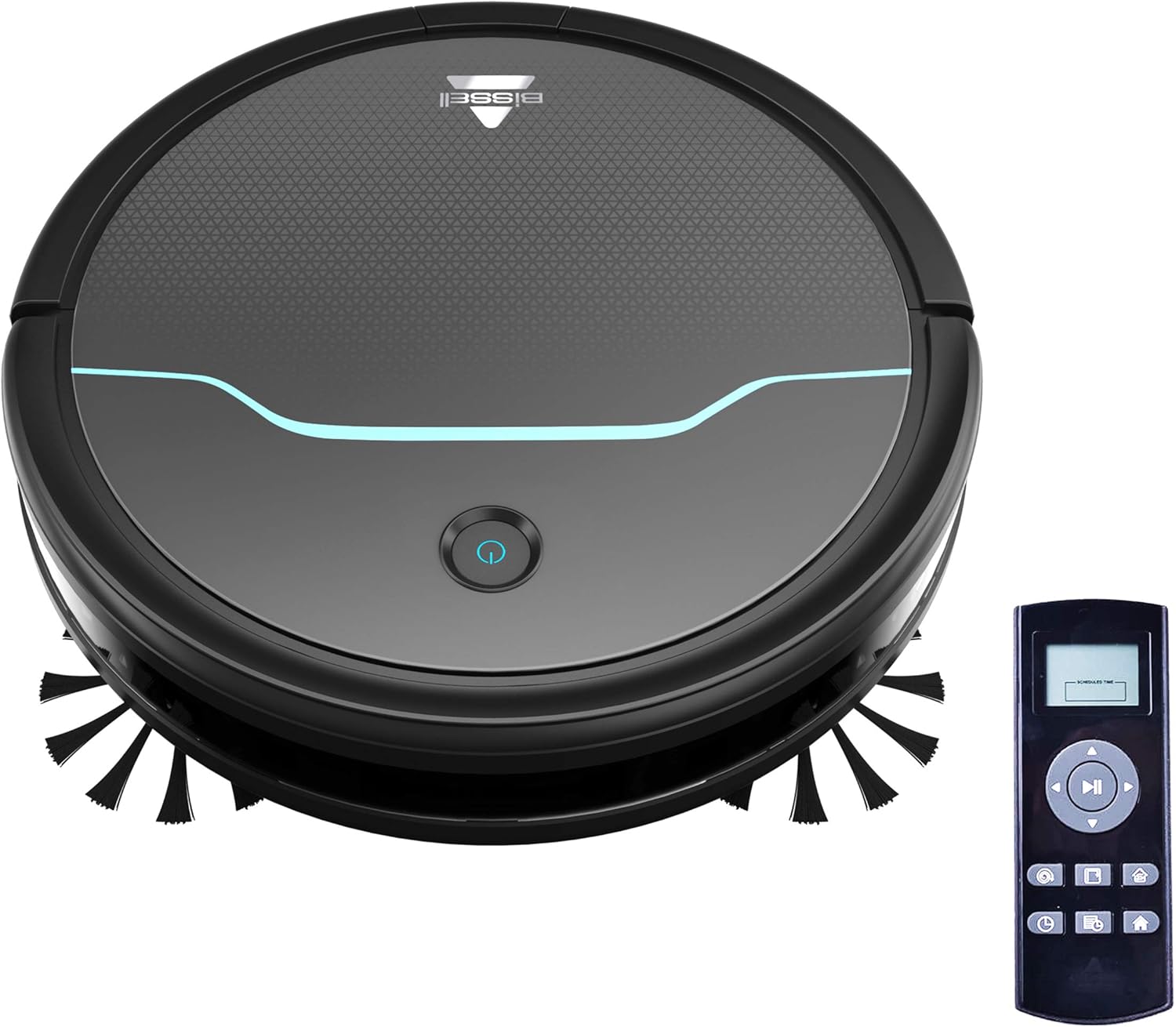
This image shows the main unit of the robot vacuum and its accompanying remote control, highlighting its compact, circular design.

This image illustrates the vacuum's ability to clean under furniture, reaching areas that are typically difficult to access.
5. Nhazi
5.1 Nhazi ọdụ ụgbọ mmiri
Place the self-charging dock against a wall in an open, uncluttered area. Ensure there is at least 0.5 meters (1.6 feet) of clear space on either side of the dock and 1.5 meters (4.9 feet) in front of it for optimal navigation and docking.
5.2 Nchaji izizi
Connect the power adapter to the charging dock and plug it into a wall outlet. Place the robot vacuum onto the charging contacts of the dock. Ensure the indicator light on the robot illuminates, indicating it is charging. Allow the robot to fully charge before its first use (approximately 4-5 hours).
5.3 Ịwụnye ahịhịa akụkụ
Gently press the side brushes onto the square posts on the underside of the robot until they click into place. Ensure they are securely attached.
6. Ọrụ
6.1 Gbanyụọ/ gbanyụọ
To power on the robot, press and hold the power button on the top of the robot until the indicator light turns blue. To power off, press and hold the power button until the light turns off.
6.2 Ịmalite Usoro Nhicha
Press the power button once to start a cleaning cycle. The robot will automatically begin cleaning in a systematic pattern. Alternatively, use the remote control to select a cleaning mode or start cleaning.

This image shows the robot vacuum in action, effectively picking up debris from the floor.
6.3 Ụdị nhicha
The remote control allows you to select various cleaning modes:
- Ọcha akpaaka: The robot automatically cleans based on its environment.
- Ebe dị ọcha: The robot intensely cleans a specific small area.
- Ọcha Edge: Robot ahụ na-ehicha mgbidi na nsọtụ arịa ụlọ.
- Njikwa ntuziaka: Use the directional buttons on the remote to guide the robot.

This image highlights the vacuum's versatility in cleaning different floor types, including carpets.
6.4 Ịhazi usoro
Use the remote control to set a cleaning schedule for your robot vacuum. Refer to the remote control section in the full manual for detailed instructions on setting daily or weekly cleaning times.

This image depicts the robot vacuum in a typical home setting, ready to execute its programmed cleaning schedule.
7. Nlekọta
Regular maintenance ensures your Bissell EV675 operates efficiently and prolongs its lifespan. Always power off the robot before performing any maintenance.
7.1 Na-ekpofu ihe mkpofu uzuzu
It is recommended to empty the dust bin after each cleaning cycle, especially if you have pets. Press the release button on the dust bin, pull it out, open the lid, and discard the collected debris.
7.2 Nhicha/Ịdochi ihe nzacha
Remove the filter from the dust bin. Tap off loose dirt. Rinse the filter under running water if necessary, ensuring it is completely dry before reinserting. Replace the filter every 3-6 months, or as needed, to maintain optimal suction.
7.3 ihicha brushes
Remove the main brush and side brushes. Use the included cleaning tool to cut and remove any hair or debris tangled around the brushes. Ensure the brushes spin freely after cleaning.
7.4 Ihe Nzacha na Nchaji Ndị Na-akpọtụrụ
Wipe the cliff sensors, anti-collision sensors, and charging contacts on both the robot and the dock with a clean, dry cloth. This prevents dust buildup from affecting performance.
7.5 Maintenance Video
This video offers a visual demonstration of the Bissell EV675 Robot Vacuum Cleaner, covering its key functionalities and how it operates.
This short video clip showcases the Bissell EV675 Robotic Vacuum Cleaner performing a cleaning task, illustrating its mobility and cleaning path.
8. Nchọpụta nsogbu
If your Bissell EV675 is not operating as expected, refer to the common issues and solutions below:
| Nsogbu | Ihe nwere ike ime | Ngwọta |
|---|---|---|
| Robot anaghị agbanyụ ma ọ bụ chajị. | Battery drained; charging contacts dirty; power adapter not connected. | Ensure robot is properly docked; clean charging contacts; check power adapter connection. |
| Robot na-arapara ọtụtụ oge. | Obstacles (cords, rugs with tassels); low-hanging furniture. | Clear obstacles; use virtual barriers if available; ensure charging dock has sufficient clearance. |
| Poor suction or not picking up debris. | Dust bin full; filters clogged; main brush tangled. | Empty dust bin; clean or replace filters; clean main brush. |
| Side brushes not spinning. | Brushes tangled with hair/debris; brushes not installed correctly. | Remove and clean side brushes; ensure they are clicked into place. |
| Robot makes unusual noises. | Debris in main brush; foreign object in wheels. | Inspect and clean main brush and wheels for obstructions. |
9. Nkọwapụta
- Akara: Bissel
- Aha nlereanya: BISSELL EV675 Robot Vacuum Cleaner for Pet Hair with Self Charging Dock, Bonus Filter, Bonus Edge Cleaning Brushes, 2503
- Nọmba nlereanya: 2503
- Njirimara Pụrụ Iche: Automatic Dust Collection, Programmable, Self-Cleaning Brushroll
- Agba: Black With Disco Teal Accents
- Ụdị nzacha: Disk
- Ndụ batrị: 100 nkeji
- Ike: 0.4 lita
- Isi mmalite ike: Igwe anaghị agba nchara
- Usoro njikwa: Ime ime
- Ihe kpatara ụdị: Robotic
- Akụkụ ngwaahịa: 12.75 x 12.75 x 3.5 sentimita asatọ
- Ibu ihe: 6.62 pound
- Nkwanye ihu: Floors, Carpet, Floor
10. Akwụkwọ ikike na nkwado
For warranty information, product registration, or customer support, please visit the official Bissell websaịtị ma ọ bụ kpọtụrụ ngalaba ọrụ ndị ahịa ha. Debe akwụkwọ nnata ịzụrụ maka akwụkwọ ikike.


