1. Okwu mmalite
Thank you for choosing the Setty Power Bank with Solar Panels. This portable power bank is designed to provide convenient charging for your electronic devices on the go, featuring a 5000 mAh battery capacity and an integrated solar panel for supplementary charging. Please read this manual carefully before using the product to ensure safe and optimal performance.
2. Ozi nchekwa
- Do not expose the power bank to extreme temperatures, direct sunlight for prolonged periods (beyond charging), or fire.
- Avoid contact with water or other liquids. This device is not fully waterproof.
- Do not disassemble, modify, or attempt to repair the device yourself. Contact qualified service personnel.
- Debe ebe ụmụaka na-apụghị iru.
- Jiri naanị eriri nchaji na ihe nkwụnye ọkụ dakọtara.
- Tụfuo ụlọ akụ ike nke ọma dịka iwu obodo siri dị.
3. Ihe ngwugwu
- Setty Power Bank with Solar Panels (5000 mAh)
- USB Charging Cable (Micro-USB)
- Akwụkwọ ntuziaka onye ọrụ
4. Ngwaahịa gafereview
Familiarize yourself with the components of your Setty Power Bank.
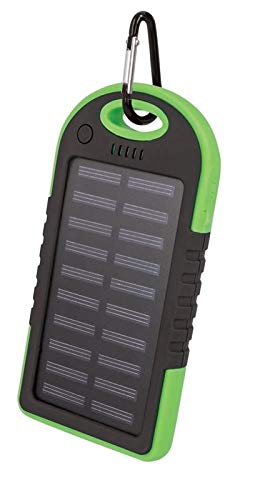
Foto nke 1: Setty Power Bank with Solar Panels. The image displays the power bank in its packaging, highlighting its green and black design, solar panel, and a carabiner clip for portability. The packaging also indicates "SOLAR TRAVEL BATTERY 5000 mAh".
- Ogwe anyanwụ: Converts sunlight into electrical energy to slowly charge the internal battery.
- USB Output Ports (2): Maka ịchaji ngwaọrụ mpụga.
- Micro-USB Input Port: For charging the power bank itself.
- Ihe ngosi LED: Show battery level and charging status.
- Bọtịnụ ike: To turn on/off the device and activate the flashlight.
- Igwe ọkụ: Ìhè LED agbakwunyere maka ìhè.
- Ihe nkiri Carabiner: For attaching the power bank to bags or gear.
5. Nhazi
5.1 Nchaji mbụ nke ụlọ akụ ọkụ
Before first use, it is recommended to fully charge the power bank via a USB power source.
- Connect the provided Micro-USB cable to the power bank's input port.
- Connect the other end of the USB cable to a USB wall adapter (not included), computer USB port, or other compatible USB power source.
- The LED indicators will illuminate to show the charging progress. Once all LEDs are solid, the power bank is fully charged.
- Kwupu eriri ahụ ozugbo ochachachachara.
Mara: Solar charging is a supplementary feature and is significantly slower than wall charging. For optimal performance, always fully charge the power bank via USB before extended use.
6. Ntuziaka ọrụ
6.1 Nchaji Ngwaọrụ Mpụga
- Connect your device's charging cable to one of the USB output ports on the power bank.
- Connect the other end of the cable to your electronic device (e.g., smartphone, tablet).
- The power bank should automatically begin charging your device. If not, press the power button once to initiate charging.
- The LED indicators will show the remaining battery level of the power bank.
- Disconnect your device once it is fully charged or when you no longer need to charge it.
6.2 Nchaji anyanwụ
The integrated solar panel allows for emergency or supplementary charging when no other power source is available.
- Place the power bank with the solar panel facing direct sunlight.
- A dedicated LED indicator (if present) or the main battery indicators may show that solar charging is active.
- Solar charging is slow and dependent on sunlight intensity. It is not intended as the primary charging method.
6.3 LED Indicator Functions
The LED lights indicate the power bank's status:
- Solid LEDs: Indicate remaining battery capacity. (e.g., 4 LEDs = 75-100%, 3 LEDs = 50-75%, etc.)
- Igwe ọkụ na-egbuke egbuke: Indicate the power bank is currently being charged.
6.4 Ọrụ ọkụ ọkụ
To use the integrated flashlight:
- Gbanwuo: Pịa ma jide bọtịnụ ike ahụ maka ihe dị ka sekọnd 2-3.
- Gbanyụọ: Press and hold the power button again for approximately 2-3 seconds.
7. Nlekọta
- Clean the power bank with a soft, dry cloth. Do not use harsh chemicals or abrasive cleaners.
- Keep the solar panel clean and free of dust or debris for optimal solar charging efficiency.
- Chekwaa ụlọ akụ ike n'ebe dị jụụ, kpọrọ nkụ mgbe ọ naghị eji ya.
- If storing for extended periods, charge the power bank to at least 50% every 3 months to prolong battery life.
8. Nchọpụta nsogbu
| Nsogbu | Ihe nwere ike ime | Ngwọta |
|---|---|---|
| Ụlọ akụ ọkụ anaghị akwụ ụgwọ. |
|
|
| Ngwaọrụ anaghị akwụ ụgwọ site na ụlọ akụ ọkụ. |
|
|
| Solar charging is very slow. |
|
|
9. Nkọwapụta
- Akara: Setty
- Nọmba nlereanya: 5900495682062
- Ike batrị: 5000 mAh (Milliampoge awa)
- Ntinye: USB (Micro-USB)
- Mpụta: 2 x ọdụ ụgbọ USB
- Mpụta ugbu a: 1 A
- Isi mmalite ike: Solar Powered, USB
- Ngwa dakọtara: Computer (and other USB-chargeable devices)
10. Akwụkwọ ikike Ozi
Setty products are manufactured to high-quality standards. For specific warranty terms and conditions, please refer to the warranty card included with your purchase or contact your retailer. Keep your proof of purchase for any warranty claims.
11. Nkwado
If you encounter any issues or have questions regarding your Setty Power Bank that are not covered in this manual, please contact the retailer where you purchased the product or visit the official Setty websaịtị maka enyemaka ọzọ.


