Okwu mmalite
The Insignia NS-SPBTWAVE2-BK Wave 2 Portable Bluetooth Speaker provides high-quality wireless audio streaming from your compatible devices. Designed for versatility, its robust construction and rubberized feet allow for stable placement in both horizontal and vertical orientations. Enjoy hands-free communication with the built-in speakerphone and extended listening sessions thanks to its 12-hour battery life.
This manual provides essential information for setting up, operating, maintaining, and troubleshooting your speaker. Please read it thoroughly before use and retain it for future reference.
Ihe ngwugwu
Gbaa mbọ hụ na ihe niile dị na ngwugwu:
- Insignia NS-SPBTWAVE2-BK Wave 2 Portable Bluetooth Speaker
- Igwe nchaji USB
- 3.5mm Audio Cable (Auxiliary)
- Quick Setup Guide (or similar documentation)
Njirimara ngwaahịa
- Ikuku Njikọ: Connects wirelessly to smartphones, tablets, and other Bluetooth-enabled devices.
- Ogologo ndụ batrị: Features a rechargeable 2,000 mAh battery, providing up to 12 hours of playback on a full charge.
- Igwe okwu arụnyere n'ime ya: Enables hands-free calling directly through the speaker.
- Auxiliary Audio Input: Allows for wired connection to audio devices via a 3.5mm audio cable.
- Nkwanye ọtụtụ: Designed to stand securely in both horizontal and vertical positions.
Akụkụ nke Ọkà Okwu
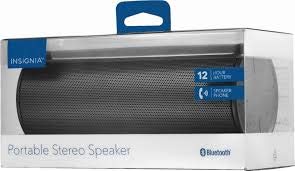
Foto 1: N'ihu view of the Insignia Wave 2 Speaker in horizontal orientation.

Figure 2: Vertical view of the speaker, illustrating the power button, charging port, and auxiliary input port at the bottom.
Refer to the images above for the location of key components such as the power button, volume controls, Bluetooth indicator, charging port, and auxiliary input.
Melite
1. gingchaji Okwu Okwu
- Connect the small end of the USB charging cable to the charging port on the speaker (refer to Figure 2).
- Connect the large end of the USB charging cable to a USB power adapter (not included) or a powered USB port on a computer.
- The charging indicator light will illuminate. Allow approximately 12 hours for a full charge before first use. The indicator light will change or turn off once charging is complete.
2. Njikọ Bluetooth
- Ensure the speaker is fully charged. Press and hold the Power button to turn on the speaker. The Bluetooth indicator light will begin to flash, indicating it is in pairing mode.
- On your Bluetooth-enabled device (smartphone, tablet, etc.), navigate to the Bluetooth settings and ensure Bluetooth is enabled.
- Chọọ maka available devices. Select "Insignia Wave 2" from the list.
- Once paired, the Bluetooth indicator light on the speaker will become solid, and you may hear an audible confirmation.
- Ọ bụrụ na a kpaliri maka paswọọdụ, tinye "0000".
3. Auxiliary (Wired) Connection
- Connect one end of the 3.5mm audio cable to the AUX input port on the speaker (refer to Figure 2).
- Connect the other end of the 3.5mm audio cable to the headphone jack or audio output port of your audio device.
- The speaker will automatically switch to auxiliary mode when a cable is detected.
Onye na-arụ ọrụ
Gbanyụọ/ Gbanyụọ
- To turn on: Press and hold the Power button until the indicator lights illuminate.
- To turn off: Press and hold the Power button until the indicator lights turn off.
Njikwa olu
- Gbanwee olu site na iji bọtịnụ olu dị na ọkà okwu.
- You can also control the volume from your connected Bluetooth device or auxiliary audio source.
Ịkpọ oku na-enweghị aka
When connected via Bluetooth, the speaker can be used for hands-free calls:
- Zaa oku: Press the Play/Pause/Call button once.
- Kwụsị oku: Press the Play/Pause/Call button once during a call.
- Jụ oku: Press and hold the Play/Pause/Call button.
- Speak clearly towards the speaker's built-in microphone for optimal voice pickup.
Nlekọta
- Nhicha: Use a soft, dry, lint-free cloth to clean the speaker's exterior. Do not use liquid cleaners, aerosols, or solvents.
- Nlekọta batrị: To prolong battery life, avoid fully discharging the battery frequently. Recharge the speaker regularly, even if not in use. Avoid exposing the speaker to extreme temperatures (hot or cold).
- Nchekwa: When not in use for extended periods, store the speaker in a cool, dry place away from direct sunlight and moisture.
- Nguzogide mmiri: Ọkà okwu a bụ Ọ BỤGHỊ mmiri anaghị abanye. Zere ka mmiri ghara ịbanye ma ọ bụ oke mmiri ghara ịdị.
Nchọpụta nsogbu
| Nsogbu | Ngwọta enwere ike |
|---|---|
| Ọkà okwu anaghị agbanwuo. | Ensure the battery is charged. Connect the speaker to a power source using the USB charging cable. |
| Enweghị ụda sitere na ọkà okwu. | Check the volume level on both the speaker and the connected device. Ensure the correct input source (Bluetooth or AUX) is selected. Verify the Bluetooth connection or auxiliary cable. |
| Enweghị ike ijikọ site na Bluetooth. | Ensure the speaker is in pairing mode (flashing Bluetooth indicator). Turn off and on Bluetooth on your device. Move the speaker closer to your device. Forget the speaker from your device's Bluetooth list and try pairing again. |
| Ogo ụda adịghị mma ma ọ bụ mgbagha. | Ensure the speaker is within Bluetooth range (approx. 33 ft / 10 m). Reduce the volume on the source device or speaker. Check for interference from other wireless devices. Try a different audio source or file. |
| Igwe okwu anaghị arụ ọrụ n'oge oku. | Ensure the speaker is properly connected via Bluetooth. Speak directly towards the speaker. Check your phone's call settings to ensure audio is routed to the Bluetooth speaker. |
Nkọwapụta
- Aha nlereanya: Ifufe 2
- Nọmba nlereanya: NS-SPBTWAVE2-BK
- Teknụzụ Njikọta: Bluetooth
- Ndụ batrị: Ruo awa 12
- Ụdị batrị: 1 Lithium ion (gụnyere)
- Oge nchaji: Ihe dị ka awa 12
- Akụkụ ngwaahịa: 6.8 x 2.8 x 2.8 sentimita (17.3 x 7.1 x 7.1 cm)
- Ibu ihe: 1 paụnd (0.45 n'arọ)
- Ụkpụrụ mmepụta ụda: Stereo
- Algbaàmà-na-Noise ruru: 80 dB
- Igwe okwu arụnyere n'ime ya: Ee
- Ntinye inyeaka: Ee (3.5mm)
- Ihe mgbochi mmiri: Mba
- Ihe: Plastic
- UPC: 600603230455
Akwụkwọ ikike na nkwado
This Insignia NS-SPBTWAVE2-BK Wave 2 Portable Bluetooth Speaker comes with a Akwụkwọ ikike nwere oke. For specific terms and conditions of your warranty, please refer to the warranty card included with your purchase or visit the official Insignia websaịtị.
For technical support, troubleshooting assistance, or warranty claims, please contact Insignia Customer Service. Contact information can typically be found on the Insignia websaịtị ma ọ bụ n'ime akwụkwọ ngwaahịa gị.


