Okwu mmalite
The Xfinity HD 720p Wireless Indoor/Outdoor Home Security Camera allows you to monitor your home environment with live video accessible from anywhere. Designed for both indoor and outdoor use, this camera provides essential security features to keep you informed.
Kedu ihe dị na Igbe ahụ
- Xfinity HD 720p Wireless Security Camera (Model: SCHC2AEW)
- Ihe nkwụnye ọkụ
- eriri USB
- Ngwa mgbakwunye (skru na arịlịka)

Image: Xfinity Home Security Camera and accessories neatly packaged in its box.
Ntuziaka nhazi
- Njikọ ike: Connect the camera to the power adapter using the provided USB cable, then plug the adapter into a standard electrical outlet.
- Nbudata ngwa: Download the official Xfinity Home app from your smartphone's app store (iOS App Store or Android Google Play).
- Ngwakọta ngwaọrụ: Open the Xfinity Home app and follow the on-screen instructions to add a new device. You will typically need to scan a QR code on the camera or manually enter its details to pair it with your home Wi-Fi network. Ensure your Wi-Fi network is 2.4 GHz for compatibility.

Image: The Xfinity Home Security Camera placed on a surface, ready for setup.
Ntuziaka ọrụ
Dị ndụ View na Njikwa Basic
Once paired, access the live video feed through the Xfinity Home app. The app provides controls for:
- Mgbasa ozi dị ndụ: View ezigbo oge footage site na igwefoto gị.
- Edekọ: Manually record video clips.
- nseta ihuenyo: Were foto ndị ka dị na ndepụta a dị ndụ.
- Audio Ụzọ Abụọ: Speak through the camera's speaker and hear audio from its microphone.
Ọhụụ abalị
The camera features night vision capabilities for clear monitoring in low-light conditions. This feature automatically activates when ambient light is insufficient, providing a black-and-white image. Some models may offer color night vision depending on ambient light and settings.
Nchọpụta ngagharị na ọkwa
Configure motion detection settings within the Xfinity Home app to receive alerts on your smartphone when activity is detected. You can customize sensitivity levels and notification preferences.
Nhọrọ nchekwa
The camera supports local storage via a MicroSD card (not included). Insert a compatible MicroSD card into the designated slot to store recorded video clips directly on the device. Cloud storage options may also be available through your Xfinity Home service subscription.
Nwụnye na Ịkwado
The Xfinity Home Security Camera can be placed on a flat surface or mounted to a wall. Use the included mounting hardware for secure wall installation. Ensure the camera is positioned to cover the desired monitoring area.
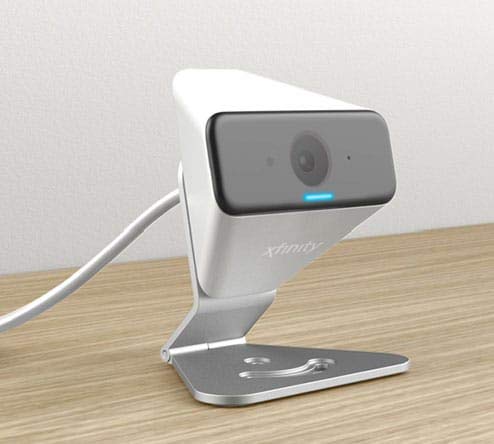
Image: The Xfinity Home Security Camera positioned on a desk, demonstrating its compact design.
Nkọwapụta ngwaahịa
| Njirimara | Nkọwa |
|---|---|
| Nọmba nlereanya | SCHC2AEW |
| Mkpebi ịse vidiyo | 720p |
| Teknụzụ Njikọta | Ikuku (Wi-Fi) |
| Protocol Njikọta | Wi-Fi (2.4 GHz compatible) |
| Ojiji ime ime/n'èzí | Ime ụlọ, n'èzí |
| Atụmatụ pụrụ iche | Ihe mmetụta mmegharị, ọhụụ abalị |
| Isi Iyi Ike | DC (12 Volts, 1 Watt) |
| Akụkụ (L x W x H) | 3 x 3 x 2 sentimita asatọ |
| Ibu Ibu | 1.57 pound |
| Ogo nchekwa mba ụwa | IP65 |
Nchọpụta nsogbu
- Enweghị ike: Ensure the power adapter is securely connected to both the camera and a working electrical outlet.
- Okwu Njikọta: Verify your Wi-Fi network is 2.4 GHz. Restart your router and the camera. Ensure the camera is within range of your Wi-Fi signal.
- Ngwa anaghị aza: Close and reopen the Xfinity Home app. If the issue persists, try reinstalling the app.
- Ogo vidiyo na-adịghị mma: Check your Wi-Fi signal strength. Ensure the camera lens is clean and free from obstructions.
Akwụkwọ ikike na nkwado ndị ahịa
For warranty information, please refer to the documentation included with your purchase or visit the official Xfinity support website. For technical assistance or customer service, please contact Xfinity customer support directly.


