1. Ngwaahịa gafereview
The SilverStone Strider Gold S Series SST-ST75F-GS-V3 is a 750W fully modular ATX power supply designed for desktop computers. It features 80 PLUS Gold certification for high efficiency, a compact 140mm depth for easy integration, and a class-leading single +12V rail for stable power delivery. This power supply is built to provide reliable and continuous power output under various operating conditions.
- 750 Watt Maximum DC Output: Na-enye ample power for high-performance systems.
- Nhazi kọmpat: With a depth of 140mm, it allows for easy installation in various PC cases.
- 100% Modular Cables: Enhances cable management and airflow within the system.
- 80 PLUS Gold Certification: Ensures high power efficiency, reducing heat and operating costs.
- Class-Leading Single +12V Rail: Delivers stable and consistent power to critical components.
- Strict 3% Voltage Regulation and Low Ripple & Noise: Guarantees clean and reliable power.
- 24/7 Continuous Power Output: Operates reliably with 40℃ operating temperature.
- Silent Running 120mm Fan: Features an 18dBA minimum noise level for quiet operation.

Image: The SilverStone Strider Gold S 750W power supply shown alongside its retail packaging.
2. Ozi nchekwa
Biko gụọ ma ghọta ntuziaka nchekwa niile tupu ịwụnye ma ọ bụ rụọ ọrụ ọkụ ọkụ a. Ọdịda ịgbaso ntuziaka ndị a nwere ike bute ujo ọkụ eletrik, ọkụ ma ọ bụ mebie ngwaahịa na akụrụngwa ejikọrọ.
- Hazardous Area: This device is not designed to be user serviceable and contains high voltage inside that can be dangerous when opened. In the event of malfunction, please notify your dealer or local distributor for service.
- Nwụnye ọkachamara: Installation should be performed by qualified personnel to prevent damage or injury.
- Igwe ikuku: Ensure adequate ventilation around the power supply. Do not block any ventilation openings.
- Mmiri: Ewepụla ọkụ eletrik na mmiri ma ọ bụ oke iru mmiri.
- Isi mmalite ike: Connect the power supply only to a grounded power outlet.
- Bufee: Do not overload the power supply beyond its specified wattage.
- Njikwa USB: Ensure all cables are properly routed and secured to prevent damage or interference.

Foto: Top view of the power supply showing the product label, including electrical specifications and safety warnings in multiple languages.
3. Ihe ngwugwu
Hụ na ihe niile edepụtara n'okpuru dị na ngwugwu ngwaahịa gị:
- SilverStone Strider Gold S 750W Power Supply (SST-ST75F-GS-V3)
- Modular Cable Set (various types for motherboard, CPU, PCIe, SATA, Peripherals)
- Igwe ọkụ AC
- Ịkwanye kposara
- User Manual / Warranty Information Booklet
- Cable Ties / Velcro Straps (for cable management)

Image: A complete set of modular cables, mounting screws, cable ties, and documentation included with the power supply.
4. Ntọala na nwụnye
Follow these steps to properly install your SilverStone Strider Gold S 750W power supply into your computer system.
4.1 Ndepụta nbanye tupu etinyere
- Gbaa mbọ hụ na agbanyụrụ sistemụ kọmputa gị kpamkpam wee wepụ ya na oghere mgbidi.
- Mepee igbe kọmpụta gị ka ị nweta mpaghara mgbago ọkụ ọkụ.
- If replacing an existing power supply, carefully disconnect all cables and remove it.
4.2 Nwụnye anụ ahụ
- Position the SilverStone SST-ST75F-GS-V3 power supply into the designated PSU bay in your computer case. Ensure the fan is oriented correctly for optimal airflow (typically facing downwards if there's a bottom vent, or upwards if not).
- Chekwaa ọkụ eletrik na akpa ahụ site na iji skru agbakwunyere enyere.
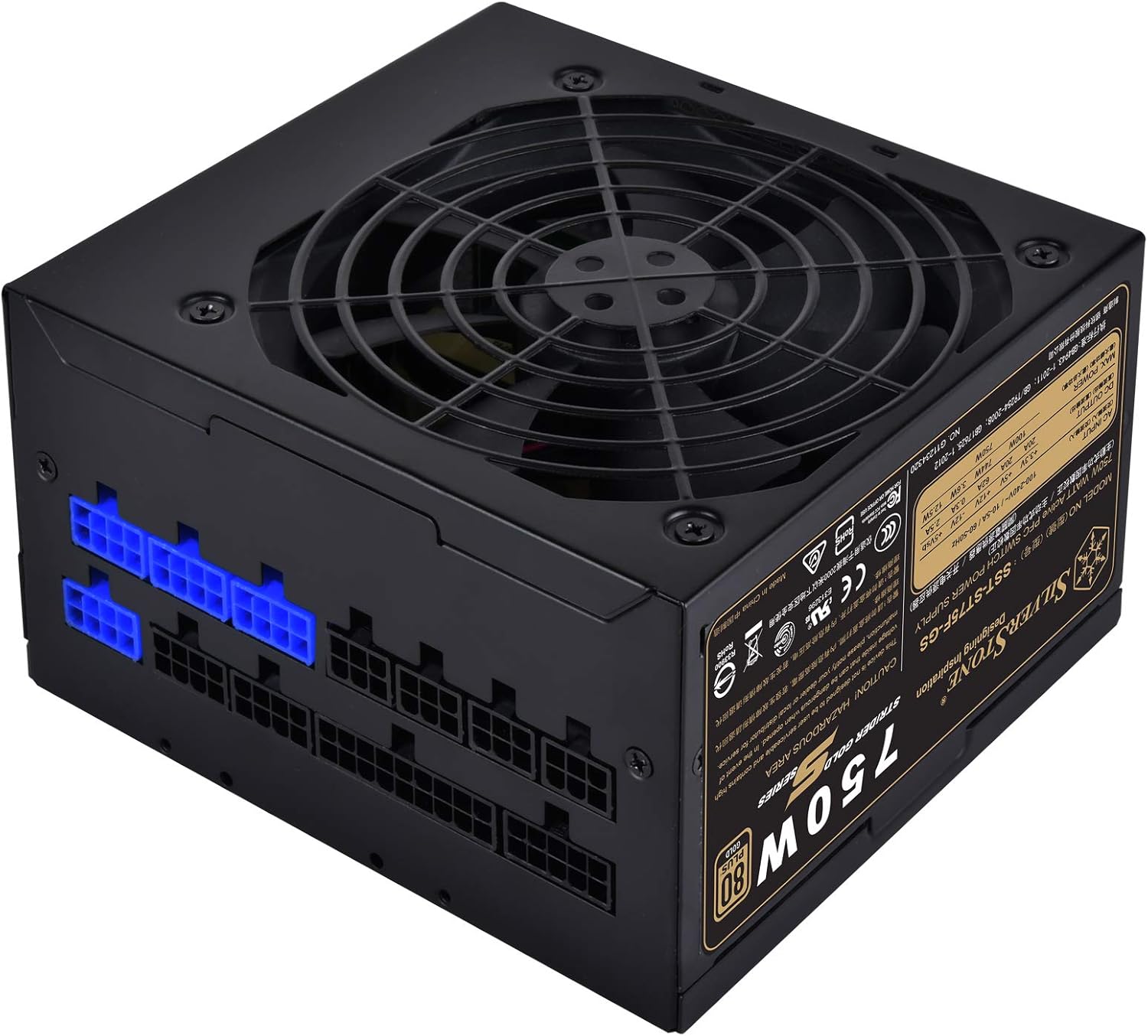
Oyiyi: Otu akụkụ view of the power supply, highlighting the modular cable connection ports on one side.
4.3 Cable Connection Guide
As a fully modular power supply, you only need to connect the cables required for your system components. This improves cable management and airflow.
- 24-pin ATX Motherboard USB: Jikọọ nnukwu eriri 24-pin site na PSU na ọdụ ụgbọ mmiri kwekọrọ na motherboard gị.
- 8-pin (4+4) EPS/ATX 12V CPU Cable: Connect the 8-pin or split 4+4-pin cable to the CPU power connector on your motherboard. Some motherboards may require two such connectors.
- Igwe PCI-E: For graphics cards, connect the appropriate 6-pin or 8-pin (6+2) PCI-E power cables from the PSU to your graphics card(s). Use separate cables for each connector on the GPU if possible for better power delivery.
- Igwe ọkụ SATA: Jikọọ eriri ike SATA na SSDs, HDDs na draịva anya gị.
- Igwe n'akụkụ (Molex): Connect Molex cables for any other components requiring this type of power, such as case fans or older peripherals.

Foto: nkọwa zuru ezu view of the modular cable connection panel, showing various types of ports for different cables.
Ensure all connections are firm and secure. After connecting all necessary cables, organize them using the provided cable ties or Velcro straps to improve airflow and aesthetics.
5. Ọrụ
Once the power supply is installed and all components are connected, you can power on your system.
- Connect the AC power cord to the power supply's inlet and then to a grounded wall outlet.
- Tụgharịa ngbanwe ọkụ na azụ nke ọkụ ọkụ na ọnọdụ 'ON' (I).
- Pịa bọtịnụ ike dị na akpa kọmputa gị iji malite sistemụ ahụ.
5.1 Fans arụ ọrụ
The 120mm fan in the SST-ST75F-GS-V3 is designed for silent operation, with a minimum noise level of 18dBA. The fan speed will adjust automatically based on the power supply's load and temperature to maintain optimal cooling while minimizing noise.

Foto: A nso nso view of the 120mm cooling fan integrated into the power supply unit.
6. Nlekọta
Proper maintenance can extend the lifespan of your power supply and ensure stable operation.
- Nhicha: Periodically clean the exterior of the power supply and its fan grille to prevent dust buildup. Use compressed air to gently clear dust from the fan blades and vents. Ensure the system is powered off and unplugged before cleaning.
- gburugburu: Operate the power supply in a clean, dry, and well-ventilventilated environment. Avoid extreme temperatures.
- Nlele eriri: Occasionally check all modular cable connections to ensure they remain secure.
7. Nchọpụta nsogbu
If you encounter issues with your power supply, try the following basic troubleshooting steps:
- Enweghị ike:
- Ensure the AC power cord is securely connected to both the power supply and the wall outlet.
- Lelee na mgba ọkụ na azụ PSU dị na ọnọdụ 'ON' (I).
- Hụ na ihe mkpuchi mgbidi ahụ na-arụ ọrụ site na ịpịnye ngwaọrụ ọzọ.
- Ensure all modular cables are correctly and firmly seated in both the PSU and the components.
- Sistemu anaghị akwụsi ike/Mgbochi enweghị usoro:
- Lelee maka njikọ eriri adịghị.
- Ensure adequate ventilation within the PC case to prevent overheating.
- Confirm that your system's power requirements do not exceed the 750W capacity of the PSU.
- Ụda olu fan:
- Clean any dust buildup from the fan and vents.
- Ensure the PSU is not operating under excessive load for prolonged periods.
If issues persist after performing these steps, please refer to the warranty information or contact SilverStone customer support.
8. Nkọwapụta
Detailed technical specifications for the SilverStone Strider Gold S 750W Power Supply (SST-ST75F-GS-V3).
| Njirimara | Nkọwapụta |
|---|---|
| Nọmba nlereanya | SST-ST75F-GS-V3 |
| Maximum DC Output | 750W |
| Asambodo 80 PLUS | Ọlaedo |
| Ụdị Ihe | ATX |
| Nhazi ike inye ike | Ofụri Esịt Modular |
| Akụkụ (LxWxH) | 140mm x 150mm x 86mm (5.51 x 5.91 x 3.39 inch) |
| Ibu | 1.31 n'arọ (2.89 pound) |
| Usoro jụrụ oyi | Ikuku (mmanya 120mm) |
| Minimum Fan Noise | 18dBA |
| Okpomọkụ na-arụ ọrụ | 0 ℃ ~ 40 ℃ |
| Voltage Iwu | ±3% |
| Ripple & mkpọtụ | ±3% |
8.1 Electrical Output Specifications
| Ụgbọ okporo ígwè | +3.3V | +5V | +12V | -12V | + 5Vsb |
|---|---|---|---|---|---|
| Oke. Mmepụta ugbu a | 20A | 20A | 62A | 0.3A | 2.5A |
| Max. Ike jikọtara ọnụ | 100W | 744W | 3.6W | 12.5W | |
| Mkpokọta oke. Ike | 750W | ||||
9. Akwụkwọ ikike na nkwado
SilverStone Technology provides a limited warranty for its products. The specific terms and duration of the warranty may vary by region and product. Please refer to the warranty information booklet included with your product for detailed terms and conditions.
For technical support, warranty claims, or further assistance, please visit the official SilverStone Technology website or contact your local dealer or distributor. You can find contact information and support resources on their websaịtị.
Akụrụngwa dị n'ịntanetị: www.silverstonetek.com


