1. Okwu mmalite
Thank you for choosing the Cecotec Ready Warm 6670 Cristal Electric Radiator. This modern and elegant crystal convector is designed to provide efficient and rapid heating for your living spaces. Featuring an adjustable thermostat, timer function, and Wi-Fi connectivity, it offers convenient control and optimized energy consumption. This manual provides essential information for safe operation, installation, maintenance, and troubleshooting.
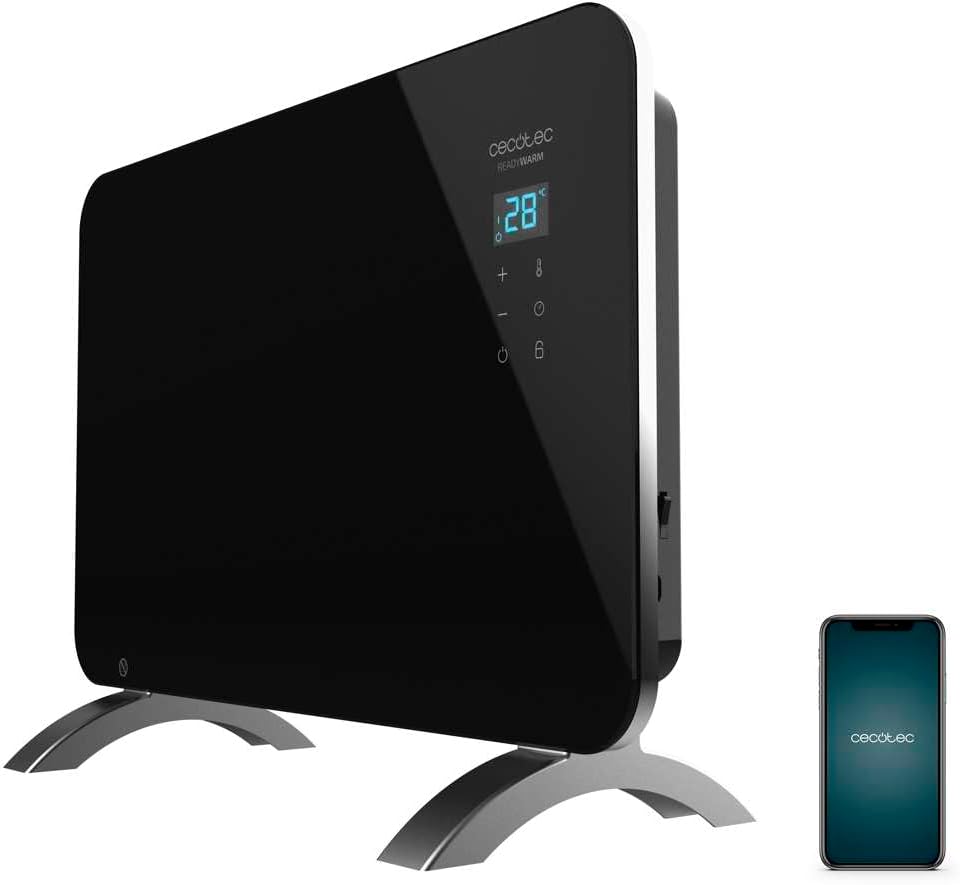
Figure 1: The Cecotec Ready Warm 6670 Cristal Electric Radiator, showcasing its sleek black design and digital display, alongside a smartphone indicating its Wi-Fi control capability.
2. Ntuziaka nchekwa dị mkpa
Biko gụọ ntuziaka niile nke ọma tupu i jiri ngwa ahụ ma debe ha maka ntụaka n'ọdịnihu. Ọ bụrụ na i meghị iwu ndị a, ọ nwere ike ibute nkụchi ọkụ eletrik, ọkụ, ma ọ bụ mmerụ ahụ dị njọ.
- Gbaa mbọ hụ na voltage egosiri na akara ọkwa dabara na isi vol gịtage tupu ejikọta ngwa ahụ.
- Do not use this appliance near water or in damp environments, such as bathrooms, due to its IP24 splash protection rating.
- Always place the radiator on a stable, flat surface. Ensure adequate clearance from walls and furniture for proper ventilation.
- Do not cover the radiator, as this can lead to overheating and fire hazards.
- Keep children and pets away from the appliance during operation, as surfaces can become very hot.
- Unplug the appliance from the power outlet when not in use, before cleaning, or before moving it.
- Do not operate the appliance with a damaged cord or plug, or if it has malfunctioned or been dropped.
- Repairs should only be performed by qualified personnel. Improper repairs can be dangerous.
- Ezubere ngwa a maka ime ụlọ naanị.
3. Ngwa ngwaahịa
Familiarize yourself with the main parts of your Cecotec Ready Warm 6670 Cristal Electric Radiator:
- Main Heating Unit (Glass Panel)
- Ogwe ngosi dijitalụ
- Control Buttons (+, -, Power, Mode, Timer)
- Igwe ọkụ na nkwụnye
- Detachable Pedestal Feet (for freestanding use)
- Wall Mounting Brackets (optional, not included in this model description but common for panel heaters)

Ọgụgụ 2: A zuru ezu view of the radiator's digital display and control buttons, showing temperature, mode, and timer indicators.
4. Ntọala na nwụnye
Your radiator can be used as a freestanding unit with the included pedestal feet.
4.1. Attaching the Pedestal Feet
- Jiri nlezianya kewaa radiator na ihe niile dị na ya.
- Place the radiator on a soft, flat surface to prevent scratching the glass panel.
- Align the pedestal feet with the mounting holes at the bottom of the radiator.
- Secure the feet using the provided screws. Ensure they are firmly attached.
- Once the feet are attached, carefully place the radiator upright in your desired location. Ensure it is on a stable, level surface and away from flammable materials.

Figure 3: The radiator positioned in a room, demonstrating its freestanding setup with the pedestal feet.
5. Ntuziaka ọrụ
5.1. Basic Ọrụ
- Tinye radiator ahụ n'ime ebe ọkụ eletrik kwesịrị ekwesị.
- Pịa Ike bọtịnụ (akara: okirikiri nwere ahịrị kwụ ọtọ) on the control panel to turn the unit on. The digital display will illuminate.
- Jiri ihe + na - buttons to adjust the desired temperature. The display will show the set temperature.
- Pịa Ụdị bọtịnụ (symbol: thermometer) to cycle through heating modes (e.g., Eco, Max).
- To turn off the radiator, press the Ike bọtịnụ ọzọ.
5.2. Wi-Fi Connectivity and App Control
The Cecotec Ready Warm 6670 Cristal can be controlled via your smartphone using the Tuya Smart APP.
- Download the "Tuya Smart" app from your smartphone's app store (available for iOS and Android).
- Register or log in to your Tuya Smart account.
- Gbaa mbọ hụ na ejikọrọ ekwentị gị na netwọk Wi-Fi 2.4 GHz.
- On the radiator, press and hold the Wi-Fi button (if available, or a combination of buttons as per app instructions) to enter pairing mode. The Wi-Fi indicator on the display will blink.
- In the Tuya Smart app, tap "+" to add a device. Select "Heater" or "Radiator" from the device list.
- Follow the on-screen instructions in the app to connect the radiator to your Wi-Fi network. This typically involves confirming the Wi-Fi indicator is blinking and entering your Wi-Fi password.
- Once connected, you can control the radiator's power, temperature, mode, and timer settings directly from the app.

Figure 4: A user interacting with a smartphone, illustrating the convenience of controlling the radiator remotely via the Tuya Smart application.
5.3. Ọrụ ngụ oge
The timer allows you to set a specific duration for the radiator to operate.
- Pịa Ngụ oge bọtịnụ (akara: elekere) on the control panel or in the app.
- Jiri ihe + na - buttons to set the desired operating time in hours.
- The radiator will automatically turn off after the set time has elapsed.
6. Nlekọta na nhicha
Regular cleaning ensures optimal performance and extends the lifespan of your radiator.
- Mgbe niile, kwụpụ radiator ahụ na ebe a na-etinye ọkụ eletrik ma hapụ ya ka ọ jụọ oyi kpamkpam tupu e hichaa ya.
- Jiri nwayọ hichaa elu mpụta, damp akwa . Ejila ihe nchacha abrasive, ihe mgbaze, ma ọ bụ kemịkalụ siri ike, n'ihi na ndị a nwere ike imebi njedebe.
- Do not immerse the radiator in water or any other liquid.
- Ensure no water enters the control panel or electrical components.
- For storage, clean the unit and store it in a cool, dry place, preferably in its original packaging.
7. Nchọpụta nsogbu
Ọ bụrụ na ị hụ nsogbu na radiator gị, lee nsogbu na ngwọta ndị a na-ahụkarị:
| Nsogbu | Ihe nwere ike ime | Ngwọta |
|---|---|---|
| Radiator anaghị agba ọkụ. | Not plugged in; power outlet faulty; power button not pressed; overheat protection activated. | Check power connection; try a different outlet; press power button; unplug and let cool for 30 minutes before restarting. |
| Enweghị mmepụta okpomọkụ. | Temperature setting too low; mode not set correctly. | Increase desired temperature; ensure correct heating mode (e.g., Max) is selected. |
| Njikọ Wi-Fi daa. | Incorrect Wi-Fi password; router too far; 5 GHz network used; pairing mode not active. | Verify password; move radiator closer to router; ensure 2.4 GHz network is used; re-enter pairing mode on radiator. |
| Radiator agbanyụọla na mberede. | Timer function active; overheat protection activated. | Check timer settings; ensure radiator is not covered and has adequate ventilation. |
8. Nka na ụzụ nkọwa
| Njirimara | Nkọwa |
|---|---|
| Ụdị | Cecotec |
| Nọmba nlereanya | big-V1704474 (05350) |
| Agba | Nwa |
| Ike | 1000 W |
| Voltage | 220 volts |
| Ihe onwunwe | Aluminum (Heating element), Glass (Panel) |
| Usoro kpo oku | Okwuchi |
| Njirimara Pụrụ Iche | Adjustable Thermostat, Wi-Fi Connectivity, Timer, Overheat Protection, IP24 Splash Protection |
| Akụkụ (L x W x H) | 47 x 13 x 64 cm (Product); 60 x 24 x 46 cm (Product, alternative) |
| Ibu Ibu | 5.1 kilogram |
| Ọkwa mkpọtụ | 44 dB |
| Akwadoro ojiji | Indoor (Home) |
9. Akwụkwọ ikike na nkwado
Cecotec products are manufactured to high-quality standards. This product comes with a standard manufacturer's warranty covering defects in materials and workmanship from the date of purchase. Please refer to the warranty card included with your product for specific terms and conditions.
For technical support, troubleshooting assistance, or warranty claims, please contact Cecotec customer service through their official website or the contact information provided in your product packaging. When contacting support, please have your model number (big-V1704474) and purchase date ready.
Spare parts availability: 10 Years.


