1. Okwu mmalite
Thank you for choosing the Sportstech F17 Treadmill. This manual provides essential information for the safe and effective use, setup, operation, and maintenance of your new fitness equipment. Please read this manual thoroughly before operating the treadmill and retain it for future reference.
The Sportstech F17 is designed for home fitness, featuring a powerful yet quiet motor, a comfortable running surface, and smart connectivity options for an enhanced training experience.

Image 1.1: A woman running on the Sportstech F17 treadmill, demonstrating its use.
2. Ntuziaka nchekwa dị mkpa
To reduce the risk of serious injury, read all important precautions and instructions in this manual before using the treadmill. Sportstech assumes no responsibility for personal injury or property damage sustained by or through the use of this product.
- Always place the treadmill on a level surface with at least 2 meters (6.5 feet) of clear space behind it and 0.6 meters (2 feet) on each side.
- Keep children and pets away from the treadmill, especially during operation.
- Ensure the safety key is properly attached to your clothing before starting the treadmill. In case of an emergency, pulling the safety key will immediately stop the machine.
- Afela oke onye ọrụ dị kilogram 120 (264 lbs).
- Yiri akpụkpọ ụkwụ na uwe egwuregwu kwesịrị ekwesị. Zere uwe ndị na-adịghị mma nke nwere ike ịdaba n'ime akụkụ ndị na-agagharị agagharị.
- If you feel faint, dizzy, or experience pain during your workout, stop immediately and consult a physician.
- Unplug the treadmill from the power outlet when not in use, before cleaning, and before performing any maintenance.
- The treadmill features extra-wide side profiles for enhanced safety during use. Always step onto these profiles if you need to pause your run without stopping the belt.
3. Ihe ngwugwu
Carefully unpack your Sportstech F17 Treadmill and verify that all items are present:
- 1x Sportstech F17 Treadmill
- 1x User Manual (DE, EN, IT, FR, ES)
- Tools for minor adjustments
- Pulse belt (for heart rate monitoring)
4. Ntọala na Mgbakọ mbụ
The Sportstech F17 treadmill comes pre-assembled, requiring minimal setup. Its innovative Easy Folding System allows for quick deployment and compact storage.
4.1 Mepee igwe ihe eji eme ihe
- Place the packaged treadmill on a flat, stable surface.
- Jiri nlezianya wepụ ihe niile nkwakọ ngwaahịa.
- Locate the folding mechanism release. Gently lift the running deck until it locks into the upright position.
- Lower the console arms into their operational position.
- Ensure all parts are securely locked before connecting to power.

Image 4.1: Visual guide to the Easy Folding System, illustrating how to unfold the treadmill for use and fold it for compact storage.
4.2 Ijikọ n'ike
Plug the power cord into a grounded electrical outlet. Ensure the power switch is in the 'ON' position.
5. Ntuziaka ọrụ
The Sportstech F17 features an intuitive LED display and touch controls for easy operation.
5.1 Ogwe njikwa gafereview
The LED display shows key workout metrics such as time, distance, speed, calories burned, and heart rate (when using the pulse belt). The touch-sensitive buttons allow you to start, stop, adjust speed, and select programs.

Image 5.1: The intuitive LED touchscreen control panel, showing various workout data and touch buttons.
5.2 Malite mgbatị ahụ
- Tinye obere igodo nchekwa na uwe gị.
- Gaa n'akụkụ okporo ụzọ nke treadmill ahụ.
- Pịa bọtịnụ 'MALITE' na njikwa ahụ. Belt ahụ ga-amalite ịkwaga n'ọsọ dị ala.
- Carefully step onto the running belt.
- Adjust the speed using the '+' and '-' buttons. The maximum speed is 12 km/h.
5.3 Stopping a Workout
- To stop gradually, press the 'STOP' button. The belt will slow down and come to a complete stop.
- For an emergency stop, pull the safety key from the console. The treadmill will immediately cease operation.
5.4 Pre-installed Programs
The F17 treadmill includes 12 pre-installed workout programs. To select a program, press the 'PROGRAM' button and cycle through the options. Follow the on-screen prompts to start your chosen program.
5.5 App Connectivity (KINOMAP & Other Apps)
Enhance your training with the integrated app compatibility. The F17 is designed to work with fitness apps like KINOMAP, offering live videos, coaching, and multiplayer modes.
- Download the compatible fitness app (e.g., KINOMAP) on your tablet or smartphone.
- Place your device securely in the integrated tablet holder on the console.
- Follow the app's instructions to connect to your Sportstech F17 treadmill via Bluetooth.
- Enjoy interactive workouts, virtual routes, and performance tracking.

Image 5.2: The treadmill console with a tablet displaying the Kinomap app, showcasing live videos and interactive training.
5.6 Nleba anya ọnụego obi
The treadmill includes a pulse belt for accurate heart rate monitoring. Wear the pulse belt according to its separate instructions. Your heart rate will be displayed on the console, allowing you to train within your target zones.
5.7 Akụkụ ọdịyo
The F17 is equipped with MP3 functionality (via aux-in), a headphone jack, and stereo speakers. Connect your audio device to enjoy music during your workout.
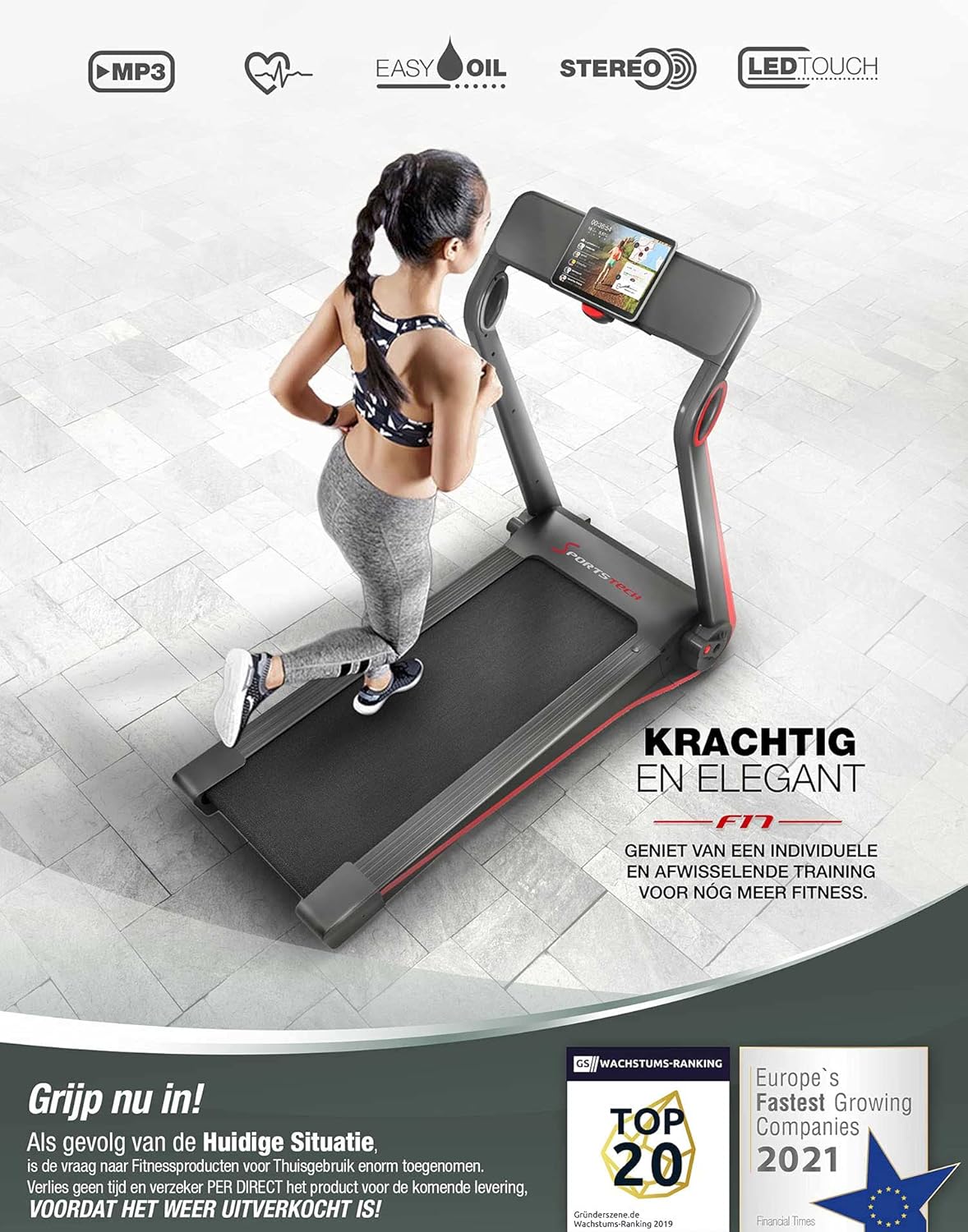
Foto 5.3: Ofeview of key features including MP3 connectivity, automatic lubrication, stereo speakers, and LED touch display.
6. Nlekọta
Regular maintenance ensures the longevity and optimal performance of your Sportstech F17 treadmill.
6.1 Innovative Lubrication System
The F17 features an innovative, self-lubricating system that automatically dispenses silicone oil evenly over the running deck. This eliminates the need for frequent manual re-oiling, simplifying maintenance.
- Monitor the oil level indicator (if available) or refer to the manual for recommended refill intervals.
- Use only approved silicone oil for treadmills.

Foto 6.1: Zuru ezu view of the automatic lubrication system, showing oil distribution for smooth belt operation.
6.2 Nhicha
- Mgbe niile, wepụ ihe na-akpụ akpụ tupu ihicha ya.
- Jiri ihe dị nro, d hichaa ihe njikwa na elu mpụta ya.amp akwa . Zere ihe nhicha ma ọ bụ ihe mgbaze.
- Periodically vacuum underneath the treadmill to remove dust and debris.
6.3 Running Belt Adjustment and Tension
Over time, the running belt may shift or become loose. Proper belt tension and alignment are crucial for safe and efficient operation.
- If the belt feels loose or slips during use, it may need tensioning.
- If the belt drifts to one side, it may need alignment.
- Refer to the detailed instructions in the printed manual for specific steps on adjusting belt tension and alignment using the provided tools. Perform adjustments gradually and test the treadmill after each adjustment.
7. Nchọpụta nsogbu
This section addresses common issues you might encounter with your Sportstech F17 treadmill. For problems not listed here, please contact customer support.
| Nsogbu | Ihe nwere ike ime | Ngwọta |
|---|---|---|
| Treadmill anaghị arụ ọrụ. | Power cord not plugged in; power switch off; safety key not in place. | Ensure power cord is securely plugged in. Check if the power switch is ON. Verify the safety key is correctly inserted into the console. |
| Belt ịgba ọsọ na-amị amị ma ọ bụ na-ala azụ. | Belt too loose; insufficient lubrication; user weight exceeds limit. | Adjust belt tension (refer to Section 6.3). Check the automatic lubrication system. Ensure user weight is within the 120 kg limit. |
| Mkpọtụ na-adịghị ahụkebe n'oge arụ ọrụ. | Ihe ndị dị nro; eriri anaghị adabara; nsogbu moto. | Check for any loose screws or parts. Adjust belt alignment (refer to Section 6.3). If noise persists, contact customer support. |
| Heart rate monitor not working. | Pulse belt not worn correctly; battery low (if applicable). | Ensure the pulse belt is worn correctly and making good contact with your skin. Check/replace pulse belt battery if necessary. |
8. Nkọwapụta
| Njirimara | Nkọwa |
|---|---|
| Nlereanya | F17 |
| Ike moto | 2.5 Horsepower (DC motor) |
| Ọsọ kacha | 12 km / h |
| Running Surface (L x W) | 1100 mm x 400 mm |
| Ibu Onye ọrụ kacha | 120 n'arọ |
| Akụkụ (Ekpughepụrụ) | 144 x 72 x 123.8 cm |
| Akụkụ (Ejiri | | 40.8 x 72 x 141.8 cm (approximate, based on packed size) |
| Ibu ngwaahịa | 20.5 n'arọ |
| Ụdị ngosi | Ikanam |
| Mmemme | 12 pre-installed programs |
| Njikọta | App compatible (e.g., Kinomap), Bluetooth |
| Atụmatụ pụrụ iche | Easy Folding System, Automatic Lubrication System, Integrated Speakers, Tablet Holder, Pulse Belt included |

Image 8.1: A visual summary of the Sportstech F17's key specifications and features.
9. Akwụkwọ ikike na nkwado
For warranty information, please refer to the warranty card included with your product or visit the official Sportstech website. If you encounter any issues or require technical assistance, please contact Sportstech customer support. Have your model number (F17) and purchase details ready when contacting support.
Contact information can typically be found on the Sportstech website or in the original purchase documentation.


