1. N'eluview
The Digitus DN-82024 Media Converter facilitates seamless conversion between multimode and singlemode fiber optic signals. This device allows for network extension over long distances using fiber optics without requiring a complete network cabling overhaul. Its intuitive design ensures straightforward installation and operation, providing a reliable solution for integrating different fiber optic network segments.
2. Ihe ngwugwu
Gbaa mbọ hụ na ihe niile dị na ngwugwu:
- Fast Ethernet Multimode/Singlemode Media Converter SC/SC
- Ntuziaka mmalite ngwa ngwa
- Ihe nkwụnye ọkụ
3. Atụmatụ
- Simple conversion between Multi Mode and Single Mode fiber optic.
- Rapid migration for long distances.
- Connectors: SC/SC, Wavelength: 1310 nm.
- Suitable for 50/125µm, 62.5/125µm, and 100/140µm fiber optics (Multimode), up to 2 km.
- Suitable for 8.3/125µm, 8.7/125µm, 9/125µm, and 10/125µm fiber optics (Singlemode), up to 20 km.
4. Nhazi
Follow these steps to set up your Digitus DN-82024 Media Converter:
- Njikọ Ike: Connect the provided power adapter to the DC 5V port on the media converter. Plug the power adapter into a standard electrical outlet. The 'PWR' LED indicator should illuminate.
- Connect Fiber Optic Cables: Connect the appropriate fiber optic cables (multimode or singlemode, depending on your network infrastructure) to the SC/SC ports. Ensure that the transmit (TX) port on one device connects to the receive (RX) port on the other, and vice-versa.
- Jikọọ ngwaọrụ netwọk: Connect your network devices (e.g., switches, routers, servers) to the other ends of the fiber optic cables.
- Nyochaa njikọ: Once all connections are made, observe the LED indicators on the front panel. The 'LINK A' and 'LINK B' LEDs should illuminate, indicating a successful fiber optic link. The 'TX' and 'RX' LEDs will flash to indicate data transmission and reception.
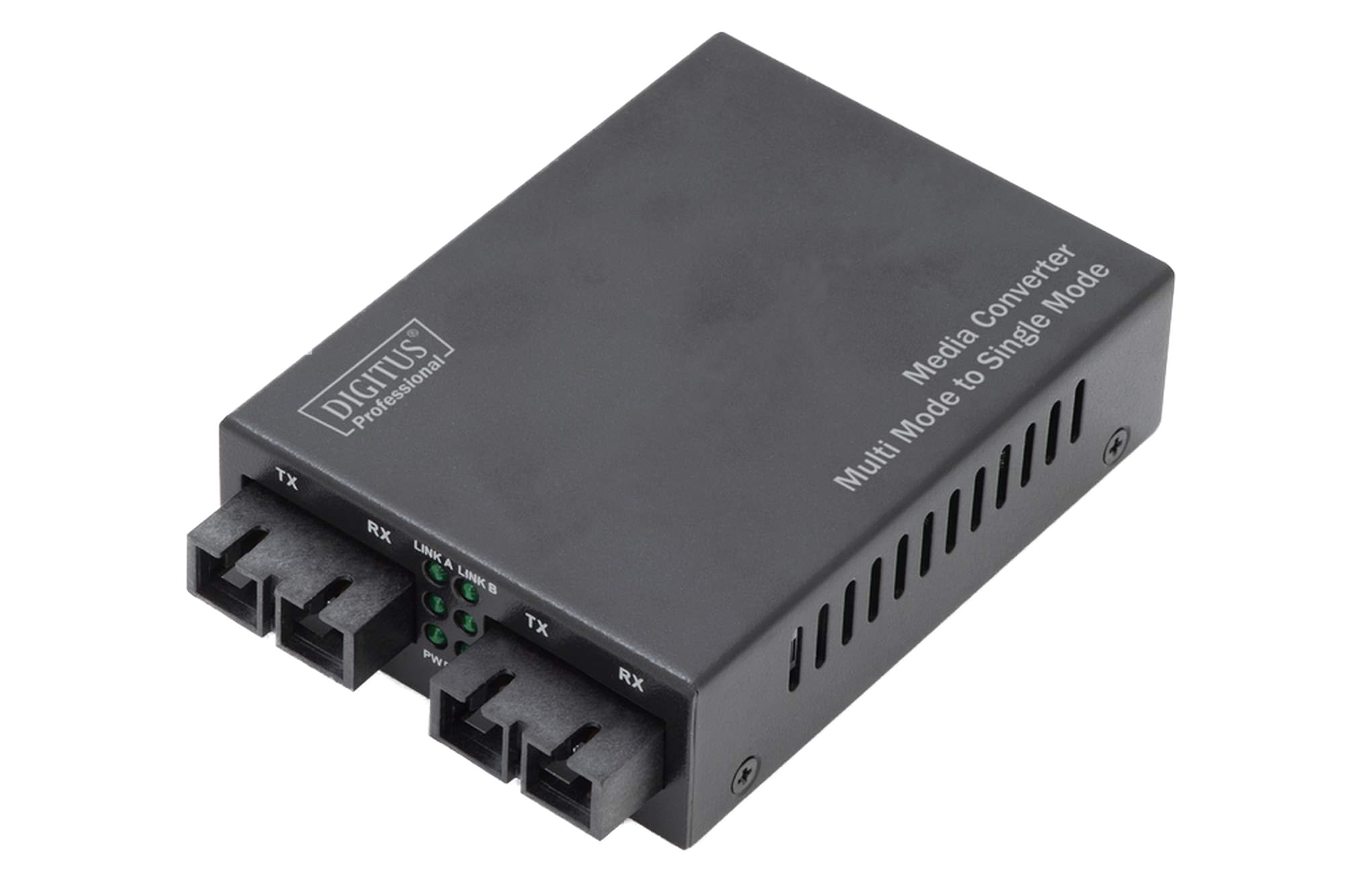
Figure 1: Digitus DN-82024 Media Converter unit.

Figure 2: Media converter with fiber optic cables connected to the SC/SC ports.
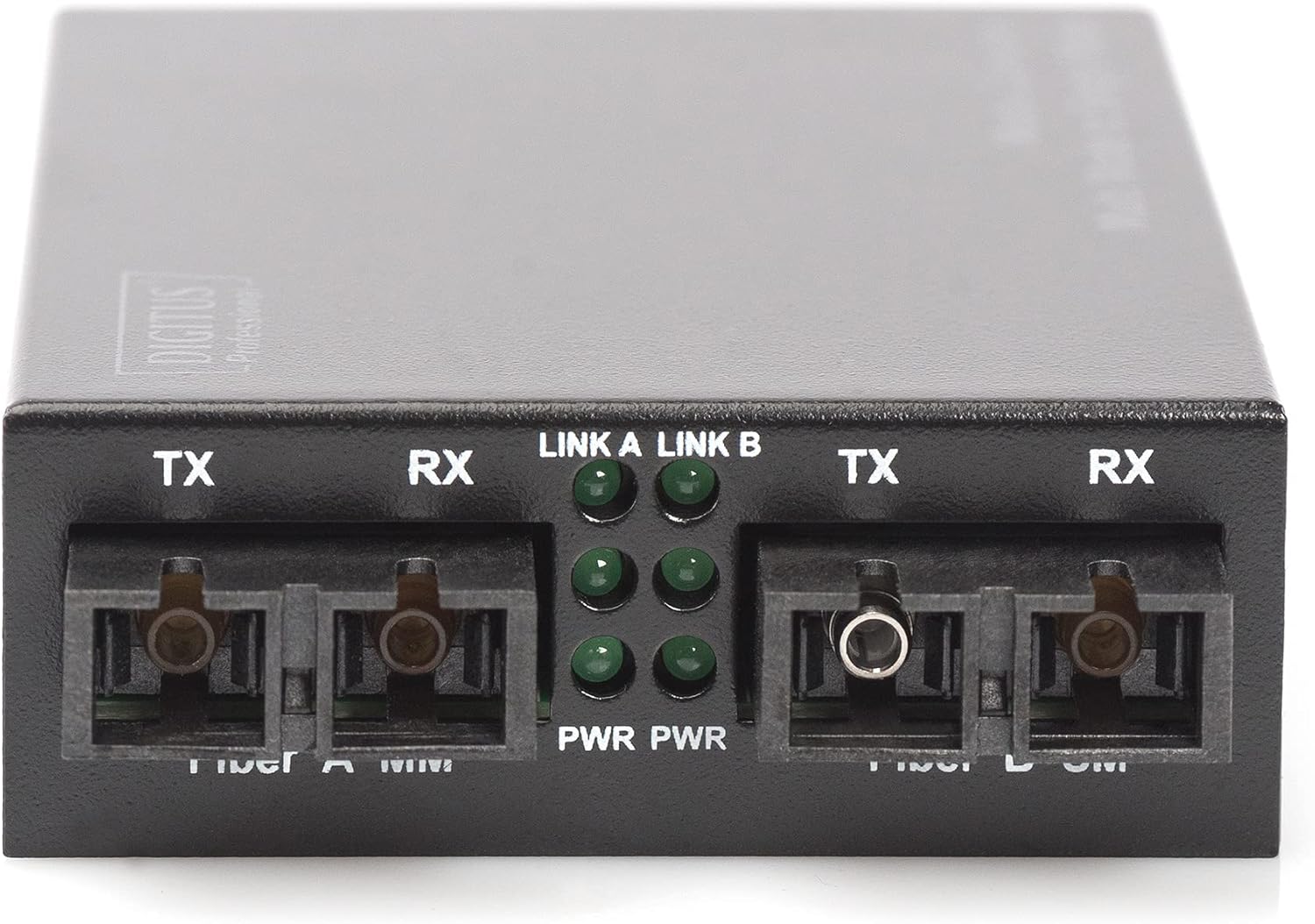
Figure 3: Front panel showing SC ports and LED indicators for power, link, and activity.
5. Ntuziaka ọrụ
The Digitus DN-82024 Media Converter operates automatically once all connections are established and power is supplied. It functions as a transparent bridge, converting Fast Ethernet signals between electrical and fiber optic media.
Ihe ngosi LED:
- PWR (Ike): Illuminates when the device is receiving power.
- LINK A / LINK B (Link Status): Illuminates when a valid fiber optic link is established. Flashes to indicate data activity.
- TX (Bufee): Flashes when data is being transmitted over the fiber optic link.
- RX (nata): Flashes when data is being received over the fiber optic link.
6. Nlekọta
To ensure optimal performance and longevity of your media converter:
- gburugburu: Keep the device in a clean, dry, and well-ventilated environment. Avoid extreme temperatures and humidity.
- Fiber Optic Connectors: Regularly inspect and clean fiber optic connectors. Dust and debris can significantly degrade signal quality. Use only approved fiber optic cleaning tools and methods.
- Njikwa USB: Ensure fiber optic cables are not bent beyond their minimum bend radius to prevent damage to the fiber core.
- Ịnye ọkụ: Periodically check the power adapter and cable for any signs of damage or loose connections.
7. Nchọpụta nsogbu
If you encounter issues with your Digitus DN-82024 Media Converter, refer to the following troubleshooting guide:
| Nsogbu | Ihe nwere ike ime | Ngwọta |
|---|---|---|
| Enweghị ike LED | Enweghị ọkọnọ ike ma ọ bụ ihe nkwụnye nwere nsogbu. | Ensure the power adapter is securely connected to the device and a working power outlet. Check the power adapter for damage. |
| No Link LED (LINK A/B) | Fiber optic cable issue, incorrect connection, or incompatible fiber type. | Verify that both ends of the fiber optic cable are correctly connected (TX to RX, RX to TX) and that the cable is not damaged. Ensure the connected network devices are powered on and functioning correctly. Confirm that the correct multimode or singlemode fiber type is used for the connection. Clean fiber optic connectors if necessary. |
| Ịrụ ọrụ netwọk dị nwayọọ | Dirty fiber optic connectors, damaged cable, or network congestion. | Ensure fiber optic connectors are clean. Check for any physical damage to the cables or connectors. Verify that the connected network devices are operating at the expected speed and that there is no network congestion. |
8. Nkọwapụta
| Nlereanya | DNA-82024 |
| Njikọ | SC/SC |
| Ogologo ogologo | 1310 nm |
| Ọnụego mbufe data | 100 Mbit/s |
| Multimode Range | Up to 2 km (for 50/125µm, 62.5/125µm, 100/140µm fiber) |
| Singlemode Range | Up to 20 km (for 8.3/125µm, 8.7/125µm, 9/125µm, 10/125µm fiber) |
| Ntinye ike | 5V DC |
| Oke. Oriri ugbu a | 1 A |
| Oriri ike | 3.5W |
| Akụkụ (L x W x H) | 95 mm x 70 mm x 26 mm |
| Okpomọkụ na-arụ ọrụ | -10°C ruo 55°C |
| Ibu | 300 g |
9. Akwụkwọ ikike na nkwado
For detailed warranty information, technical support, and service inquiries, please refer to the official Digitus website or contact your local reseller. It is recommended to keep your purchase receipt as proof of purchase for any warranty claims.
You can find more information about Digitus solutions at: Digitus Solutions Overview


