1. Okwu mmalite
Thank you for choosing the Bagotte SH020 3MP 1296P FHD Wireless IP Camera. This manual provides detailed instructions for setting up, operating, and maintaining your camera to ensure optimal performance and security. Please read this manual carefully before use and keep it for future reference.
2. Ihe ngwugwu
Gbaa mbọ hụ na ihe niile dị na ngwugwu:
- 1 x Bagotte SH020 IP Camera
- 1 x nkwụnye ọkụ
- 1 x eriri USB
- 1 x Nkwụnye Aka
- 2 x kposara
- 1 x Akwụkwọ ntuziaka onye ọrụ
3. Ngwaahịa gafereview
The Bagotte SH020 is a 3MP 1296P Full HD wireless IP camera designed for indoor surveillance. It features pan and tilt functionality, infrared night vision, two-way audio, motion detection, and local storage via a MicroSD card.

Foto 1: N'ihu view of the Bagotte SH020 3MP 1296P FHD Wireless IP Camera.

Image 2: Diagram illustrating the components of the Bagotte SH020 camera, including the IR sensor, lens, MicroSD card slot, antenna, network interface, power input, and reset button.
4. Nhazi
4.1. Na-agbanye ike
- Connect the USB cable to the camera's power input port.
- Tinye ihe nkwụnye ọkụ n'ime oghere eletrik ọkọlọtọ.
- The camera will power on and initiate its startup sequence. Wait for the indicator light to flash, indicating it's ready for setup.
4.2. Ngwa nwụnye
Download the recommended mobile application (e.g., SriHome or MIPC, as mentioned in product reviews) from your device's app store (Google Play Store for Android or Apple App Store for iOS). Chọọ maka 'SriHome' or 'MIPC' and install the application.
4.3. Ijikọ na Wi-Fi
- Open the installed application and create an account or log in.
- Follow the in-app instructions to add a new device. This usually involves scanning a QR code located on the camera or manually entering the device ID.
- Ensure your mobile device is connected to a 2.4GHz Wi-Fi network. The camera does not support 5GHz Wi-Fi.
- Enter your Wi-Fi network password when prompted by the app.
- The camera will attempt to connect to your Wi-Fi network. Once connected, the indicator light will typically turn solid blue or green, and the app will confirm successful pairing.
4.4. Ịtinye igwefoto
The camera can be placed on a flat surface or mounted to a wall or ceiling using the provided bracket and screws.
- Họrọ ebe kwesịrị ekwesị maka mkpuchi nlekọta kacha mma.
- Attach the mounting bracket to the desired surface using the screws.
- Securely attach the camera to the mounting bracket. Ensure it is firmly in place.
5. Na-arụ ọrụ igwefoto
5.1. Ndụ View na njikwa
Access the live video feed through the mobile application. You can remotely control the camera's pan (355°) and tilt (90°) movements to adjust the viewing angle. The app also supports 4x digital zoom.
Video 1: Seller's operation video demonstrating the camera's pan, tilt, auto-tracking, mobile phone view, two-way audio, MicroSD card slot, and infrared night vision features.
5.2. Audio Ụzọ Abụọ
The camera features a built-in microphone and speaker, enabling two-way audio communication. Use the microphone icon in the app to speak through the camera and listen to audio from the camera's location.
5.3. Ọhụụ abalị
Equipped with 10 IR LEDs, the camera provides clear infrared night vision up to 10 meters, ensuring surveillance even in complete darkness. The IR-Cut filter automatically switches between day and night modes.
5.4. Nchọpụta ngagharị na Mkpu
The camera supports motion detection with adjustable sensitivity. When motion is detected, the camera can trigger an alarm, send push notifications to your phone, and initiate recording. Advanced AI features include auto motion tracking and humanoid detection.
5.5. Ndekọ na Nchekwa
The camera supports MicroSD cards up to 128GB for local storage of recordings. Recording modes include motion-activated, timed, and manual recording. You can playback recorded footage ozugbo site na ngwa ahụ.
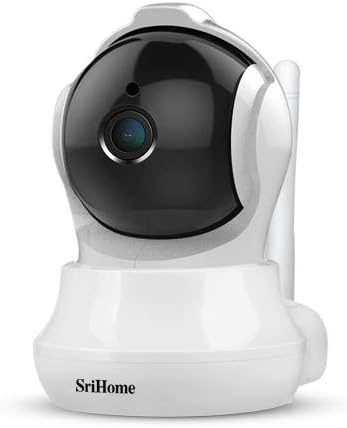
Image 3: The Bagotte SH020 camera positioned in a room, demonstrating its discreet design and wide viewakụkụ n'akuku.
6. Nlekọta
- Nhicha: Use a soft, dry cloth to clean the camera lens and body. Avoid harsh chemicals or abrasive materials.
- Mmelite femụwe: Regularly check the mobile application for available firmware updates to ensure your camera has the latest features and security enhancements.
- Kaadị MicroSD: If using a MicroSD card, periodically check its status and ensure sufficient storage space. Back up important recordings as needed.
7. Nchọpụta nsogbu
- Igwefoto anaghị ejikọta na Wi-Fi: Ensure your Wi-Fi network is 2.4GHz. Verify the Wi-Fi password is correct. Move the camera closer to the router. Reset the camera using the reset button and try again.
- Ogo vidiyo na-adịghị mma: Check your internet connection speed. Ensure the camera lens is clean. Adjust video resolution settings in the app.
- Nchọpụta mmegharị anaghị arụ ọrụ: Verify motion detection is enabled in the app settings. Adjust sensitivity levels and detection zones.
- Enweghị ọdịyo: Check volume settings in the app. Ensure the microphone and speaker are not obstructed.
8. Nkọwapụta
| Njirimara | Nkọwapụta |
|---|---|
| Mkpebi vidiyo | 3MP, 1296P (2304*1296), H.264 |
| Ogologo Pan/Tilt | Pan: 355°, Tụgharịa: 90° |
| oghere | 3.6 mm |
| Oke ọhụụ abalị | Up to 10 meters (10 IR LEDs) |
| Audio | Ọdịda ụzọ abụọ (igwe okwu arụnyere na igwe okwu) |
| Nchekwa | Kaadị MicroSD (ihe ruru 128GB) |
| Njikọ ikuku | Wi-Fi (naanị 2.4GHz) |
| Nchọpụta ngagharị | Yes, with AI Auto Motion Tracking and AI Humanoid Detection |
| Ịnye ọkụ | DC 5V, 1A |
| Akụkụ | 7.3 x 7.6 x 10 cm |
| Ibu | 380 g |
9. Akwụkwọ ikike na nkwado
For warranty information and technical support, please refer to the documentation included with your product or visit the official Bagotte websaịtị. Debe nnata nzụta gị dị ka ihe akaebe nke ịzụrụ maka nkwupụta ikike.


