1. Okwu mmalite
Thank you for choosing the ToughTested 24,000 mAh Solar Power Bank. This device is designed to provide reliable portable power for your electronic devices, especially in outdoor and emergency situations. This manual contains important information regarding the safe and efficient use, maintenance, and troubleshooting of your power bank. Please read it thoroughly before use and retain it for future reference.
2. Ngwaahịa gafereview
2.1 Atụmatụ
- Massive 24,000 mAh Capacity: Provides multiple charges for smartphones, tablets, and other USB-powered devices.
- Ogwe igwe dị elu nke ọma: Supplementary charging via sunlight, converting solar energy efficiently.
- Otutu ọdụ ụgbọ mmiri: Includes 2 USB-A ports and 1 fast-charging USB-C port for simultaneous device charging.
- Durable and Rugged Design: IP67 rated for water, dust, and shock resistance, suitable for harsh environments.
- Teknụzụ chaja smart: Instasense Power Sharing detects and delivers optimal charge for connected devices.
- Igwe ọkụ ọkụ agbakọtara ọnụ: Features a 4-mode LED flashlight for emergency lighting.
Ihe ngwugwu 2.2
- ToughTested 24,000 mAh Solar Power Bank
- USB-C na eriri USB-C
- USB-A ruo Micro-USB USB
- Akwụkwọ ntuziaka
2.3 Eserese ngwaahịa

Foto 1: N'ihu view of the ToughTested Solar Power Bank, showing the solar panel and rugged casing.
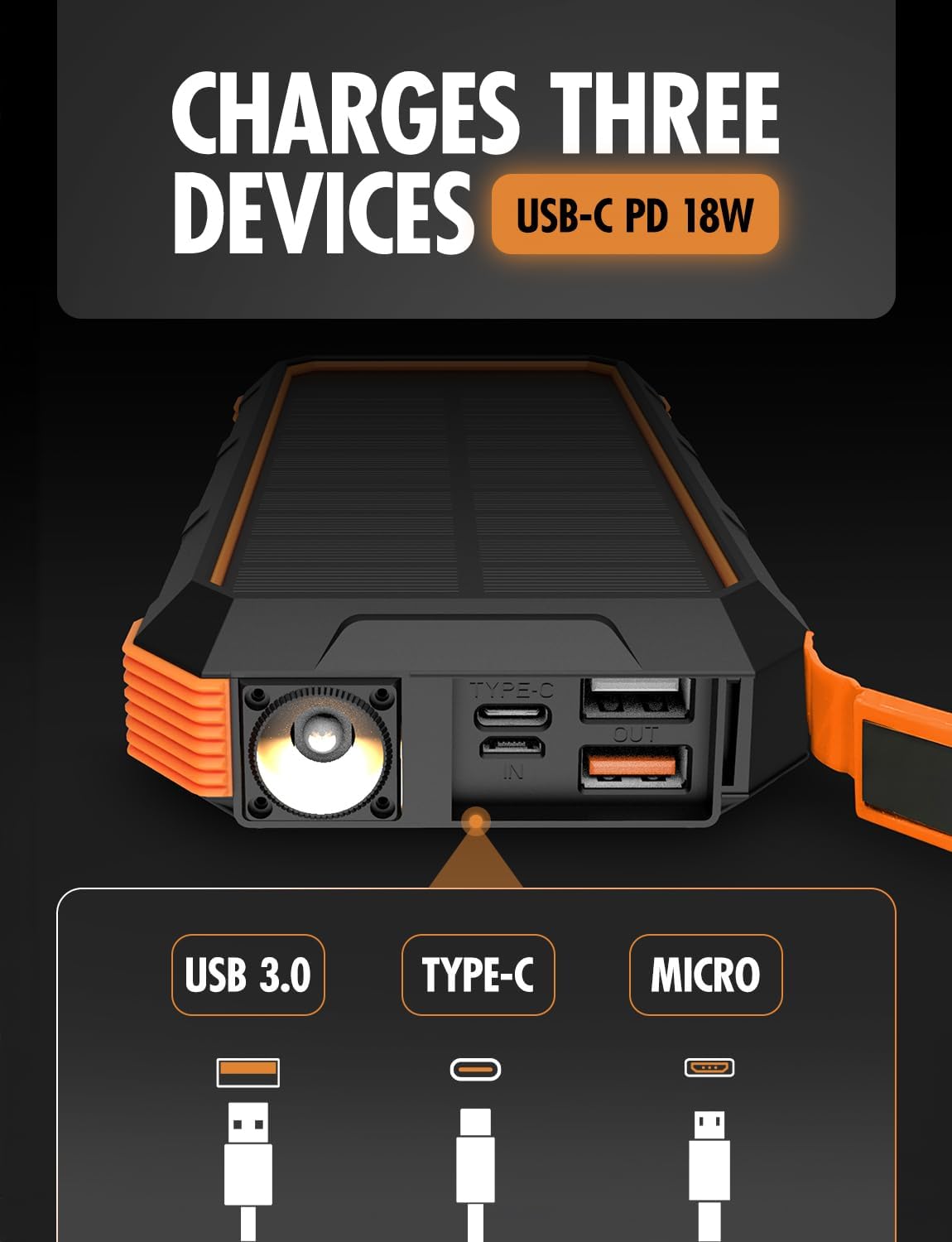
Foto 2: Akụkụ view of the power bank, highlighting the USB-C (input/output), USB 3.0 (output), and Micro-USB (input) ports, along with the LED flashlight.
3. Nhazi
3.1 Nchaji mbụ nke ụlọ akụ ọkụ
Before first use, fully charge the power bank using a wall adapter. This ensures the internal battery is conditioned for optimal performance.
- Connect the provided USB-C cable to the USB-C port on the power bank.
- Connect the other end of the USB-C cable to a compatible USB wall adapter (not included).
- Allow the power bank to charge until all battery indicator lights are solid, indicating a full charge.
The USB-C port supports 18W Power Delivery (PD) for faster charging of the power bank itself.

Figure 3: Illustration of the power bank's PD fast charging capability, indicating 18W power delivery.
4. Ntuziaka ọrụ
4.1 Ịchaji Power Bank
Your ToughTested Solar Power Bank can be charged via two methods:
- Wall Adapter (Recommended for primary charging): Use the USB-C port with a wall adapter for the fastest and most efficient charge.
- Solar Panel (Supplementary charging): Place the power bank in direct sunlight. The solar panel will convert sunlight into energy to charge the internal battery. Note that solar charging is slower and intended for emergency or supplementary power, not as a primary charging method.
4.2 Ịchaji ngwaọrụ gị
The power bank features multiple output ports to charge various devices simultaneously.
- Connect your device's charging cable to one of the available output ports (USB-A or USB-C) on the power bank.
- Jikọọ nsọtụ nke ọzọ nke eriri na ngwaọrụ gị.
- The power bank will automatically begin charging your device. The Instasense Power Sharing Technology will detect your device's charging requirements and deliver the optimal current.
- Lelee ọnọdụ chajị ngwaọrụ gị. Kwụsị ya ozugbo chajịchara ya nke ọma.
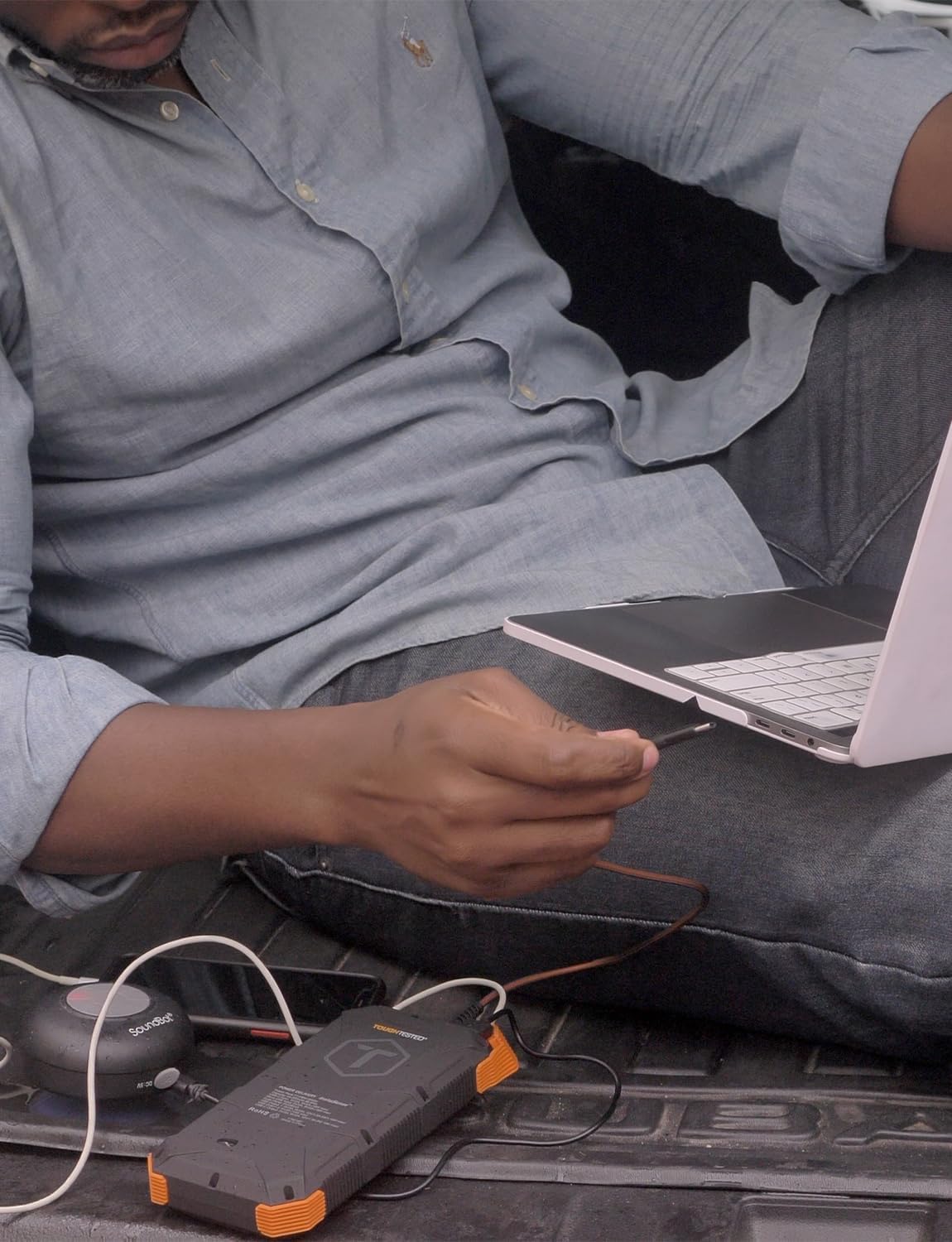
Figure 4: A user charging a laptop using the ToughTested Solar Power Bank, demonstrating its multi-device charging capability.
4.3 LED Flashlight arụ ọrụ
The integrated LED flashlight has four modes: Standard, SOS, Strobe, and Off.
- Ka ịgbanwuo: Press and hold the power button for approximately 3 seconds. The flashlight will turn on in Standard mode.
- To cycle modes: Briefly press the power button to switch between Standard, SOS, and Strobe modes.
- Iji gbanyụọ: Pịa ma jide bọtịnụ ike maka ihe dịka 3 sekọnd.

Figure 5: The power bank with its ultra-bright LED flashlight activated.
5. Nlekọta
5.1 Nhicha
Wipe the power bank with a soft, dry cloth. For stubborn dirt, a slightly damp cloth can be used. Ensure all ports are dry before use. Do not use harsh chemicals or abrasive cleaners.
5.2 Nchekwa
Store the power bank in a cool, dry place away from direct sunlight and extreme temperatures. For long-term storage, it is recommended to charge the power bank to approximately 50-75% every 3-6 months to maintain battery health.
5.3 Ogologo
The power bank is IP67 rated, meaning it is protected against dust ingress and can withstand immersion in water up to 1 meter for 30 minutes. While rugged, avoid intentional submersion or exposing it to high-pressure water jets.

Figure 6: The power bank's weather-proof housing, showing its resistance to water and dust. Note: Product is IP67 rated, image may show IP66.
6. Nchọpụta nsogbu
- Ụlọ akụ ọkụ anaghị akwụ ụgwọ:
- Ensure the charging cable is securely connected to both the power bank's input port and the power source.
- Verify the wall adapter or USB port is functional.
- If using solar charging, ensure the solar panel is exposed to direct sunlight and is clean. Solar charging is slow and primarily supplementary.
- Ngwaọrụ anaghị akwụ ụgwọ site na ụlọ akụ ọkụ:
- Lelee ma ụlọ akụ ọkụ nwere ụgwọ zuru oke.
- Ensure the charging cable between the power bank and your device is functional and securely connected.
- Gbalịa ọdụ ụgbọ mmiri mmepụta dị iche na ụlọ akụ ike.
- Some devices may require the power button on the power bank to be pressed to initiate charging.
- Igwe ọkụ anaghị arụ ọrụ:
- Ensure the power bank has charge.
- Press and hold the power button for 3 seconds to activate the flashlight.
7. Nkọwapụta
| Njirimara | Nkọwa |
|---|---|
| Nọmba nlereanya | TT-PBW-SW24 |
| Ike batrị | 24,000 mAh |
| Ntinye (USB-C) | 5V/3A (15W), Power Delivery (PD) |
| Mpụta (USB-C) | 5V/3A (15W), Power Delivery (PD) |
| Mpụta (USB-A) | 5V/3A (15W) |
| Igwe ọkụ anyanwụ | High-efficiency 400mAh |
| Ogo nke enweghị mmiri / uzuzu uzuzu | IP67 |
| Akụkụ | 2 x 4 x 8 sentimita asatọ |
| Ibu | 1 pound |
| Atụmatụ pụrụ iche | 4-Mode LED Flashlight, Instasense Power Sharing |
8. Ozi nchekwa
- Achịkọtala, mepee, ma ọ bụ kụrie mkpọ batrị.
- Ewepụla ụlọ akụ ike ọkụ ma ọ bụ ọkụ. Zere nchekwa na ìhè anyanwụ.
- Adịla mkpirisi mkpọ batrị. Echekwala ngwugwu batrị nke ọma n'ime igbe ma ọ bụ drawer ebe ha nwere ike ịmegharị ibe ha mkpụmkpụ ma ọ bụ ihe ndị na-eduzi ga-eme ka ha dị mkpụmkpụ.
- In the event of a battery leak, do not allow the liquid to come into contact with the skin or eyes. If contact has been made, wash the affected area with copious amounts of water and seek medical advice.
- Debe ụlọ akụ ike dị ọcha ma kpọọ nkụ.
- Ahapụla batrị na chaja ogologo oge mgbe anaghị eji ya.
- Edonyela ụlọ akụ ike ahụ ka ọ bụrụ ujo igwe.
- Dispose of the power bank according to local regulations. Do not dispose of as household waste.
- Ntuziaka California 65 ịdọ aka ná ntị: Ngwaahịa a nwere ike ịnwe kemịkal mara Steeti California iji bute ọrịa kansa na ntụpọ ọmụmụ ma ọ bụ mmerụ ahụ ndị ọzọ.
9. Akwụkwọ ikike na nkwado
The ToughTested 24,000 mAh Solar Power Bank is backed by a 5-Year ToughCare Warranty, ensuring durability and performance. For warranty claims, technical support, or any questions regarding your product, please contact ToughTested customer service through their official websaịtị ma ọ bụ onye na-ere ahịa ebe a zụrụ ngwaahịa ahụ.

Figure 7: Product packaging indicating the 5-Year Warranty and key features.


