Okwu mmalite
Daalụ maka ịzụrụasing the Intempo Bluetooth Speaker with FM Radio. This manual provides important information for the safe and efficient operation of your device. Please read it thoroughly before use and retain it for future reference.

Foto 1: N'ihu view of the Intempo Bluetooth Speaker.
Ozi nchekwa dị mkpa
- Ewepụla akụkụ ahụ ka ọ bụrụ mmiri mmiri na-asọpụta ma ọ bụ na-efesa.
- Do not disassemble the unit. Repairs should only be performed by qualified personnel.
- Keep the unit away from direct sunlight, heat sources, and open flames.
- Gbaa mbọ hụ na ikuku ikuku kwesịrị ekwesị; egbochila oghere ventilashị ọ bụla.
- Jiri naanị eriri chaja enyere maọbụ nke e nyere ikike.
Ngwaahịa gafereview
The Intempo Bluetooth Speaker features a vintage design with modern functionality. It includes Bluetooth connectivity for wireless audio streaming, an FM radio tuner, and an auxiliary input for wired connections. A leather carry strap enhances portability.

Figure 2: Front panel showing speaker grille, FM tuning dial, and control knobs.

Figure 3: Rear panel with charging port, power switch, and extendable FM antenna.
Melite
1. gingchaji Okwu Okwu
- Locate the Micro USB charging port on the rear of the speaker.
- Jikọọ eriri USB chaja enyere na ọdụ chaja nke ọkà okwu.
- Connect the other end of the USB cable to a suitable USB power adapter (not included) or a computer's USB port.
- Ọkụ na-egosi chajị ga-enwu n'oge ịchaji wee gbanyụọ ozugbo chajịchara.
2. Ịgbanye / gbanyụọ
- To power on the speaker, slide the power switch located on the rear panel to the 'ON' position.
- To power off the speaker, slide the power switch to the 'OFF' position.
Ntuziaka ọrụ
1. Ọnọdụ Bluetooth
- Power on the speaker. The speaker will automatically enter Bluetooth pairing mode, indicated by a flashing 'BT' indicator light.
- Na ngwaọrụ Bluetooth gị (smartphone, tabletị, wdg), gbanye Bluetooth wee chọọ ngwaọrụ dịnụ.
- Select 'Intempo EE3332BLUSTKEU' from the list of devices.
- Once paired, the 'BT' indicator light will become solid, and you will hear a confirmation tone.
- Ugbu a, ị nwere ike ịgbasa ọdịyo site na ngwaọrụ gị gaa na ọkà okwu na-enweghị eriri.
2. Ọnọdụ redio FM
- Extend the telescopic antenna on the rear of the speaker for optimal reception.
- Rotate the function knob to select 'FM' mode. The 'AUX/FM' indicator light will illuminate.
- Use the tuning dial on the front of the speaker to scan for FM radio stations.
- Gbanwee olu site na iji mkpịsị olu.
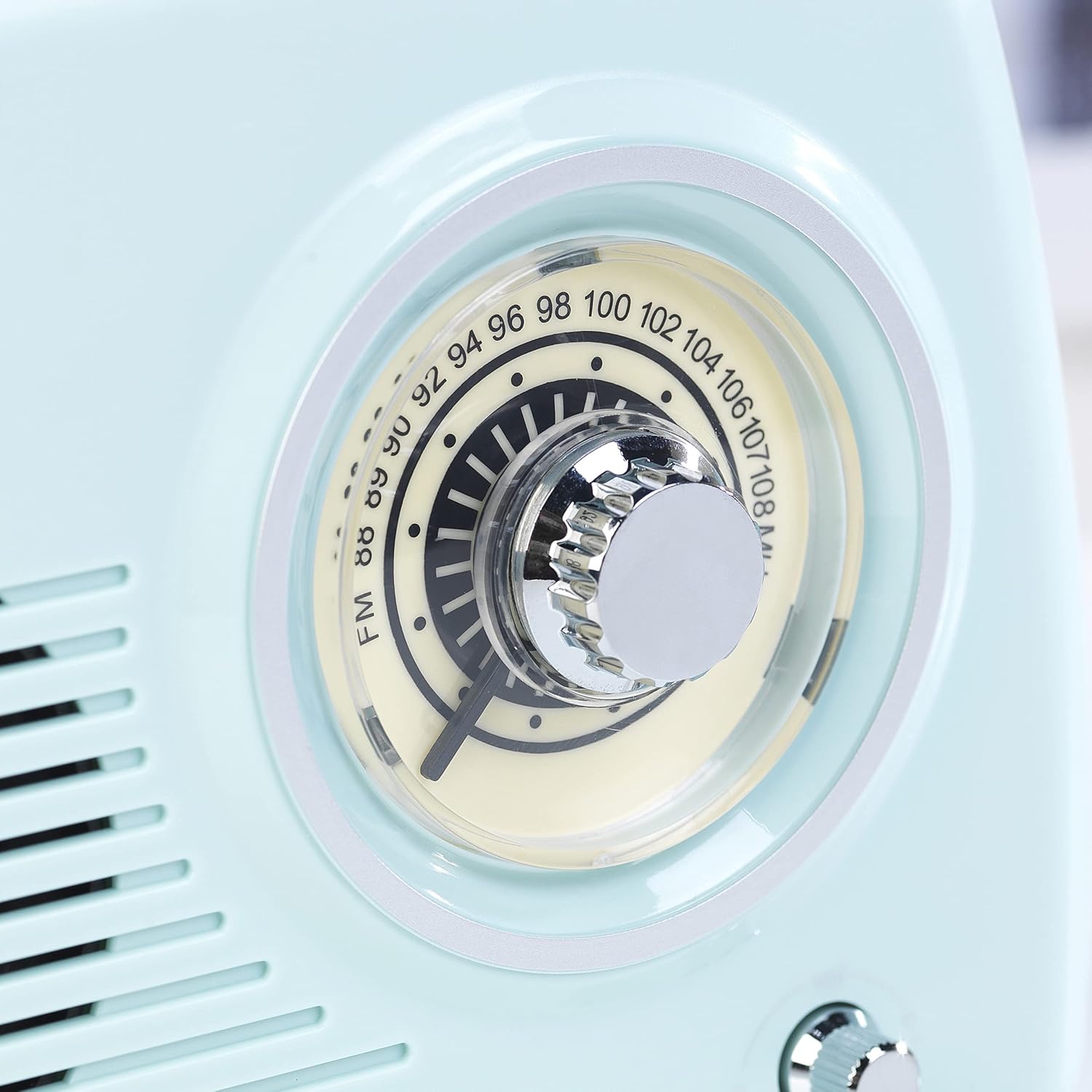
Figure 4: Close-up of the FM tuning dial for station selection.
3. Auxiliary Input (AUX) Mode
- Jikọọ otu njedebe nke eriri ọdịyo 3.5mm (anaghị etinye ya) na ọdụ ụgbọ mmiri AUX dị na ọkà okwu.
- Connect the other end of the audio cable to the headphone jack or audio output of your non-Bluetooth device.
- Rotate the function knob to select 'AUX' mode. The 'AUX/FM' indicator light will illuminate.
- Play audio from your connected device. Adjust the volume using the volume knob on the speaker and/or your connected device.
4. Njikwa olu
Rotate the volume knob on the front panel clockwise to increase the volume and counter-clockwise to decrease it.
Nlekọta
- Nhicha: Jiri ákwà dị nro ma kpọọ nkụ hichaa ọkà okwu ahụ. Ejila ihe nhicha ma ọ bụ ihe mgbaze.
- Nchekwa: Mgbe a naghị eji ya eme ihe ruo ogologo oge, chekwaa ọkà okwu n'ebe dị jụụ, nke kpọrọ nkụ, na-adịghị na ìhè anyanwụ kpọmkwem na oke okpomọkụ.
- Nlekọta batrị: To prolong battery life, fully charge the speaker before first use and recharge it regularly, even if not in frequent use.
Nchọpụta nsogbu
| Nsogbu | Ihe nwere ike ime | Ngwọta |
|---|---|---|
| Ọkà okwu anaghị agba ọkụ. | Batrị agwụla. | Jiri eriri USB chajie igwe okwu. |
| Enweghị ụda. | Olu dị obere ma ọ bụ mechie. ahọpụtara ọnọdụ ezighi ezi. | Increase volume. Ensure correct mode (Bluetooth, FM, AUX) is selected. |
| Enweghị ike ijikọ site na Bluetooth. | Speaker is not in pairing mode. Device is too far. | Ensure speaker is in Bluetooth mode and indicator is flashing. Move device closer to speaker. Restart both devices. |
| Nnabata redio FM na-adịghị mma. | Antenna anaghị agbatị ma ọ bụ ebe mgbaàmà adịghị mma. | Fully extend the telescopic antenna. Reposition the speaker for better reception. |
Nkọwapụta
| Njirimara | Nkọwa |
|---|---|
| Ụdị | INTEMPO |
| Nọmba nlereanya | EE3332BLUSTKEU |
| Agba | Acha anụnụ anụnụ |
| Akụkụ ngwaahịa (L x W x H) | 21.6 x 8.9 x 15.1 cm |
| Ibu Ibu | 970 g |
| Mpụta ike | 5 Watt |
| Teknụzụ Njikọta | Bluetooth |
| Teknụzụ Ndozi | FM |
| Ndị otu redio akwadoro | FM (88-108 MHz) |
| Atụmatụ | Bluetooth, USB Port (for charging), Portable |
| Eji akwadoro | Camping, Home, Travel |

Ọgụgụ 5: Akụkụ ngwaahịa.
Ozi akwụkwọ ikike
This product comes with a standard manufacturer's warranty. Please refer to the warranty card included in the packaging for specific terms and conditions, including the warranty period and coverage details. Keep your proof of purchase for any warranty claims.
Ozi gbasara nnweta akụkụ ndị ọzọ maka ngwaahịa a adịghị ugbu a.
Nkwado ndị ahịa
For technical assistance, troubleshooting beyond this manual, or warranty inquiries, please contact Intempo customer support. Contact details can typically be found on the product packaging or the official Intempo websaịtị.
Nkwado n'ịntanetị: Visit the official Intempo websaịtị maka FAQ na akụrụngwa nkwado.
Nkwado email: Rụtụ aka na akwụkwọ ngwaahịa gị maka adreesị ozi-e ndị ahịa.


