Okwu mmalite
This manual provides detailed instructions for the proper setup, operation, and maintenance of your Integra CDC-3.4 6-Disc CD Carousel Changer. Please read this manual thoroughly before using the unit to ensure optimal performance and longevity. The Integra CDC-3.4 is designed for high-fidelity audio playback from compact discs, featuring a robust carousel mechanism for convenient disc management.
Ozi nchekwa dị mkpa
Iji belata ihe egwu nke ujo eletrik, ọkụ, ma ọ bụ mmebi nke unit ahụ, biko debe ihe nchekwa nchekwa ndị a:
- Gụọ ntuziaka: Gụọ ntuziaka nchekwa na ọrụ niile tupu ị rụọ ngwa.
- Jido ntuziaka: Debe ntuziaka nchekwa na ọrụ maka ntụnye aka n'ọdịnihu.
- Ịdọ aka ná ntị ntị: Soro ịdọ aka ná ntị niile dị na ngwa ngwa yana na ntuziaka ọrụ.
- Soro ntuziaka: Soro usoro ọrụ niile wee jiri ntuziaka.
- Mmiri na mmiri: Ejila ngwa a n'akụkụ mmiri.
- Nhicha: Jiri akwa kpọrọ nkụ hichaa naanị.
- Igwe ikuku: Akwụsịla oghere ikuku ikuku ọ bụla. Wụnye dị ka ntuziaka onye nrụpụta si dị.
- Okpomọkụ: Awụnyela n'akụkụ ebe okpomọkụ ọ bụla dị ka radiators, ndekọ okpomọkụ, stovu, ma ọ bụ ngwa ndị ọzọ (gụnyere amplifiers) nke na-emepụta okpomọkụ.
- Ike-Powerdọ Nchedo: Chebe eriri ọkụ ka ị ghara ịgagharị ma ọ bụ tuo ya, ọkachasị na plọg, ebe nchekwa dị mma, na ebe ha si na ngwa ahụ pụta.
- Kpupụ n'oge oké ifufe: Kwupu ngwa a n'oge oke mmiri ozuzo ma ọ bụ mgbe ejighi ya ogologo oge.
- Ije ozi: Tụtụ aka n'aka ndị ọrụ ruru eru. A na-achọ ọrụ mgbe ngwa ahụ mebiri emebi n'ụzọ ọ bụla, dị ka eriri ọkụ ma ọ bụ plọg mebiri emebi, mmiri mmiri wụfuru ma ọ bụ ihe dabara n'ime ngwa ahụ, ekpughere ngwa ahụ na mmiri ozuzo ma ọ bụ mmiri, anaghị arụ ọrụ nke ọma. , ma ọ bụ ahapụla ya.
Kedu ihe dị na Igbe ahụ
Carefully unpack your Integra CDC-3.4 and ensure all the following items are present:
- Integra CDC-3.4 CD Player
- Ụdọ ọkụ
- Basic manual (this document)
- RCA Cable (for analog audio connection)
- RI Cable (for system remote integration)
- Remote Control (RC-778C)
- Batrị AAA 2 (maka njikwa anya)
Melite
1. Ntinye
Place the Integra CDC-3.4 on a stable, level surface with adequate ventilation. Ensure there is sufficient space around the unit for proper airflow to prevent overheating. Avoid placing it near heat sources or in direct sunlight.
2. Ijikọ Audio Cables
The CDC-3.4 offers multiple audio output options. Choose the connection type that best suits your audio receiver or ampntughari:
- Analog Audio Output (RCA): Connect the supplied RCA cable from the ANALOG OUTPUT (L/R) jacks on the CDC-3.4 to the corresponding analog audio input jacks on your receiver/ampna -emegharị ihe.
- Digital Coaxial Output: For a digital audio connection, use a coaxial digital cable (not supplied) to connect the COAXIAL jack on the CDC-3.4 to a digital coaxial input on your receiver/ampna -emegharị ihe.
- Mmepụta Anya Dijitalụ: For an optical digital audio connection, use an optical digital cable (not supplied) to connect the OPTICAL jack on the CDC-3.4 to a digital optical input on your receiver/ampna -emegharị ihe.
3. Connecting RI Cable (Remote Interactive)
Ọ bụrụ na nnata gị /amplifier supports Integra's RI (Remote Interactive) system, connect the supplied RI cable from the REMOTE CONTROL (RI) jack on the CDC-3.4 to the RI jack on your receiver/amplifier. This allows for integrated control functions between the components.
4. Ijikọ Ike
After all audio and control cables are connected, plug the supplied power cord into the AC INLET on the rear of the CDC-3.4, and then plug the other end into a wall outlet.
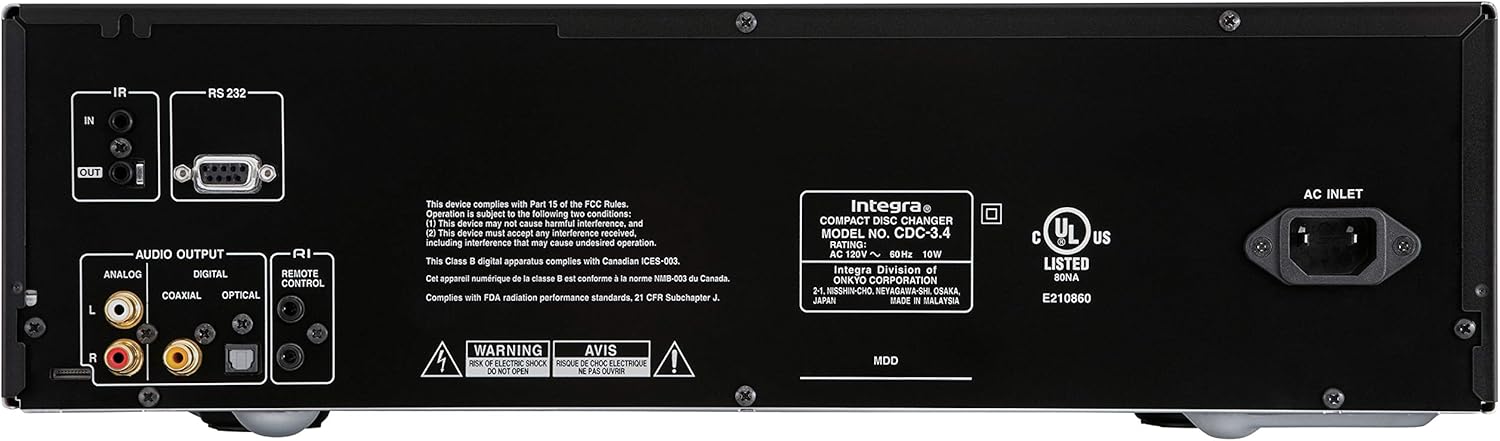
Figure 1: Rear panel connections of the Integra CDC-3.4.
Ntuziaka ọrụ
1. Gbanyụọ / gbanyụọ
Pịa Njikere/Gbanyere button on the front panel or the On bọtịnụ dị na njikwa dịpụrụ adịpụ iji gbanye ma ọ bụ gbanyụọ ngwaọrụ ahụ.
2. Loading Discs
The CDC-3.4 is a 6-disc carousel changer. To load discs:
- Pịa Mepee/mechie button on the front panel or remote to open the disc tray.
- Place a CD onto an empty disc well, ensuring it is seated correctly. The disc wells are numbered 1 through 6.
- You can swap up to 5 discs while the 6th disc continues to play.
- Pịa Mepee/mechie ọzọ imechi tray.
3. Disc Selection
To select a specific disc for playback:
- On the front panel, use the Họrọ diski buttons (1-6) to directly choose a disc.
- On the remote control, use the numbered buttons (1-6) to select a disc.
4. Njikwa ọkpụkpọ
Use the following buttons on the front panel or remote control for playback:
- Play/Pause (►/▐▐): Na-amalite ma ọ bụ kwụsịtụ ọkpụkpọ.
- Kwụsị (■): Kwụsị ịkpọghachi ya.
- Skip (◀◀/►►): Na-awụlikwa elu gaa na egwu gara aga ma ọ bụ nke na-esote.
- Search (◀◀◀/►►►): Fast forwards or reverses within a track (hold down).
5. Ụdị ọkpụkpọ
- N'usoro: Pịa Random button to play tracks in a random order.
- Tinyegharịa: Pịa Tinyegharịa button to repeat the current track, current disc, or all discs.

Figure 2: Front panel controls of the Integra CDC-3.4.

Figure 3: Integra RC-778C Remote Control.
Nlekọta
Na-ehicha Ngalaba
To clean the exterior of the unit, use a soft, dry cloth. For stubborn stains, slightly dampen the cloth with water or a mild, non-abrasive cleaner. Do not use harsh chemicals, solvents, or abrasive cleaning pads, as these can damage the finish.
Nlekọta diski
Handle CDs by their edges to avoid fingerprints and scratches. Store discs in their cases when not in use. If a disc is dirty, wipe it gently from the center outwards with a soft, lint-free cloth. Do not use abrasive materials or solvents.
Nlekọta nke ime
The Integra CDC-3.4 contains no user-serviceable parts. Do not attempt to open the casing or perform any internal maintenance. Refer all servicing to qualified service personnel.
Nchọpụta nsogbu
If you experience issues with your Integra CDC-3.4, please consult the table below before contacting support.
| Nsogbu | Ihe nwere ike ime | Ngwọta |
|---|---|---|
| Enweghị ike | Ejikọghị eriri ọkụ na nchekwa. | Gbaa mbọ hụ na etinyere eriri ọkụ ahụ nke ọma n'ime ngwa na nbata mgbidi. |
| Mwepu mgbidi anaghị arụ ọrụ. | Jiri ngwaọrụ ọzọ nwalee ọpụpụ ahụ. | |
| Enweghị ụda | Ejikọtaghị eriri ọdịyo nke ọma. | Check all audio cable connections between the CDC-3.4 and your receiver/ampna -emegharị ihe. |
| Incorrect input selected on receiver/ampna -emegharị ihe. | Select the correct input source on your receiver/ampna -emegharị ihe. | |
| Disc not playing or reading | Disc dị ọcha ma ọ bụ kpụchara akpụcha. | Clean the disc with a soft, lint-free cloth. Try another disc. |
| Etinyere diski ezighi ezi. | Ensure the disc is placed correctly in the disc well with the label side up. | |
| Njikwa anya anaghị arụ ọrụ | Batteries are depleted or inserted incorrectly. | Jiri batrị AAA ọhụrụ dochie batrị ndị ahụ, hụ na ha nwere ike ịhazi polarity nke ọma. |
| Ihe mgbochi dị n'etiti remote na unit. | Ensure there is a clear line of sight between the remote and the unit's IR sensor. |
Nkọwapụta
| Njirimara | Nkọwa |
|---|---|
| Nọmba nlereanya | CDC-3.4 |
| Ike diski | 6 Discs (CD Carousel Changer) |
| Digital to Analog Converters (DACs) | Dual High Quality Wolfson 192 kHz / 24-bit |
| oversampling | 128 times oversampling |
| Signal Path Technology | Vector Linear Shaping Circuitry (VLSC) for Noise-free Signal Path, Proprietary Direct Digital Path |
| Ntinye ederede | Analog (RCA L/R), Digital Coaxial, Digital Optical |
| Njikwa njikwa | RS232, IR (Infrared), RI (Remote Interactive) |
| Ngwaahịa (W x H x D) | Ihe dịka 17.1 x 9.8 x 21 sentimita (43.4 x 24.9 x 53.3 cm) |
| Ibu Ibu | 15.2 pound (6.9 n'arọ) |
| Ihe achọrọ ike | AC 120V ~ 60Hz |
| Ngwa gụnyere | Remote Control, RCA Cable, RI Cable, Power Cord, AAA Batteries |
Akwụkwọ ikike na nkwado
Akwụkwọ ikike nke onye nrụpụta
The Integra CDC-3.4 typically comes with a manufacturer's warranty, which may vary by region. Please refer to the warranty card included with your product or visit the official Integra (Onkyo) website for specific warranty terms and conditions. It is recommended to retain your proof of purchase for warranty claims.
Nkwado ndị ahịa
For technical assistance, troubleshooting beyond this manual, or warranty inquiries, please contact Integra customer support. You can find contact information, including phone numbers and online support resources, on the official Onkyo/Integra websaịtị.


