1. Okwu mmalite
Thank you for choosing the AVANTEK CW-11 Wireless Doorbell. This manual provides essential information for the proper installation, operation, and maintenance of your new doorbell system. Please read these instructions carefully before use and retain them for future reference.

Image 1.1: AVANTEK CW-11 Wireless Doorbell system, showing the compact transmitter and receiver units.
2. Ozi nchekwa
- Ewepụla ngwaọrụ ahụ na oke okpomọkụ ma ọ bụ ìhè anyanwụ kpọmkwem.
- Keep the device away from water and high humidity. The transmitter is IP55 waterproof, but the receiver is for indoor use only.
- Anwala ịkwasa ma ọ bụ rụkwaa ngwaọrụ n'onwe gị. Kpọtụrụ nkwado ndị ahịa maka enyemaka.
- Debe batrị ebe ụmụaka na-agaghị eru ya aka. Tụfuo batrị ejirila mee ihe nke ọma.
3. Ihe ngwugwu
- 1 x Wireless Transmitter (Doorbell Button)
- 1 x Plug-in Receiver (Chime Unit)
- 1 x CR2 Battery (pre-installed in transmitter)
- 2 x kposara
- 2 x arịlịka
- 1 x teepu nrapado nwere akụkụ abụọ
- 1 x Screwdriver
4. Ngwaahịa gafereview
The AVANTEK CW-11 Wireless Doorbell system consists of a battery-powered transmitter (doorbell button) and a plug-in receiver (chime unit). The receiver features 52 selectable melodies, 5 adjustable volume levels, and an LED indicator for visual alerts.

Image 4.1: The receiver unit, illustrating its features including 52 chimes, 5 volume levels, and an LED indicator.
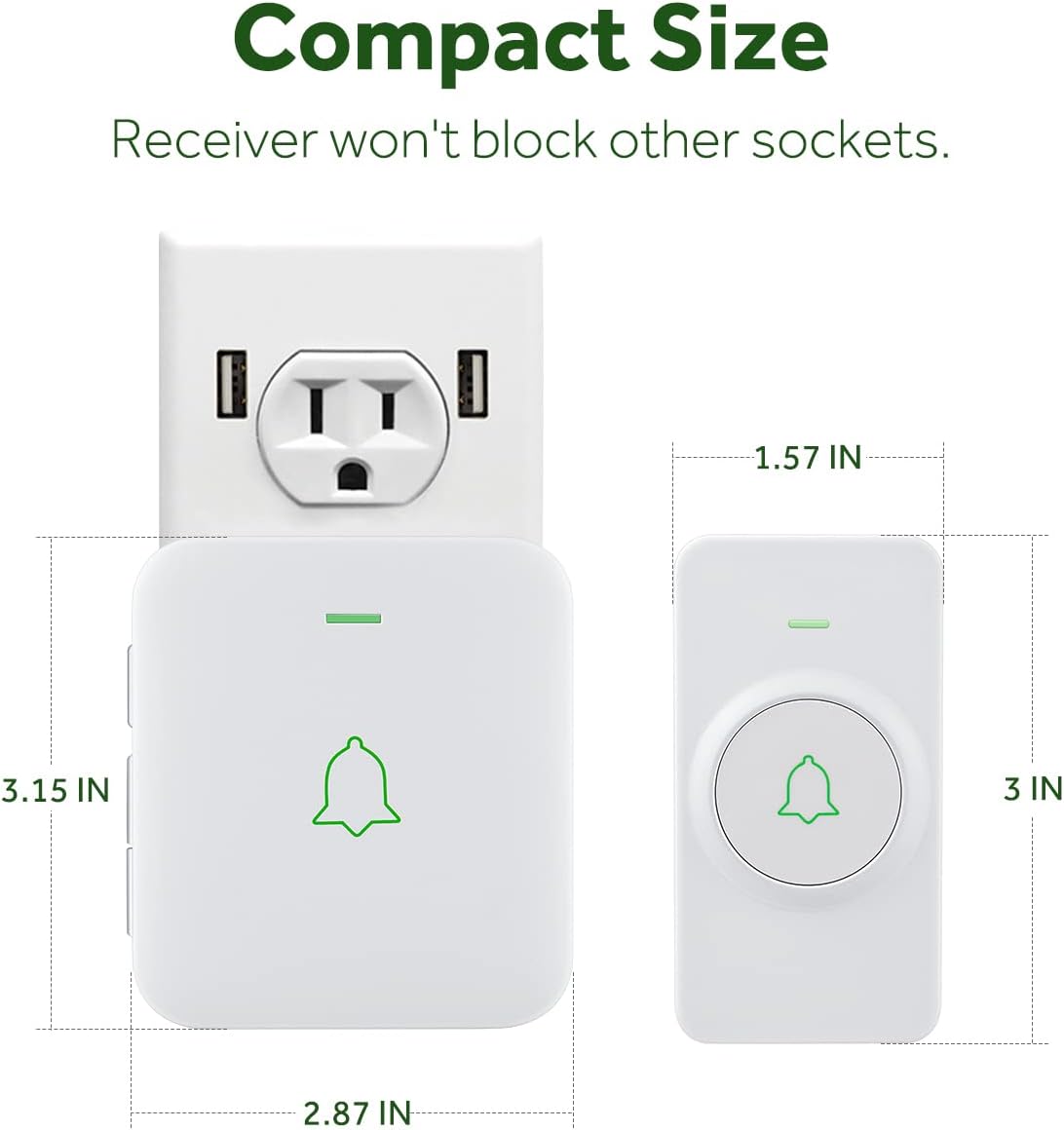
Image 4.2: The compact size of both the transmitter and receiver, designed to not obstruct adjacent power sockets.
5. Nhazi ntuziaka
5.1 Installing the Transmitter
The transmitter can be installed using either the provided double-sided adhesive tape or screws and anchor plugs.

Image 5.1: Visual guide for installing the transmitter using either adhesive tape or screws and anchor plugs.
Method A: Using Double-Sided Adhesive Tape
- Clean the desired mounting surface thoroughly to ensure it is free of dust and moisture.
- Peel off one side of the protective film from the double-sided adhesive tape and attach it to the back of the transmitter.
- Peel off the other side of the protective film and firmly press the transmitter onto the cleaned surface for at least 30 seconds.
Method B: Using Screws and Anchor Plugs
- Mark the desired mounting points for the transmitter on the wall.
- Drill two holes at the marked positions.
- Insert the anchor plugs into the drilled holes.
- Align the transmitter's mounting holes with the anchor plugs and secure it with the provided screws.
Ihe dị mkpa: To prevent signal interference, do not install the transmitter close to or on metal surfaces such as metal door frames or mailboxes.
5.2 Plugging in the Receiver
Plug the receiver into a standard electrical outlet in a location where the chime can be easily heard. The LED on the receiver will flash upon initial power-up.
5.3 Pairing the Doorbell System
The transmitter and receiver are pre-paired at the factory. If re-pairing is needed or if you add additional transmitters/receivers, follow these steps:
- Tinye ihe nnata n'ime oghere ike.
- To enter pairing mode, hold down the Volume button on the receiver for 3 seconds. The LED on the receiver will flash.
- Remove the battery insulating film from the transmitter (if not already done).
- Press the Push button on the transmitter. Its LED will flash.
- After successful pairing, the receiver will chime once, and the LEDs on both the receiver and transmitter will flash simultaneously.
Video 5.2: Official AVANTEK video demonstrating how to install the wireless doorbell transmitter.
Video 5.3: Official AVANTEK video demonstrating how to pair the wireless doorbell system.
6. Ntuziaka ọrụ
6.1 Ịgbanwe Egwu
The receiver offers 52 different melodies. Use the 'Next' and 'Previous' buttons on the side of the receiver to cycle through the available tunes. Press the doorbell button to preview the selected melody.

Image 6.1: The receiver offers a wide selection of melodies for personalization.
6.2 na-agbanwe olu
There are 5 adjustable volume levels, with a maximum setting of 115 dB. Use the 'Volume' button on the side of the receiver to increase or decrease the sound level.
6.3 Ọnọdụ ogbi
To activate mute mode (0 dB), repeatedly press the 'Volume' button until the sound is off. In this mode, only the LED indicator will flash when the doorbell is pressed, providing a silent visual alert.

Image 6.2: The mute mode feature allows for silent notifications, ideal for quiet environments.
7. Nlekọta
7.1 Nhicha
Wipe the devices with a soft, dry cloth. Do not use abrasive cleaners or solvents.
7.2 Battery Replacement (Transmitter)
The transmitter uses a CR2 battery with an estimated lifespan of 3 years. When the battery is low, the transmitter's LED may not light up or the signal range may decrease. To replace the battery:
- Carefully open the transmitter casing using the provided screwdriver or a small flat-head screwdriver.
- Wepu batrị CR2 ochie.
- Insert a new CR2 battery, ensuring correct polarity (+/-).
- Mechie casing nke ọma.
8. Nchọpụta nsogbu
- Doorbell not chiming: Ensure the receiver is plugged in and powered. Check the transmitter battery. Re-pair the devices if necessary (refer to Section 5.3).
- Short signal range: Ensure the transmitter is not installed on or near metal surfaces. Relocate the receiver to a more central position. Replace the transmitter battery.
- Ntinye aka: The doorbell operates on a frequency that minimizes interference with other household devices. If interference occurs, try changing the melody or relocating the receiver.
- Ọrụ ebe nchekwa: The device remembers your last melody and volume level after a power outage, so no need to reset settings.
9. Nkọwapụta
| Njirimara | Nkọwapụta |
|---|---|
| Nọmba nlereanya | CW-11 |
| Ikuku iche | Ruo 1000 ụkwụ (mita 300) |
| Egwu | 52 |
| Ọkwa olu | 5 (up to 115 dB) |
| Batrị nnyefe | 1 x CR2 (gụnyere) |
| Ndụ batrị nnyefe | Ihe ruru. Afọ ise |
| Ngosi nke enweghị mmiri | IP55 (Transmitter) |
| Okpomọkụ na-arụ ọrụ | -4 °F ruo 140 °F (-20 °C ruo 60 Celsius) |
| Isi Iyi Ike | AC & Batrị |
| Akụkụ ngwaahịa | Receiver: 2.8 x 0.6 x 3.1 inches; Transmitter: 3.15 x 1.57 x 0.79 inches (approx.) |
10. Akwụkwọ ikike na nkwado
For warranty information or technical support, please refer to the contact details provided with your product packaging or visit the official AVANTEK websaịtị. Debe nnata nzụta gị ka ihe akaebe nke ịzụrụ.


