1. Okwu mmalite
Thank you for choosing the ONKRON M5 WHT Full Motion TV Wall Mount. This manual provides essential information for the safe and correct installation, operation, and maintenance of your new wall mount. Please read these instructions thoroughly before beginning installation and retain them for future reference.
The ONKRON M5 WHT is designed to securely hold flat-panel televisions and monitors ranging from 37 to 70 inches, with a maximum weight capacity of 40 kg (88 lbs). It supports VESA mounting patterns from 100x100mm up to 400x400mm, offering full motion capabilities including swivel, tilt, and extension for optimal viewakụkụ .
2. Ozi nchekwa
WARNING: Failure to read and follow all instructions may result in personal injury, property damage, or voiding of your warranty.
- This product is intended for installation by qualified personnel only. If you are unsure about the installation process, consult a professional installer.
- Ensure the mounting surface (wall) can safely support the combined weight of the mount and your television. The wall must be capable of supporting at least four times the weight of the TV and mount.
- Agafela ikike ibu kacha nke 40 n'arọ (88 lbs).
- Verify your TV's VESA mounting pattern (distance between mounting holes on the back of your TV) is within the range of 100x100mm ruo 400x400mm.
- Use only the hardware provided or specified in this manual. Do not use power tools to tighten screws excessively, as this may damage the hardware or the mounting surface.
- Debe obere akụkụ na ihe e ji ekpuchi ihe niile ebe ụmụaka na-agaghị eru aka, n'ihi na ha nwere ike ibute ihe egwu nke ịpịa ihe.
- Always check for hidden electrical wires, water pipes, or gas lines in the wall before drilling. Use a stud finder and a reliable method to confirm wall composition.
- Do not install this product on drywall alone. It must be mounted to a solid wood stud, concrete, or brick wall.
3. Ihe ngwugwu
Carefully unpack the box and ensure all components are present and undamaged. If any parts are missing or defective, contact ONKRON customer support.

Foto: Ofeview of the ONKRON M5 WHT TV Wall Mount package, showing the mount, various screws, washers, spacers, and a wrench, alongside the instruction manual and product box.
Ngwungwu a na-agụnyekarị:
- Mgbakọ Mgbidi Efere
- TV Bracket Arms (Vertical Rails)
- Extension Arms (if required for larger VESA patterns)
- Mounting Hardware Kit (various screws, washers, spacers for TV and wall mounting)
- Wrench
- Akwụkwọ ntuziaka
4. Nkọwapụta
| Nlereanya | M5 WHT |
| Ụdị | ONKRON |
| Nha TV dakọtara | 37-70 sentimita asatọ |
| Ike ibu kacha | 40 n'arọ (88 lbs) |
| Ndakọrịta VESA | 100x100mm, 200x100mm, 200x200mm, 300x200mm, 300x300mm, 400x200mm, 400x300mm, 400x400mm |
| Tilt Angle | +12°/-2° |
| Akụkụ Swivel | +/- 120 Celsius |
| Ogologo Mgbidi (Min-Max) | 45 mm - 450 mm (1.7 - 17.7 inches) |
| Ihe onwunwe | Alloy Steel |
| Agba | Ọcha |
| Akụkụ ngwaahịa | 56 x 25 x 23 cm (apịaji) |
| Ibu ngwaahịa | 3.83 n'arọ |
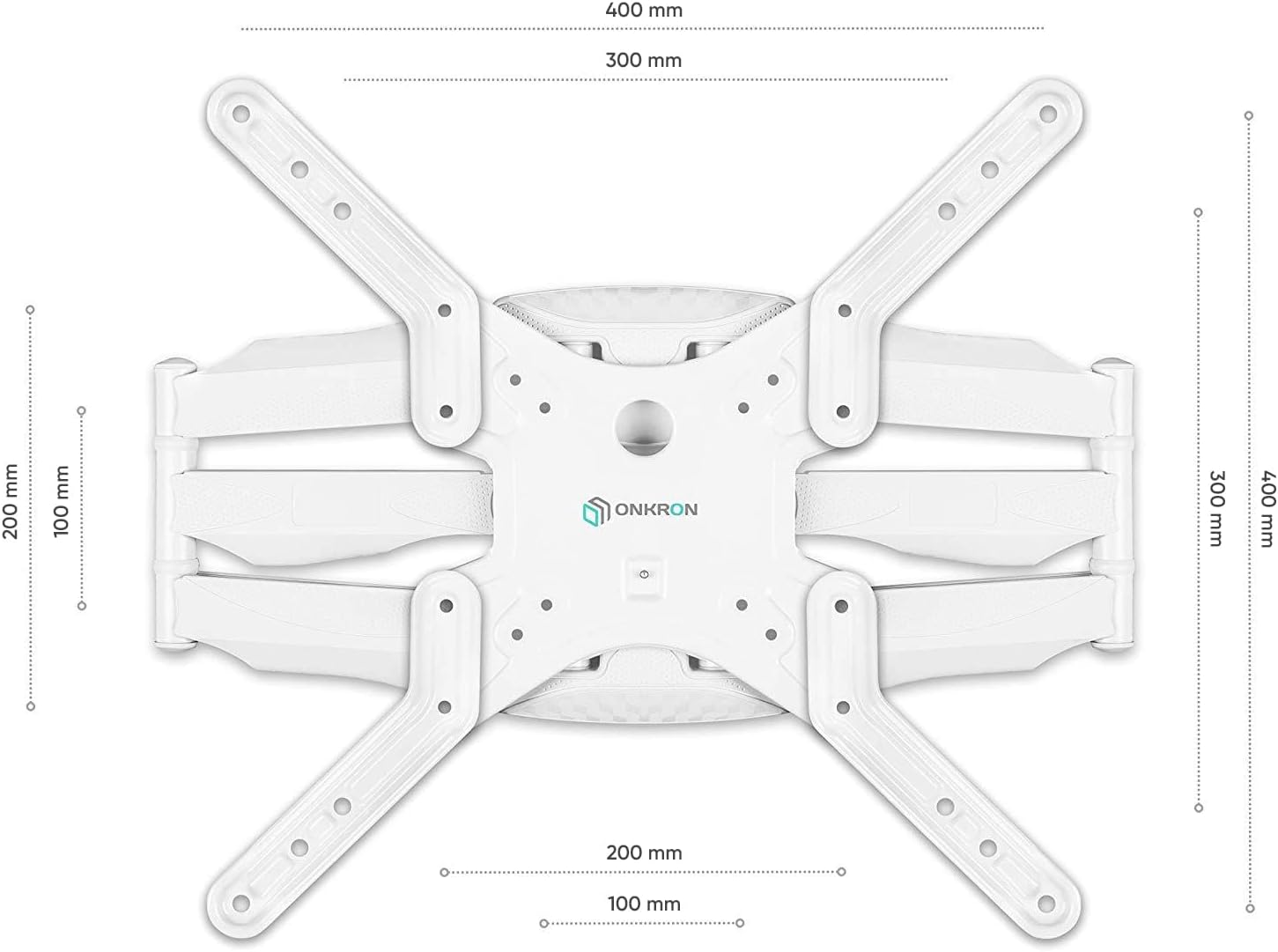
Image: Detailed VESA compatibility diagram for the ONKRON M5 WHT mount, illustrating various hole patterns from 100x100mm to 400x400mm.
5. Ntọala na nwụnye
5.1 Ndepụta nbanye tupu etinyere
- Verify TV Compatibility: Check your TV's weight and VESA mounting pattern against the mount's specifications.
- Chọpụta Ụdị mgbidi: Determine if your wall is solid concrete, brick, or wood stud. Do not install on drywall alone.
- Ngwakọta ngwa: You will need a drill, stud finder (for wood studs), level, tape measure, pencil, and a Phillips head screwdriver.
- Kpochapụ Mpaghara: Ensure the installation area is clear of obstructions and provides enough space to work safely.
5.2 Ịtinye efere mgbidi
- Ebe Ịwụnye Akara: Use a stud finder to locate the center of a wood stud. Mark the desired height for the top of your TV. Use a level to ensure the marks for the wall plate are perfectly horizontal.
- Oghere pilot: Drill pilot holes at the marked locations. The size of the drill bit will depend on your wall type and the lag bolts provided. For wood studs, typically a 5.5mm (7/32") bit is used. For concrete/brick, a 10mm (3/8") masonry bit is usually required, along with wall anchors.
- Efere mgbidi echedoro: Attach the wall plate to the wall using the provided lag bolts and washers. Tighten them firmly but do not overtighten. Ensure the wall plate is level.
5.3 Attaching TV Brackets to the TV
- Họrọ skru TV: Choose the correct diameter and length of screws (M4, M6, M8) that fit your TV's mounting holes. Use washers and spacers if necessary to ensure a snug fit and prevent damage to the TV.
- Tinye okporo ụzọ kwụ ọtọ: Secure the two vertical TV bracket rails to the back of your television. Ensure they are centered and aligned vertically. The hooks on the rails should face upwards.
- Attach Extension Arms (if needed): For larger VESA patterns (e.g., 400x400mm), attach the extension arms to the vertical rails using the provided hardware.
5.4 Ịwụnye TV na efere mgbidi
- Lift and Hook TV: With assistance, carefully lift the television and hook the vertical TV bracket rails onto the wall plate. Ensure both rails are securely seated on the wall plate.
- Secure Safety Screws: Locate the safety screws at the bottom of the vertical rails. Tighten these screws to lock the TV onto the wall plate, preventing accidental dislodgement.
6. Ntuziaka ọrụ
The ONKRON M5 WHT mount offers flexible positioning for your TV. Always handle the TV gently when making adjustments.
6.1 Adjusting Extension and Swivel

Image: The ONKRON M5 WHT mount demonstrating its extension capabilities, from a slim folded position (1.7 inches from wall) to a fully extended position (17.7 inches from wall).
To extend or retract the TV from the wall, gently pull or push the television. The articulated arms will allow the TV to move smoothly. To swivel the TV left or right, gently rotate the screen to your desired viewing angle. The mount allows for a swivel of up to +/- 120 degrees.
6.2 Ịgbanwe Ntụgharị

Image: The ONKRON M5 WHT mount illustrating its tilt function, showing angles from -2 degrees to +10 degrees, with a close-up of the tilt adjustment mechanism.
The mount allows for a tilt range of +12 degrees upwards and -2 degrees downwards. To adjust the tilt, loosen the tilt adjustment knobs or bolts on the TV bracket arms, set the TV to the desired angle, and then re-tighten the knobs/bolts to secure the position. This helps reduce glare and optimize viewing.
6.3 Njikwa eriri
The ONKRON M5 WHT features integrated cable management clips along the arms. Route your TV cables through these clips to keep them organized and prevent tangling, contributing to a clean and tidy appearance.
7. Nlekọta
- Nhicha: Jiri ákwà dị nro ma kpọọ nkụ hichaa ebe a na-etinye ihe n'elu ya. Ejila ihe nhicha ma ọ bụ ihe mgbaze, n'ihi na ha nwere ike imebi ihe ahụ.
- Nyocha oge: Periodically check all screws and bolts to ensure they remain tight and secure. Re-tighten if necessary.
- mmanu mmanu: The moving parts of the mount are designed for smooth operation. No lubrication is typically required. If movement becomes stiff, ensure no debris is obstructing the joints.
8. Nchọpụta nsogbu
- TV abụghị ọkwa: Check the wall plate and TV bracket rails with a level. Adjust the wall plate if possible, or use the fine-tuning adjustments on the TV brackets if available. Ensure all screws are tightened evenly.
- Difficulty moving the TV: Ensure all adjustment knobs/bolts are sufficiently loosened before attempting to move the TV. Check for any obstructions or cables caught in the mechanism.
- TV feels unstable: Immediately remove the TV from the mount. Re-check all installation steps, especially the wall mounting and TV bracket attachment. Ensure all screws are securely tightened and the wall can support the weight. If unsure, consult a professional.
- Akụkụ na-efu: Refer to the 'Package Contents' section. If parts are missing, contact ONKRON customer support for assistance.
9. Akwụkwọ ikike na nkwado
ONKRON products are manufactured with quality and durability in mind. For warranty information, technical support, or to purchase replacement parts, please visit the official ONKRON websaịtị ma ọ bụ kpọtụrụ ngalaba ọrụ ndị ahịa ha.
You can find more information and contact details on the ONKRON brand store: ONKRON Store


