Okwu mmalite
Daalụ maka ịzụrụasing the Aduro LED Wireless Speaker. This portable speaker combines high-quality audio with dynamic LED lighting, creating an immersive experience for any setting. Designed for ease of use and portability, it features wireless connectivity, hands-free calling, and multiple light modes. Please read this manual carefully to ensure proper operation and to maximize your enjoyment of the product.
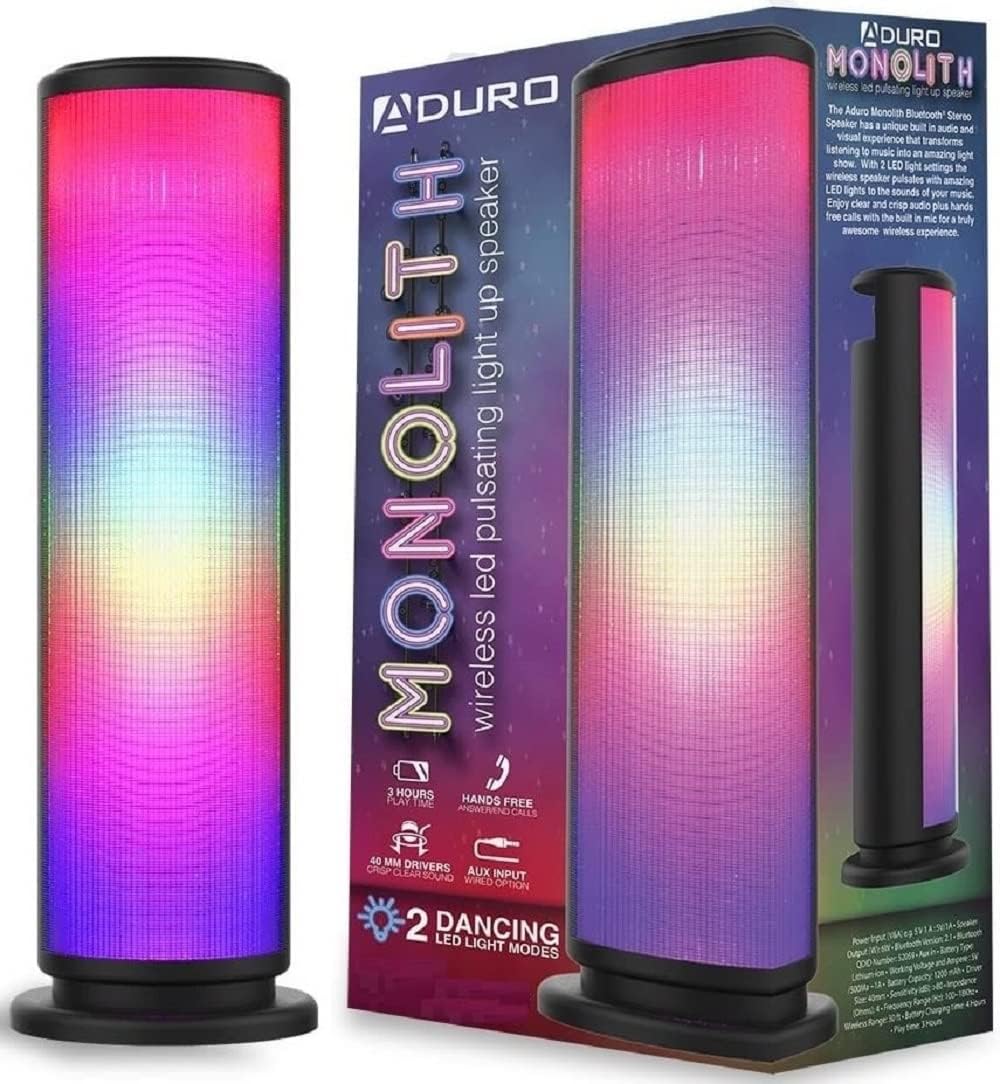
Image: The Aduro LED Wireless Speaker, showcasing its vibrant pulsating LED lights and sleek black design.
Ozi nchekwa
- Ewepụla ọkà okwu na oke okpomọkụ, ìhè anyanwụ kpọmkwem, ma ọ bụ oke iru mmiri.
- Zere idobe ma ọ bụ idobe ọkà okwu na mmetụta siri ike.
- Achịkọtala, rụkwaa, ma ọ bụ gbanwee ọkà okwu n'onwe gị. Kpọtụrụ ndị ọrụ ruru eru ọrụ niile.
- Keep the speaker away from water and liquids. This product is not waterproof.
- Jiri naanị eriri nchaji akọwapụtara yana nkwụnye ọkụ.
- Do not operate the speaker near medical equipment or in environments where radio frequency interference is prohibited.
Kedu ihe dị na Igbe ahụ
Biko lelee ọdịnaya nke ngwugwu ahụ ka ị hụ na ihe niile dị:
- Aduro LED Wireless Speaker (1 unit)
- USB USB cable (1 nkeji)
- Akwụkwọ ntuziaka (akwụkwọ a)
Note: Wall adapter for charging is not included.
Ngwaahịa gafereview
Mara ihe ndị dị na ya na njikwa ya:
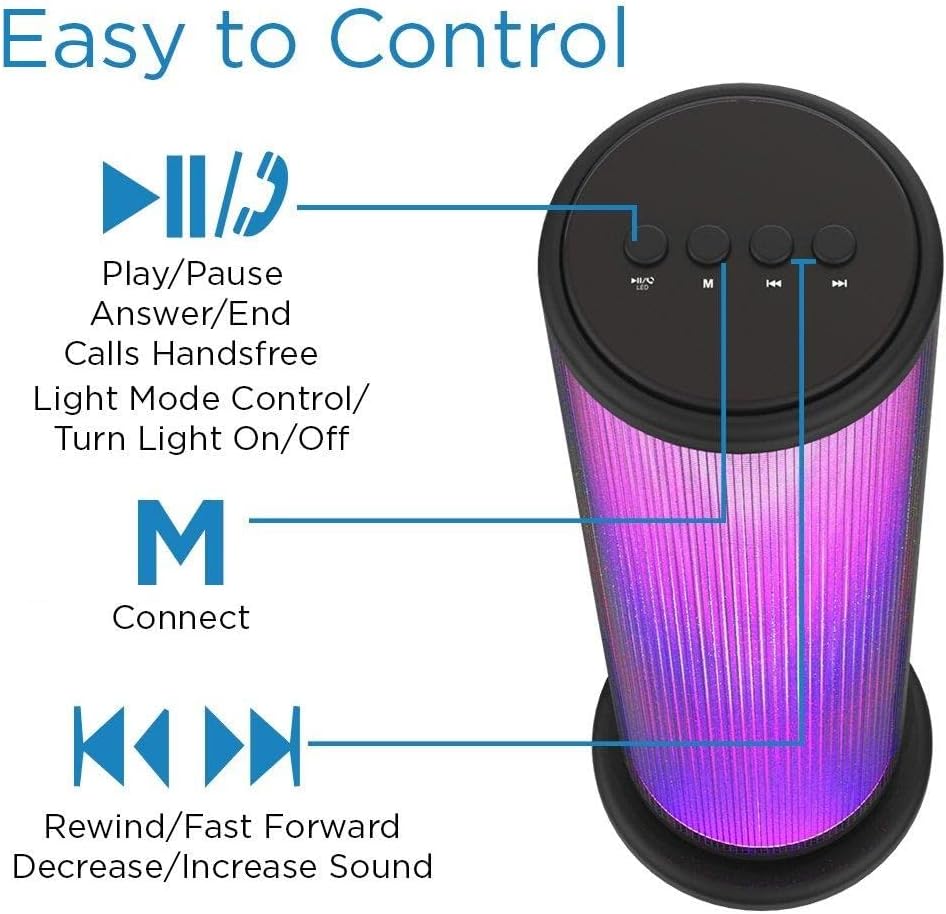
Image: Top panel of the Aduro speaker, illustrating the control buttons for play/pause, light mode, connect, and track/volume control.
Ogwe njikwa (N'elu)
- Play/Pause Button (►▮▮): Press to play or pause audio. Also used to answer/end calls.
- Light Mode Button (●/LED): Press to switch between LED light modes (Rhythmic Lights, Still Pattern) or turn lights on/off.
- Mode/Connect Button (M): Press to switch between Bluetooth and AUX input modes. Long press to enter Bluetooth pairing mode.
- Previous Track/Volume Down (◀◀): Short press for previous track. Long press to decrease volume.
- Next Track/Volume Up (►►): Short press for next track. Long press to increase volume.

Image: Bottom panel of the Aduro speaker, showing the Micro USB charging port and the AUX input port.
Ports (Bottom)
- Ọdụ USB USB: Maka ịchaji ọkà okwu.
- Ntinye aka AUX: Maka njikọ ọdịyo ejiri waya mee ihe site na iji eriri ọdịyo 3.5mm.
Melite
Ịchaji Ọkà Okwu
- Connect the Micro USB end of the charging cable to the Micro USB port on the speaker.
- Jikọọ njedebe USB-A nke eriri chaja na isi iyi ike USB (dịka ọmụmaatụ, ọdụ USB kọmputa, ihe nkwụnye mgbidi USB).
- Ihe ngosi LED ga-enwu mgbe a na-achaji ya ma gbanyụọ ya mgbe a na-achaji ya nke ọma.
- A full charge takes approximately 4 hours. The speaker provides up to 3 hours of playtime with LED lights active.
Ntuziaka ọrụ
Gbanyụọ/ Gbanyụọ
- To power on, press and hold the Play/Pause button (►▮▮) for a few seconds until you hear an audible prompt.
- To power off, press and hold the Play/Pause button (►▮▮) again for a few seconds.
Njikọ Bluetooth
- Ensure the speaker is powered on and in Bluetooth mode (indicated by a flashing blue LED). If not, press the 'M' button to switch modes.
- Na ngwaọrụ gị (smartphone, tabletị, wdg), gbanye Bluetooth wee chọọ ngwaọrụ dịnụ.
- Select "Aduro Monolith" from the list of devices.
- Once paired, the speaker will provide an audible confirmation, and the blue LED will stop flashing and remain solid.
- Ọkà okwu ahụ ga-anwa ijikọghachi na ngwaọrụ ejikọtara ikpeazụ ozugbo mgbe agbanyere ya.
Using AUX Input
- Jikọọ otu njedebe nke eriri ọdịyo 3.5mm (anaghị etinye ya) na ọdụ ụgbọ mmiri AUX dị na ọkà okwu.
- Connect the other end of the audio cable to the headphone jack or audio output of your device.
- Ọkà okwu ga-agbanwe ozugbo gaa na ọnọdụ AUX.
- Control audio playback and volume from your connected device.
Ụdị ọkụ ọkụ LED
The speaker features two LED light modes. Press the Light Mode button (●/LED) to cycle through the options:
- Rhythmic Lights: Lights pulsate and change color in sync with the music.
- Still Pattern: Lights display a continuous, non-pulsating color pattern.
- Pressing the button again will turn the lights off.

Image: The Aduro speaker demonstrating its two distinct LED light modes: Rhythmic Lights and Still Pattern.
Ịkpọ oku na-enweghị aka
When connected via Bluetooth, the speaker's built-in microphone allows for hands-free calls:
- Zaa oku: Press the Play/Pause button (►▮▮) once.
- Kwụsị oku: Press the Play/Pause button (►▮▮) once during a call.
- Jụ oku: Press and hold the Play/Pause button (►▮▮) for 2 seconds.
Nlekọta
- Jiri akwa dị nro hichaa ọkà okwu. Ejila ihe nchacha abrasive ma ọ bụ ihe mgbaze.
- Chekwaa ọkà okwu n'ebe dị jụụ, kpọrọ nkụ mgbe ọ naghị eji ya.
- Zere ka anwụ na-acha kpọmkwem ma ọ bụ okpomọkụ dị oke elu ghara ịpụta ìhè ruo ogologo oge.
- Na-anya batrị mgbe niile, ọbụlagodi ma ọ bụrụ na ejighị ya ugboro ugboro, iji kwado ahụike batrị.
Nchọpụta nsogbu
| Nsogbu | Ihe nwere ike ime | Ngwọta |
|---|---|---|
| Ọkà okwu anaghị agbanwuo. | Batrị agwụla. | Chajie ọkà okwu zuru ezu. |
| Enweghị ike ijikọ site na Bluetooth. | Ọkà okwu adịghị na ọnọdụ njikọta ma ọ bụ tere aka na ngwaọrụ. | Ensure speaker is in Bluetooth pairing mode (flashing blue LED). Move device closer to speaker (within 10 meters). Turn off and on Bluetooth on your device. |
| Enweghị ụda sitere na ọkà okwu. | Olu dị oke ala ma ọ bụ na ejikọtaghị ngwaọrụ nke ọma. | Increase volume on both speaker and connected device. Re-pair Bluetooth or re-connect AUX cable. |
| Ọkụ LED anaghị arụ ọrụ. | Lights are turned off or battery is low. | Press the Light Mode button (●/LED) to turn lights on. Charge the speaker. |
| Ogo ụda adịghị mma. | Device is too far, interference, or low battery. | Move device closer. Avoid obstacles. Charge the speaker. |
Nkọwapụta
| Njirimara | Nkọwa |
|---|---|
| Aha Nlereanya | Monolith |
| Nọmba nlereanya | AY-MTSP-01 |
| Ụdị Ọkà Okwu | N'èzí, Enwere ike ibugharị ya |
| Teknụzụ Njikọta | Bluetooth, AUX |
| Oke Bluetooth | Ruo mita 10 (ụkwụ 33) |
| Ọnọdụ mmepụta ọdịyo | Stereo |
| Ike Nwepu kacha elu | 6 Watt |
| Nha ọkwọ ụgbọ ala | 40mm |
| Ụdị batrị | Lithium ion |
| Ike batrị | 1200mAh |
| Ndụ batrị | Up to 3 hours (with LED lights active) |
| Oge Nchaji | Ihe dị ka awa 4 |
| Akụkụ (L x W x H) | 3.5 x 5.8 x 11.8 sentimita asatọ |
| Ibu Ibu | 15 ounce (0.94 lbs) |
| Agba | Nwa |
| Ngwa gụnyere | 40mm Drivers, rechargeable battery, sensitive control panel, speakers, built-in microphone |
Akwụkwọ ikike na nkwado
Aduro products are designed with quality and reliability in mind. This product comes with a manufacturer's warranty. For specific warranty details and duration, please refer to the warranty card included with your purchase or visit the official Aduro websaịtị.
For technical support, troubleshooting assistance, or warranty claims, please contact Aduro customer service through their official channels. Please have your model number (AY-MTSP-01) and proof of purchase ready when contacting support.
Ị nwere ike ịchọta ozi ndị ọzọ na nkọwa kọntaktị na Aduro Store on Amazon.


