Okwu mmalite
This manual provides comprehensive instructions for the safe and effective operation, maintenance, and troubleshooting of your FLIR K45 High Performance Thermal Imaging Camera. The FLIR K45 is designed to provide clear thermal images in challenging environments, aiding in navigation and decision-making.

Figure 1: FLIR K45 Thermal Imaging Camera in operation, showing a thermal view.
Ozi nchekwa
Always read and understand all safety warnings and instructions before operating the FLIR K45 camera. Failure to do so may result in injury or damage to the device.
- Do not expose the camera to temperatures exceeding its operational limits (up to 500°F for 5 minutes).
- Ensure the battery is properly charged and installed before use.
- Avoid direct exposure of the lens to extreme heat sources when not in use for thermal imaging.
- The device is water resistant (IP67), but avoid prolonged submersion.
Ngwa ngwaahịa
The FLIR K45 package includes the following items:
- FLIR K45 Thermal Imaging Camera
- Lithium Ion Battery (included)
- Charging dock (if applicable, based on image)
- eriri USB
- Ihe nkwụnye ọkụ
- Akwụkwọ
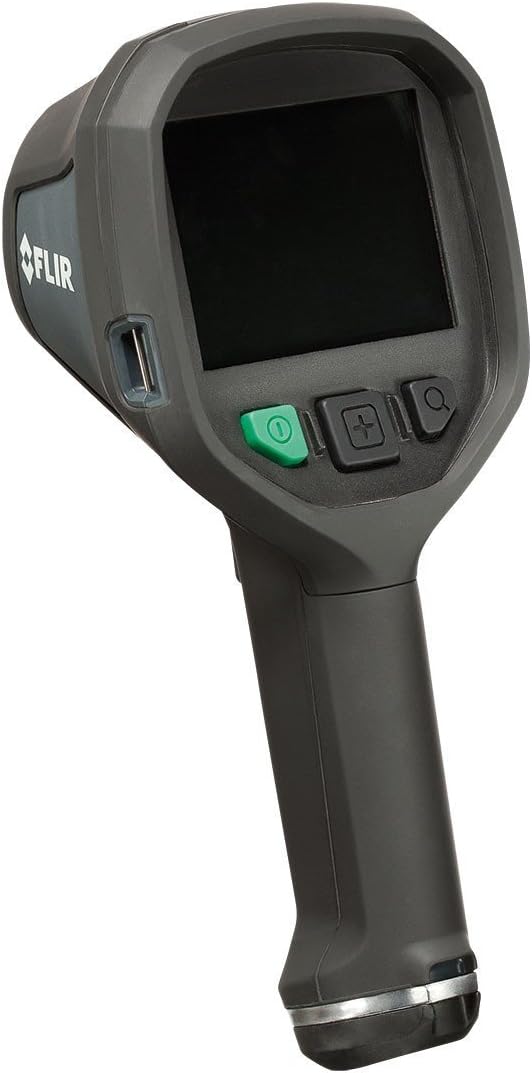
Foto 2: N'ihu view of the FLIR K45 camera, showing the screen and control buttons.

Foto 3: N'ihu view of the FLIR K45, highlighting the thermal lens.
Melite
1. Ịchaji batrị
The FLIR K45 uses a Lithium Ion battery. Before first use, fully charge the battery. Connect the camera to the charging dock or directly via the USB cable to a power adapter.
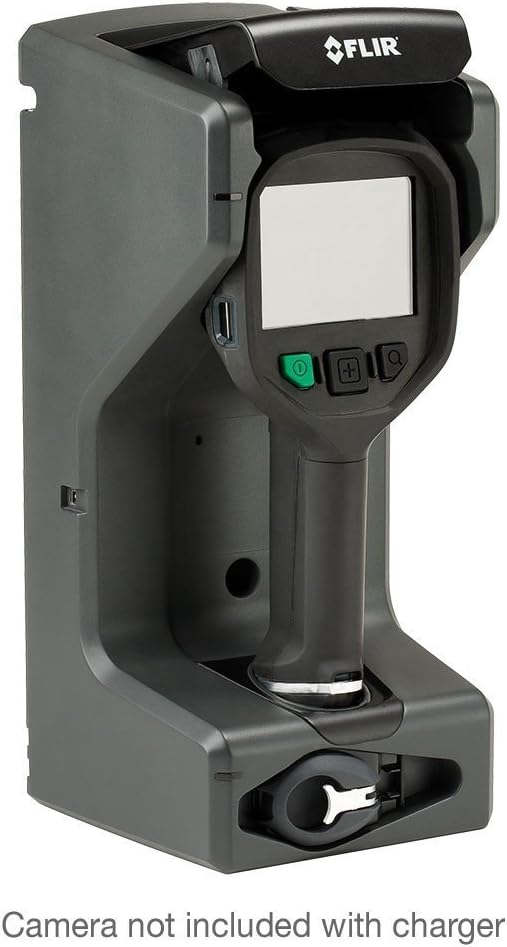
Figure 4: FLIR K45 in its charging dock. Camera not included with charger.
2. Ịtinye batrị
Locate the battery compartment, typically at the base of the handle. Insert the charged Lithium Ion battery, ensuring it clicks into place securely.
3. Ike izizi
Press and hold the power button (green button) to turn on the device. The 4-inch screen will illuminate, displaying the FLIR logo followed by the thermal image feed.
Ntuziaka ọrụ
1. Basic Ọrụ
Point the camera towards the area of interest. The thermal image will be displayed on the 4-inch screen. The K45 provides a crisp, 240 x 180 pixel thermal image, enhanced by FSX™ Flexible Scene Enhancement for improved detail.

Ọgụgụ 5: Ọpụample of a thermal image captured by the FLIR K45, indicating temperature variations.
2. Ụdị onyonyo
The FLIR K45 offers several image modes to optimize viewing for different scenarios. Use the mode selection button (often indicated by a plus/minus or menu icon) to cycle through these options:
- IR image: Standard infrared thermal view.
- TI Basic fire-fighting mode: Optimized for general firefighting scenarios.
- Black-and-white fire-fighting mode: Provides a high-contrast monochrome thermal view.
- Fire mode: Specific mode for fire scene analysis.
- Search-and-rescue mode: Enhances visibility for locating individuals.
- Heat detection mode: Highlights areas of significant heat.
- Thumbnail gallery: Na-enye ohere review of saved images.

Figure 6: Detail of the FLIR K45 control buttons for navigation and mode selection.
3. Na-ese foto
To capture a thermal image, press the designated capture button (refer to the device's physical buttons, often a trigger or a specific button on the control panel). Images are saved to the internal memory or an inserted SD card.
Nlekọta
1. Na-ehicha igwefoto
Regularly clean the camera body with a damp cloth. For the lens, use a soft, lint-free cloth specifically designed for optical surfaces. Do not use abrasive cleaners or solvents.
2. Nlekọta batrị
To prolong battery life, avoid fully discharging the battery frequently. Store the camera and battery in a cool, dry place when not in use for extended periods.
Nchọpụta nsogbu
| Nsogbu | Ihe nwere ike ime | Ngwọta |
|---|---|---|
| Igwefoto anaghị agba ọkụ. | Batrị dị ala ma ọ bụ mebie. | Chajie batrị zuru oke. |
| Onyonyo na-agba agba ma ọ bụ edoghị anya. | Dirty lens; extreme temperature difference. | Clean the lens; allow camera to acclimate to environment. |
| Enweghị ike ịchekwa onyonyo. | Memory full or no SD card inserted. | Delete old images or insert a compatible SD card. |
If you encounter issues not listed here, please refer to the support section for further assistance.
Nkọwapụta
| Njirimara | Nkọwa |
|---|---|
| Nlereanya | FLIR K45 |
| Mkpebi okpomọkụ | 240 x 180 pikselụ |
| Nha ihuenyo | 4-anụ ọhịa (11 cm) |
| Izi ezi | ±4°C (±7.2°F) or ±4% of reading (for ambient 10°C to 35°C) |
| Ịdị ogologo | Withstands 2-meter drop, IP67 water resistant |
| Okpomọkụ na-arụ ọrụ | Fully operational up to 500°F (5 minutes) |
| Ụdị batrị | 1 batrị lithium ion (gụnyere) |
| Akụkụ ngwaahịa | 4.7 x 4.9 x 11 sentimita asatọ |
| Ibu Ibu | 1 pound |
| Ụdị mgbasa ozi | Kaadị SD |
Ozi akwụkwọ ikike
The FLIR K45 camera is protected by FLIR's 2-5-10 Warranty:
- afọ 2 maka batrị.
- afọ 5 maka igwefoto.
- afọ 10 maka onye nchọpụta.
For detailed warranty terms and conditions, please refer to the official FLIR websaịtị ma ọ bụ kpọtụrụ nkwado ndị ahịa.
Nkwado ndị ahịa
For technical assistance, service, or additional information regarding your FLIR K45 Thermal Imaging Camera, please contact FLIR customer support or visit the official FLIR websaịtị.
Ị nwekwara ike ịga na Ụlọ Ahịa FLIR na Amazon maka ozi ngwaahịa na akụrụngwa.
Vidiyo ngwaahịa
No official product videos from the seller were provided in the available data for embedding in this manual.


