Ngwaahịa gafereview
The Blackmagic Design Pocket Cinema Camera 4K (model CINECAMPOCHDMFT4K) is a handheld digital film camera designed for professional video production. It features a 4/3" CMOS sensor, 13 stops of dynamic range, and dual native ISO up to 25,600, enabling high-quality video capture in various lighting conditions. The camera supports recording in industry-standard formats such as Apple ProRes and 12-bit Blackmagic RAW.
Atụmatụ gụnyere:
- Incredible Image Quality: 4/3" image sensor with 4096 x 2160 native resolution, active MFT lens mount, 13 stops dynamic range, and dual native ISO up to 25,600.
- Nhọrọ ndekọ ọtụtụ: Records to SD/UHS-II and CFast 2.0 cards, or external SSD via USB-C.
- Na-agbanwe agbanwe File Ụdị: Supports Apple ProRes (up to 4K) and 12-bit Blackmagic RAW. Includes DaVinci Resolve Studio activation key.
- Ihe eji eme enyi: Lightweight carbon fiber polycarbonate composite body with a multifunction handgrip and a large, bright 5" LCD display.
- Njikọta sara mbara: Full-size HDMI, mini XLR with 48-volt phantom power, 3.5mm microphone and headphones connections, USB-C, and Bluetooth.
Ihe ngwugwu
The Blackmagic Design Pocket Cinema Camera 4K package includes:
- Blackmagic Design Pocket Cinema Camera 4K body
- DaVinci Resolve Studio activation key
- Lens turret dust cap
- 30W power supply with locking connector and international adapters
- LP-E6 battery
Ntuziaka nhazi
1. Ntinye batrị
The camera uses an LP-E6 battery. To install:
- Locate the battery compartment on the bottom of the camera.
- Mepee mkpuchi nke batrị batrị.
- Insert the LP-E6 battery, ensuring correct orientation.
- Mechie mkpuchi nke batrị batrị nke ọma.

Ọgụgụ 1: N'azụ view of the camera, showing the battery compartment location.
2. Ntinye kaadị ebe nchekwa
The camera supports SD/UHS-II and CFast 2.0 cards. To insert:
- Locate the memory card slots on the side of the camera.
- Mepee mkpuchi oghere kaadị ebe nchekwa.
- Insert the SD or CFast card into the appropriate slot until it clicks into place.
- Mechie mkpuchi oghere kaadị ebe nchekwa.

Foto 2: Akụkụ view of the camera, illustrating the memory card slots.
3. Mgbakwunye Lensi
The camera features an active Micro Four Thirds (MFT) lens mount. To attach a lens:
- Remove the lens turret dust cap from the camera body.
- Hazie ntụpọ uhie ahụ dị na lensi ahụ na ntụpọ uhie ahụ dị na ihe e ji etinye lensi igwefoto ahụ.
- Gently insert the lens into the mount and rotate it clockwise until it clicks into place.
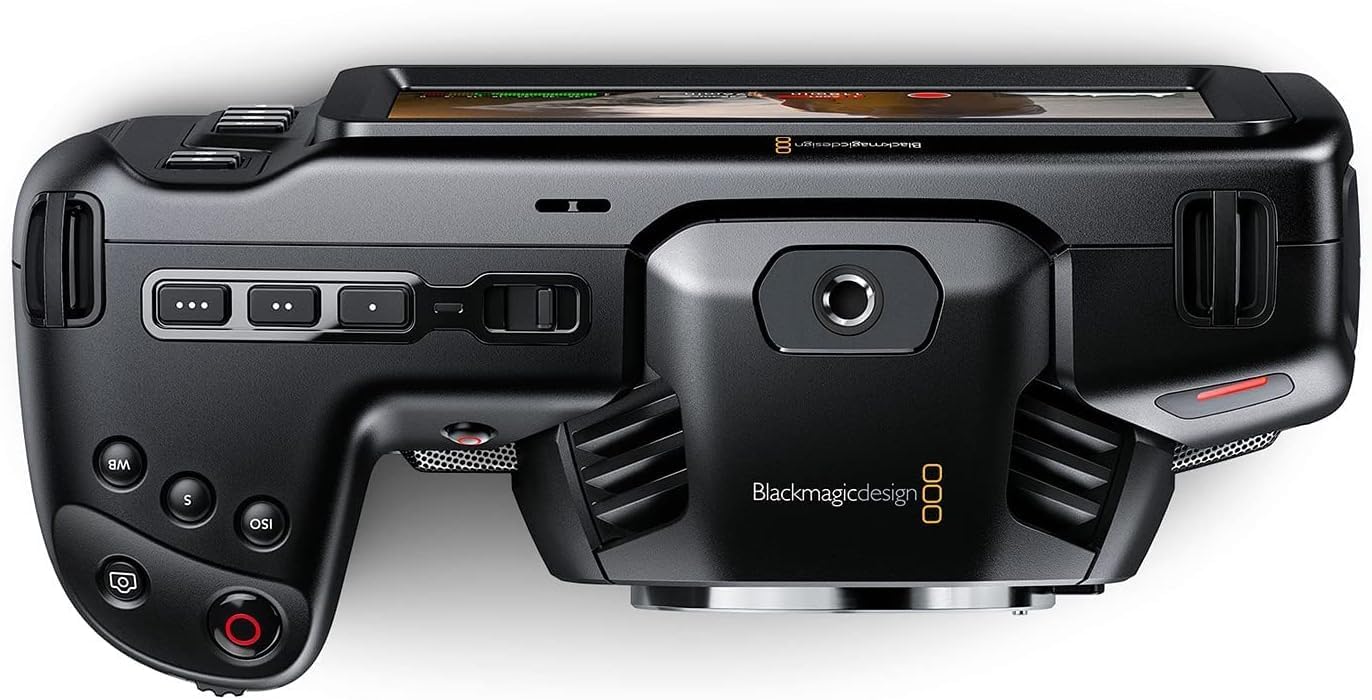
Foto 3: N'ihu view of the camera, highlighting the MFT lens mount.
4. Njikọ ike
For extended operation, connect the included 30W power supply:
- Connect the appropriate international adapter to the power supply.
- Tinye ọkụ eletrik n'ime oghere mgbidi.
- Connect the locking DC power connector to the 12V input port on the camera.

Foto 4: Akụkụ view of the camera, showing the 12V power input and other connectivity options.
Ntuziaka ọrụ
1. Ịgbanye / gbanyụọ
To power on the camera, slide the "ON/OFF" switch located on the top left side of the camera body. To power off, slide the switch back to the "OFF" position.
2. Basic Controls and Touchscreen Interface
The camera features a large 5" touchscreen LCD for intuitive control. Physical buttons are also available for quick access to essential functions such as ISO, Shutter, White Balance, and Record.

Figure 5: Camera screen showing various recording settings and options.
3. Ntọala ndekọ
Access recording settings via the touchscreen menu. You can select:
- Codec and Quality: Choose between Blackmagic RAW (Constant Bitrate, Constant Quality Q0, Q5) or Apple ProRes (422 HQ, 422, 422 LT, 422 Proxy).
- Mkpebi: Options include 4K DCI (4096x2160), 4K 2.4:1 (4096x1720), Ultra HD (3840x2160), 2.8K Anamorphic (2880x2160), 2.6K 16:9 (2688x1512), and HD (1920x1080).
- Ọnụọgụ etiti: Up to 60fps in 4K and 120fps in HD.

Ọgụgụ 6: Zuru ezu view of the camera's menu for selecting recording codecs and resolutions.
4. Ntinye ụda
The camera offers versatile audio input options:
- Mini XLR: For professional microphones, with 48-volt phantom power support.
- Ntinye 3.5mm: For external microphones or line-level audio.
- Igwe okwu Stereo arụnyere n'ime ya: For convenient on-camera audio capture.
- Jack ekweisi 3.5mm: Maka nlekota ọdịyo.
5. External Monitoring and Storage
Connect external monitors via the full-size HDMI port. For extended recording, use the USB-C port to connect external SSD media.
Nlekọta
- Nhicha: Use a soft, dry cloth to clean the camera body. For the lens and sensor, use specialized cleaning kits and follow manufacturer guidelines.
- Nchekwa: Store the camera in a dry, dust-free environment, ideally in a protective case when not in use. Remove batteries during long-term storage.
- Mmelite femụwe: Regularly check the Blackmagic Design websaịtị maka mmelite firmware iji hụ na arụmọrụ kacha mma yana ịnweta atụmatụ ọhụrụ.
Nchọpụta nsogbu
Ọ bụrụ na ị hụ nsogbu na igwefoto gị, tụlee usoro ndị a maka idozi nsogbu izugbe:
- Okwu ike: Ensure the battery is fully charged or the power adapter is securely connected. Check battery orientation.
- Nsogbu ndekọ: Verify that memory cards are correctly inserted and have sufficient free space. Check selected codec and resolution settings for compatibility with your workflow.
- Ogo foto: Ensure the lens is clean and properly attached. Check ISO settings for excessive noise in low light.
- Ngwa ngwa: If using DaVinci Resolve Studio, ensure it is updated to the latest version.
For more detailed troubleshooting, refer to the comprehensive manual available on the Blackmagic Design support websaịtị.
Nkọwapụta
| Akụkụ ngwaahịa | 7.01 x 3.37 x 3.78 sentimita asatọ |
| Ibu Ibu | 1.53 pound |
| Nọmba Nlereanya ihe | CINECAMPOCHDMFT4K |
| Ụdị | Nhazi Blackmagic |
| Teknụzụ ihe mmetụta foto | CCD |
| Mkpebi ịse vidiyo | 4K |
| Oghere kacha | 2.8 millimeters |
| Ụdị ebe nchekwa Flash | SD |
| Usoro Nseta vidiyo | Blackmagic RAW, ProRes 422 |
| Ụdị ọdịyo akwadoro | AAC, MP3, na PCM |
| Nha ihuenyo | 5 sentimita asatọ |
| Teknụzụ Njikọta | USB |
| Batrị | 1 batrị achọrọ (gụnyere) |
Akwụkwọ ikike na nkwado
For warranty information and technical support, please refer to the official Blackmagic Design websaịtị ma ọ bụ kpọtụrụ ndị ahịa ha ozugbo. Debe nnata nzụta gị dị ka ihe akaebe nke ịzụrụ maka nkwupụta ikike.
Online resources and additional documentation can be found at: Blackmagic Design Support


