1. Okwu mmalite
Thank you for choosing the ASAKUKI Smart Wi-Fi Essential Oil Diffuser. This device combines aromatherapy with smart technology, allowing you to control it via a mobile application or voice commands. It is designed to humidify and purify the air, creating a relaxing atmosphere in your home or office.
This manual provides detailed instructions for the safe and efficient use of your diffuser. Please read it thoroughly before operation and retain it for future reference.

Image: The ASAKUKI Smart Wi-Fi Essential Oil Diffuser is versatile for various environments, including nurseries, family rooms, bedrooms, yoga studios, and workspaces.
2. Nchekwa nchekwa
Iji hụ na arụ ọrụ dị mma ma gbochie mmebi, biko lee ihe ndị a:
- Always place the diffuser on a flat, stable surface.
- Do not exceed the maximum water fill line (500ml).
- Use only clean tap water or distilled water. Avoid using hot water.
- Add essential oils carefully to avoid spilling on the exterior of the unit.
- Debe ihe mgbasa ozi ka ụmụaka na anụ ụlọ ghara iru.
- Do not cover the mist outlet during operation.
- Unplug the device from the power outlet before cleaning or refilling.
- Etinyela otu ụlọ na mmiri ma ọ bụ mmiri ndị ọzọ.
- If the unit is damaged, do not attempt to repair it yourself. Contact customer support.
- The diffuser features an automatic shut-off when water runs out, but it is recommended to monitor water levels.
3. Ihe ngwugwu
Chọpụta na ihe niile dị na ngwugwu gị:
- ASAKUKI Smart Wi-Fi Essential Oil Diffuser (Model DF010)
- Ihe nkwụnye ọkụ
- Akwụkwọ ntuziaka onye ọrụ
- iko (nwere ike ịgụnye)
4. Ngwaahịa gafereview
Familiarize yourself with the main components of your diffuser:

Image: The ASAKUKI Smart Wi-Fi Essential Oil Diffuser, showing its sleek design and the accompanying mobile app for control.
- Ihe mkpuchi: Top cover of the diffuser.
- Ebe alụlụ: Where the mist is released.
- tank mmiri: Holds up to 500ml of water.
- Max Water Line: Indicates the maximum fill level.
- Ultrasonic Plate: Located at the bottom of the water tank, responsible for mist generation.
- Ọpụpụ ikuku: Located on the base.
- Drain Side: Indicated for proper water drainage.
- Bọtịnụ ọkụ: Controls the LED light functions.
- Mist/Wi-Fi Button: Controls mist output and initiates Wi-Fi pairing.
- Ike Jack: Maka ijikọ nkwụnye ọkụ.
5. Nhazi ntuziaka
Soro usoro ndị a maka nhazi mbụ:
- Debe ihe na-agbasa ihe: Debe ihe mgbasa ozi ahụ n'elu ebe dị larịị, kwụsiri ike, na nke na-anaghị eguzogide mmiri.
- Wepu ihe mkpuchi: Gently lift the top lid off the diffuser.
- Tinye mmiri: Using a measuring cup, fill the water tank with clean tap water or distilled water up to the maximum water line (500ml). Do not overfill.
- Tinye mmanụ ndị dị mkpa: Tinye ntapụ mmanụ dị mkpa atọ ruo ise ozugbo n'ime tankị mmiri. Hazie ọnụego ya dabere na mmasị onwe gị na nha ụlọ ahụ.
- Dochie mkpuchi: Securely place the lid back onto the diffuser.
- Njikọ Ike: Plug the power adapter into the power jack at the base of the diffuser, then plug the adapter into a wall outlet.
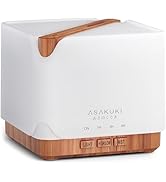
Image: Simple setup guide illustrating connecting power, app pairing, and wireless control.
6. Ntuziaka ọrụ
6.1 Njikwa akwụkwọ ntuziaka
- Njikwa alụlụ: Pịa Mist/Wi-Fi button once for continuous mist. Press again for intermittent mist (30 seconds on, 30 seconds off). Press a third time to turn off the mist.
- Njikwa ọkụ: Pịa Ìhè button once to turn on the LED light with automatic color cycling. Press again to fix the light to a specific color. Continue pressing to cycle through colors. Press and hold the Light button to turn off the light.
6.2 Smart Wi-Fi and App Control
The diffuser can be controlled remotely using the TuyaSmart app.
- Budata ngwa: Chọọ maka "TuyaSmart" in your smartphone's app store (iOS or Android) and download it.
- Debanye aha/Banye: Mepee ngwa ahụ wee denye aha akaụntụ ọhụrụ ma ọ bụ banye ma ọ bụrụ na ị nwere otu.
- Tinye Ụdị Mmakọ: With the diffuser plugged in, press and hold the Mist/Wi-Fi button for 5 seconds until the indicator light flashes rapidly. This indicates the diffuser is in pairing mode.
- Tinye ngwaọrụ: In the TuyaSmart app, tap "Add Device" or the "+" icon. Select "Small Home Appliance" > "Diffuser" (Wi-Fi).
- Jikọọ na Wi-Fi: Follow the in-app instructions to connect the diffuser to your 2.4GHz Wi-Fi network. Ensure your phone is also connected to the same 2.4GHz network during setup.
- Njikwa: Once successfully paired, you can control the mist, light, set timers, and create schedules directly from the TuyaSmart app.

Image: The mobile app allows for convenient control of the diffuser's functions.
Njikwa olu 6.3 na Alexa
The diffuser is compatible with Amazon Alexa for voice control.
- Kwado nka: In the Alexa app, search for and enable the "TuyaSmart" skill.
- Akaụntụ njikọ: Link your TuyaSmart account to your Alexa account.
- Chọpụta Ngwaọrụ: Ask Alexa to "Discover devices" or manually discover them in the Alexa app.
- Iwu olu: Once discovered, you can use commands such as:
- "Alexa, turn on the diffuser."
- "Alexa, turn off the diffuser."
- "Alexa, set the diffuser to red."
- "Alexa, set diffuser brightness to 50%."

Image: Voice control with Alexa allows hands-free operation of the diffuser.
7. Nlekọta
Regular cleaning helps maintain optimal performance and extends the lifespan of your diffuser.
7.1 Nhicha
Clean the diffuser after every 5-6 uses or every 3-5 days, especially when changing essential oils.
- Kwụpụ: Disconnect the diffuser from the power outlet.
- Mmiri efu: Remove the lid and carefully pour out any remaining water from the drain side of the water tank.
- Hichapụ Ọcha: Use a soft cloth or cotton swab with a small amount of mild dish soap to gently wipe the inside of the water tank and the ultrasonic plate.
- Sachaa: Rinse the water tank with clean water, being careful not to get water into the air outlet.
- Akọrọ: Wipe all parts dry with a clean, soft cloth.
- Deep Clean (Optional): For stubborn residue, add a small amount of white vinegar to the water tank and let it sit for 10-15 minutes before wiping and rinsing.
7.2 Nchekwa
When not in use for an extended period, ensure the diffuser is clean and completely dry. Store it in a cool, dry place away from direct sunlight.
8. Nchọpụta nsogbu
Ọ bụrụ na ị na-enwe nsogbu, rụtụ aka na nsogbu ndị a na-ahụkarị na ngwọta ndị a:
| Nsogbu | Ihe nwere ike ime | Ngwọta |
|---|---|---|
| Enweghị alụlụụ ma ọ bụ alụlụ dị ala |
|
|
| Diffuser does not power on |
|
|
| Enweghị ike ijikọ na Wi-Fi/App |
|
|
| Mgbapu mmiri |
|
|
9. Nkọwapụta
| Njirimara | Nkọwa |
|---|---|
| Ụdị | ASAKUKI |
| Nọmba nlereanya | DF010 |
| Ike | 500 milliliters |
| Akụkụ | 6"L x 6"W x 7"H |
| Ihe onwunwe | Acrylonitrile Butadiene Styrene (ABS), Polypropylene (PP) |
| Isi Iyi Ike | Igwe ọkụ eletrik |
| Wattage | 10 watt |
| Mpaghara mkpuchi | Ruo 323 Square Feet |
| Atụmatụ pụrụ iche | App Control, Automatic Shut-Off, Multiple Light Settings, Multiple Mist Settings, Voice Control (Alexa) |
| Ọkwa mkpọtụ | Ala karịa 35 dB |
| Runtime (Full Capacity) | Up to 16 hours (on weak mist setting) |
10. Akwụkwọ ikike na nkwado
The ASAKUKI Smart Wi-Fi Essential Oil Diffuser comes with a 1-year technical support warrantyAkwụkwọ ikike a na-ekpuchi ntụpọ nrụpụta na nsogbu ndị sitere na ojiji nkịtị.
For technical assistance, troubleshooting, or warranty claims, please contact ASAKUKI customer support through the retailer where you purchased the product or visit the official ASAKUKI websaịtị maka ozi kọntaktị.
Please have your model number (DF010) and proof of purchase ready when contacting support.


