1. Okwu mmalite
The Edifier M3600D is a high-performance 2.1 active speaker system designed for multimedia use. Featuring THX certification and a total RMS output of 200 Watts, this system delivers powerful and clear audio. It includes a robust subwoofer and two satellite speakers, offering versatile connectivity options for various audio sources.
2. Kedu ihe dị na Igbe ahụ
- 1 x Subwoofer
- Igwe okwu Satịlaịtị 2 x
- 1 x eriri ọkụ
- Connecting Cables (for satellites and audio input)
- 1 x Akwụkwọ ntuziaka onye ọrụ
3. Nhazi
Follow these steps to set up your Edifier M3600D speaker system:
- Nkwanye: Position the subwoofer on the floor, ideally near a wall for enhanced bass. Place the satellite speakers on either side of your listening area, ensuring they are equidistant from you for optimal stereo imaging.
- Jikọọ ndị na-ekwu okwu Satellite: Connect the right and left satellite speakers to the corresponding output ports on the rear of the subwoofer using the provided cables. The right satellite speaker typically features the volume control and input selection.
- Jikọọ Isi iyi ọdịyo: Choose your preferred audio input method (Optical, Coaxial, Line In, or AUX) and connect the appropriate cable from your audio source (e.g., computer, TV, smartphone) to the subwoofer's input ports.
- Njikọ ike: Plug the power cable into the subwoofer's power input, then connect it to a wall outlet.
- Ike Na: Turn on the power switch located on the rear of the subwoofer. The system is now ready for operation.

Figure 3.1: Edifier M3600D Multimedia 2.1 Active Speaker System. This image shows the main subwoofer unit alongside the two satellite speakers, illustrating the complete system setup.
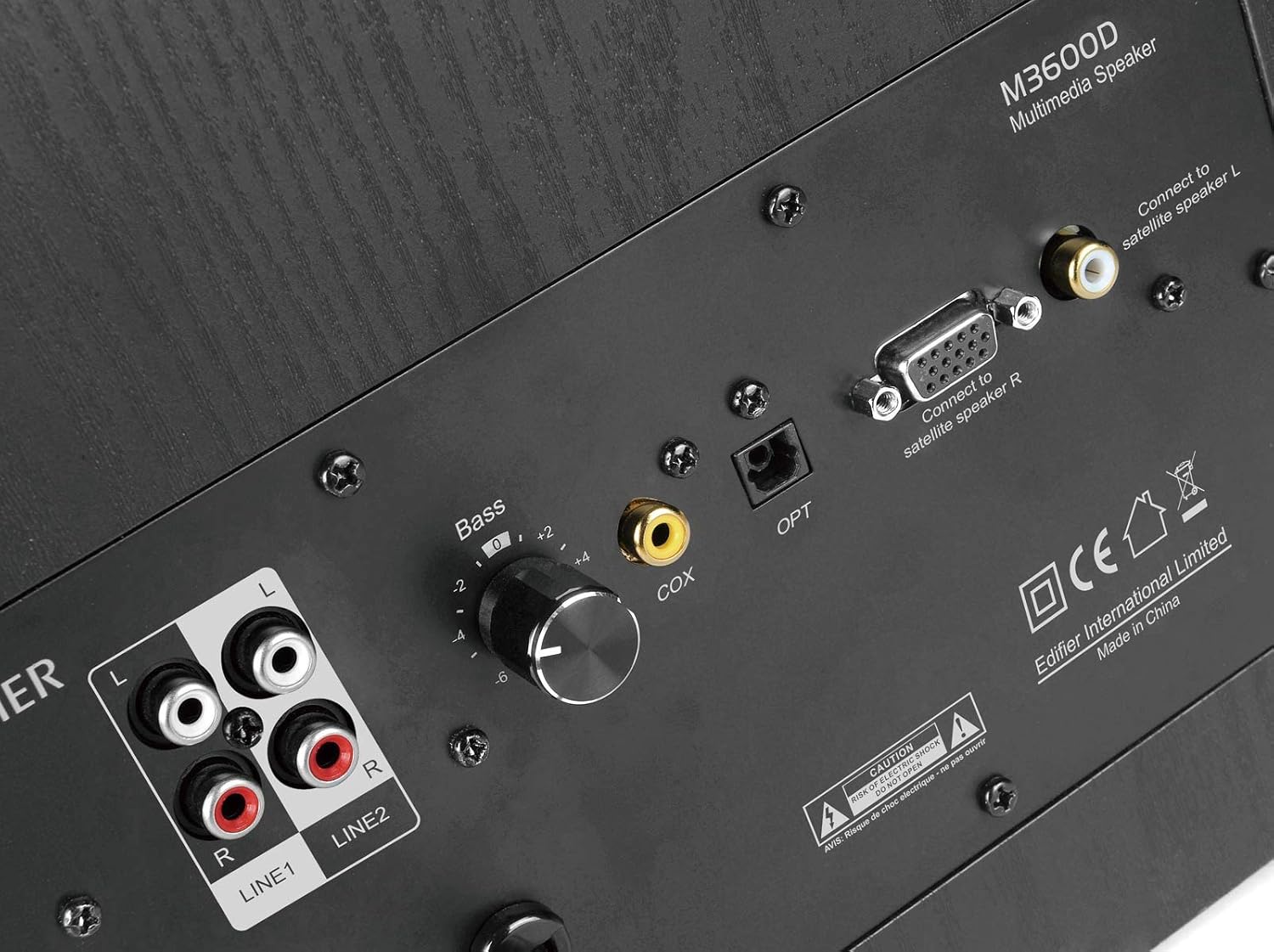
Figure 3.2: Rear panel of the M3600D subwoofer. This image highlights the various input ports (Line In 1, Line In 2, Coaxial, Optical) and the output connections for the satellite speakers, along with the bass control knob and power switch.
4. Ntuziaka ọrụ
Once the system is set up, follow these instructions for operation:
- Gbanyụọ/ Gbanyụọ: Use the main power switch on the rear of the subwoofer to turn the system on or off.
- Njikwa olu: The large rotary dial on the front of the right satellite speaker controls the master volume. Rotate clockwise to increase volume and counter-clockwise to decrease it.
- Nhọrọ ntinye: Press the volume dial on the right satellite speaker to cycle through the available audio inputs (Optical, Coaxial, Line In 1, Line In 2, AUX). An indicator light will show the currently selected input.
- Ndozi Bass: Use the 'Bass' control knob located on the rear panel of the subwoofer to adjust the bass level to your preference.
- Mmepụta ekweisi: A 3.5mm headphone jack is available on the right satellite speaker for private listening. Plugging in headphones will mute the speakers.
5. Njikọta
The M3600D offers multiple connectivity options:
- Optical Input (OPT): For high-quality digital audio connection from devices like TVs, game consoles, or Blu-ray players.
- Coaxial Input (COX): Another digital audio input option, suitable for similar devices as the optical input.
- Line In 1 (RCA): Stereo RCA input for connecting devices with RCA audio outputs.
- Line In 2 (RCA): Additional stereo RCA input for another audio source.
- Ntinye AUX (3.5mm): A standard 3.5mm auxiliary input for connecting smartphones, tablets, laptops, or MP3 players.
Mara: This system does not support Bluetooth connectivity. For wireless audio, an external Bluetooth adapter would be required (not included).
6. Nkọwapụta
| Njirimara | Nkọwapụta |
|---|---|
| Aha Nlereanya | M3600D |
| Ụdị Ọkà Okwu | 2.1 Multimedia Speaker System (Subwoofer) |
| Nwee ikike zuru ezu | 200 Watts RMS (Subwoofer: 130W, Satellites: 2 x 35W) |
| THX kwadoro | Ee |
| Ihe onwunwe | Wood (MDF cabinet with vinyl wood grain laminate) |
| Ntinye | Optical, Coaxial, Line In (RCA x2), AUX (3.5mm) |
| Usoro njikwa | Rotary Volume/Input Dial (on satellite), Bass Knob (on subwoofer) |
| Dayameta nke subwoofer | 7 Centimeters (Woofer Diameter) |
| Nha ọkwọ ụgbọ ala ọdịyo | 17.78 sentimita asatọ |
| Agba | Nwa |
| Akụkụ ngwaahịa | 12 x 16.75 x 11 sentimita asatọ |
| Ibu Ibu | 21 pound |
| Ngwa dakọtara | Smartphone, Tablet, Desktop, Laptop, MP3 Player, Television, Projector |
7. Nchọpụta nsogbu
If you encounter issues with your M3600D speaker system, please refer to the following common troubleshooting steps:
- Enweghị ụda:
- Ensure the power cable is securely connected and the power switch on the subwoofer is ON.
- Verify that the correct input source is selected on the right satellite speaker.
- Check all audio cables for secure connections between the source, satellites, and subwoofer.
- Increase the volume on both the speaker system and your audio source.
- If using headphones, ensure they are unplugged from the satellite speaker.
- Ụda agbagọ:
- Belata olu na sistemụ okwu na isi iyi ọdịyo gị.
- Check if the audio source itself is producing distorted sound. Try a different source.
- Gbaa mbọ hụ na ejikọrọ eriri niile nke ọma ma ghara imebi.
- Adjust the bass control knob on the subwoofer.
- Ụda anaghị akwụsị akwụsị:
- Lelee maka njikọ eriri adịghị.
- Ensure there are no strong electromagnetic interferences near the speakers.
- Try a different audio cable or input source to isolate the problem.
If the issue persists after trying these steps, please contact Edifier customer support.
8. Nlekọta
To ensure the longevity and optimal performance of your Edifier M3600D speaker system, follow these maintenance guidelines:
- Nhicha: Use a soft, dry cloth to clean the surfaces of the speakers and subwoofer. Avoid using abrasive cleaners, waxes, or solvents.
- Nkwanye: Place the speakers on a stable, level surface to prevent accidental falls. Avoid placing them in direct sunlight, near heat sources, or in areas with high humidity or dust.
- Igwe ikuku: Hụ na ikuku na-abata nke ọma n'akụkụ subwoofer ahụ iji gbochie oke okpomọkụ. Ekpuchila oghere ikuku ọ bụla.
- Njikwa USB: Debe eriri ndị ahụ n'usoro ma ghara inwe nsogbu ma ọ bụ oke nrụgide iji gbochie mmebi.
- Gbanyụọ mgbe anaghị eji ya: For extended periods of inactivity, it is recommended to turn off the system using the main power switch.
9. Akwụkwọ ikike na nkwado
The Edifier M3600D Multimedia 2.1 Active Speaker System comes with a Akwụkwọ ikike dị afọ 2. This warranty covers manufacturing defects and ensures hassle-free full replacement in the USA and Canada.
For warranty claims, technical assistance, or further inquiries, please contact Edifier USA customer support. Refer to the official Edifier websaịtị ma ọ bụ ozi kọntaktị enyere na nkwakọ ngwaahịa gị maka nkọwa nkwado kachasị ọhụrụ.