1. Okwu mmalite
This manual provides essential information for the safe and efficient operation, installation, and maintenance of your Carrier Estrella Pro 2018 1.0 Ton 3 Star Window Air Conditioner. Please read this manual thoroughly before using the appliance and retain it for future reference. This air conditioner is designed to provide comfortable cooling for your indoor environment, featuring a 1.0 ton capacity and a 3-star energy rating.
2. Ozi nchekwa
Iji gbochie mmerụ ahụ onye ọrụ ma ọ bụ ndị ọzọ na mbibi ihe onwunwe, a ga -emerịrị ntuziaka ndị a. Ịrụ ọrụ na -ezighi ezi n'ihi ileghara ntuziaka anya nwere ike bute mmerụ ahụ ma ọ bụ mmebi.
- Gbaa mbọ hụ na ọkọnọ ike dabara akara akara dị na unit ahụ.
- Ejikwala aka mmiri arụ ọrụ ikuku oyi.
- Etinyekwala mkpịsị aka ma ọ bụ ihe mba ọzọ n'ime oghere ikuku ma ọ bụ mpụta.
- Debe ihe ndị na-ere ọkụ na nkeji.
- Always disconnect power before cleaning or servicing the unit.
- Installation must be performed by qualified personnel in accordance with local electrical codes.
- Anwala ịrụzi ihe dị n'ime ụlọ ọrụ ahụ n'onwe gị. Kpọtụrụ ndị ọrụ ikike.
3. Akụrụngwa Ngwaahịa
Your Carrier Estrella Pro 2018 air conditioner is equipped with several features designed for enhanced comfort and efficiency:
- Ihe nzacha vitamin C: Disperses minute particles of Vitamin C into the air, which may help soften skin and reduce stress.
- Ọ dị mfe: Extra sensors built into the remote control inform the unit of the temperature in various parts of the room, ensuring optimal temperature delivery.
- Nchọpụta smart: In case of a fault, this function diagnoses the issue immediately, turns off the AC to protect it, and indicates a protection or error code for faster service.
- Modera Modera: An energy-saving mode that gradually increases the temperature while you sleep, maintaining comfort while reducing energy consumption.
- Exhaust Command: Ensures a constant supply of fresh and healthy air in your room.
- Malitegharịa ekwentị na akpaghị aka: Retains settings and temperature levels during unexpected power outages, restarting with previous settings automatically when power resumes.
- Swing akpaaka: Evenly cools or heats every part of the room by automatically rotating/swinging the air deflector.
- Nexgen Dehumidifier: Reduces humidity in a specific room while retaining cooling capability, maintaining a comfortable temperature and preventing mold/mildew.
- Ikanam Display: Bright LED display included in the control panel.
- Built-in Slinger: Condensed water is absorbed and recycled by the heat condenser for minimum energy use and zero drainage problems.
- Hydrophilic Blue Fins: Improve heat exchange by absorbing and spreading water on their surface, preventing droplet formation. The anti-corrosive epoxy coating improves heat transfer and prevents corrosion.
- 24hr Timer: Allows the unit to run on automatic mode, programming it to start and stop at a pre-assigned time.
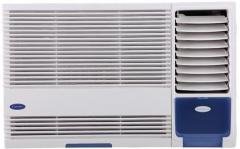
Foto 3.1: N'ihu view of the Carrier Estrella Pro 2018 Window Air Conditioner, showcasing ya kọmpat imewe.
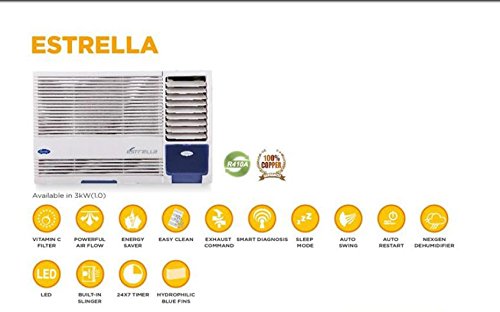
Onyonyo 3.2: Ofefeview of the Estrella Pro's key features, including Vitamin C filter, powerful airflow, energy saver, easy clean, exhaust command, smart diagnosis, sleep mode, auto swing, auto restart, Nexgen dehumidifier, LED, built-in slinger, 24x7 timer, and hydrophilic blue fins.
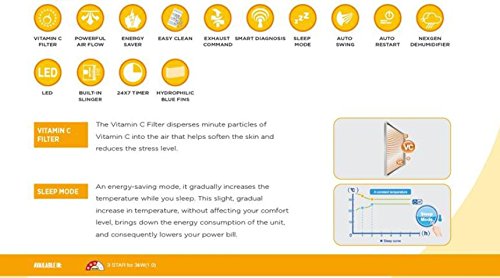
Figure 3.3: Detailed explanation of the Vitamin C Filter and Sleep Mode functionalities, including a graph illustrating temperature changes during Sleep Mode.
4. Nhazi
Proper installation is crucial for the performance and longevity of your air conditioner. It is recommended that installation be carried out by a certified technician.
4.1 Ịhọrọ ebe
- Select a window that can support the weight of the unit.
- Ensure there are no obstructions to airflow both inside and outside the room.
- The unit should be installed with a slight downward tilt towards the outside to allow for proper condensate drainage.
4.2 Eletriki chọrọ
- Connect the unit to a dedicated power outlet with the correct voltage na amperage as specified on the product label.
- Ejila eriri ndọtị ma ọ bụ ihe nkwụnye ọtụtụ-outlet.
- Hụ na ebe a na-esi ike eletrik arụ ọrụ nke ọma.
4.3 Nzọụkwụ Nwụnye (General)
- Prepare the window opening, ensuring it is clean and free of debris.
- Carefully lift and place the air conditioner into the window opening.
- Secure the unit using the provided mounting brackets and screws.
- Install the side panels to seal the gap between the unit and the window frame.
- Ensure all seals are tight to prevent air leakage.
5. Ntuziaka ọrụ
Your air conditioner can be operated using the control panel on the unit or the provided remote control.
5.1 Basic Arụmọrụ
- Gbanyụọ/ Gbanyụọ: Pịa IKE bọtịnụ iji gbanye ma ọ bụ gbanyụọ unit ahụ.
- Nhọrọ ụdị: Pịa MODE button to cycle through available modes: Cool, Fan, Dry (Dehumidifier).
- Ndozi okpomọkụ: Jiri ihe UP na N'ala arrow buttons to set your desired temperature.
- Ọsọ onye ofufe: Pịa FAN ọsọ button to adjust the fan speed (Low, Medium, High, Auto).
5.2 Ọrụ Pụrụ Iche
- Modera Modera: Activate this mode for quiet, energy-efficient operation during sleep. The temperature will gradually increase over time.
- Ọrụ ngụ oge: Jiri ihe TIMER button to set a specific time for the unit to turn on or off automatically within a 24-hour period.
- Swing akpaaka: Pịa INGTỌ button to activate or deactivate the automatic louver movement for even air distribution.
- Ụdị ihe na-eme ka mmiri ghara ịdị ọcha (akọrọ): Select this mode to reduce humidity in the room without significant cooling.
6. Nlekọta
Nlekọta anya mgbe niile na-eme ka arụmọrụ dị mma ma gbasaa ogologo ndụ nke ikuku ikuku gị.
6.1 Nchacha ikuku ikuku
- Ugboro: Clean the air filter every two weeks, or more often if the unit is used frequently or in dusty environments.
- Nzọụkwụ:
- Kwupu ike na unit.
- Open the front panel and remove the air filter.
- Jiri mmiri dị ṅara ṅara saa nzacha na ncha dị nro.
- Rinse thoroughly and allow it to air dry completely before reinstalling.
6.2 Nhicha mputa
- Jiri nwayọ hichaa mpụta nke otu ahụ, damp akwa .
- Ejila kemịkalụ siri ike, abrasives, ma ọ bụ ihe mgbaze.
6.3 Nlekọta oge
- Before long periods of non-use (e.g., winter), run the unit in fan-only mode for a few hours to dry the internal components.
- Clean the air filter and cover the unit to protect it from dust.
7. Nchọpụta nsogbu
If you encounter issues with your air conditioner, refer to the following common problems and solutions. For more complex issues, utilize the Nchọpụta nyocha feature or contact customer support.
| Nsogbu | Ihe nwere ike ime | Ngwọta |
|---|---|---|
| Unit anaghị agbanwuo | No power supply; Power cord unplugged; Blown fuse/tripped breaker | Check power connection; Reset breaker/replace fuse. |
| Ezughi oke jụrụ oyi | Dirty air filter; Room too large; Doors/windows open; Temperature setting too high | Clean air filter; Close doors/windows; Lower temperature setting. |
| Oke mkpọtụ | Loose installation; Fan hitting obstruction; Unit not level | Ensure secure installation; Check for obstructions; Level the unit. |
| Mgbapu mmiri | Unit not tilted correctly; Drain pan clogged | Adjust unit tilt; Clear drain pan. |
If the problem persists after attempting these solutions, please contact Carrier customer service for assistance. The Smart Diagnosis feature can provide error codes to help service technicians identify the issue quickly.
8. Nkọwapụta
The following table outlines the key specifications for the Carrier Estrella Pro 2018 1.0 Ton 3 Star Window Air Conditioner:
| Njirimara | Nkọwa |
|---|---|
| Ụdị | Onye na-ebu |
| Ịrụ ọrụ ike | Ogo kpakpando 3 |
| Ike | 1 Tọn |
| Ụdị nwụnye | Ohere |
| Atụmatụ pụrụ iche | Auto Restart, Dehumidifier, Sleep Mode, Vitamin C Filter, Easy Clean, Smart Diagnosis, Exhaust Command, Auto Swing, Nexgen Dehumidifier, LED, Built-in Slinger, Hydrophilic Blue Fins, 24hr Timer |
| Agba | ọcha |
| Ogwe njikwa | njikwa anya |
| Asambodo | kpakpando ume |
| Igwe nju oyi | R-32 |
| ASIN | B07BFXPZ2T |
| Ụbọchị mbụ dị | Maachị 13, 2018 |
9. Akwụkwọ ikike na nkwado
Your Carrier Estrella Pro 2018 air conditioner comes with a comprehensive warranty:
- Akwụkwọ ikike ngwaahịa: 1 year on the entire product.
- Akwụkwọ ikike Compressor: Afọ 5 na compressor.
For warranty claims, technical support, or service requests, please contact Carrier customer service. Ensure you have your product model number and purchase date available when contacting support.
You can find contact information for Carrier customer support on the official Carrier websaịtị ma ọ bụ na nkwakọ ngwaahịa gị.


