1. Okwu mmalite
This manual provides essential information and instructions for the safe and efficient use of your Nokia 8 Sirocco TA-1005 smartphone. Please read this guide thoroughly before operating your device to ensure optimal performance and longevity. This device is designed for use with GSM, 3G, and 4G LTE networks. Compatibility with CDMA networks, including Verizon, Sprint, and US Cellular, is not supported. Verify network compatibility with your service provider prior to use.
2. Kedu ihe dị na Igbe ahụ
Upon unboxing your Nokia 8 Sirocco TA-1005, verify that all components are present:
- Nokia 8 Sirocco TA-1005 Device
- USB Type-C USB
- Ihe nkwụnye ọkụ
- Igwe isi
- Ngwaọrụ SIM Ejector
- Ntuziaka mmalite ngwa ngwa
- Ozi nchekwa na akwụkwọ ikike
3. Nhazi ngwaọrụ
Familiarize yourself with the physical components of your Nokia 8 Sirocco TA-1005.
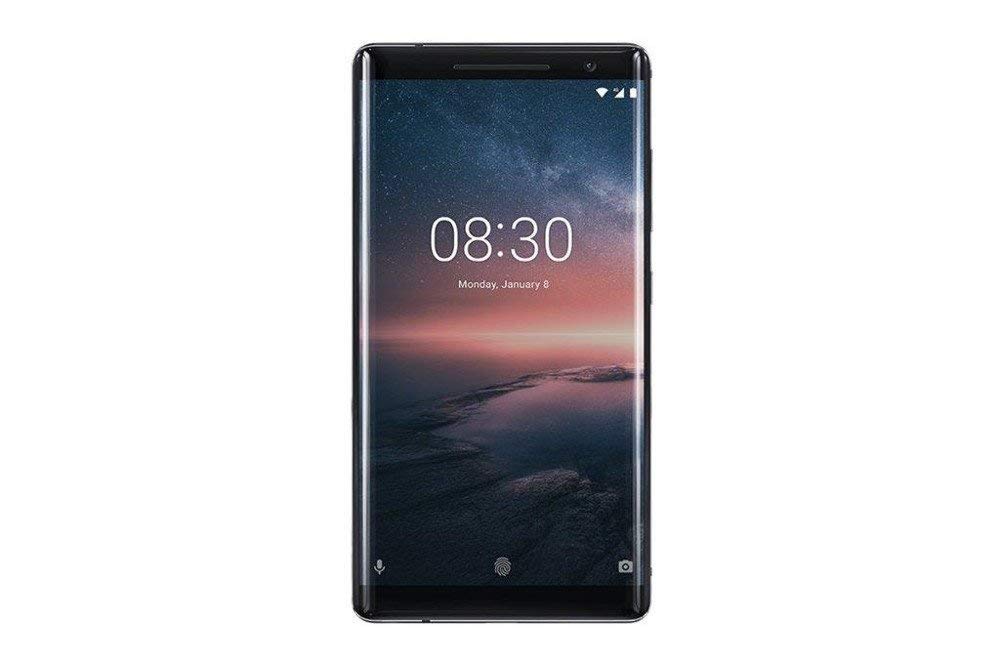
Foto 3.1: N'azụ view of the Nokia 8 Sirocco TA-1005. This image displays the dual camera setup with ZEISS optics, the circular fingerprint sensor below the camera, and the Nokia logo centrally placed. The 'androidone' branding is visible towards the bottom.
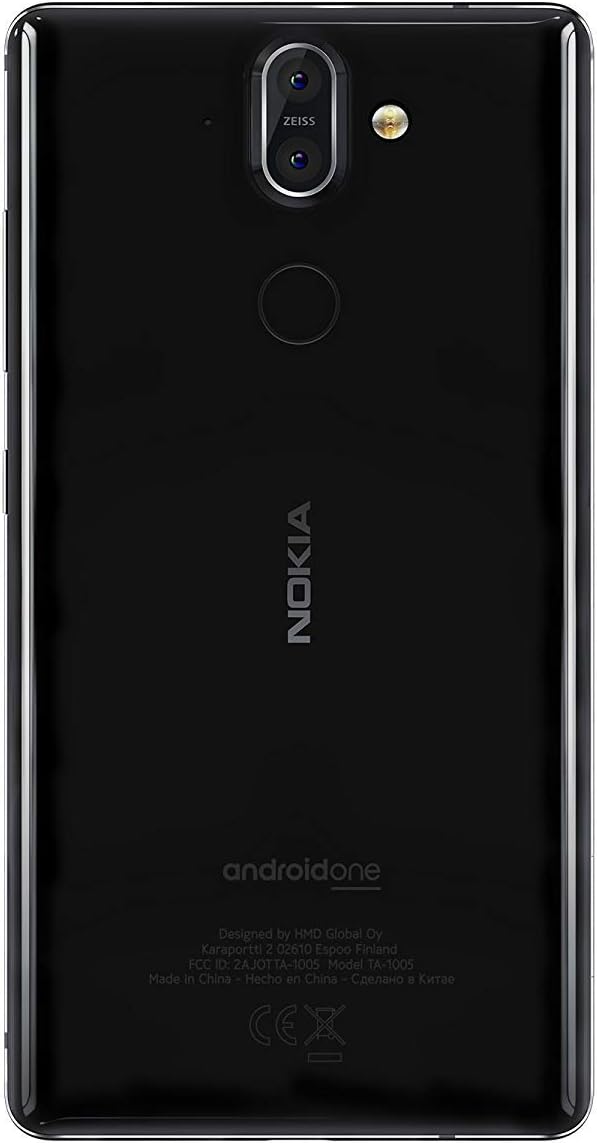
Foto 3.2: N'ihu view of the Nokia 8 Sirocco TA-1005. The image highlights the 5.5-inch P-OLED curved display, the front-facing camera at the top, and the on-screen navigation buttons. The device features minimal bezels.

Foto 3.3: Akụkụ view of the Nokia 8 Sirocco TA-1005. This image illustrates the slim profile of the device, with the power button and volume rocker located on the right side for easy access.
Isi ihe:
- Igwefoto ihu: Located at the top of the display.
- Ihe nti: For calls, located above the display.
- Ngosipụta: 5.5-inch P-OLED capacitive touchscreen.
- Bọtịnụ olu: On the right side, to adjust audio levels.
- Ike/Mkpọchi bọtịnụ: On the right side, to power on/off or lock/unlock the screen.
- Ọdụ ụgbọ mmiri Ụdị-C: N'okpuru, maka ịchaji na nnyefe data.
- Igwe okwu: Located at the bottom and top.
- Ọkà okwu: Located at the bottom.
- SIM/Memory Card Tray: On the side, for inserting SIM cards.
- Igwefoto azụ: Dual cameras with ZEISS optics on the back.
- Flash: Dual-tone flash next to the rear cameras.
- Mkpisiaka mmetụta: On the back, below the rear cameras.
4. Nhazi
4.1. Ịtinye kaadị SIM
- Chọta tray kaadị SIM n'akụkụ ngwaọrụ gị.
- Tinye ngwaọrụ SIM ejector n'ime obere oghere dị na tray ahụ iji mepee ya.
- Place your Nano-SIM card(s) into the designated slot(s) on the tray, ensuring the gold contacts face downwards.
- Jiri nlezianya tụgharịa traị ahụ azụ n'ime ngwaọrụ ahụ ruo mgbe ọ pịrị na ya.
Mara: This device does not support external memory cards.
4.2. Ịgbanyụ ma gbanyụọ
- Iji gbanye: Press and hold the Power/Lock button until the Nokia logo appears.
- Iji gbanyụọ: Press and hold the Power/Lock button until the power options menu appears, then select "Power off".
4.3. Mbido Mbido
Upon first power-on, the device will guide you through the initial setup process. This includes selecting your language, connecting to a Wi-Fi network, setting up your Google account, and configuring security features like fingerprint unlock or a PIN/pattern.
5. Ntuziaka ọrụ
5.1. Ịkpọ oku
- Open the "Phone" application.
- Enter the phone number using the dial pad or select a contact from your address book.
- Pịa akara ngosi oku iji malite oku ahụ.
5.2. Izipu ozi
- Open the "Messages" application.
- Tap the "Start chat" or "New message" icon.
- Tinye nọmba onye nnata ma ọ bụ họrọ na kọntaktị.
- Pịnye ozi gị na mpaghara ederede.
- Pịa akara ngosi izipu.
5.3. Iji igwefoto
- Open the "Camera" application.
- Debe isiokwu gị na ihuenyo.
- Pịa bọtịnụ mkpuchi ka ịsee foto.
- Switch between photo and video modes, or access advanced settings like portrait mode or panorama, as desired.
5.4. Njikọ Ịntanetị
- Wi-Fi: Gaa na Ntọala> Netwọk & ịntanetị> Wi-Fi. Turn Wi-Fi on and select an available network. Enter the password if required.
- Data mkpanaka: Gaa na Ntọala> Netwọk & ịntanetị> Netwọk mkpanaka. Ensure "Mobile data" is enabled.
5.5. Nchekwa atụmatụ
Your Nokia 8 Sirocco TA-1005 offers various security options:
- Mkpọghe mkpịsị aka: Debanye akara mkpịsị aka gị site na Settings > Security & Location > Fingerprint.
- Mkpọchi ihuenyo: Set a PIN, pattern, or password via Settings > Security & Location > Screen lock.
6. Nlekọta
6.1. Na-ehicha ngwaọrụ
Use a soft, lint-free cloth to clean your device. Avoid using harsh chemicals or abrasive materials, which can damage the screen or finish.
6.2. Nlekọta batrị
- Charge your device using only Nokia-approved chargers and cables.
- Zere ikpughe ngwaọrụ na oke okpomọkụ.
- Ekwela ka batrị ka ọ na-apụ ugboro ugboro.
6.3. Mmelite ngwanrọ
Lelee ma wụnye mmelite ngwanrọ mgbe niile iji hụ na ngwaọrụ gị nwere njirimara kachasị ọhụrụ, patches nche na nkwalite arụmọrụ. Gaa na Ntọala> Sistemu> Mmelite sistemụ.
7. Nchọpụta nsogbu
If you encounter issues with your device, refer to the following common solutions:
| Nsogbu | Ngwọta |
|---|---|
| Ngwaọrụ anaghị agbanwu | Hụ na batrị ahụ chajị. Jikọọ na chaja ruo opekata mpe nkeji iri na ise. Ọ bụrụ na ọ zaghị, malitegharịa ike site n'iji bọtịnụ Ike maka sekọnd iri ruo iri na ise. |
| Mgbama netwọkụ adịghị mma | Check SIM card insertion. Move to an area with better network coverage. Restart the device. Verify network settings in Ntọala> Netwọk & ịntanetị> Netwọk mkpanaka. |
| Applications are crashing | Hichapụ cache ngwa ahụ (Ntọala > Ngwa na ọkwa > [Aha Ngwa] > Nchekwa na nchekwa > Hichapụ ebe nchekwa). Update the app from the Google Play Store. If the issue persists, uninstall and reinstall the app. |
| Batrị na-agbapụ ngwa ngwa | Reduce screen brightness. Close unused background apps. Disable Wi-Fi, Bluetooth, and GPS when not in use. Check battery usage in Ntọala > Batrị iji chọpụta ngwa ndị na-eri ike. |
| Ngwaọrụ anaghị anabata | Perform a force restart by holding the Power button for 10-15 seconds. If the issue continues, consider a factory reset (Ntọala> Sistemu> Nhọrọ Tọgharia> Hichapụ data niile (ntọgharị ụlọ ọrụ)). Ịdọ aka ná ntị: A factory reset will erase all data on your device. Back up important data before proceeding. |
8. Nkọwapụta
Detailed technical specifications for the Nokia 8 Sirocco TA-1005:
| Njirimara | Nkọwa |
|---|---|
| Aha Nlereanya | 8 Sirocco |
| Nọmba nlereanya | TA-1005 |
| Sistemụ nrụọrụ | Android 8.0 (Oreo) |
| Nhazi | Qualcomm MSM8998 Snapdragon 835, Octa-core (4x2.5 GHz Kryo & 4x1.8 GHz Kryo) |
| GPU | Adreno 540 |
| RAM | 6 GB |
| Nchekwa nke ime | 128 GB |
| Ngosipụta | 5.5 inches, P-OLED capacitive touchscreen, 1440 x 2560 pixels, Corning Gorilla Glass 5 |
| Igwefoto azụ | 12MP Wide (f/1.7) + 13 MP Tele (f/2.6), dual-tone flash |
| Igwefoto ihu | 5MP |
| Ike batrị | 3250 mAh |
| Ịchaji | Nkwado Nchaji ngwa ngwa |
| Njikọta | Wi-Fi 802.11a/b/g/n, Bluetooth, USB Type-C |
| Akụkụ | 43.36 x 43.17 x 0.75 cm |
| Ibu | 181 g |
| Ụdị SIM | Nano-SIM |
| Nkwado netwọkụ | 2G GSM, 3G, 4G LTE (Note: Not compatible with CDMA networks) |
9. Safety and Warranty Information
9.1. Ntuziaka nchekwa
- Do not use the device in prohibited areas, such as aircraft or hospitals.
- Avoid exposing the device to water or excessive moisture.
- Use only original or approved accessories.
- Anwala ịkwasa ma ọ bụ rụkwaa ngwaọrụ n'onwe gị.
- Tụfuo ngwaọrụ na batrị ya nke ọma dịka iwu mpaghara siri dị.
9.2. Akwụkwọ ikike Ozi
Your Nokia 8 Sirocco TA-1005 is covered by a limited manufacturer's warranty. Please refer to the separate warranty document included in your product packaging or visit the official Nokia support websaịtị maka usoro na ọnọdụ zuru ezu. Debe ihe akaebe nke ịzụrụ ihe gị maka nkwupụta nkwa.


