1. Okwu mmalite
Daalụ maka ịzụrụasing the Perel LED Headlamp EHL21. This manual provides essential information for the safe and efficient operation, maintenance, and troubleshooting of your new headlamp. Please read these instructions carefully before first use and retain them for future reference.
2. Ntuziaka nchekwa dị mkpa
- Do not look directly into the LED light. The intense light can cause temporary vision impairment or eye damage.
- Debe isi isiamp away from water and moisture unless explicitly stated as waterproof.
- Agbalịla ịgbasa ma ọ bụ gbanwee isi ahụamp. Nke a ga-emebi akwụkwọ ikike ma nwee ike ibute mmebi ma ọ bụ mmerụ ahụ.
- Debe ebe ụmụaka na-apụghị iru.
- Jiri naanị eriri chaja enyere maọbụ nke akwadoro.
- Tụfuo batrị dịka iwu mpaghara siri dị.
3. Ihe ngwugwu
Biko lelee ngwungwu maka ihe ndị a:
- 1 x Perel LED Headlamp EHL21
- 1 x Micro USB eriri USB
- 1 x Built-in Lithium-ion Battery
4. Ngwaahịa gafereview
The Perel LED Headlamp EHL21 is a lightweight and versatile lighting solution designed for various activities. It features multiple lighting modes, a motion sensor for hands-free operation, and a rechargeable battery.
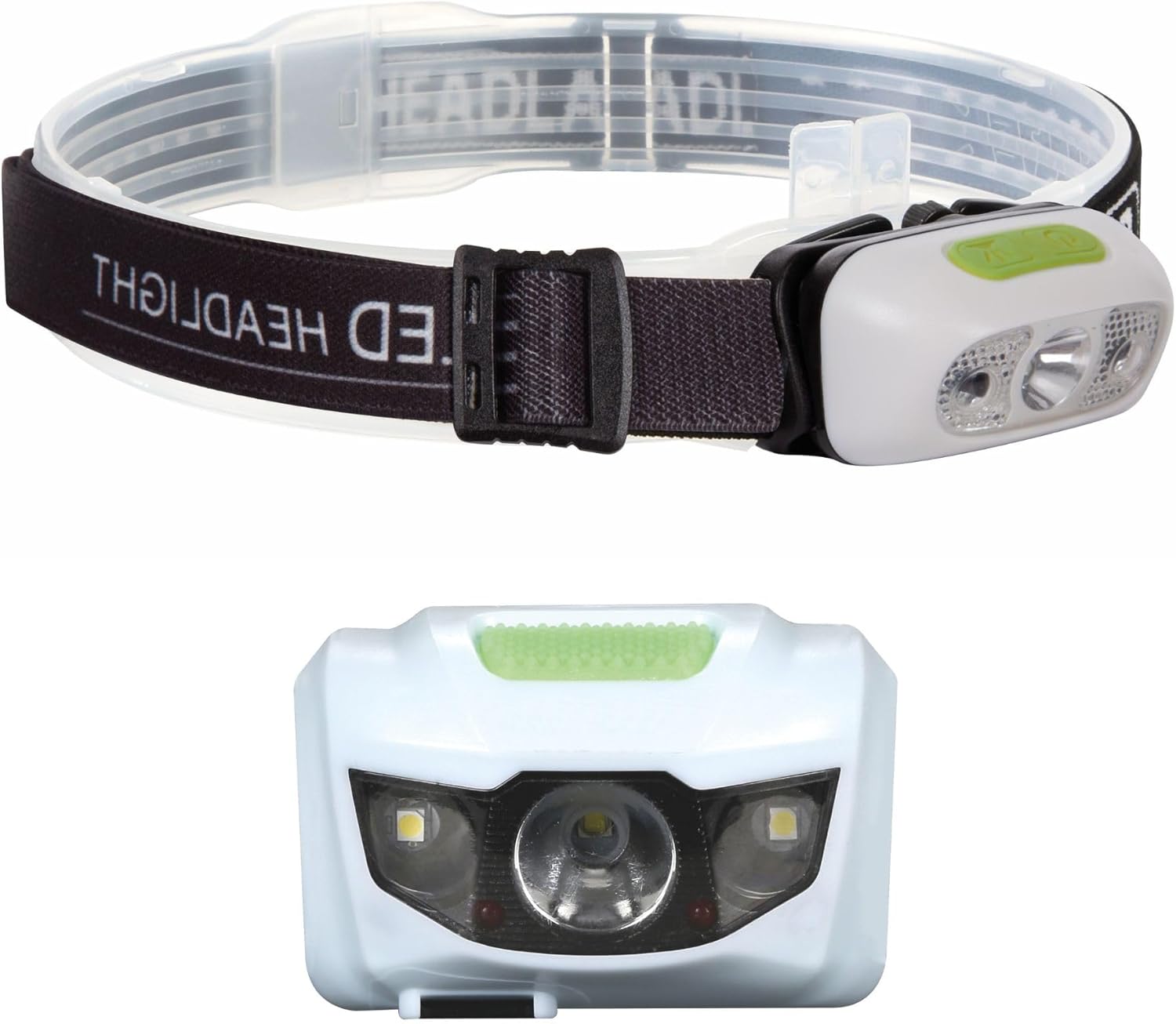
Image 1: Perel LED Headlamp with adjustable strap and front view of the light unit.

Image 2: Close-up of the Perel LED Headlamp showing the micro USB charging port and cable.
5. Nhazi
Tupu ojiji mbụ, biko soro usoro ndị a:
- Ebube mbụ: Gbanyụọ headl ahụ nke ọmaamp using the provided Micro USB cable. Refer to Section 6 for detailed charging instructions.
- Hazie eriri isi: Debe isi isiamp on your head and adjust the elastic strap for a comfortable and secure fit. The strap should be snug but not too tight.
6. Ntuziaka ọrụ
Isi okwuamp features a power button and a motion sensor for convenient operation.
Arụ ọrụ bọtịnụ ike:
- Pịa otu ugboro: Turns on the headlamp in 100% brightness mode.
- Pịa ugboro abụọ: Switches to 50% brightness mode.
- Pịa ugboro atọ: Switches to 25% brightness mode.
- Pịa ugboro anọ: Activates SOS flashing mode.
- Pịa ugboro ise: Turns off the headlamp.
- Long press (2 seconds) from any mode: Turns off the headlamp ozugbo.
Ọrụ sensọ ngagharị:
Isi okwuamp is equipped with a motion sensor for hands-free control. To activate the sensor:
- Gbanwuo isi isiamp using the power button to your desired brightness mode.
- Press the dedicated sensor button (usually indicated by a wave icon). The sensor indicator light will illuminate.
- Once activated, you can turn the headlamp on or off by waving your hand in front of the sensor.
- To deactivate the sensor, press the sensor button again.

Image 3: Illustration of the four lighting modes: 100%, 50%, 25%, and SOS.

Foto 4: Isiamp is suitable for various activities such as cycling, camping, hiking, and jogging.
7. Charging the Headlamp
The Perel LED Headlamp EHL21 is equipped with a built-in rechargeable Lithium-ion battery.
- Locate the Micro USB charging port on the side of the headlamp (refer to Image 2).
- Connect the small end of the Micro USB cable to the headlampọdụ ụgbọ mmiri.
- Connect the larger USB end of the cable to a standard USB power source (e.g., computer USB port, USB wall adapter, power bank).
- A charging indicator light will show the charging status. Typically, a red light indicates charging, and a green or blue light indicates a full charge.
- Once fully charged, disconnect the charging cable. Do not overcharge the battery.
8. Nlekọta na nlekọta
- Nhicha: Hichapụ isi isiamp jiri nwayọọ, damp akwa . Ejila ihe nchacha abrasive ma ọ bụ ihe mgbaze.
- Nchekwa: Chekwaa isi isiamp in a cool, dry place when not in use. If storing for extended periods, charge the battery every 3-6 months to maintain its lifespan.
- Nlekọta batrị: Avoid fully discharging the battery frequently. Recharge before the battery is completely depleted.
9. Nchọpụta nsogbu
| Nsogbu | Ihe nwere ike ime | Ngwọta |
|---|---|---|
| Isiamp adịghị agbanye. | Batrị agwụla. | Kpuchie isi isiamp zuru oke. |
| Ìhè adịghị nchara. | Batrị dị ala. | Fanye headlamp. |
| Motion sensor not responding. | Sensor not activated or obstructed. | Ensure the sensor button is pressed and there are no obstructions in front of the sensor. |
| Isiamp anaghị akwụ ụgwọ. | Eriri ma ọ bụ isi iyi ọkụ eletrik adịghị mma. | Try a different Micro USB cable or USB power source. Ensure connections are secure. |
10. Nka na ụzụ nkọwa
| Njirimara | Nkọwapụta |
|---|---|
| Nlereanya | EHL21 |
| Onye nrụpụta | Velleman (Perel) |
| Akụkụ (L x W x H) | 0.1 x 0.1 x 0.1 cm (Product); 30 x 60 x 35 cm (Packaging) |
| Ibu | 73 grams |
| Ụdị batrị | 1 x Lithium-ion (included) |
| Isi Iyi Ike | Akwanyere batrị |
| Ụdị bọlbụ | Ikanam |
| Atụmatụ pụrụ iche | Rechargeable, On/Off Sensor |
| Ihe onwunwe | Aluminom Alloy |
| Agba | Ọcha |
11. Akwụkwọ ikike na nkwado
Perel products are designed for reliability and performance. This product comes with a standard manufacturer's warranty against defects in materials and workmanship. For specific warranty details, please refer to the warranty card included with your purchase or visit the official Perel websaịtị.
If you encounter any issues or have questions regarding your Perel LED Headlamp EHL21, please contact Perel customer support through their official channels. Please have your model number (EHL21) and proof of purchase ready when contacting support.


