1. Okwu mmalite
Thank you for choosing the EMPIRE GAMING Ustream Microphone. This manual provides essential information for the proper setup, operation, and maintenance of your microphone. Please read it thoroughly before use to ensure optimal performance and longevity of the product.
The EMPIRE GAMING Ustream Microphone is designed for high-quality audio capture, ideal for live streaming, podcasting, gaming communication, and voice chat applications.
2. Ngwaahịa gafereview
2.1. Atụmatụ igodo
- High-quality sound with noise reduction filter.
- 3-in-1 multifunction button for volume control and mute.
- Compact and detachable microphone design.
- Articulated stand for adjustable angle.
- Anti-slip and weighted base for stability.
- Includes wind protection foam.
- Plug-and-Play USB connectivity, no drivers required.
- Compatible with PC, Mac, PS4, and Xbox One.
2.2. Ihe ngwugwu
- EMPIRE GAMING Ustream Microphone (detachable)
- Articulated stand
- Wind protection foam
- Akwụkwọ ntuziaka onye ọrụ
2.3. Ihe osise

Foto 1: The EMPIRE GAMING Ustream Microphone, showing its main body, stand, and integrated USB cable.

Foto 2: Akụkụ view of the microphone, highlighting its sleek design and adjustable arm.
3. Nhazi
3.1. Mgbakọ
- Jiri nlezianya wepụ ihe niile dị na igbe ahụ.
- Attach the detachable microphone unit to the articulated stand. Ensure it clicks securely into place.
- Place the assembled microphone on a stable, flat surface. The weighted and anti-slip base provides stability.
- If desired, place the included wind protection foam over the microphone head to reduce plosive sounds and breath noise.

Foto 3: Diagram illustrating the microphone's dimensions and 180-degree articulation range for optimal positioning.

Foto 4: The microphone shown with the included wind protection foam installed, ready for use.
3.2. Connecting to Your Device (Plug-and-Play)
The EMPIRE GAMING Ustream Microphone features Plug-and-Play functionality, meaning no additional drivers or software are required for most operating systems.
- Connect the USB cable from the microphone to an available USB port on your PC, Mac, PS4, or Xbox One.
- Your operating system should automatically detect and install the necessary device drivers. This process may take a few moments.
- Once installed, the microphone will be ready for use. You may need to select it as the default input device in your system's sound settings or within your application (e.g., Discord, Twitch, OBS).
3.3. Ndakọrịta
The microphone is compatible with:
- PC (Windows operating systems)
- Mac (macOS operating systems)
- PlayStation 4 (PS4)
- Xbox One
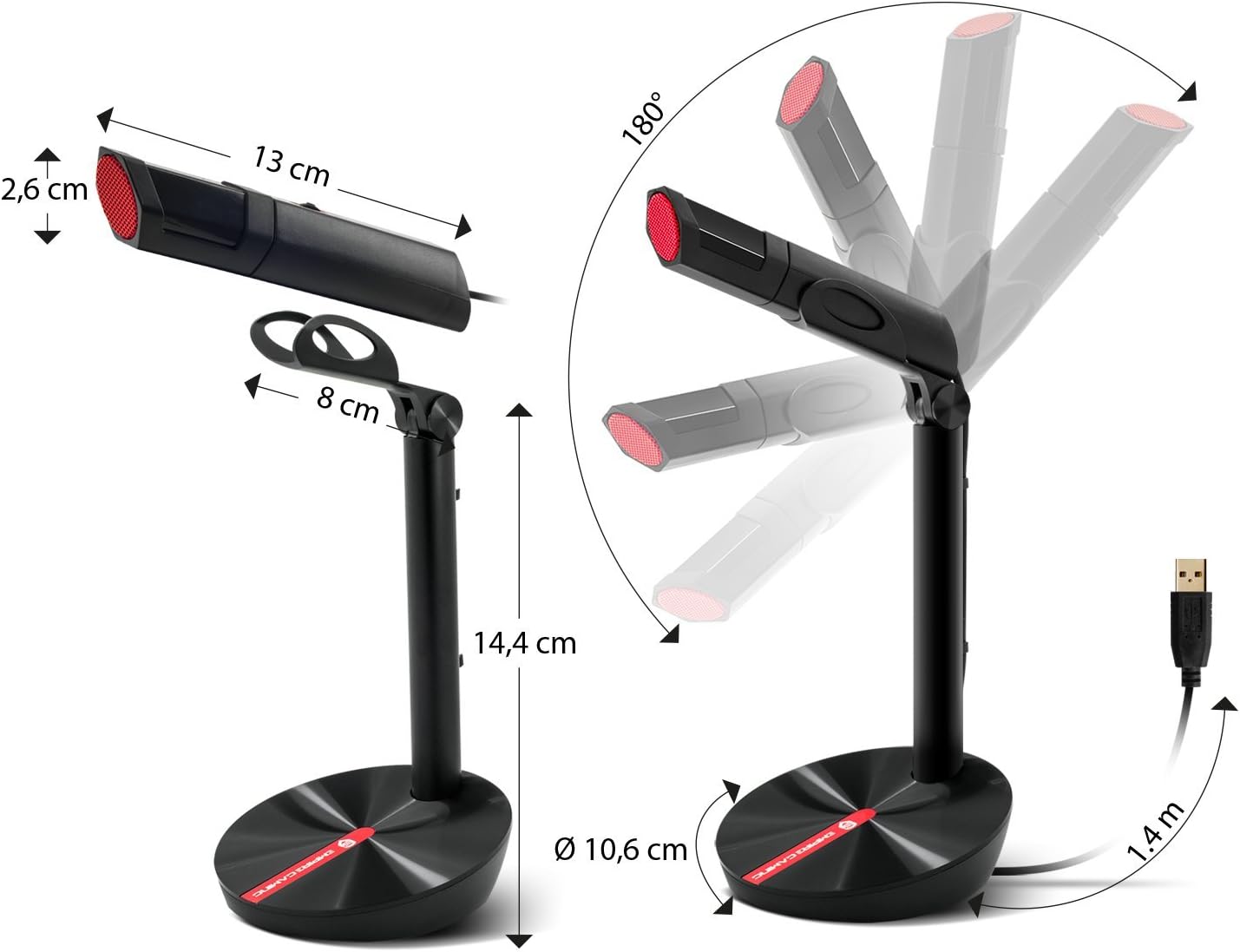
Foto 5: Visual representation of the microphone's compatibility with Discord, Skype, TeamSpeak, and Twitch.
4. Ntuziaka ọrụ
4.1. Microphone Positioning
For optimal sound quality, position the microphone approximately 15-30 cm (6-12 inches) from your mouth. Utilize the articulated stand to adjust the angle and height to suit your preference.
4.2. Volume and Mute Control
The microphone features a 3-in-1 multifunction button located on its body:
- Ndozi olu: Rotate the button up or down to increase or decrease the microphone's input volume.
- Mechie ọrụ: Press the button to mute or unmute the microphone. When muted, the microphone's LED indicator may change color or turn off (refer to specific model behavior).

Foto 6: Close-up of the microphone's multifunction button for volume control and mute functionality.
4.3. Noise Reduction Filter
The EMPIRE GAMING Ustream Microphone incorporates a noise reduction filter to enhance sound clarity by minimizing background noise. This feature operates automatically to provide clear audio for your audience or teammates.

Foto 7: Internal diagram illustrating the high-quality sound capture and noise reduction filter technology.
4.4. Ihe ngosi eji eme ihe
This microphone is optimized for various applications, including:
- Live streaming on platforms like Twitch and YouTube.
- Recording podcasts.
- Voice communication in games via Discord, TeamSpeak, and other chat applications.

Foto 8: A user engaged in a gaming session, utilizing the EMPIRE GAMING Ustream Microphone for communication.
5. Nlekọta
To ensure the longevity and optimal performance of your microphone, follow these simple maintenance guidelines:
- Nhicha: Use a soft, dry cloth to wipe the microphone's surface. Avoid using abrasive cleaners or solvents.
- Nchekwa: Mgbe ejighị ya, chekwaa igwe okwu n'ebe dị ọcha, kpọrọ nkụ pụọ na oke okpomọkụ na ìhè anyanwụ.
- Ijikwa: Avoid dropping the microphone or subjecting it to strong impacts, as this can damage internal components.
6. Nchọpụta nsogbu
If you encounter issues with your EMPIRE GAMING Ustream Microphone, please refer to the following common solutions:
- Ahụghị igwe okwu:
- Gbaa mbọ hụ na ejikọrọ eriri USB na ma igwe okwu na ngwaọrụ gị.
- Try connecting the microphone to a different USB port on your device.
- Malitegharịa ekwentị gị ma ọ bụ console.
- Check your device's sound settings to ensure the Ustream Microphone is selected as the default input device.
- Enweghị ụda ma ọ bụ obere olu:
- Check the microphone's multifunction button to ensure it is not muted and the volume is turned up.
- Verify the input volume settings in your operating system and any applications you are using (e.g., Discord, OBS).
- Ensure the microphone is positioned correctly and close enough to the sound source.
- Poor sound quality or background noise:
- Ensure the wind protection foam is properly installed.
- Minimize ambient noise in your environment.
- Adjust the microphone's position to reduce echo or room reverberation.
- Check for any electrical interference from other devices nearby.
7. Nkọwapụta
| Njirimara | Nkọwa |
|---|---|
| Aha Nlereanya | Ustream Microphone |
| Nọmba nlereanya | OE-MIC-01 |
| Teknụzụ Njikọta | USB (USB Type-A connector) |
| Isi Iyi Ike | Ekwenyere (USB) |
| Ụkpụrụ Polar | Unidirectional |
| Mmetụta ọdịyo | 58 decibel |
| Signgbaàmà-na-Noise ruru | 58 dB |
| Ihe kpatara ụdị igwe okwu | Lavalier (referring to compact design) |
| Ihe onwunwe | Polycarbonate |
| Atụmatụ pụrụ iche | LED RGB |
| Ngwa dakọtara | Personal Computer, Mac, PS4, Xbox One |
| Agba | Nwa |
| Eji akwadoro | Ịgba egwu |
8. Akwụkwọ ikike na nkwado
For warranty information and technical support, please refer to the documentation provided with your purchase or visit the official EMPIRE GAMING websaịtị. Debe ihe akaebe nke ịzụrụ ihe maka akwụkwọ ikike ọ bụla.
Manufacturer: OPTIMUMWAY


