Okwu mmalite
This manual provides essential instructions for the Jam Audio Out There Active Noise Cancelling On-Ear Bluetooth Headphones. Please read this guide thoroughly to ensure proper use, maintenance, and to maximize your listening experience. These headphones offer active noise cancellation, Bluetooth connectivity, hands-free calling, and a comfortable on-ear design.
Kedu ihe dị na Igbe ahụ
Chọpụta na ihe niile dị na nkwakọ ngwaahịa:
- Out There Headphones
- AUX Cable (3.5mm)
- Igwe nchaji USB
- Ntuziaka mmalite ngwa ngwa (tụ aka na ntuziaka a maka ntuziaka zuru ezu)

Image: Contents of the Jam Audio Out There headphone package, including the headphones, AUX cable, and USB charging cable.
Ngwaahịa gafereview na njikwa
Familiarize yourself with the headphone's layout and controls for optimal use.
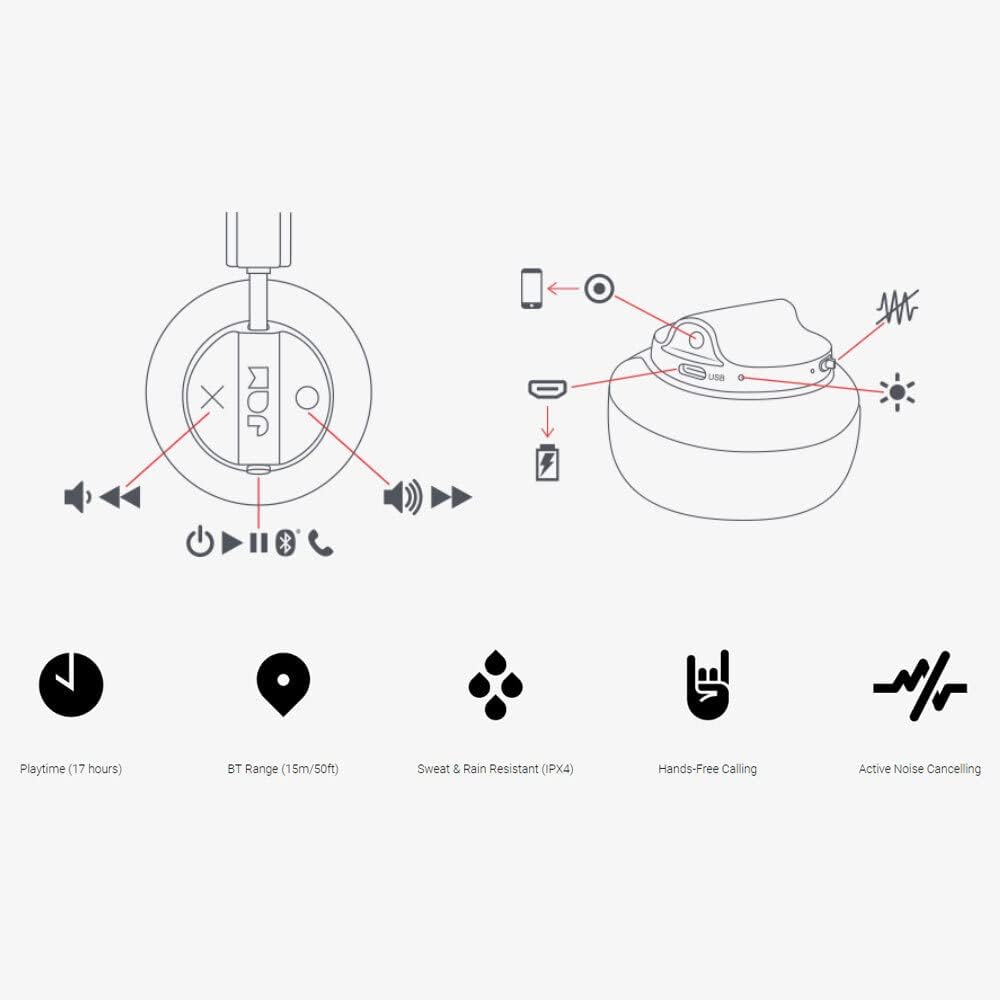
Image: Detailed diagram illustrating the control buttons and ports on the Jam Audio Out There headphones, including power, volume, track navigation, call management, and the charging port.
- Bọtịnụ ike: Pịa ma jide ka ịgbanwuo/ gbanyụọ.
- Elu elu/Egwu na-esote: Pịa mkpirisi maka ibuli olu, ogologo pịa maka egwu ọzọ.
- Egwu ala/Oge gara aga: Pịa obere oge maka mbelata olu, pịa ogologo oge maka egwu gara aga.
- Gwuo/Kwụsị/zaa oku: Single press to play/pause music or answer/end a call.
- Active Noise Cancelling (ANC) Switch: Toggle to activate or deactivate noise cancellation.
- Nchaji ọdụ ụgbọ mmiri: Micro USB ọdụ ụgbọ mmiri maka ịchaji.
- Ọdụ ụgbọ mmiri AUX: 3.5mm jack for wired audio connection.
Melite
1. Ịchaji ekweisi
Before first use, fully charge your headphones. Connect the provided USB charging cable to the charging port on the headphones and the other end to a USB power source. The LED indicator will show charging status and turn off when fully charged. A full charge takes approximately 2 hours and provides up to 17 hours of playtime.

Image: The Jam Audio Out There headphones provide up to 17 hours of playtime on a single charge.
2. Ịgbanye / gbanyụọ
- To power on: Press and hold the Power button for 3 seconds. The LED indicator will flash.
- To power off: Press and hold the Power button for 3 seconds. The LED indicator will turn off.
3. Njikọ Bluetooth
- Gbaa mbọ hụ na agbanyụrụ ekweisi.
- Press and hold the Power button for 5 seconds until the LED indicator flashes red and blue, indicating pairing mode.
- Na ngwaọrụ gị (smartphone, tabletị, kọmpụta), mee ka Bluetooth nwee ike wee chọọ ngwaọrụ dị.
- Select "JAM Out There" from the list of devices.
- Ozugbo ejikọtara ya, ihe ngosi LED dị na ekweisi ga-agbanwe agba anụnụ anụnụ.
- The headphones have a Bluetooth range of up to 15 meters (50 feet).

Image: The Jam Audio Out There headphones offer Bluetooth compatibility, allowing a range of up to 15 meters or 50 feet from your connected device.
Ntuziaka ọrụ
Egwu Egwu
- Gwuo/kwụsịtụ: Pịa bọtịnụ Play/kwụsịtụ otu ugboro.
- Track na-esote: Pịa bọtịnụ Mpịakọta Elu ruo ogologo oge.
- Gara aga Track: Pịa bọtịnụ Mbelata Olu ruo ogologo oge.
- Ndozi olu: Short press the Volume Up or Volume Down buttons.
Ịkpọ oku na-enweghị aka
- Azịza/Kwụsị Oku: Pịa bọtịnụ Play/kwụsịtụ otu ugboro.
- Jụ oku: Pịa ma jide bọtịnụ Play/kwụsịtụ maka sekọnd 2.
- Kpọọ oku: Initiate the call from your connected device. The audio will automatically transfer to the headphones.
- Music will automatically pause during a call and resume after the call ends.
Ịkagbu mkpọtụ mkpọtụ (ANC)
- To activate ANC: Slide the ANC switch to the ON position. The ANC indicator light will illuminate.
- To deactivate ANC: Slide the ANC switch to the OFF position. The ANC indicator light will turn off.
- Using ANC can reduce ambient noise, enhancing your listening experience. Note that ANC can be used independently or with Bluetooth audio.
Wired Connection (AUX-in)
For a wired connection, use the provided 3.5mm AUX cable. Plug one end into the headphone's AUX-in port and the other into your audio device. This allows you to continue listening even if the headphone battery is depleted or if Bluetooth is not available.
Nlekọta
- Nhicha: Jiri ákwà dị nro ma kpọọ nkụ hichaa ekweisi. Ejila kemịkal siri ike ma ọ bụ ihe ndị na-emebi ihe.
- Nchekwa: Store the headphones in a cool, dry place away from extreme temperatures.
- Nguzogide mmiri: These headphones are IPX4 rated, meaning they are resistant to sweat and light splashes of water. Do not submerge them in water or expose them to heavy rain. Ensure the charging port cover is securely closed when not charging to maintain water resistance.
- Nlekọta batrị: To prolong battery life, avoid fully discharging the headphones frequently. Charge them regularly, even if not in use for extended periods.
Nchọpụta nsogbu
| Nsogbu | Ngwọta |
|---|---|
| Igwe ekweisi anaghị agba ọkụ | Ensure the headphones are charged. Connect to a power source using the USB cable. |
| Enweghị ike ijikọ site na Bluetooth |
|
| Enweghị ụda ma ọ bụ olu dị ala |
|
| Mkpọtụ Nkagbu Active Noise anaghị arụ ọrụ | Ensure the ANC switch is in the ON position and the ANC indicator light is illuminated. |
| Headphones falling apart or breaking | While the product is designed for durability, excessive force or improper handling can cause damage. Handle with care. If issues persist, refer to warranty information. |
Nkọwapụta
- Aha nlereanya: N'ebe ahụ
- Nọmba nlereanya: HX-HP303BK
- Njikọta: Bluetooth, 3.5 mm Jack (AUX-in)
- Oke ikuku: Ruo mita 15 (ụkwụ 50)
- Ndụ batrị: Ruo awa iri abụọ
- Njikwa mkpọtụ: Nkagbu mkpọtụ nọ n'ọrụ
- Nguzogide mmiri: IPX4 Rated (Sweat and Rain Resistant)
- Ntinye ntị: Na Ntị
- Ihe: Rọba, Silikọn
- Ibu ihe: 5.1 ounce (0.32 pound)
- Akụkụ ngwaahịa: 8.58 x 3.19 x 8.66 sentimita asatọ
- Ngwa gụnyere: Headphones, Charging Cord, AUX Cable
Ihe karịrị vidiyo ngwaahịaview
Kirie ihe onyonyo a ka ịmata ngwaahịa aview of the Jam Audio product line, including the Out There headphones.
Video: An official Jam Audio sizzle video showcasing various products, including the Out There headphones, highlighting their design and features.
Akwụkwọ ikike na nkwado
For warranty information, product registration, or technical support, please refer to the official Jam Audio websaịtị ma ọ bụ kpọtụrụ ndị ahịa ha ọrụ. Debe ihe akaebe nke ịzụrụ ihe maka akwụkwọ ikike.


