Okwu mmalite
This manual provides detailed instructions for the safe and efficient operation of your Mikado MD-856 Multimedia Bluetooth Speaker system. Please read this manual thoroughly before using the product and retain it for future reference.
Ozi nchekwa
- Ewepụla unit ahụ na mmiri ozuzo ma ọ bụ mmiri iji gbochie ọkụ ma ọ bụ ujo eletrik.
- Emeghela casing. Kpọtụrụ ndị ọrụ ruru eru ọrụ niile.
- Gbaa mbọ hụ na ikuku ikuku dị na gburugburu unit ahụ.
- Use only the power supply specified for this device.
- Keep away from direct sunlight, heat sources, and strong magnetic fields.
- Zere itinye ihe ndị dị arọ na nkeji.
Ihe ngwugwu
Biko lelee na etinyere ihe niile edepụtara n'okpuru na ngwugwu gị:
- Main Subwoofer Unit
- Igwe okwu Satịlaịtị (otu abụọ)
- Njikwa anya
- Usage Manual (this document)
- Akwụkwọ ikike
- USB RCA
- USB antenna
Ngwaahịa gafereview
The Mikado MD-856 is a 5.1 channel multimedia speaker system designed to deliver rich audio. It features multiple connectivity options including Bluetooth, USB, SD card, FM radio, and AUX input.
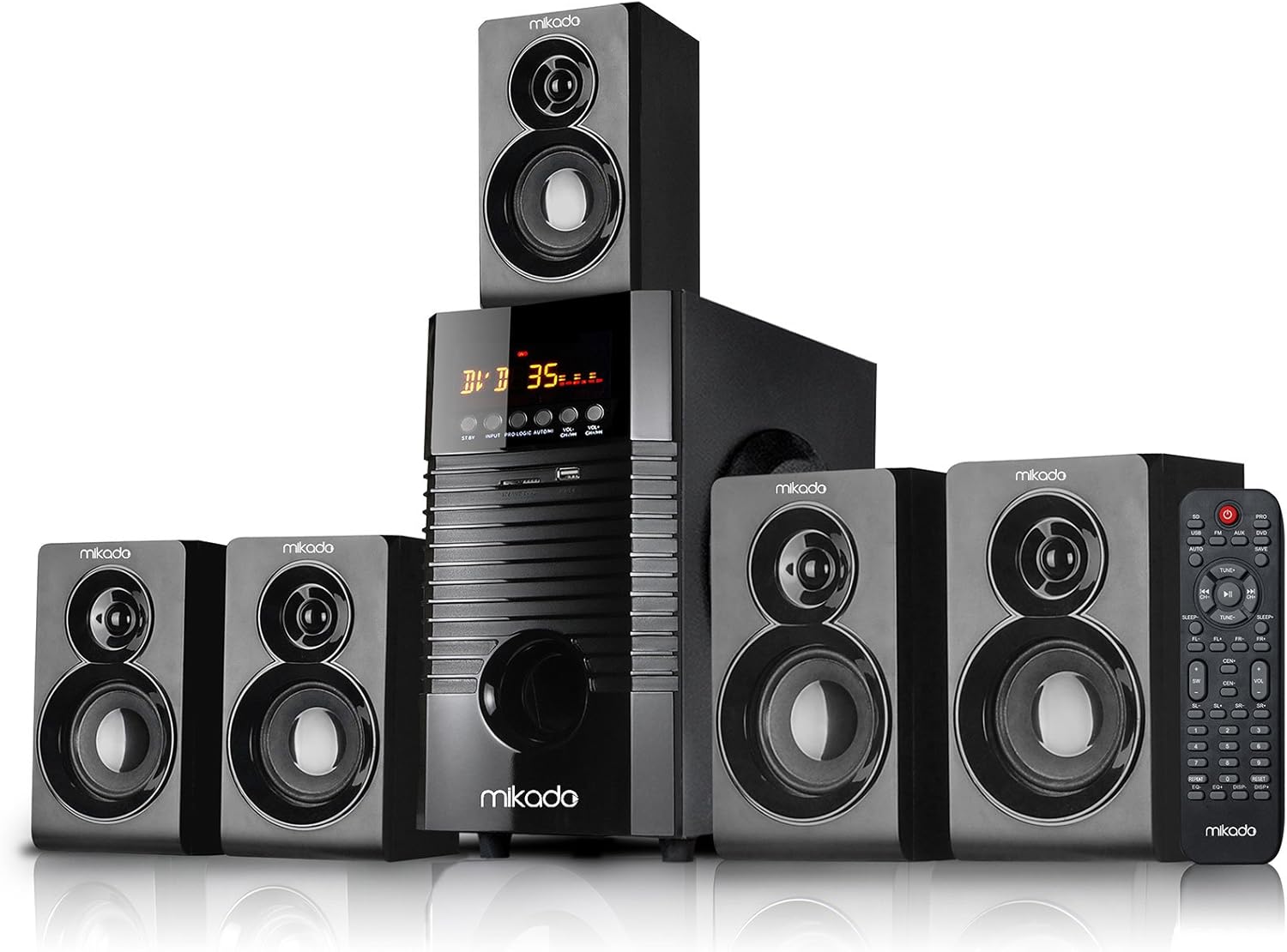
Foto 1: N'ihu view of the Mikado MD-856 5.1 Multimedia Bluetooth Speaker system, showing the central subwoofer unit, five satellite speakers, and the remote control.

Foto 2: Rear panel of the Mikado MD-856 subwoofer, displaying various audio input and output ports, power switch, and power cable connection.
Melite
1. Njikọ Ọkà Okwu
- Connect the five satellite speakers to the corresponding output ports on the rear panel of the main subwoofer unit. Ensure correct polarity (+ to + and - to -).
- Position the speakers for optimal 5.1 surround sound experience. Typically, one center speaker, two front speakers, and two rear speakers.
2. Njikọ ike
- Hụ na ihe mgba ọkụ eletrik dị na panel azụ dị n'ọnọdụ OFF.
- Connect the power cable to the main subwoofer unit and then plug it into a standard electrical outlet.
3. Njikọ Ntinye ọdịyo
Họrọ otu n'ime ụzọ ndị a iji jikọọ isi iyi ọdịyo gị:
- RCA (AUX) Input: Use the provided RCA cable to connect your audio source (e.g., TV, PC, DVD player) to the "AUX AUDIO INPUT" ports on the rear panel. Match the red and white connectors.
- Kaadị USB/SD: Insert a USB flash drive or SD card into the respective slots on the front panel of the subwoofer.
- Antenna FM: Connect the included antenna cable to the FM antenna port on the rear panel for improved radio reception.
Ntuziaka ọrụ
1. Gbanyụọ / gbanyụọ
Flip the power switch on the rear panel to the ON position. The display on the front panel will illuminate.
2. Nhọrọ mode
Press the "MODE" button on the front panel or the remote control to cycle through available input modes: Bluetooth, USB, SD, FM, and AUX.
3. Njikwa olu
Adjust the master volume using the large knob on the front panel or the volume buttons on the remote control.
4. Njikọ Bluetooth
- Switch the speaker system to Bluetooth mode. The display will show "BT" or a similar indicator.
- Enable Bluetooth on your mobile device (smartphone, tablet, etc.) and search for available devices.
- Select "MD-856" from the list of devices. Once paired, you will hear a confirmation sound.
5. USB/SD Playback
When a USB drive or SD card is inserted, the system will automatically switch to USB/SD mode and begin playing compatible audio files. Use the remote control for playback functions (play/pause, next/previous track).
6. Redio FM
In FM mode, press the "SCAN" button on the remote control to automatically scan and save available radio stations. Use the "PREV/NEXT" buttons to navigate through saved stations.
Nlekọta
- Nhicha: Use a soft, dry cloth to clean the surfaces of the speakers. Do not use liquid cleaners or abrasive materials.
- Nchekwa: If storing the unit for an extended period, disconnect it from the power supply and store it in a cool, dry place.
- Igwe ikuku: Ensure that the ventilation openings on the subwoofer are not blocked to prevent overheating.
Nchọpụta nsogbu
| Nsogbu | Ihe nwere ike ime | Ngwọta |
|---|---|---|
| Enweghị ike | Power cable not connected; Power switch off; Power outlet faulty | Check power cable connection; Turn power switch ON; Try a different power outlet |
| Enweghị ụda | Volume too low; Incorrect input mode; Audio cables not connected properly; Source device not playing | Increase volume; Select correct input mode; Check audio cable connections; Ensure source device is playing audio |
| Bluetooth anaghị ejikọta | Speaker not in Bluetooth mode; Device too far; Bluetooth on device off | Switch to Bluetooth mode; Move device closer; Enable Bluetooth on your device |
| Nnabata FM adịghị mma | Ejikọghị antenna; Mgbaàmà adịghị ike | Connect FM antenna; Adjust antenna position for better signal |
Nkọwapụta
- Ụdị: MD-856
- Akara: Mikado
- Ụdị ọkà okwu: Multimedia 5.1 Channel
- Teknụzụ Njikọta: Bluetooth, USB
- Ike Nwepụta Kachasịnụ: 25 Watt
- Nhazi ọwa ụda gburugburu: 5.1
- Eji akwadoro: PC - TV
- Akụkụ ngwaahịa: 35 x 35 x 44 cm
- Ibu ihe: 7.9 kilogram
- Agba: Nwa
- Ngwa gụnyere: Controller, Usage Manual, Warranty Certificate, RCA Cable, Antenna Cable
Akwụkwọ ikike na nkwado
Your Mikado MD-856 speaker system comes with a Warranty Certificate. Please refer to the certificate for details regarding warranty coverage and terms. For technical support or service inquiries, please contact your local Mikado dealer or authorized service center.


