Okwu mmalite
This manual provides essential information for the safe and efficient operation of your Vonyx ST180 Portable Sound System. Please read these instructions carefully before use and retain them for future reference.
The Vonyx ST180 is a versatile, self-contained portable sound system featuring a 12-inch woofer, 450 Watts of power, Bluetooth connectivity, CD/MP3 player (USB/SD), and multiple microphone inputs. Its integrated battery, telescopic handle, and wheels make it suitable for various mobile applications.
Ntuziaka nchekwa
- Isi mmalite ike: Gbaa mbọ hụ na ọkọnọ ike dabara na voltage specified on the unit. Use only the provided power cable.
- Mmiri na mmiri: Do not expose the unit to rain or moisture to prevent electric shock or fire.
- Igwe ikuku: Hụ na ikuku na-abata nke ọma. Ekpuchila oghere ikuku.
- Okpomọkụ: Keep the unit away from heat sources such as radiators, heat registers, stoves, or other apparatus that produce heat.
- Nhicha: Disconnect from power before cleaning. Use a dry cloth only.
- Ije ozi: Anwala ijere unit ahụ n'onwe gị. Tụtụ aka n'aka ndị ọrụ ruru eru.
- Nlekọta batrị: For optimal battery life, fully charge the unit before first use and recharge regularly. Avoid complete discharge.
Melite
1. Mwepu na nyocha izizi
Carefully remove the sound system and all accessories from the packaging. Inspect the unit for any signs of damage during transit. Retain the packaging for future transport or storage.
2. Power Connection and Battery Charging
Connect the provided power cable to the AC inlet on the rear panel of the unit and then to a suitable wall outlet. The internal battery will begin charging automatically. The "CHARGE" indicator light will illuminate during charging.

Foto nke 1: The Vonyx ST180 Portable Sound System with its telescopic handle extended, ready for transport. This image shows the overall design and portability features.

Foto nke 2: Rear panel connections of the Vonyx ST180, including the AC power inlet, external battery terminals, and RCA Line Out ports.
A full charge is recommended before the first use to maximize battery life. The unit can operate while charging.
3. Ntọala igwe okwu
- Igwe igwe ikuku: Insert batteries into the two UHF wireless microphones. The system operates on 863.000 MHz and 865.000 MHz. Ensure the microphones are switched on. The "RF" indicator on the control panel will light up when a wireless microphone is connected.
- Igwe okwu waya: Connect the wired microphone to the 6.35mm MIC input jack on the control panel.
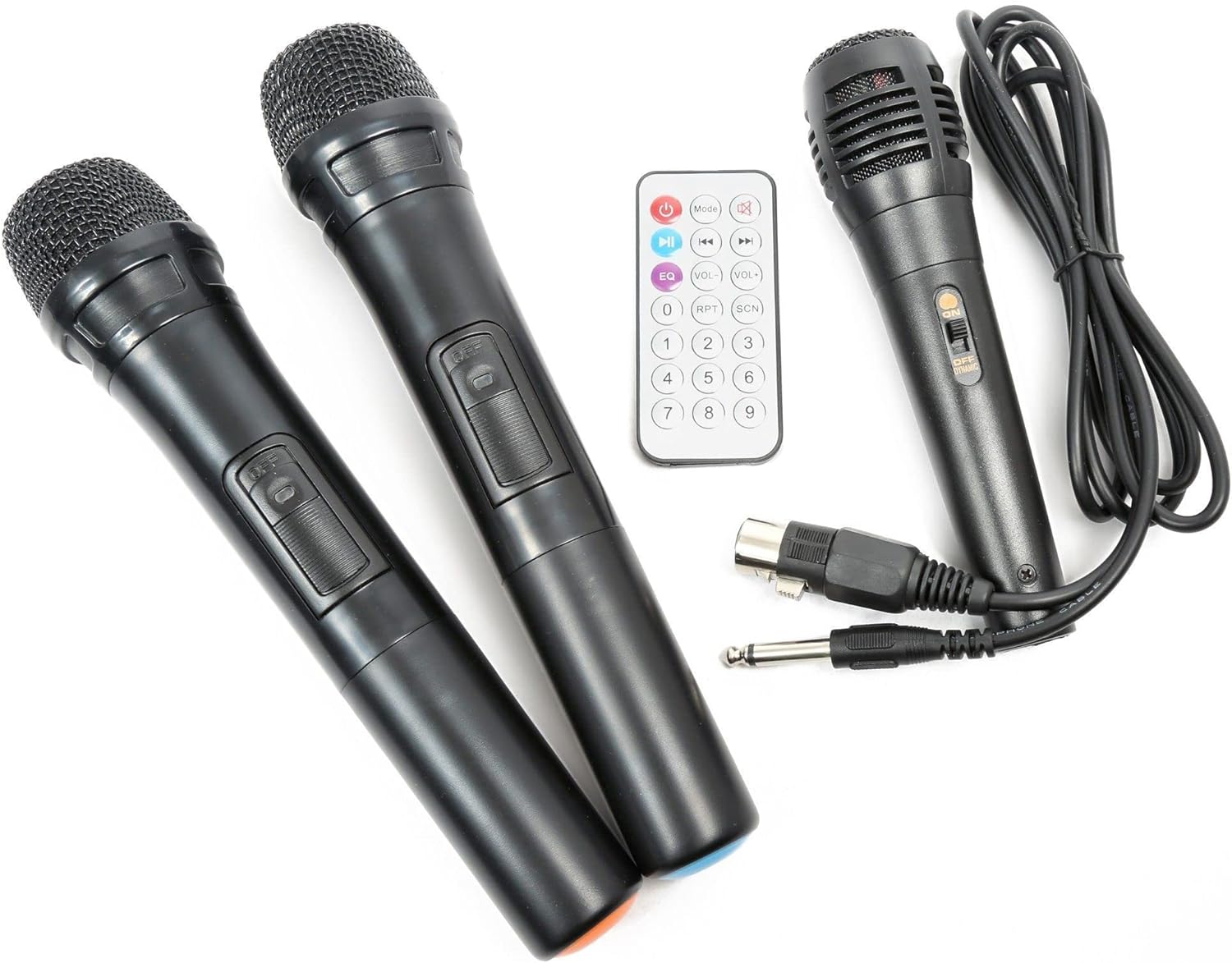
Foto nke 3: Included accessories: two UHF wireless microphones, one wired microphone, and the infrared remote control.
Ntuziaka ọrụ
1. Ịgbanye / gbanyụọ
Locate the "POWER" switch on the control panel. Flip it to the "ON" position to power on the unit. Flip it to "OFF" to power down.

Foto nke 4: gafereview of the Vonyx ST180 control panel, featuring master volume, EQ controls, microphone inputs, and the integrated media player.
2. Nhọrọ Isi iyi Audio
The ST180 supports multiple audio sources:
- Bluetooth:
- Press the "MODE" button on the media player or remote control until "BT" appears on the display.
- On your smartphone, tablet, or computer, enable Bluetooth and search for "VONYX".
- Select "VONYX" to pair. A confirmation tone will sound upon successful pairing.
- You can now stream audio wirelessly from your device.
- CD/MP3 Player (USB/SD):
- Insert a CD into the CD slot, a USB drive into the USB port, or an SD card into the SD card slot.
- The unit will automatically detect the media and begin playback, or you may need to press the "MODE" button to select the correct source (USB or SD).
- Use the playback controls (Play/Pause, Next, Previous, Folder, Repeat, Shuffle) on the unit or remote control.
- Line Input (3.5mm Jack): Connect an external audio device (e.g., laptop, MP3 player) using a 3.5mm audio cable to the "LINE INPUT" jack. Select "LINE" mode if available, or ensure no other media is playing.
- External Audio Input (RCA): Connect devices with RCA outputs to the "LINE IN" RCA ports on the control panel.
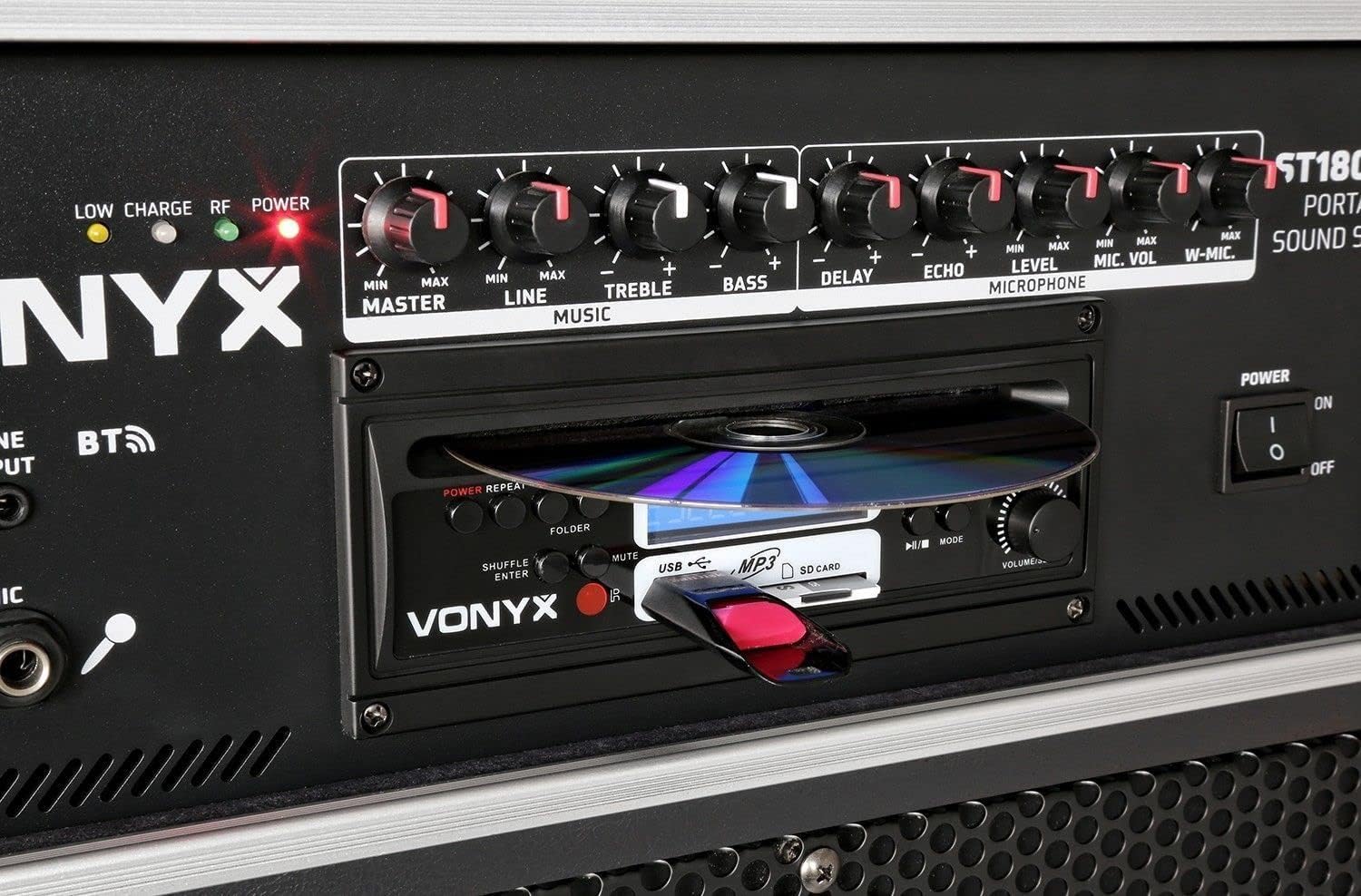
Foto nke 5: Zuru ezu view of the integrated media player, showing the CD tray, USB port, and SD card slot. A USB drive is inserted.
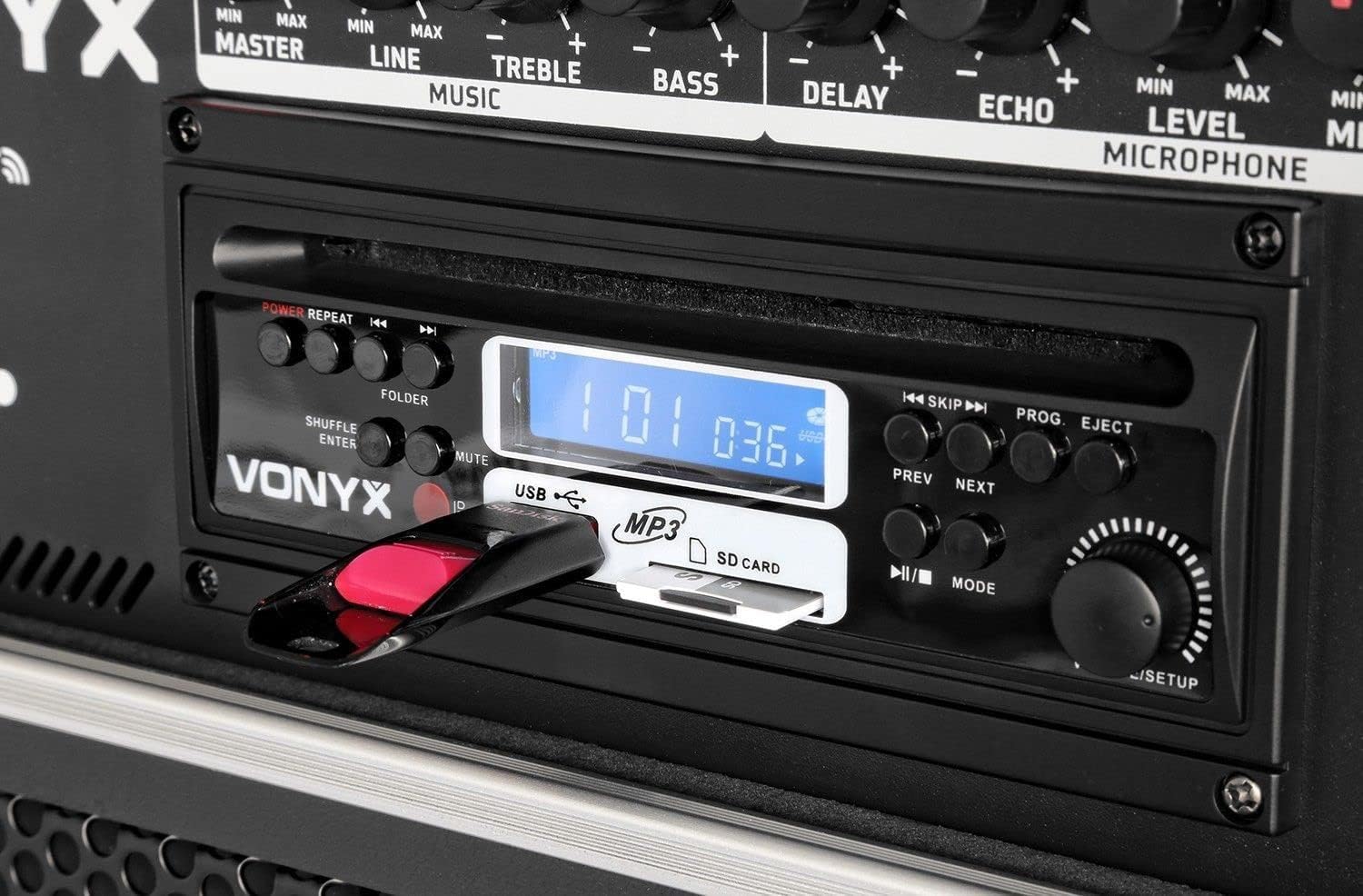
Foto nke 6: Close-up of the media player's control buttons and digital display, indicating playback status and selected source.
3. Eji igwe okwu
Adjust the microphone volume using the "MIC VOL" knob for wired microphones and "W-MIC" knob for wireless microphones. Use the "LEVEL" knob to fine-tune the microphone input sensitivity. Apply "DELAY" and "ECHO" effects as desired.
4. Njikwa Audio
- Nna-ukwu: Controls the overall output volume of the system.
- EZI: Adjusts the volume of the line input sources.
- AH: Na-agbanwe mmeghachi omume ugboro ugboro dị elu.
- IHE: Na-agbanwe mmeghachi omume dị ala ugboro ole.
5. Remote Control
The included infrared remote control allows for convenient operation of the media player functions (play, pause, track skip, mode selection) and volume adjustments from a distance.
Nlekọta
- Nhicha: Jiri akwa dị nro dị nro hichaa mpụta nke unit ahụ. Ejila ihe nchacha abrasive ma ọ bụ ihe mgbaze.
- Nchekwa batrị: If storing the unit for an extended period, ensure the battery is partially charged (around 50%) and recharge it every few months to prevent deep discharge.
- Ụgbọ njem: When moving the unit, utilize the telescopic handle and wheels. Exercise caution on uneven surfaces.
Nchọpụta nsogbu
| Nsogbu | Ihe nwere ike ime | Ngwọta |
|---|---|---|
| Enweghị ike | Power cable disconnected; unit switched off; battery depleted. | Check power cable connection; ensure power switch is ON; charge the battery. |
| Enweghị mmepụta ụda | Master volume too low; incorrect input selected; audio source not playing. | Increase MASTER volume; select correct input mode; ensure audio source is playing and its volume is up. |
| Igwe okwu anaghị arụ ọrụ | Microphone switched off; batteries depleted (wireless); MIC/W-MIC volume too low; incorrect frequency (wireless). | Switch microphone ON; replace batteries; increase MIC/W-MIC volume; ensure wireless microphones are on correct frequencies (863.000 MHz / 865.000 MHz). |
| Bluetooth anaghị ejikọta | Unit not in Bluetooth mode; device too far; previously paired with another device. | Select "BT" mode; ensure device is within range; disconnect from other Bluetooth devices and try pairing again. |
| CD/USB/SD not playing | Incorrect media format; media not inserted correctly; media player mode not selected. | Ensure media is in supported format (MP3); re-insert media; select correct mode (CD, USB, or SD). |
Nkọwapụta
| Ụdị | VONYX |
| Nọmba nlereanya | 170.013 |
| Mpụta ike | 450 Watt |
| Nha Woofer | 12 sentimita asatọ |
| Ọnụọgụ nke ọwa | 2 |
| Ntinye ọdịyo | USB, SD/MMC, Bluetooth, 6.3mm Jack (Microphone), 3.5mm Jack (External Audio), RCA Line In |
| Mmepụta ọdịyo | RCA Stereo Line Out |
| Wireless Microphone Frequencies | 863.000 MHz, 865.000 MHz |
| Nzaghachi ugboro ugboro | Ruo 20,000 Hz |
| Batrị enwere ike ịchaji | 12V/4.5Ah (Integrated) |
| Teknụzụ Njikọta | Bluetooth, USB |
| Atụmatụ pụrụ iche | Bluetooth, USB Port, Portable, CD Player, SD Card Slot, Telescopic Handle, Wheels |
| Akụkụ (L x W x H) | 32 x 43 x 76 cm |
| Ibu Ibu | 32.7 kilogram |
| Ihe onwunwe | Naịlọn |
| Isi Iyi Ike | AC and Battery Combination |
| Ụdị nkwụnye | Ugwu Osisi |
Akwụkwọ ikike na nkwado
For warranty information and technical support, please refer to the documentation provided with your purchase or visit the official Vonyx websaịtị. Debe ihe akaebe nke ịzụrụ ihe maka akwụkwọ ikike ọ bụla.
Onye nrụpụta: Vonyx
Ozi mkpọtụrụ: Please refer to the Vonyx official website or your retailer for the most up-to-date support contact details.


