1. Ngwaahịa gafereview
The WZRELB RBP60024B1 is a 600W (1200W surge) pure sine wave power inverter designed to convert 24V DC power from batteries to 120V AC power for various electronic appliances. This inverter is suitable for off-grid systems and emergency backup power applications. It features a robust design with high-quality components, including an extra thick PCB for enhanced load capacity, branded MOSFETs, and true copper inductance for stable AC output. The unit is CE and FCC approved and designed to minimize electromagnetic interference.
Key features include an LED display for monitoring DC and AC voltage, an intelligent silent cooling fan, and multiple protection mechanisms to ensure safe and reliable operation.

Figure 1: WZRELB RBP60024B1 600W 24V Pure Sine Wave Inverter
2. Kedu ihe dị na Igbe ahụ
- WZRELB RBP60024B1 600W 24V Pure Sine Wave Inverter
- 2 x Cables with cable lug terminals
- Fuses
- Akwụkwọ ntuziaka onye ọrụ

Figure 2: Inverter with included cables and manual
3. Ntọala na nwụnye
Proper installation is crucial for the safe and efficient operation of your inverter. Please follow these steps carefully.
3.1 Njikọ batrị
- Chọpụta ọnụ ụzọ: Locate the positive (red) and negative (black) terminals on both your 24V battery bank and the inverter. Ensure correct polarity.
- Kwadebe eriri: Use the provided cables with lug terminals. If using your own cables, ensure they are of sufficient gauge (AWG 7 or larger) and length (thicken if exceeding 24 inches) to minimize voltage dobe.
- Connect to Inverter: Remove the hardware (nut, lock washer, flat washer) from the inverter's DC input studs. Place the cable lug for the positive terminal onto the positive stud, followed by the flat washer, lock washer, and nut. Tighten securely. Repeat for the negative terminal. If using two cables per terminal for higher current, twist the second cable's lug to ensure a clean, tight connection.
- Jikọọ na batrị: Connect the other end of the cables to the corresponding positive and negative terminals of your 24V battery bank. Ensure all connections are tight and secure.
- Nda ala: Connect a grounding wire from the grounding lug on the inverter to a proper earth ground.
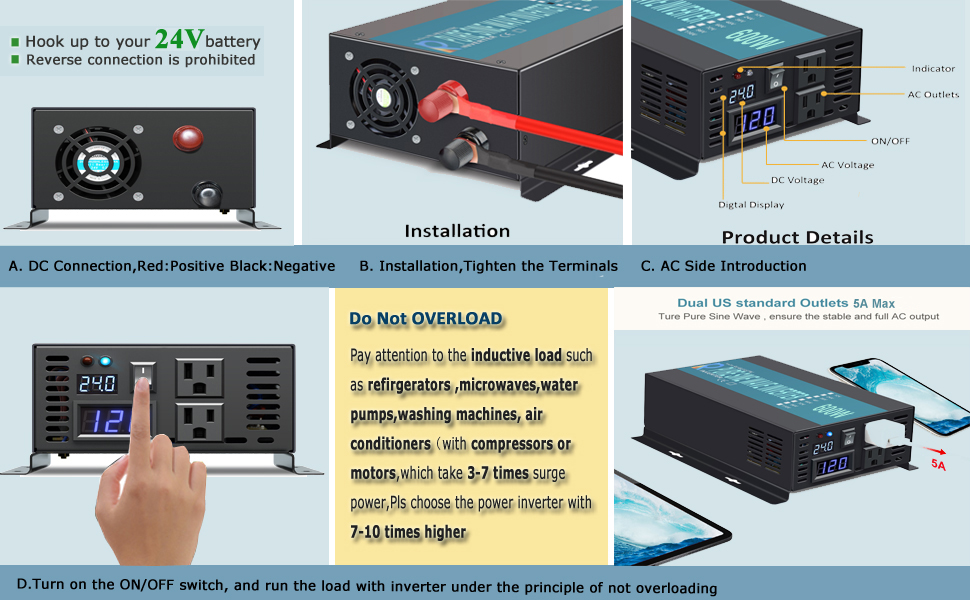
Figure 3: Inverter connection points and installation steps
3.2 Njikọ mmepụta AC
The inverter provides standard AC outlets for direct plug-in appliances. For hardwired applications, use the terminal block on the inverter. Ensure proper wiring for hot, neutral, and ground connections.
Video 1: Installation and Troubleshooting Guide for WZRELB Inverters. This video demonstrates how to connect the inverter to a battery bank and hardwire to an AC outlet, emphasizing proper cable connections and safety.
4. Ntuziaka ọrụ
Once properly installed, operating your WZRELB inverter is straightforward.
4.1 Gbanyụọ/ gbanyụọ
- Gbanwuo: Flip the ON/OFF switch on the inverter to the 'ON' position. The LED display will illuminate, showing the DC input voltage na AC mmepụta voltage.
- Jikọọ Ngwa: After the AC voltage stabilizes (typically around 120V), you can plug in your appliances.
- Gbanyụọ: Before disconnecting any appliances, flip the ON/OFF switch to the 'OFF' position.
4.2 Njikwa Ibu
It is critical to understand the power requirements of your appliances to prevent overloading the inverter.
- Resistive Loads: For resistive loads (e.g., laptops, TVs, electric cookers, LED lights), choose an inverter with a continuous power rating higher than the appliance's rated power. It is recommended to use no more than 80% of the inverter's rated power.
- Ibu Inductive: For inductive loads (e.g., microwaves, water pumps, air conditioners, appliances with motors or compressors), these require a higher surge power to start. Choose an inverter whose continuous power is 3-7 times higher than your appliance's rated power. For refrigerators, a 10 times higher power inverter is suggested.

Figure 4: Front panel of the inverter showing LED display and AC outlets
4.3 Sistemụ jụrụ oyi
The inverter is equipped with an intelligent silent fan that automatically activates to cool the unit when necessary, ensuring optimal performance and longevity.
5. Nlekọta
To ensure the long-term performance and safety of your WZRELB inverter, regular maintenance is recommended.
- Keep Connections Tight: Periodically check all DC and AC connections to ensure they remain tight and free from corrosion. Loose connections can lead to overheating and power loss.
- Clean Ventilation Openings: Ensure the inverter's ventilation openings are clear of dust and debris to allow for proper airflow and cooling. Use a soft, dry cloth or compressed air for cleaning.
- Ọnọdụ gburugburu: Operate the inverter in a dry, well-ventilated area, away from direct sunlight, moisture, and flammable materials.
- Ahụike batrị: Regularly monitor your battery bank's health and charge level. A healthy battery system is essential for inverter performance.
6. Nchọpụta nsogbu
If you encounter issues with your inverter, refer to the following common problems and solutions.
6.1 Inverter Not Turning On
- Ịchaji batrị: Ensure the battery bank is fully charged before installation. Large capacitors in the inverter may trigger low-voltage protection if the battery power is low.
- Soft Start Function: Turn on the inverter first, then connect your loads. Connecting loads before the inverter is fully on may cause unstable output or prevent it from turning on.
- Ibu ibu: Check if there is an overload condition. Disconnect loads and try powering on again.
6.2 Inverter Shuts Down Automatically
- Vol dị alatage Nchedo: The inverter will shut down if the DC input voltage drops too low. For a 24V system, the low voltage alarm is 20.5V ± 1VDC, and low voltage shut down is 19.5V ± 1VDC. Recharge or replace your batteries.
- N'ime Voltage Nchedo: The inverter will shut down if the DC input voltage exceeds 30.5V. Ensure your battery system does not exceed this voltage.
- Nchekwa ibu ibu: If the connected load exceeds the inverter's capacity, it will shut down. Reduce the load.
- Okwu USB: Check if standard cables are used and if they are of adequate gauge and length. Thin or long cables can cause significant voltage drop, leading to premature shutdown.
- Ike batrị: Ensure your battery capacity is sufficient for the load. For a 600W 24VDC inverter, a battery system of ≥30AH is recommended.
Video 2: WZRELB 3000W 24VDC Pure Sine Wave Inverter. This video provides a general overview of a WZRELB pure sine wave inverter, demonstrating its operation and features, which are similar across models.
7. Nkọwapụta
| Nkọwapụta | Uru |
|---|---|
| Ụdị | WZRELB |
| Aha Nlereanya | RBP60024B1 |
| Enyere ike | 600W |
| Ike ịwa ahụ | 1200W |
| Ntinye DC Voltage | 24VDC |
| Mmepụta AC Voltage | 120VAC |
| Ugboro ugboro | 60HZ |
| Mmepụta Waveform | Okpokoro nke Sine |
| Akụkụ ngwaahịa | 9.4 x 7.8 x 3.7 sentimita asatọ |
| Ibu Ibu | 5.25 pound |
| Isi Iyi Ike | Akwanyere batrị |
| Eji akwadoro | Home, Off-Grid Systems |
8. Akwụkwọ ikike na nkwado
The WZRELB RBP60024B1 Pure Sine Wave Inverter comes with a two-year warranty. Our customer service team is available to assist with any questions or issues you may encounter. For support, please refer to the contact information provided in your product packaging or visit the official WZRELB websaịtị.


