1. Okwu mmalite
This manual provides detailed instructions for the safe and correct installation, operation, and maintenance of your RICOO R23-F TV Wall Mount. Please read this manual thoroughly before installation and retain it for future reference. Proper installation is crucial for the safety and stability of your television.
2. Ozi nchekwa
- Ike ibu: Do not exceed the maximum weight capacity of 209 lbs (95 kg). Exceeding this limit may result in serious injury or property damage.
- Ụdị Mgbidi: The included screws and Fischer dowels/plugs are suitable for solid concrete walls only. For other wall types (e.g., wood stud, brick, drywall), consult a professional installer or use appropriate mounting hardware (not included).
- Ndakọrịta VESA: Ensure your TV's VESA mounting pattern is compatible with the mount (200x200, 300x300, 400x200, 400x300, 400x400).
- Nwụnye ọkachamara: If you are unsure about the installation process or wall type, seek assistance from a qualified professional.
- Ngwa: Use appropriate tools for installation. Wear safety glasses and gloves.
- Ụmụaka: Debe ụmụaka pụọ na mpaghara ntinye.
3. Ihe ngwugwu
Please verify that all components are present and undamaged before proceeding with installation. If any parts are missing or damaged, contact RICOO customer support.
- RICOO R23-F TV Wall Mount assembly
- Mounting hardware kit (screws, washers, spacers)
- Fischer dowels/plugs (for solid concrete walls)
- Akwụkwọ ntuziaka
Mara: Specific quantities of screws and dowels may vary. Refer to the included hardware bag for exact counts.
4. Atụmatụ
- Adjustable Swivel: Swivels up to 180 degrees (if display width is max 80cm) for optimal viewakụkụ .
- Tilt nwere ike idozi: Tilts +/-15 degrees to reduce glare and improve viewna -akasi obi.
- Front Plate Rotation: Rotates +/-6 degrees for ideal horizontal alignment after installation.
- Ndakọrịta VESA: Supports VESA patterns 200x200, 300x300, 400x200, 400x300, 400x400.
- Nha ihuenyo akwadoro: Suitable for 32" to 65" displays.
- Ike dị elu: Supports up to 209 lbs (95 kg) thanks to durable cold-rolled steel construction.
- Adjustable Wall Distance: Extends from 115mm to 522mm from the wall.
5. Ntọala na nwụnye
Ngwa achọrọ (anaghị etinye ya): Drill, stud finder (if not concrete wall), level, screwdriver, pencil, measuring tape.
5.1. Prepare the TV
- Jiri nlezianya dobe ihu TV gị n'elu ala dị nro ma dị ọcha iji gbochie ncha.
- Chọpụta oghere VESA na-agbago n'azụ TV gị.
- Attach the vertical TV brackets to the back of your TV using the appropriate screws, washers, and spacers from the hardware kit. Ensure they are securely fastened but do not overtighten. The rails are continuously adjustable to fit various TV sizes.
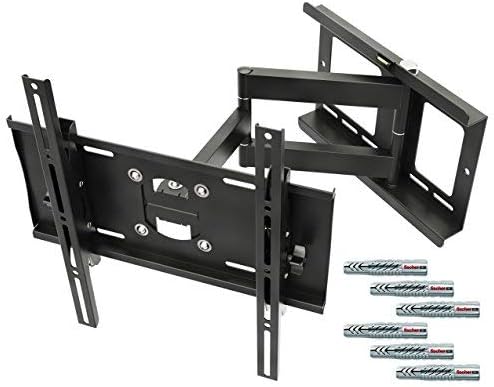
Foto 1: Ofeview of the RICOO R23-F TV Wall Mount components and included hardware.
5.2. Mount the Wall Plate
- Determine the desired height and position for your TV. Use a pencil to mark the drill holes for the wall plate.
- For Solid Concrete Walls: Drill pilot holes at the marked locations. Insert the Fischer dowels/plugs into the holes.
- Position the wall plate over the drilled holes and secure it to the wall using the provided screws. Use a level to ensure the wall plate is perfectly horizontal before fully tightening all screws.
- Ihe dị mkpa: For other wall types (e.g., wood stud, brick, drywall), specialized anchors and screws are required and are not included. Consult a professional for proper installation on these surfaces.
5.3. Attach the TV to the Wall Mount
- With assistance, carefully lift the TV (with attached brackets) and hook the brackets onto the arms of the wall mount.
- Ensure the TV is securely seated on the mount. Engage any safety locking mechanisms if present.
6. Ntuziaka ọrụ (Ndozigharị)
The RICOO R23-F mount offers various adjustments for optimal viewing.
6.1. Mgbanwe nke Swivel
The mount allows for 180-degree continuous swiveling. Gently push or pull the TV to the desired left or right angle. Ensure the TV's width does not exceed 80cm for full 180-degree movement.

Image 2: Demonstrates the 180-degree swivel capability and the extendable/retractable arm of the mount.
6.2. Ntughari Ntughari
To adjust the tilt angle (+/-15 degrees), loosen the tilt adjustment knobs or bolts on the TV brackets, set the TV to the desired vertical angle, and then securely tighten the knobs/bolts.
6.3. Front Plate Rotation
For minor horizontal alignment adjustments after installation, the front plate can be rotated +/-6 degrees. Loosen the rotation screws, adjust the TV to be perfectly level, and then retighten the screws.

Image 3: Illustrates the +/-6 degree front plate rotation, adjustable rails for various TV sizes, and +/-15 degree tilt adjustment.
6.4. Extension and Retraction
The articulating arm allows the TV to be extended from the wall (115mm to 522mm) or pushed back closer to the wall. Gently pull or push the TV to achieve the desired wall distance.
7. Nlekọta
- Nyocha oge niile: Lelee skru na njikọ niile iji hụ na ha kwụsiri ike na nchekwa.
- Nhicha: Clean the mount with a soft, dry cloth. Avoid abrasive cleaners or solvents that could damage the finish.
- mmanu mmanu: Moving parts are designed for smooth operation. No regular lubrication is typically required. If movement becomes stiff, contact customer support.
8. Nchọpụta nsogbu
- TV abụghị ọkwa: Check the front plate rotation adjustment (Section 6.3) and ensure the wall plate was installed level.
- Ugwu ahụ adịghị mma: Recheck all wall and TV attachment screws for tightness. Ensure the wall type is appropriate for the installed hardware. Do not exceed the weight capacity.
- Difficulty adjusting tilt/swivel: Ensure no cables are snagged. For tilt, loosen adjustment knobs before attempting to change the angle.
- TV does not fit: Verify your TV's VESA pattern matches the mount's compatibility (200x200, 300x300, 400x200, 400x300, 400x400) and that your screen size is within the recommended 32"-65" range.
9. Nkọwapụta
| Njirimara | Nkọwapụta |
|---|---|
| Nọmba nlereanya | R23F |
| Ụdị | RICOO |
| Ụdị nkwụnye | Ugwu mgbidi |
| Ụdị mmegharị | Articulating, Swivel |
| Ndakọrịta VESA | 200x200, 300x300, 400x200, 400x300, 400x400 |
| Na-atụ aro Ihuenyo | 32"-65" |
| Ikike ịdị arọ kacha | 209 lbs (95 n'arọ) |
| Tilt Angle | +/- 15 ogo |
| Akụkụ Swivel | 180 Degrees (max, if display width < 80cm) |
| Front Plate Rotation | +/- 6 ogo |
| Ogologo mgbidi | 115mm - 522mm |
| Ihe onwunwe | Ígwè a na-akpọgharị oyi |
| Akụkụ ngwaahịa | 20.55 x 15.75 x 16.93 inches (approximate, mount folded) |
| Ibu Ibu | 15.18 pound |
| Agba | Nwa |
10. Akwụkwọ ikike na nkwado
For warranty information, technical support, or to inquire about replacement parts, please contact RICOO customer service directly. Refer to the product packaging or the official RICOO websaịtị maka nkọwa kọntaktị.


