1. Ngwaahịa gafereview
The TTEC 2KM102S Tone Bluetooth Headset is designed for wireless communication, offering convenience and clear audio. This manual provides instructions for setting up, operating, and maintaining your headset.
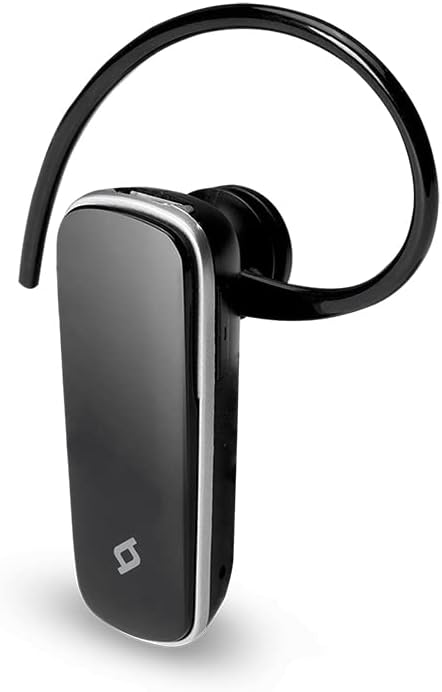
Foto 1: N'ihu view of the TTEC 2KM102S Tone Bluetooth Headset.
2. Ihe ngwugwu
Gbaa mbọ hụ na ihe niile dị na ngwugwu:
- TTEC 2KM102S Tone Bluetooth Headset
- nko ntị
- Igwe nchaji USB
3. Ntuziaka Nhazi
3.1 Ịchaji ekweisi
Before first use, fully charge the headset. Use the provided USB charging cable.
- Connect the small end of the USB charging cable to the charging port on the headset.
- Jikọọ nsọtụ ka ukwuu nke eriri USB na isi iyi ike USB (dịka ọmụmaatụ, ọdụ ụgbọ USB kọmputa, ihe nkwụnye mgbidi USB).
- The LED indicator on the headset will show the charging status. Refer to the "LED Indicator" section for details.
- Ozugbo chajịrị chaja zuru oke, kwụpụ eriri nchaji.
Mara: The headset features an integrated rechargeable battery. Charging time may vary.
3.2 Ijikọ na ngwaọrụ
To use the headset wirelessly, it must be paired with a Bluetooth-enabled device.
- Gbaa mbọ hụ na agbanyụrụ ekweisi.
- Press and hold the multi-function button on the headset until the LED indicator flashes red and blue alternately. This indicates pairing mode.
- Na ngwaọrụ gị (smartphone, tabletị, wdg), gbanye Bluetooth wee chọọ ngwaọrụ dịnụ.
- Select "TTEC Tone" or "2KM102S" from the list of found devices.
- Once paired, the LED indicator will flash blue periodically, and you may hear a confirmation tone.
Ndụmọdụ: For iPhone and iPad users, the battery status of the headset can be monitored on your device's screen.
3.3 Multi-Device Pairing
The TTEC Tone headset supports simultaneous connection with two different Bluetooth devices.
- Pair the headset with the first device as described in section 3.2.
- Gbanyụọ Bluetooth na ngwaọrụ mbụ.
- Put the headset back into pairing mode (LED flashes red and blue).
- Jikọọ ekweisi na ngwaọrụ nke abụọ.
- Re-enable Bluetooth on the first device. The headset should automatically connect to both devices.
The headset will manage audio from both connected devices, prioritizing incoming calls.
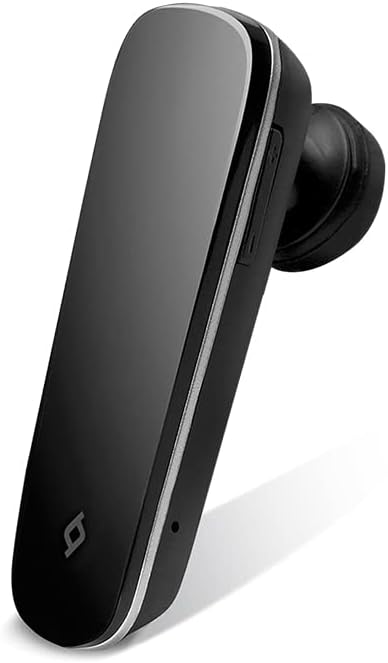
Foto 2: Akụkụ view of the TTEC 2KM102S Tone Bluetooth Headset, showing control buttons.
4. Ntuziaka ọrụ
4.1 Gbanyụọ ma ọ bụ gbanyụọ
- Ike Na: Press and hold the multi-function button for approximately 3 seconds until the LED flashes blue.
- Gbanyụọ: Press and hold the multi-function button for approximately 5 seconds until the LED flashes red and then turns off.
4.2 Njikwa oku
The multi-function button controls call functions:
- Oku azaa: Pịa bọtịnụ ọrụ ọtụtụ mgbe oku batara.
- Oku ngwụcha: Pịa bọtịnụ ọtụtụ ọrụ otu ugboro n'oge oku.
- Jụ oku: Pịa ma jide bọtịnụ ọrụ ọtụtụ ihe dịka sekọnd 2 mgbe oku batara.
- Nọmba Ikpeazụ emegharịgharịrị: Pịa bọtịnụ ọtụtụ ọrụ ugboro abụọ mgbe ọ na-anọghị na oku.
4.3 Njikwa olu
Use the dedicated volume buttons on the headset:
- Dịkwuo Mpịakọta: Press the Volume Up button (+).
- Belata Mpịakọta: Press the Volume Down button (-).
4.4 Ọnọdụ ihe ngosi LED
The LED indicator provides visual cues for the headset's status:
- Flashing Red & Blue: Ụdị njikọ.
- Flashing Blue (slowly): Connected/Standby.
- Uhie siri ike: Nchaji.
- LED Off (after solid red): Ebubo zuru oke.
- Flashing Red (rapidly): Batrị dị ala.
5. Nlekọta
Proper care ensures the longevity of your headset.
- Nhicha: Use a soft, dry cloth to clean the headset. Do not use abrasive cleaners or immerse in water.
- Nchekwa: Chekwaa ekweisi n'ebe dị jụụ, kpọrọ nkụ na-adịghị na ìhè anyanwụ kpọmkwem na oke okpomọkụ.
- Nlekọta batrị: To preserve battery life, avoid fully discharging the headset frequently. Charge it regularly, even if not in use for extended periods.
6. Nchọpụta nsogbu
| Nsogbu | Ngwọta enwere ike |
|---|---|
| Igwe ekweisi anaghị agbanwuo. | Ensure the headset is charged. Connect it to a power source using the USB cable. |
| Enweghị ike ijikọ na ngwaọrụ. |
|
| Enweghị ụda ma ọ bụ ụda olu adịghị mma. |
|
| Ekweisi na-akwụsịkarị. |
|
7. Nkọwapụta ngwaahịa
| Aha nlereanya: | Ụda |
| Nọmba nlereanya: | 2KM102S |
| Akara: | TTEC |
| Njikọta: | Bluetooth |
| Ụdị ngwaọrụ: | Igwe isi Bluetooth |
| Oge okwu: | Ruo awa iri abụọ |
| Oge njikere: | Ruo awa iri abụọ |
| Njikọ ọtụtụ ebe: | Yes, connect to 2 devices simultaneously |
| Akụkụ (L x W x H): | 4.5 x 1.7 x 2 cm |
| Agba: | Nwa |
| Nchaji ọdụ ụgbọ mmiri: | USB |
8. Akwụkwọ ikike na nkwado
For warranty information and customer support, please refer to the warranty card included with your product or visit the official TTEC websaịtị. Debe nnata nzụta gị ka ihe akaebe nke ịzụrụ.
Onye nrụpụta: tc


