1. Okwu mmalite na gafereview
The Blackmagic Design Mini HDMI-SDI Converter 6G is a professional video conversion device designed to transform HDMI video signals into SDI video. This converter supports various formats including Standard Definition (SD), High Definition (HD), and Ultra High Definition (Ultra HD) up to 6G-SDI. It is an ideal solution for integrating consumer HDMI cameras and devices into broadcast and professional video workflows.
This manual provides essential information for setting up, operating, and maintaining your Mini HDMI-SDI Converter 6G, ensuring optimal performance and longevity.
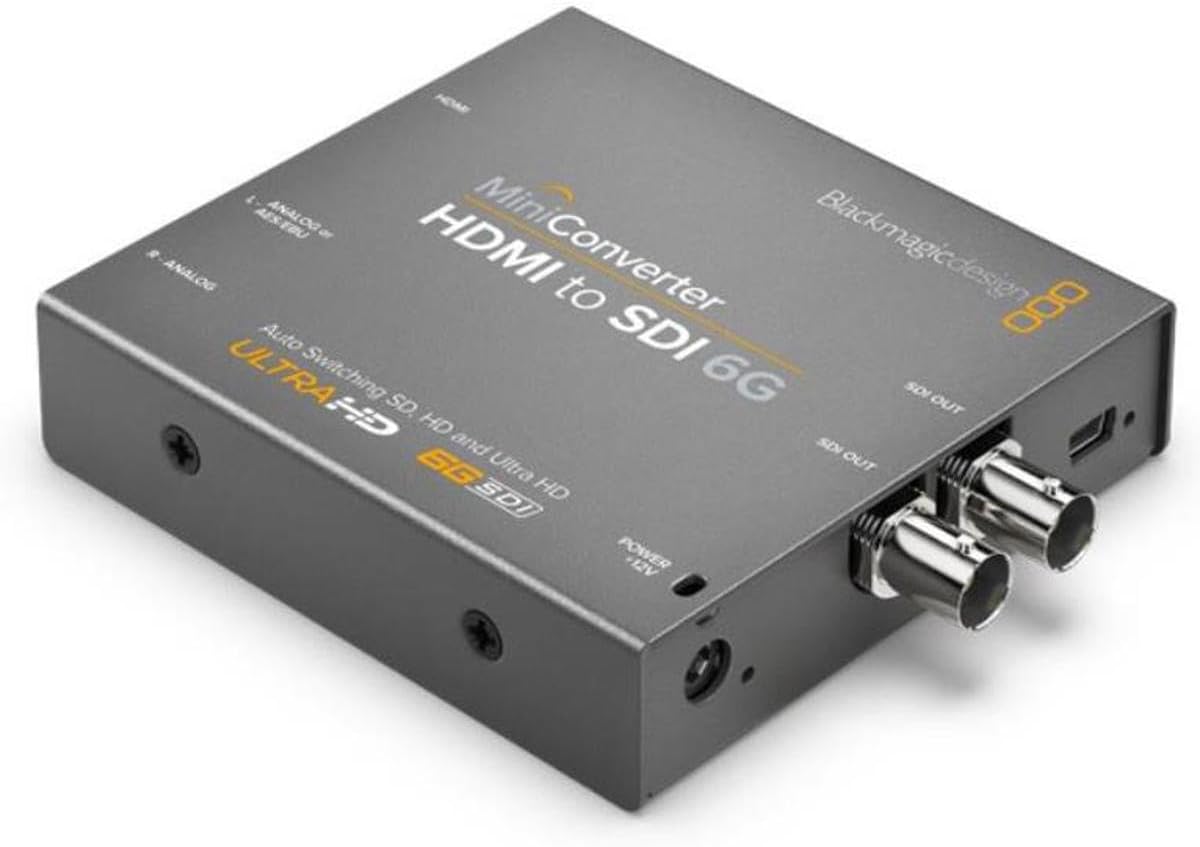
Foto 1: N'ihu view of the Blackmagic Design Mini HDMI-SDI Converter 6G, illustrating its compact design and connection ports.
2. Atụmatụ igodo
- HDMI to SDI Conversion: Converts HDMI input to SDI output, supporting SD, HD, and Ultra HD formats up to 6G-SDI.
- Ntinye ọdịyo: Embeds audio from the incoming HDMI signal, or from external AES/EBU or balanced analog audio inputs, into the SDI output.
- Automatic Format Switching: Automatically detects and switches between SD, HD, and Ultra HD video standards.
- High-Quality Video Processing: Features unsurpassed 10-bit video processing for professional broadcast quality.
- Low-Jitter SDI Connections: Ensures signal integrity over long cable runs.
- Robust and Compact Design: Engineered for reliability in various environments, from studio racks to outdoor events.
- Integrated Mini Switches: Allows for quick configuration changes directly on the unit, with a diagram provided on the back for reference.
3. Nhazi ntuziaka
- Jikọọ HDMI Isi mmalite: Connect your HDMI video source (e.g., camera, computer, media player) to the HDMI input port on the converter using a high-quality HDMI cable.
- Connect SDI Destination: Connect the SDI output port(s) of the converter to your SDI monitoring, recording, or distribution equipment using appropriate SDI cables. The converter provides two SDI outputs.
- Jikọọ ọdịyo (Nhọrọ): If you wish to embed external audio, connect your AES/EBU or balanced analog audio sources to the respective audio input jacks on the converter. Refer to the unit's labeling for correct left and right channel connections.
- Njikọ Ike: Plug the included 12V universal power supply into the converter's power input. Connect the power supply to a suitable electrical outlet. The converter will power on automatically.
- Configure Settings (if necessary): If specific settings are required for your workflow, refer to the dip switch diagram on the back of the unit. Use a small tool to adjust the switches as needed.
4. Ntuziaka ọrụ
The Blackmagic Design Mini HDMI-SDI Converter 6G is designed for straightforward operation. Once all connections are made and power is supplied, the converter will automatically detect the incoming HDMI video format and convert it to the corresponding SDI format.
- Automatic Format Detection: The converter automatically senses the input video format (SD, HD, or Ultra HD) and outputs the corresponding SDI signal. No manual configuration is typically required for standard conversions.
- Ntinye ọdịyo: Audio from the HDMI input is automatically embedded into the SDI output. If external AES/EBU or analog audio is connected, the converter will embed this audio instead, based on the dip switch settings.
- Nhazi Mgbanwe Dip: For advanced settings, such as selecting audio input sources or other operational parameters, consult the dip switch diagram located on the back of the converter. Adjusting these switches allows customization of the converter's behavior.
5. Nlekọta
To ensure the longevity and reliable performance of your Blackmagic Design Mini HDMI-SDI Converter 6G, follow these maintenance guidelines:
- Nhicha: Use a soft, dry cloth to clean the exterior of the converter. Avoid using liquid cleaners or solvents, as they may damage the finish or internal components.
- Igwe ikuku: Ensure the converter is placed in a location with adequate airflow to prevent overheating. Do not block any ventilation openings.
- Ọnọdụ gburugburu: Operate the converter within its specified temperature and humidity ranges. Avoid extreme temperatures, direct sunlight, and high moisture environments.
- Njikwa USB: Keep cables neatly organized and avoid excessive bending or tension, which can damage connectors or internal wiring.
6. Nchọpụta nsogbu
If you encounter issues with your Mini HDMI-SDI Converter 6G, consider the following troubleshooting steps:
- Enweghị mmepụta vidiyo:
- Verify that the HDMI source is active and outputting a signal.
- Check all HDMI and SDI cable connections to ensure they are secure.
- Confirm the converter is receiving power (check power LED if available).
- Ensure your SDI destination device supports the output format from the converter.
- Enweghị mmepụta ọdịyo:
- Check the audio settings on your HDMI source.
- If using external audio, ensure the cables are correctly connected and the audio source is active.
- Verify the dip switch settings on the converter are configured to embed the desired audio source.
- Mgbaàmà na-akwụsị akwụsị:
- Inspect HDMI and SDI cables for damage or loose connections.
- Ensure the power supply is stable and securely connected.
- Check for potential electromagnetic interference from other equipment.
- Incorrect Format/Resolution:
- While the converter auto-switches, ensure the HDMI source is outputting a supported format.
- Consult the dip switch diagram for any settings that might influence format handling.
If problems persist, refer to the Blackmagic Design support websaịtị ma ọ bụ kpọtụrụ ndị ahịa ha maka enyemaka ọzọ.
7. Nkọwapụta
| Njirimara | Nkọwapụta |
|---|---|
| Nọmba nlereanya | CONVMBHS24K6G |
| Akụkụ ngwaahịa (L x W x H) | 4.49 x 3.62 x 0.91 sentimita (11.4 x 9.2 x 2.3 cm) |
| Ibu Ibu | 8.6 ounce (244 grams) |
| Agba | Nwa |
| Ụdị njikọ | HDMI, SDI |
| Ngwa dakọtara | Cameras, Projectors, and other HDMI/SDI equipment |
| Onye nrụpụta | Nhazi Blackmagic |
| Ụbọchị mbụ dị | Disemba 1, 2017 |
8. Kedu ihe dị na Igbe ahụ
Your Blackmagic Design Mini HDMI-SDI Converter 6G package includes:
- Blackmagic Design Mini HDMI-SDI Converter 6G
- 12V Universal Power Supply with international plug adapters
9. Akwụkwọ ikike na nkwado
For detailed warranty information, product registration, and technical support, please visit the official Blackmagic Design websaịtị. Usoro na ọnọdụ akwụkwọ ikike nwere ike ịdị iche site na mpaghara na ngwaahịa.
You can find additional resources and contact support at: Blackmagic Design Support


