1. Okwu mmalite
The Wessel Werk EBK360 Soft Clean is a durable electric powerhead specifically designed for Ultra Soft carpet types, such as Mohawk's SmartStrand Silk and Caress by Shaw. This powerhead incorporates air channels on its front to facilitate smooth movement across carpet surfaces by allowing air to flow between the nozzle and the carpet. It features a double swivel neck for enhanced steering and flexibility, complemented by four soft, rubber wheels for improved maneuverability. The side-mounted and enclosed belt system protects against potential damage during operation. Its Double-V-shaped Chevron bristles on the roller brush efficiently guide debris towards the central vacuum's suction, ensuring consistent contact with the cleaning surface. An integrated LED headlight enhances visibility in low-light conditions. The powerhead also includes large edge cleaning channels, enabling thorough cleaning near baseboards and furniture. A wide intake opening minimizes clogging, and a 5-position height adjustment allows users to customize the powerhead's height according to the depth of the cleaning surface, ensuring an effective and convenient cleaning experience.
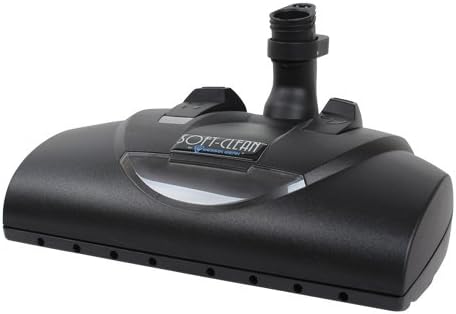
Foto 1: N'ihu view of the EBK360 Soft-Clean Electric Powerhead, showing its sleek design and nozzle.
2. Atụmatụ igodo
- Durable Electric Powerhead: Specifically designed for ultra-soft carpets.
- Double Swivel Neck: Provides easy steering and enhanced flexibility for maneuverability.
- Igwe ọkụ ọkụ LED: Illuminates the cleaning path for improved visibility in dimly lit areas.
- Large Edge Cleaning Channels: Allows for effective cleaning close to baseboards and furniture.
- Air Channels: Located on the front to facilitate easy pushing across soft carpets.
- Enclosed Side-Mounted Belt: Protects the belt from potential damage during use.
- Double-V-shaped Chevron Bristles: Guides debris efficiently to the central vacuum's suction.
- 5-Ọnọdụ Ogologo Mgbanwe: Allows customization for various carpet depths and cleaning surfaces.
3. Nhazi ntuziaka
Follow these steps to properly set up your Soft-Clean Electric Powerhead for first use:
- Ịkwapu: Carefully remove the powerhead from its packaging. Inspect for any visible damage.
- Attach to Wand: Align the powerhead's neck with the end of your vacuum cleaner's wand. Push firmly until it clicks securely into place. Ensure the electrical connection is made if your wand has integrated wiring.
- Njikọ Ike: If your vacuum system requires a separate power cord for the powerhead, connect it according to your vacuum cleaner's instructions.
- Gbanwee Ogologo: Locate the height adjustment mechanism (refer to Figure 3 for typical location). Select the appropriate height setting for your carpet type. For ultra-soft carpets, a higher setting may be necessary to allow for easier movement.

Onyonyo 2: N'okpuru view of the EBK360 Soft-Clean Electric Powerhead, highlighting the brush roll and rubber wheels.
4. Ntuziaka ọrụ
To ensure optimal performance and longevity of your Soft-Clean Electric Powerhead, follow these operating guidelines:
- Ike Na: Turn on your vacuum cleaner. The powerhead's brush roll should begin to spin, and the LED headlight should illuminate.
- Select Height: Before vacuuming, ensure the height adjustment is set correctly for the carpet pile. For very soft or thick carpets, use a higher setting to prevent the powerhead from sinking too deeply and becoming difficult to push.
- Usoro mkpochapụ: Move the powerhead in slow, overlapping passes. The double swivel neck allows for easy maneuvering around furniture and obstacles.
- Nchacha ọnụ: Utilize the large edge cleaning channels by guiding the powerhead close to baseboards and furniture legs to pick up debris in these areas.
- Low Light Operation: The LED headlight will assist in cleaning under furniture or in dimly lit rooms.
- Gbanyụọ: When finished, turn off your vacuum cleaner.
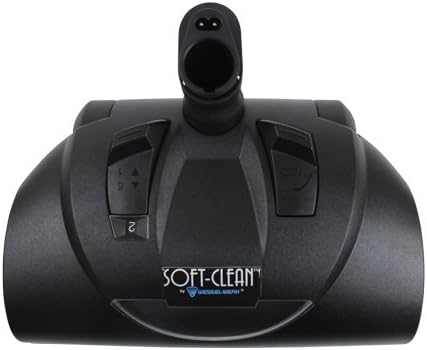
Foto 3: Top view of the EBK360 Soft-Clean Electric Powerhead, indicating the location of controls and height adjustment.
5. Nlekọta
Regular maintenance ensures the longevity and efficiency of your powerhead:
- Nhicha Mpịakọta Ahịhịa: Periodically inspect the brush roll (refer to Figure 2) for tangled hair, threads, or debris. Use scissors to carefully cut and remove any obstructions.
- Nchacha wheel: Check the four rubber wheels for any accumulated debris that might hinder smooth movement. Clean as necessary.
- Nyocha eriri: While the belt is enclosed, if you notice a decrease in brush roll performance, consult a qualified technician for belt inspection or replacement. Do not attempt to open the enclosed belt housing yourself.
- Nchacha izugbe: Wipe the exterior of the powerhead with a damp akwa . Ejila kemịkalụ siri ike ma ọ bụ ihe mkpocha abrasive.
- Nchekwa: Store the powerhead in a clean, dry place when not in use.
6. Nchọpụta nsogbu
Rụtụ aka na tebụl dị n'okpuru maka okwu nkịtị na ihe ngwọta ha nwere ike ime:
| Nsogbu | Ihe nwere ike ime | Ngwọta |
|---|---|---|
| Mpempe akwụkwọ ahịhịa anaghị agbagharị | Obstruction in brush roll; Powerhead not properly connected; Electrical issue. | Remove debris from brush roll; Ensure secure connection to wand; Check vacuum's power supply. |
| Powerhead difficult to push | Height setting too low for carpet type; Wheels obstructed. | Adjust height setting to a higher position; Clean debris from wheels. |
| Mmanya na-adịghị mma | Vacuum bag/canister full; Hose/wand clogged; Powerhead intake clogged. | Empty/replace vacuum bag/canister; Clear any clogs in hose/wand; Check powerhead intake for blockages. |
| LED headlight not working | Electrical connection issue; LED failure. | Ensure powerhead is securely connected; Contact customer support if issue persists. |
7. Nkọwapụta
| Njirimara | Uru |
|---|---|
| Nọmba nlereanya | EBK360 Soft-Clean |
| Onye nrụpụta | Universal |
| Njirimara Pụrụ Iche | Ụkwụ |
| Ngwa gụnyere | Ahịhịa |
| Ụdị Ihe | Central |
| Usoro njikwa | Metụ aka |
| Enwere ike ibugharị | Mba |
| Nọmba usoro | 360 |
| ASIN | B077NNTGPK |
| Batrị achọrọ | Mba |
8. Akwụkwọ ikike na nkwado
Ozi akwụkwọ ikike: This product comes with a standard manufacturer's warranty covering defects in materials and workmanship under normal use. The specific duration and terms of the warranty may vary. Please refer to the warranty card included with your purchase or contact the manufacturer directly for detailed information.
Nkwado ndị ahịa: For technical assistance, troubleshooting not covered in this manual, or warranty claims, please contact Universal customer support. Keep your purchase receipt and product model number (EBK360 Soft-Clean) ready when contacting support.
Please note that unauthorized repairs or modifications may void your warranty.


