1. Okwu mmalite
This manual provides essential information for the proper setup, operation, and maintenance of your SOLIS SO-3000 Bluetooth Wi-Fi Stereo Speaker. Please read this manual thoroughly before using the device to ensure optimal performance and safety.
The SOLIS SO-3000 is a versatile stereo shelf system featuring Bluetooth and Wi-Fi connectivity, Google Chromecast built-in, and Hi-Res audio compatibility. It supports multi-room streaming and voice control for a seamless audio experience.
2. Ozi nchekwa
Lee ihe ndị a iji gbochie mmebi nke ngwaọrụ ahụ ma ọ bụ mmerụ ahụ nkeonwe:
- Etinyela igwe ahụ n'ime mmiri ozuzo, mmiri ozuzo, ma ọ bụ oke okpomọkụ.
- Emeghela casing. Kpọtụrụ ndị ọrụ ruru eru ọrụ niile.
- Gbaa mbọ hụ na ọkọnọ ọkụ voltage dakọtara ihe ndị achọrọ kpọmkwem na unit ahụ.
- Debe unit ahụ site na isi mmalite okpomọkụ na ìhè anyanwụ kpọmkwem.
- Debe ihe ahụ n'elu ebe kwụsiri ike ma dị larịị iji gbochie ya ịda.
- Kwupụ ngwaọrụ ahụ n'oge oke mmiri ozuzo ma ọ bụ mgbe ejighi ya ogologo oge.
3. Ihe ngwugwu
Chọpụta na ihe niile dị na ngwugwu:
- SOLIS SO-3000 Stereo Speaker Unit
- Nnyenye ọkụ AC dị n'èzí
- Auxiliary Line-in Cord (3.5mm)
- Akwụkwọ ntuziaka (akwụkwọ a)
4. Ngwaahịa gafereview
The SOLIS SO-3000 features a compact design with intuitive controls and multiple connectivity options.
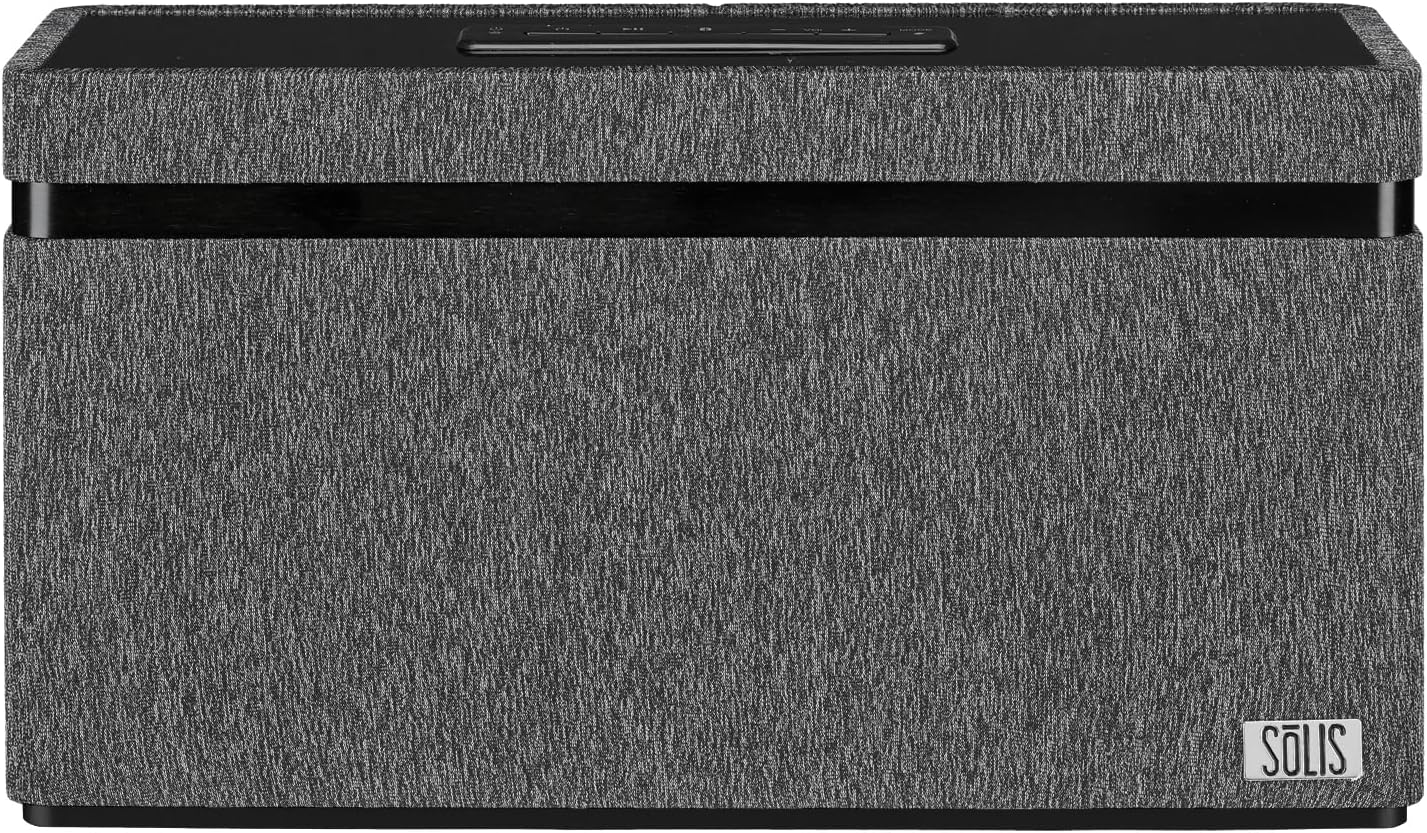
Foto: N'ihu view of the SOLIS SO-3000 speaker, showcasing its dark grey fabric finish and the SOLIS logo on the bottom right.

Foto: Angle view of the SOLIS SO-3000 speaker, highlighting the top-mounted control panel with power, play/pause, volume, and mode buttons.
Top-Mounted Controls:
- Bọtịnụ ike: Pịa ka ịgbanwuo ma ọ bụ gbanyụọ unit ahụ.
- Bọtịnụ Kwụsị/Kwụsị: Na -ejikwa ọkpụkpọ mgbasa ozi.
- Bọtịnụ olu (+/-): Na-emezi ọkwa mmepụta ọdịyo.
- Bọtịnụ ụkpụrụ: Switches between input sources (Bluetooth, Wi-Fi, Auxiliary).
5. Nhazi
5.1 Njikọ ike
- Place the SOLIS SO-3000 on a stable, flat surface.
- Connect the external AC power supply to the DC input port on the back of the speaker.
- Plug the AC power supply into a standard 120V AC, 60Hz wall outlet.
- Press the Power button on the top panel to turn on the speaker.
5.2 Wi-Fi and Google Chromecast Setup
The SOLIS SO-3000 integrates Google Chromecast for Wi-Fi streaming and multi-room audio.
- Ensure your speaker is powered on and within range of your Wi-Fi network.
- Download the Google Home app on your smartphone or tablet (available on iOS and Android).
- Open the Google Home app and follow the on-screen instructions to set up a new device.
- Select the SOLIS SO-3000 from the list of available devices.
- Follow the prompts to connect the speaker to your home Wi-Fi network (2.4 GHz or 5 GHz).
- Once connected, you can stream audio from Chromecast-enabled apps and create speaker groups for multi-room listening.
5.3 Njikọ Bluetooth
- Turn on the SOLIS SO-3000 speaker.
- Press the 'Mode' button on the top panel until the Bluetooth indicator light flashes, indicating pairing mode.
- Na ekwentị mkpanaaka gị (ama, mbadamba, laptọọpụ), mee ka Bluetooth rụọ ọrụ ma chọọ ngwaọrụ dị.
- Select "SOLIS SO-3000" from the list.
- Once paired, the Bluetooth indicator light will become solid. You can now stream audio via Bluetooth.
6. .rụ ọrụ
6.1 Ngwugharị ọdịyo
- Bluetooth: After pairing, play audio from your connected device. Use the device's controls or the speaker's Play/Pause and Volume buttons.
- Wi-Fi (Chromecast): Open a Chromecast-enabled app (e.g., Spotify, Pandora, YouTube Music) on your device. Tap the Cast icon and select your SOLIS SO-3000 speaker.
- Ntinye inyeaka: Connect an external audio source (e.g., MP3 player, iPod) to the 3.5mm auxiliary input jack on the back of the speaker using the supplied auxiliary line-in cord. Press the 'Mode' button until the auxiliary input is selected.
6.2 Njikwa olu
With Google Chromecast built-in, the SOLIS SO-3000 supports voice commands through Google Assistant. Once set up via the Google Home app, you can use voice commands to play music, control volume, and manage other tasks. Ensure your speaker is connected to Wi-Fi and linked to your Google account.
6.3 Multi-Room Streaming
To enjoy multi-room audio, set up multiple Chromecast-enabled speakers (including additional SOLIS SO-3000 units) within the Google Home app. Create speaker groups to play synchronized audio across different rooms.
7. Nlekọta
To maintain the performance and appearance of your SOLIS SO-3000 speaker:
- Nhicha: Wipe the exterior surfaces with a soft, dry cloth. Do not use liquid cleaners or abrasive materials.
- Nchekwa: Mgbe a naghị eji ya eme ihe ruo ogologo oge, chekwaa ọkà okwu n'ebe dị jụụ, nke kpọrọ nkụ, na-adịghị na ìhè anyanwụ kpọmkwem na oke okpomọkụ.
- Igwe ikuku: Ensure proper ventilation around the speaker. Do not block any vents.
8. Nchọpụta nsogbu
| Nsogbu | Ihe nwere ike ime | Ngwọta |
|---|---|---|
| Enweghị ike | Ejikọghị eriri ọkụ; ntinye adịghị arụ ọrụ. | Ensure power cord is securely connected to the speaker and a working outlet. |
| Enweghị ụda | Olu dị oke ala; ọnọdụ ntinye na-ezighi ezi; ngwaọrụ anaghị akpọ egwu. | Increase volume on speaker and source device. Select correct input mode. Ensure source device is playing audio. |
| Ọdịda ijikọ Bluetooth | Ọkà okwu adịghị n'ụdị njikọta; ngwaọrụ tere aka; nnyonye anya. | Ensure speaker is in Bluetooth pairing mode. Move device closer to speaker (within 10 meters). Turn off other Bluetooth devices. |
| Nsogbu njikọ Wi-Fi | Incorrect Wi-Fi password; out of range; router issues. | Verify Wi-Fi password. Move speaker closer to router. Restart router and speaker. Re-run Google Home app setup. |
| Njikwa olu anaghị aza | Not connected to Wi-Fi; Google Home setup incomplete. | Ensure speaker is connected to Wi-Fi and properly configured in the Google Home app. |
9. Nkọwapụta

Image: Diagram showing the dimensions of the SOLIS SO-3000 speaker: 6.3 inches (H) x 11.8 inches (W) x 3.7 inches (D).
| Njirimara | Nkọwa |
|---|---|
| Nọmba nlereanya | SO-3000 |
| Ụdị | SOLIS |
| Njikọta | Bluetooth, Wi-Fi (802.11a/b/g/n/ac, Dual Band 2.4 GHz & 5 GHz) |
| Ọnọdụ mmepụta ọdịyo | Stereo (Ọwa 2.0) |
| Ndị ọkwọ ụgbọ ala okwu | Two 3-inch Hi-Fi full-range stereo speakers |
| Mpụta ike | 2 x 18W RMS (36 Watts total) |
| Atụmatụ pụrụ iche | Google Chromecast Built-in, Hi-Res Audio, Bass Boost, Stereo Pairing, Multi-Room Streaming, Voice Control |
| Ntinye | Auxiliary input jack (3.5mm) |
| Ngwa dakọtara | Desktọpụ, Laptọọpụ, Ama Ama, Mbadamba |
| Isi Iyi Ike | Corded Electric (120V AC, 60Hz) |
| Akụkụ ngwaahịa (H x W x D) | 6.3" x 11.8" x 3.7" (16 cm x 30 cm x 9.4 cm) |
| Ibu Ibu | 5.95 lbs (2.7 n'arọ) |
| Oke Bluetooth | Ruo mita 10 (ụkwụ 33) |
| Agba | Black with Grey Accents |
| Ụdị nkwụnye | Ugwu okpokoro |
10. Akwụkwọ ikike
The SOLIS SO-3000 speaker comes with a limited warranty. Please refer to the warranty card included in your package or contact customer support for detailed information regarding warranty terms and conditions.
11. Nkwado
For technical assistance, troubleshooting, or warranty inquiries, please contact SOLIS customer support. Contact information can typically be found on the manufacturer's websaịtị ma ọ bụ na nkwakọ ngwaahịa.
Onye nrụpụta: SOLIS
Websaịtị: Visit the SOLIS Store on Amazon


