1. Okwu mmalite
Thank you for choosing the Cerwin Vega CVE-18s Powered Subwoofer. This 18-inch, 1000-watt Class D powered subwoofer is designed to deliver powerful low-frequency sound for various applications, including live performances, DJing, and fixed installations. It features two Combo XLR/TRS inputs, one XLR output, two DSP-driven modes for sound tailoring, and Bluetooth audio streaming capabilities, offering up to 126dB of maximum SPL. This manual provides essential information for the safe and efficient operation of your CVE-18s subwoofer.
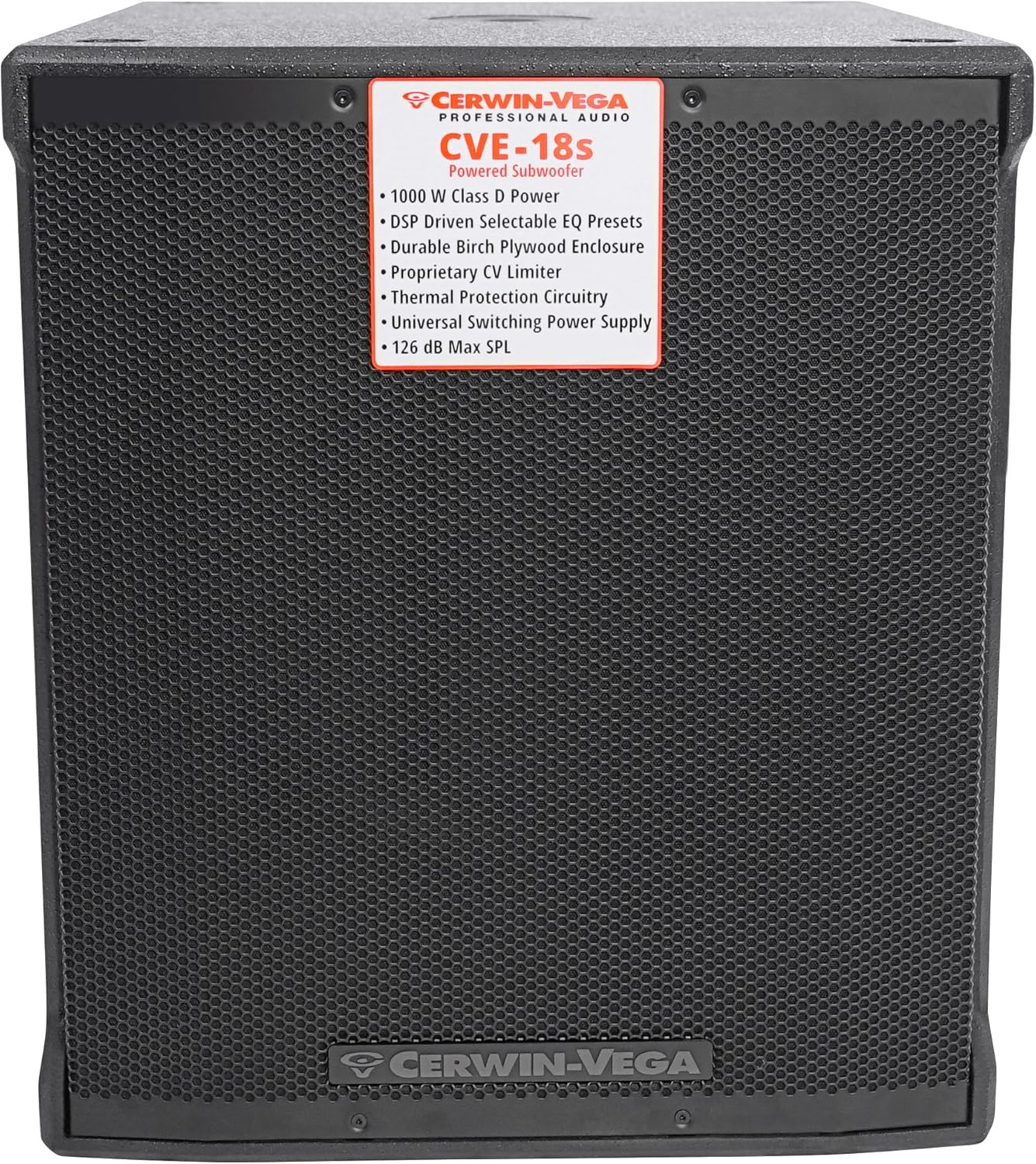
Foto 1: N'ihu view of the CVE-18s Powered Subwoofer, highlighting the protective grille and the Cerwin Vega branding.
2. Ntuziaka nchekwa dị mkpa
Biko gụọ ma ghọta ntuziaka nchekwa niile tupu ị jiri ngwaahịa a. Debe akwụkwọ ntuziaka a maka ntụaka n'ọdịnihu.
- Isi mmalite ike: Jikọọ ngwaọrụ ahụ naanị na ọkọnọ ike nke ụdị akọwara na akwụkwọ ntuziaka a ma ọ bụ akara na ngwaọrụ ahụ.
- Nda ala: Ensure the power cord is properly grounded to prevent electric shock. Do not defeat the safety purpose of the polarized or grounding-type plug.
- Igwe ikuku: Akwụsịla oghere ikuku ikuku ọ bụla. Wụnye dị ka ntuziaka onye nrụpụta si dị.
- Okpomọkụ: Awụnyela n'akụkụ ebe okpomọkụ ọ bụla dị ka radiators, ndekọ okpomọkụ, stovu, ma ọ bụ ngwa ndị ọzọ (gụnyere amplifiers) nke na-emepụta okpomọkụ.
- Mmiri na mmiri: Do not use this apparatus near water or moisture. This product is not waterproof.
- Nhicha: Jiri akwa kpọrọ nkụ hichaa naanị.
- Ije ozi: Tụtụ aka n'aka ndị ọrụ ruru eru. A na-achọ ọrụ mgbe ngwa ahụ mebiri emebi n'ụzọ ọ bụla, dị ka eriri ọkụ ma ọ bụ plọg mebiri emebi, mmiri mmiri wụfuru ma ọ bụ ihe dabara n'ime ngwa ahụ, ekpughere ngwa ahụ na mmiri ozuzo ma ọ bụ mmiri, anaghị arụ ọrụ nke ọma. , ma ọ bụ ahapụla ya.
- Nchedo Ntị: Ịkpọpụta ya ruo ogologo oge n'ebe ọ nọ nwere ike imebi ntị gị ruo mgbe ebighị ebi. Kpachara anya mgbe ị na-ahazi ọkwa olu.
3. Mwepu na nyocha
Carefully unpack your Cerwin Vega CVE-18s subwoofer and inspect it for any signs of damage that may have occurred during transit. If any damage is found, contact your dealer immediately.
- Retain the original packaging materials for future shipping or storage.
- Verify that all included components are present: CVE-18s Powered Subwoofer, Power Cord, and Quick Start Guide.

Figure 2: The CVE-18s subwoofer packaging, showing model information and handling instructions.
4. Nhazi
4.1 Ntinye anụ ahụ
The placement of your subwoofer significantly impacts sound quality. Consider the following:
- Ntinye nkuku: Placing the subwoofer in a corner can enhance bass output due to room acoustics.
- Ndokwa mgbidi: Placing it against a wall can also boost bass, though less dramatically than a corner.
- Open Space: Placing it away from walls and corners may result in less bass reinforcement but potentially more accurate low-frequency response.
- Nkwụsi ike: Ensure the subwoofer is placed on a stable, level surface to prevent vibrations and movement during operation.
4.2 Njikọ
The CVE-18s features a rear panel with various inputs and outputs for connecting to your audio system.

Ọgụgụ 3: N'azụ panel gafereview of the CVE-18s, detailing connection points and control layout.

Ọgụgụ 4: Zuru ezu view of the CVE-18s control panel, showing input/output jacks, level knob, and DSP mode selectors.
- Njikọ ike: Connect the supplied power cord to the AC inlet on the rear panel and then to a grounded electrical outlet.
- Ntinye odiyo: Use XLR or 1/4" TRS cables to connect your audio source (mixer, preamplifier, etc.) to the CH 1 INPUT and/or CH 2 INPUT jacks.
- Mmepụta ọdịyo: If connecting to full-range speakers, use XLR cables from the CH 1 OUTPUT and/or CH 2 OUTPUT jacks to the inputs of your main speakers. These outputs provide a high-pass filtered signal (100Hz HPF) when selected, or a full-range signal.
4.3 Njikọ Bluetooth
The CVE-18s allows audio streaming via Bluetooth from any smartphone or tablet.
- Jide n'aka na etinyere subwoofer ahụ.
- Mee ka Bluetooth rụọ ọrụ na ama ma ọ bụ mbadamba gị.
- Press and hold the "PAIR PUSH LINK HOLD" button on the rear panel of the CVE-18s until the Bluetooth indicator light begins to flash.
- On your device, search for "CVE-18s" in the list of available Bluetooth devices and select it to pair.
- Once paired, the Bluetooth indicator light will remain solid, and you can stream audio to the subwoofer.
- For stereo pairing with another CVE speaker, refer to the Quick Start Guide for detailed instructions.
4.4 DSP Modes
The CVE-18s features two easy-to-use DSP-driven modes to tailor your sound:
- LIVE PA: Optimized for live sound reinforcement, providing a balanced low-frequency response suitable for various instruments and vocals.
- CLUB/DJ: Enhances bass impact and punch, ideal for music playback in DJ sets and club environments.
Select the desired mode using the "DSP MODE SELECT" button on the rear panel.
5. Ntuziaka ọrụ
5.1 Gbanyụọ ma ọ bụ gbanyụọ
- Before powering on, ensure all connections are secure and the LEVEL knob is set to its minimum position.
- Flip the POWER switch on the rear panel to the "ON" position. The power indicator light will illuminate.
- To power off, set the LEVEL knob to minimum, then flip the POWER switch to the "OFF" position.
5.2 Level Control
The LEVEL knob on the rear panel controls the overall output volume of the subwoofer.
- Start with the LEVEL knob at its minimum setting.
- Gradually increase the LEVEL to achieve the desired bass output, ensuring it blends well with your main speakers without distortion.
- Monitor the LIMIT indicator light. If it flashes frequently or stays lit, reduce the LEVEL to prevent clipping and potential damage.
5.3 Output Mode Selection
The "OUTPUT SELECT" button on the rear panel allows you to choose the signal sent to the XLR outputs:
- 100Hz HPF (High-Pass Filter): Sends a signal with frequencies below 100Hz removed to your main speakers. This is recommended when pairing the subwoofer with full-range speakers to optimize their performance and prevent them from reproducing low frequencies handled by the subwoofer.
- FULL RANGE: Sends the full frequency range signal to your main speakers. Use this if your main speakers have their own crossover or if you prefer a full-range signal.
6. Nlekọta
Proper maintenance ensures the longevity and optimal performance of your CVE-18s subwoofer.
- Nhicha: Disconnect the power before cleaning. Use a soft, dry cloth to wipe the exterior surfaces. Do not use abrasive cleaners, solvents, or waxes.
- Igwe ikuku: Debe oghere ikuku dị n'ebe ahụ pụọ na uzuzu na ihe ndị na-adịghị mma.
- Nchekwa: If storing the subwoofer for an extended period, place it in its original packaging in a cool, dry environment, away from extreme temperatures and humidity.
- Nyocha: Periodically check the power cord and audio cables for any signs of wear or damage. Replace damaged cables immediately.
7. Nchọpụta nsogbu
If you encounter issues with your CVE-18s subwoofer, refer to the following common problems and solutions:
| Nsogbu | Ihe nwere ike ime | Ngwọta |
|---|---|---|
| Enweghị ike | Power cord not connected; Power outlet not active; Power switch off | Ensure power cord is securely connected; Check power outlet with another device; Flip power switch to ON. |
| Enweghị mmepụta ụda | Input cables not connected; Level knob too low; DSP mode incorrect; Bluetooth not paired | Verify input cable connections; Increase LEVEL knob; Select appropriate DSP mode; Re-pair Bluetooth device. |
| Ụda agbagọ | Input signal too high; Subwoofer LEVEL too high; LIMIT indicator active | Reduce input signal level from source; Decrease subwoofer LEVEL; Ensure LIMIT indicator is not constantly lit. |
| Nsogbu njikọ Bluetooth | Device too far; Interference; Subwoofer not in pairing mode | Move device closer to subwoofer; Avoid sources of interference; Press and hold PAIR button to enter pairing mode. |
8. Nkọwapụta
Detailed technical specifications for the Cerwin Vega CVE-18s Powered Subwoofer.
| Njirimara | Nkọwa |
|---|---|
| Aha Nlereanya | Cerwin Vega CVE-18s |
| Ụdị Ọkà Okwu | Kwadoro Subwoofer |
| Dayameta Woofer | 18 sentimita asatọ |
| Ike Nwepu kacha elu | 1000 Watts (Class D) |
| Teknụzụ Njikọta | Bluetooth, XLR |
| Teknụzụ nzikọrịta ozi ikuku | Bluetooth |
| Ọnọdụ mmepụta ọdịyo | Mono, Stereo (via linked units) |
| Usoro njikwa | On-unit controls |
| Ihe onwunwe | Wood (Plywood enclosure) |
| Agba | Nwa |
| Akụkụ ngwaahịa (D x W x H) | 25.5" x 21" x 24.5" |
| Ibu Ibu | 88 pound |
| Isi Iyi Ike | Igwe ọkụ eletrik |
| Ihe eji eme ihe maka ngwaahịa | Live performances, DJing, parties, clubs, restaurants, conferences |
| UPC | 744271626018 |

Figure 5: Dimensional drawing of the CVE-18s subwoofer, showing height, width, and depth measurements.
9. Akwụkwọ ikike Ozi
The Cerwin Vega CVE-18s Powered Subwoofer comes with a limited warranty. Please refer to the warranty card included with your product or visit the official Cerwin Vega website for detailed terms and conditions regarding coverage, duration, and service procedures. Keep your proof of purchase for warranty claims.
10. Nkwado ndị ahịa
For technical assistance, troubleshooting beyond this manual, or service inquiries, please contact Cerwin Vega customer support. Contact information can typically be found on the official Cerwin Vega website or in the Quick Start Guide provided with your product.
Akụrụngwa dị n'ịntanetị: Visit the Cerwin Vega websaịtị maka FAQ, ndebanye aha ngwaahịa, yana ihe nkwado ndị ọzọ.


