Okwu mmalite
This manual provides comprehensive instructions for the safe and efficient operation, installation, and maintenance of your ATAG CX4511C oven. Please read this manual thoroughly before using the appliance and keep it for future reference. Proper use and care will ensure optimal performance and extend the lifespan of your oven.
Ntuziaka nchekwa
Na-agbaso ihe nchekwa nchekwa ndị a mgbe niile iji gbochie mmerụ ahụ nkeonwe ma ọ bụ mebie ngwa:
- Ensure the oven is properly installed by a qualified technician before first use.
- Emetụla ebe dị ọkụ aka. Na-eji oven mitt ma ọ bụ ite ite mgbe niile.
- Debe ụmụaka ka ha ghara ịbanye n'ime ngwa ahụ mgbe a na-arụ ọrụ ma na-ajụ oyi.
- Never use water to extinguish grease fires; smother the flames or use a dry chemical extinguisher.
- Echekwala ihe ndị na-ere ọkụ n'ime ma ọ bụ n'akụkụ oven.
- Wepụ ngwa ahụ na ọkụ ọkụ tupu ihicha ma ọ bụ rụọ ọrụ ọ bụla.
- Do not operate the oven if the power cord or plug is damaged.
Ngwaahịa gafereview
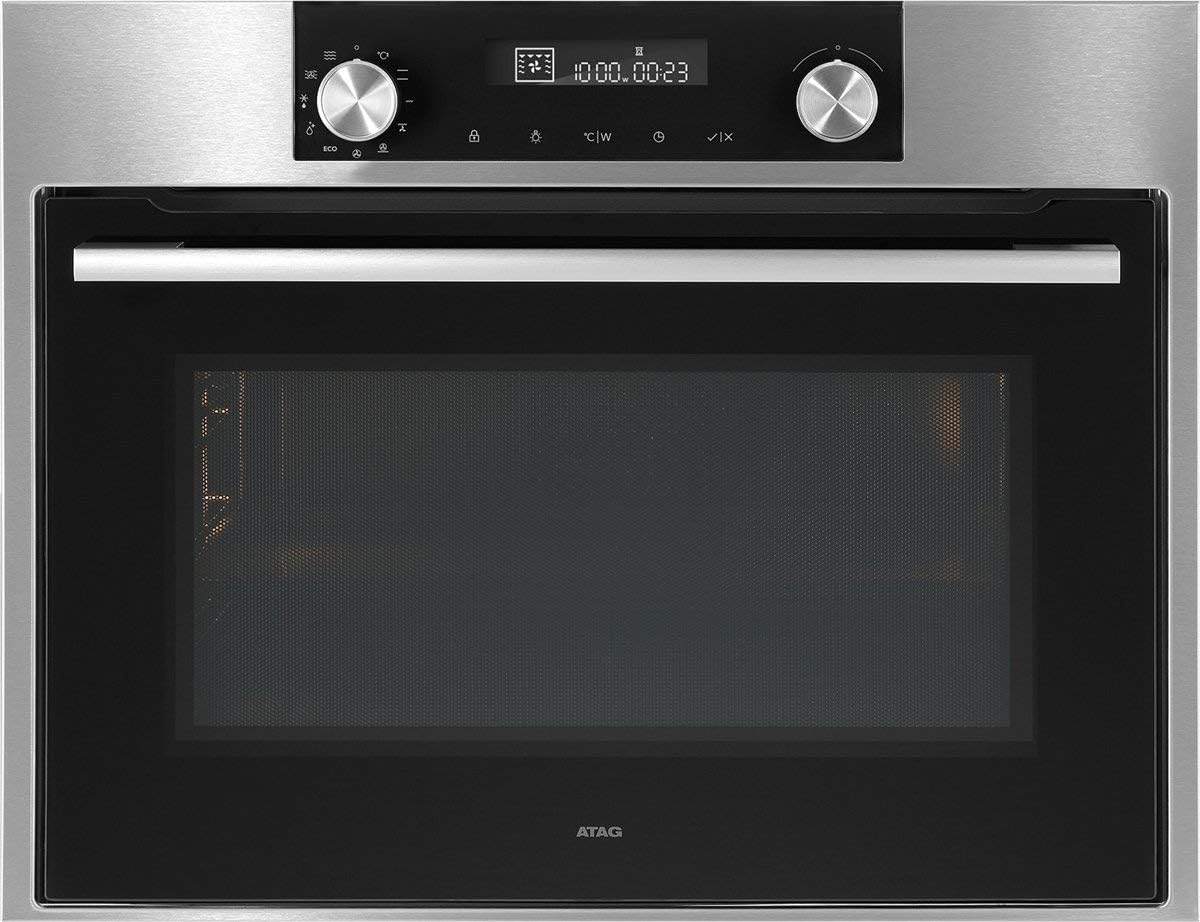
Foto 1: N'ihu view nke ATAG CX4511C oven. This image displays the stainless steel finish, the black glass door with a horizontal handle, and the integrated control panel at the top. The control panel features two rotary knobs, a digital display, and touch-sensitive buttons for various functions and settings.
Ihe ATAG CX4511C is a built-in oven designed for modern kitchens. It features a sleek stainless steel and black glass aesthetic. Key components include:
- Ogwe njikwa: Located at the top, featuring a digital display, two rotary knobs for function and temperature selection, and touch controls for timer, settings, and other options.
- Oven ụzọ: A black glass door with a sturdy stainless steel handle, providing visibility into the oven cavity.
- Ọghe oven: The interior cooking space, equipped with racks and lighting.
- Oghere ikuku: Essential for proper air circulation and cooling of the appliance.
Melite
1. Nwụnye
Ihe ATAG CX4511C oven must be installed by a qualified electrician or authorized service technician in accordance with local regulations and the provided installation instructions. Ensure adequate ventilation around the appliance.
2. Nhicha mbụ
Before first use, clean the oven interior and all accessories (racks, trays) with a damp cloth and mild detergent. Rinse thoroughly and dry. Do not use abrasive cleaners.
3. Ojiji Mbụ (Ọkụ n'ime)
To eliminate any manufacturing odors, operate the empty oven for approximately 60 minutes at 200°C (392°F) using a conventional heating mode. Ensure the kitchen is well-ventilated during this process.
Ntuziaka ọrụ
1. Isetịpụ Oge
Upon first connection to power, the display will flash. Use the right rotary knob to set the current time, then press the checkmark button to confirm.
2. Selecting a Cooking Function
Turn the left rotary knob to select the desired cooking function (e.g., conventional heat, fan-assisted, grill). The selected function icon will appear on the display.
3. Setting Temperature and Time
After selecting a function, turn the right rotary knob to adjust the temperature. Press the timer button to set a cooking duration, then use the right knob to adjust the time. Confirm settings by pressing the checkmark button or waiting a few seconds for automatic confirmation.
4. Na-ekpo ọkụ
The oven will begin preheating once the function and temperature are set. An indicator on the display will show when the set temperature has been reached.
5. Ending Operation
To stop cooking, turn the left rotary knob to the 'Off' position or press the stop button if available. Allow the oven to cool down completely before opening the door for an extended period.
Nlekọta na nhicha
1. Mpụga ihicha
Clean the exterior surfaces, including the control panel and door, with a soft cloth and warm soapy water. For stainless steel, use a specialized stainless steel cleaner. Avoid abrasive sponges or harsh chemicals.
2. Nhicha ime ụlọ
Maka obere unyi, jiri mgbasa ozi hichaa ime ụlọ ahụamp cloth after the oven has cooled. For stubborn stains, use an oven cleaner specifically designed for the oven's interior lining, following the product instructions carefully. Remove all racks and accessories before cleaning.
3. Door Glass Cleaning
Clean the inner and outer glass panels of the oven door with a glass cleaner or warm soapy water. Ensure no liquid seeps into the door's ventilation system.
4. Ịgbanwe Oven Lamp
Ensure the oven is disconnected from the power supply. Unscrew the protective glass cover, replace the bulb with a new heat-resistant oven lamp of the same specifications, and reattach the cover.
Nchọpụta nsogbu
| Nsogbu | Ihe nwere ike ime | Ngwọta |
|---|---|---|
| Igwe ọkụ anaghị ekpo ọkụ. | No power supply; incorrect settings; fuse tripped. | Lelee njikọ ike; lelee ntọala; lelee igbe fiusi ụlọ. |
| Nsonaazụ nri na-ezighi ezi. | Ọnọdụ rak na-ezighi ezi; oven e buru ibu; ọnụ ụzọ na-emeghekarị. | Use recommended rack positions; avoid overcrowding; minimize door openings. |
| Anwụrụ ọkụ ma ọ bụ isi n'oge ojiji mbụ. | Mmanụ ndị na-emepụta ihe fọdụrụ na-ere ọkụ. | Nke a bụ ihe nkịtị. Hụ na ikuku na-abata nke ọma. Ọ ga-apụ n'anya mgbe ejiri ya mee ihe mbụ. |
| Ngosipụta na-egosi koodu mperi. | Nrụ ọrụ dị n'ime. | Note the error code and contact customer support. |
Nkọwapụta
- Akara: ATAG
- Ụdị: CX4511C
- Ike: 51 lita
- Ike: 3400 W
- ASIN: B075V16NFM
- Agba: Ojii, Ígwè anaghị agba nchara
- Ụbọchị mbụ enwere: Ọnwa Isii 11, 2019
Akwụkwọ ikike na nkwado
Your ATAG CX4511C oven comes with a manufacturer's warranty. For detailed information regarding warranty terms, conditions, and duration, please refer to the warranty card included with your appliance or visit the official ATAG website. For technical support, service requests, or spare parts, please contact ATAG customer service directly. Contact details can typically be found on the manufacturer's websaịtị ma ọ bụ na akwụkwọ enyere na ịzụrụ gị.
When contacting support, please have your model number (CX4511C) and serial number ready. The serial number is usually located on a label inside the oven door frame or on the back of the appliance.


