1. Ngwaahịa gafereview
The Seville Classics AIRLIFT Pro S3 Electric Adjustable Standing Desk is designed for professional-grade use in various workspaces, including business, school, or home environments. This desk promotes active work habits by allowing seamless transitions between sitting and standing positions, contributing to improved well-being and productivity.
Atụmatụ gụnyere:
- Quiet Dual Motors: Enables smooth and rapid height adjustments from 25.6 inches to 51.4 inches at 1.5 inches per second.
- Solid Single-Piece Top: A 54" x 28" solid wood top provides a smooth, spacious work surface. It is CARB Phase 2 compliant for safety.
- LED Display Height Controller: Features a digital controller with an LED display and four memory settings for convenient, consistent height adjustments.
- Nhazi Ọkachamara: Tested and certified to ANSI/BIFMA X5.5 safety standards, ETL certified, and CARB Phase 2 compliant for durability and performance in commercial settings.
- Njirimara ergonomic: Sloped desk top edges offer extra legroom when the desk is in a lowered position.
- Ihe owuwu na-adịgide adịgide: Industrial-strength steel frame ensures stability and longevity.

Figure 1: The AIRLIFT Pro S3 desk in a standing configuration, demonstrating ergonomic use.
2. Ntọala na Mgbakọ
The AIRLIFT Pro S3 desk is designed for simple assembly. It typically ships in two separate boxes: one for the desktop and one for the adjustable base. Pre-installed anchors on the desktop facilitate an easier installation process.
2.1 Unboxing na Nkwadebe
- Jiri nlezianya wepụ ihe niile mejupụtara wee chọpụta megide ndepụta akụkụ agbakwunyere.
- Ensure you have adequate space for assembly. It is recommended to assemble the desk upside down on a soft surface (e.g., a blanket or towel) to protect the desktop finish.
- The base is heavy (approximately 76 lbs); assistance may be required for lifting and positioning.
2.2 Nzọụkwụ Mgbakọ
- Attach the support beam to the legs.
- Secure the feet to the bottom of the legs.
- Mount the assembled frame to the underside of the desktop using the pre-installed anchors.
- Connect the control panel and power cables.
- Carefully flip the desk upright and place it in its desired location.
- Install the screw-in leveling feet to ensure stable operation on uneven surfaces.

Figure 2: Desk components indicating pre-assembly and easy setup.
3. Ntuziaka ọrụ
The AIRLIFT Pro S3 desk features an intuitive digital controller for height adjustment and memory settings.
3.1 Na-edozi elu oche
- Jiri ihe Up na Ala arrow buttons on the controller to raise or lower the desk. The LED display will show the current height.
- The desk adjusts smoothly and quietly at 1.5 inches per second.
3.2 Using Memory Settings
The controller allows you to store up to four preferred height settings for quick recall.
- Hazie tebụl ahụ ka ọ dị n'ogo ịchọrọ.
- Pịa M button. The LED display will flash.
- Within 3 seconds, press one of the numbered memory buttons (1, 2, 3, ma ọ bụ 4) iji chekwaa ịdị elu dị ugbu a ruo n'ọnọdụ ahụ.
- Iji cheta ogologo echekwara, pịa bọtịnụ ebe nchekwa nọmba kwekọrọ. Tebụl ahụ ga-aga n'ọnọdụ echekwara na akpaghị aka.

Figure 3: Digital control panel for height adjustment and memory settings.

Figure 4: Desk height range from 25.6" to 51.4".
4. Nlekọta na nlekọta
Proper maintenance ensures the longevity and optimal performance of your AIRLIFT Pro S3 desk.
- Nhicha: The MDF wood top with laminate finish is spill-proof and easy to clean. Use a soft, damp cloth with mild soap for general cleaning. Avoid harsh chemicals or abrasive cleaners.
- Mgbochi mkpofu: Always use coasters when placing hot or cold drinks on the desktop to prevent potential damage or marks.
- Ike ibu: Do not exceed the maximum weight capacity of 264 lbs. Overloading can damage the motors and frame.
- Njikwa USB: Regularly check and organize cables to prevent tangles and ensure smooth operation during height adjustments.
- Nyocha: Periodically inspect all screws and connections to ensure they are tight. Retighten if necessary.
5. Nchọpụta nsogbu
If you encounter any issues with your desk, refer to the following common troubleshooting steps:
- Desktọpụ anaghị aga: Check if the power cord is securely plugged into both the desk and a working electrical outlet. Ensure no objects are obstructing the desk's movement.
- Koodu mperi na ngosi: If an error code appears, try unplugging the desk from the power source for 10-15 seconds, then plug it back in. This often resets the system. If the error persists, consult the warranty information for support.
- Ntugharị na-adịghị agbanwe agbanwe: Verify that the leveling feet are properly adjusted and the desk is on a flat surface. Ensure the weight on the desk is evenly distributed and within the specified capacity.
- Memory Settings Not Working: Re-program the memory settings by following the steps in Section 3.2.
6. Nkọwapụta
| Njirimara | Nkọwapụta |
|---|---|
| Ụdị | Omuma ochie Seville |
| Nọmba nlereanya | OFFK65826 |
| Akụkụ ngwaahịa | 54" W x 28" D x (25.6" to 51.4" H) |
| Oke ndozi ịdị elu | 25.6" ruo 51.4" |
| Height Adjustment Speed | 1.5 sentimita asatọ kwa nkeji |
| Ike ibu | 264 n'arọ |
| Ihe kacha elu | MDF Wood with Laminate Finish |
| Isi ihe | Industrial-strength Alloy Steel |
| Ụgbọ ala | Dual Electric Motors |
| Ntọala ebe nchekwa | 4 programmable settings |
| Asambodo | ANSI/BIFMA X5.5, ETL Certified, CARB Phase 2 Compliant |
| Ibu Ibu | 120 n'arọ |
| UPC | 017641658262 |
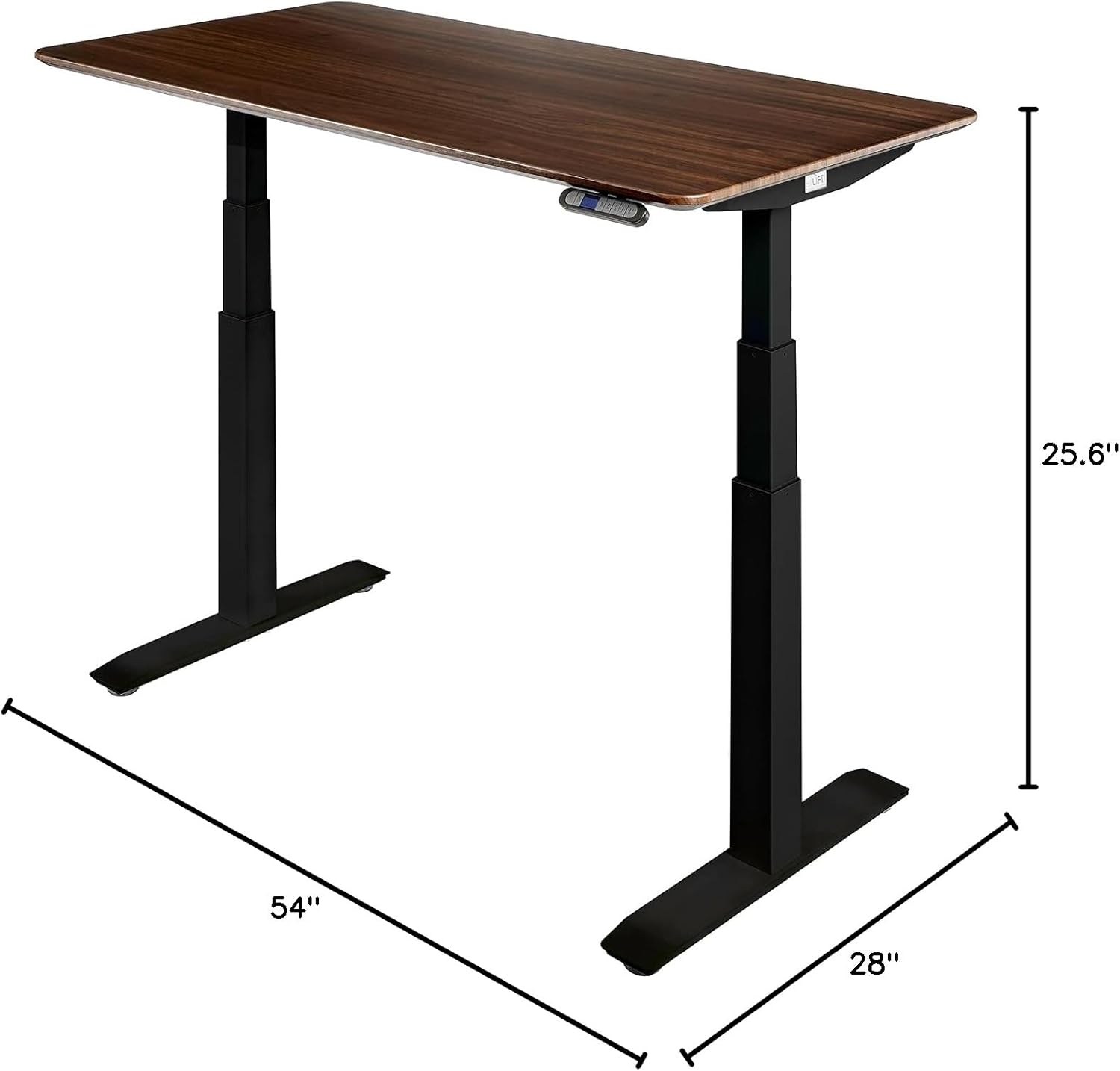
Figure 5: Desk dimensions.
7. Akwụkwọ ikike na nkwado
Seville Classics provides comprehensive coverage for your AIRLIFT Pro S3 Electric Adjustable Standing Desk.
- 7-Year Non-Electronic Component Warranty: Seville Classics, Inc. warrants to the original retail purchaser that if this product proves to be defective in material or workmanship, non-electronic parts will be replaced for a period of seven years from the date of original purchase.
- 2-Year Electronic Component Warranty: Seville Classics, Inc. warrants to the original retail purchaser that if this product proves to be defective in material or workmanship, affected electronic part(s) will be replaced for a period of two years from the date of original purchase.
For customer support or warranty claims, please refer to the contact information provided at the point of purchase or visit the official Seville Classics websaịtị.

Figure 6: Customer Support information.


