Okwu mmalite
Thank you for choosing the ClearClick Retro AM/FM Radio with Bluetooth. This classic wooden vintage-style speaker combines nostalgic aesthetics with modern functionality, allowing you to enjoy both traditional radio broadcasts and contemporary digital audio. This manual provides essential information for setting up, operating, and maintaining your new radio.
Ngwaahịa gafereview
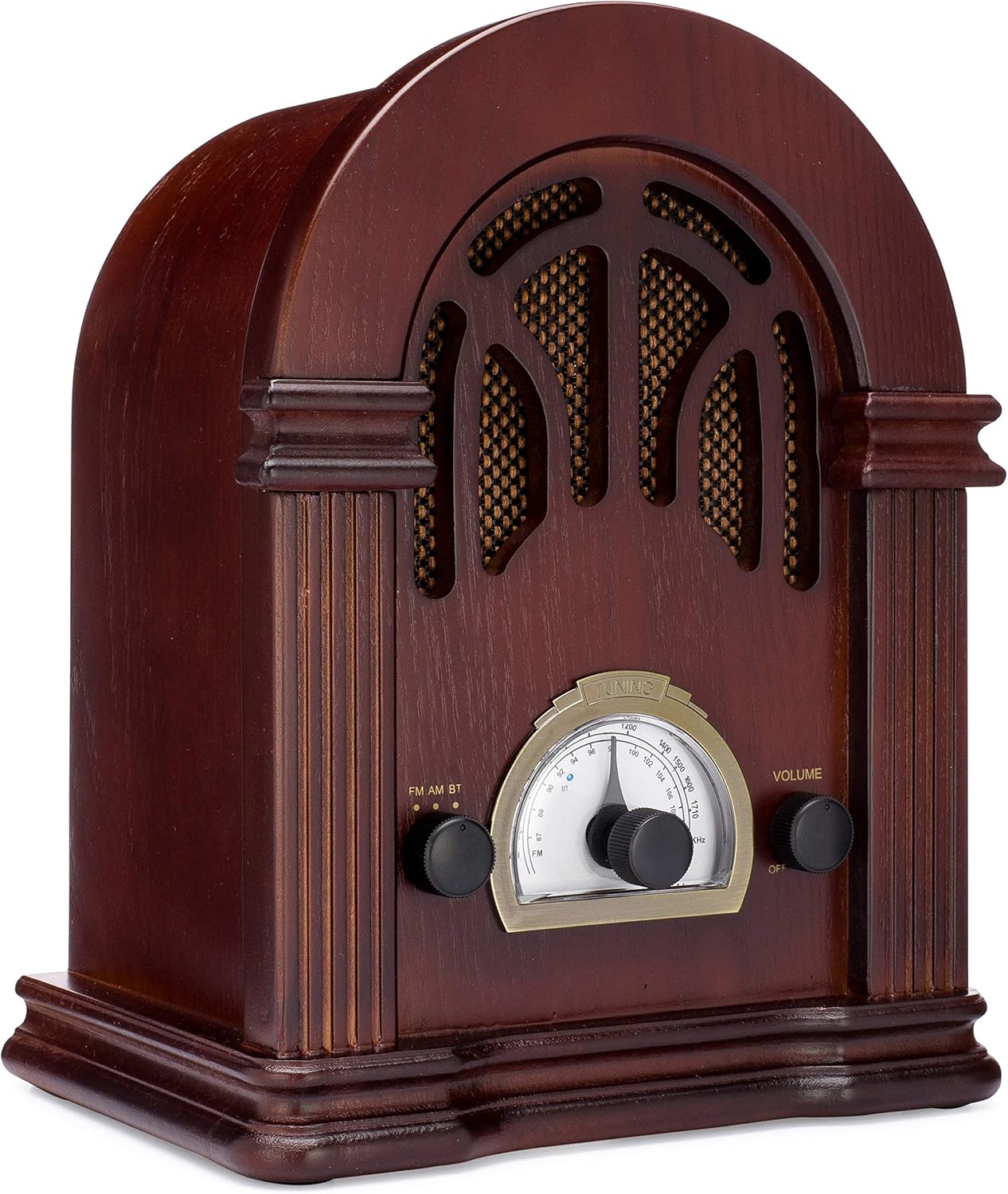
Foto 1: N'ihu view of the ClearClick Retro AM/FM Radio, showcasing its classic wooden design and central tuning dial.

Figure 2: Close-up of the tuning dial and control knobs for FM/AM/BT selection and volume.
The ClearClick Retro Radio features a beautiful, handmade wooden exterior, an easy-to-use tuning dial, and dedicated knobs for mode selection and volume control. It is designed to be powered by a standard North American power plug.
Melite
- Iwepu: Carefully remove the radio from its packaging. Ensure all components, including the power cord, are present.
- Nkwanye: Place the radio on a stable, flat surface away from direct sunlight, heat sources, and excessive moisture.
- Njikọ ike: Insert the included power cord into the AC input on the back of the radio. Plug the other end into a standard North American wall outlet (120V AC, 60Hz).
- Ntọala Antenna: For optimal FM reception, extend the built-in wire antenna fully. For AM reception, the radio utilizes an internal antenna; repositioning the radio may improve signal strength.
Ntuziaka ọrụ
Ike On / Gbanyụọ na Control Mpịakọta
- To power on the radio, rotate the right-side Mpịakọta knob clockwise until you hear a click.
- Iji gbanwee olu ahụ, gaa n'ihu na-atụgharị ya Mpịakọta isi.
- Ka ịgbanyụ, tụgharịa Mpịakọta kụọ aka n'aka elekere ruo mgbe ọ pịrị.
Ọrụ redio AM/FM
- Rotate the left-side FM AM BT knob to select either FM or AM ọnọdụ.
- Turn the central NKWUKWU knob to scan for radio stations. The tuning backlight will illuminate in AM/FM mode.
- Hazie nke NKWUKWU knob carefully for clear reception.
Ọrụ Bluetooth
- Rotate the left-side FM AM BT mkpịsị aka ịhọrọ BT mode. The radio will enter Bluetooth pairing mode, indicated by a blue LED.
- Na ngwaọrụ Bluetooth gị (dịka ọmụmaatụ, ekwentị mkpanaaka, mbadamba), chọọ ngwaọrụ Bluetooth dị.
- Select "Vintage Radio" or "ClearClick Radio" from the list to pair.
- Once paired, the blue LED will remain solid, and you can play audio from your device through the radio.
- The radio's tuning backlight stays on even in Bluetooth mode (NEW 2019 feature).
Nlekọta
- Nhicha: Use a soft, dry cloth to wipe the exterior of the radio. Do not use abrasive cleaners or solvents, as they may damage the wooden finish.
- Nchekwa: When not in use for extended periods, store the radio in a cool, dry place, away from extreme temperatures and humidity.
- Igwe ikuku: Ensure the radio has adequate ventilation to prevent overheating. Do not block the ventilation holes on the back.
Nchọpụta nsogbu
| Nsogbu | Ihe nwere ike ime | Ngwọta |
|---|---|---|
| Enweghị ike | Ejikọghị eriri ọkụ; ntinye adịghị arụ ọrụ. | Ensure power cord is securely plugged into the radio and a working wall outlet. Check if the volume knob is turned on. |
| Nnabata redio adịghị mma | Weak signal; antenna not extended. | Fully extend the FM wire antenna. For AM, try repositioning the radio. Adjust the tuning knob slowly. |
| Bluetooth anaghị ejikọ | Radio not in BT mode; device too far; device already paired. | Ensure radio is in BT mode. Move your device closer to the radio. Unpair "Vintage Radio" from your device's Bluetooth settings and try pairing again. |
| Enweghị ụda sitere na Bluetooth | Volume too low on radio or device. | Increase volume on both the radio and your connected Bluetooth device. |
Nkọwapụta
- Akụkụ ngwaahịa: 10.5" (H) x 8" (W) x 6" (D)
- Ibu ihe: 4.74 pound
- Teknụzụ Njikọta: Bluetooth
- Nkà na ụzụ Tuner: AM, FM (2-band)
- Isi mmalite ike: Corded Electric (Standard North American Power Plug)
- Ngwa gụnyere: Ụdọ ọkụ
- Ọkwa Nguzogide mmiri: Ọ bụghị mmiri na-eguzogide
- Ngosipụta teknụzụ: LCD (for tuning dial backlight)

Foto 3: Akụkụ view illustrating the dimensions of the radio.
Akwụkwọ ikike na nkwado
The ClearClick Retro AM/FM Radio with Bluetooth comes with a Akwụkwọ ikike nke otu afọ zuru oke. ClearClick is a USA-Based Small Business committed to providing excellent customer support.
For warranty claims or technical assistance, please refer to the contact information provided with your product packaging or visit the official ClearClick websaịtị. Debe nnata ịzụrụ ihe maka nkwado akwụkwọ ikike.
Ozi nchekwa dị mkpa
Please read and follow all safety instructions provided in the original product packaging. Do not expose the unit to rain or moisture. Do not disassemble the unit; refer all servicing to qualified personnel. Ensure proper ventilation to prevent overheating.


